Skip to content
  • Categories
  • Recent
  • Tags
  • Popular
  • Users
  • Groups
  • Search
  • Get Qt Extensions
  • Unsolved
Collapse
Brand Logo
  1. Home
  2. Qt Development
  3. Qt Creator and other tools
  4. qDebug() doesn't show messages in Qt Creator/Application Output
Qt 6.11 is out! See what's new in the release blog

qDebug() doesn't show messages in Qt Creator/Application Output

Scheduled Pinned Locked Moved Solved Qt Creator and other tools
45 Posts 8 Posters 5.1k Views 2 Watching
  • Oldest to Newest
  • Newest to Oldest
  • Most Votes
Reply
  • Reply as topic
Log in to reply
This topic has been deleted. Only users with topic management privileges can see it.
  • jronaldJ Offline
    jronaldJ Offline
    jronald
    wrote on last edited by
    #18

    reported: https://qt-project.atlassian.net/browse/QTCREATORBUG-33823

    1 Reply Last reply
    1
    • aha_1980A Offline
      aha_1980A Offline
      aha_1980
      Lifetime Qt Champion
      wrote on last edited by
      #19

      @jronald And to add to @JonB: You can set the environment variables for a Qt Creator Kit in Edit > Preferences > Kits > Kits. It will then be used for all new projects automatically.

      Regards

      Qt has to stay free or it will die.

      1 Reply Last reply
      0
      • M Offline
        M Offline
        MHMart_asc
        wrote on last edited by MHMart_asc
        #20

        I have the same issue in Windows 11;
        Qt Creator 18.0.0
        Qt 6.10.1 (Desktop_Qt_6_10_1_MSVC2022_64bit)

        I tried the solution of adding:
        QT_ASSUME_STDERR_HAS_CONSOLE =1

        Did so in:

        • projects > run settings > environment
        • edit > preferences > kits > (default) > environment (both)

        Unfortunately, nothing is shown in the application output. Running a completely new project (Qt widget application) with the completely new project settings and only one line added:
        qDebug() << "hi!";

        Any thoughts?

        ps. Enabling the "run in terminal" checkbox in projects > run settings does not show me any output either in the terminal.

        1 Reply Last reply
        0
        • hskoglundH Offline
          hskoglundH Offline
          hskoglund
          wrote on last edited by
          #21

          Hi, maybe you have a Visual Studio instance running (behind Qt Creator) that snatches the debug output?
          A telltale sign is the text "Cannot retrieve debugging output." in Qt Creator's Application Output.

          M 1 Reply Last reply
          0
          • hskoglundH hskoglund

            Hi, maybe you have a Visual Studio instance running (behind Qt Creator) that snatches the debug output?
            A telltale sign is the text "Cannot retrieve debugging output." in Qt Creator's Application Output.

            M Offline
            M Offline
            MHMart_asc
            wrote on last edited by
            #22

            @hskoglund thank you for the suggestion
            22a54ef4-43f2-4a1d-9246-361e6cd9131d-image.png
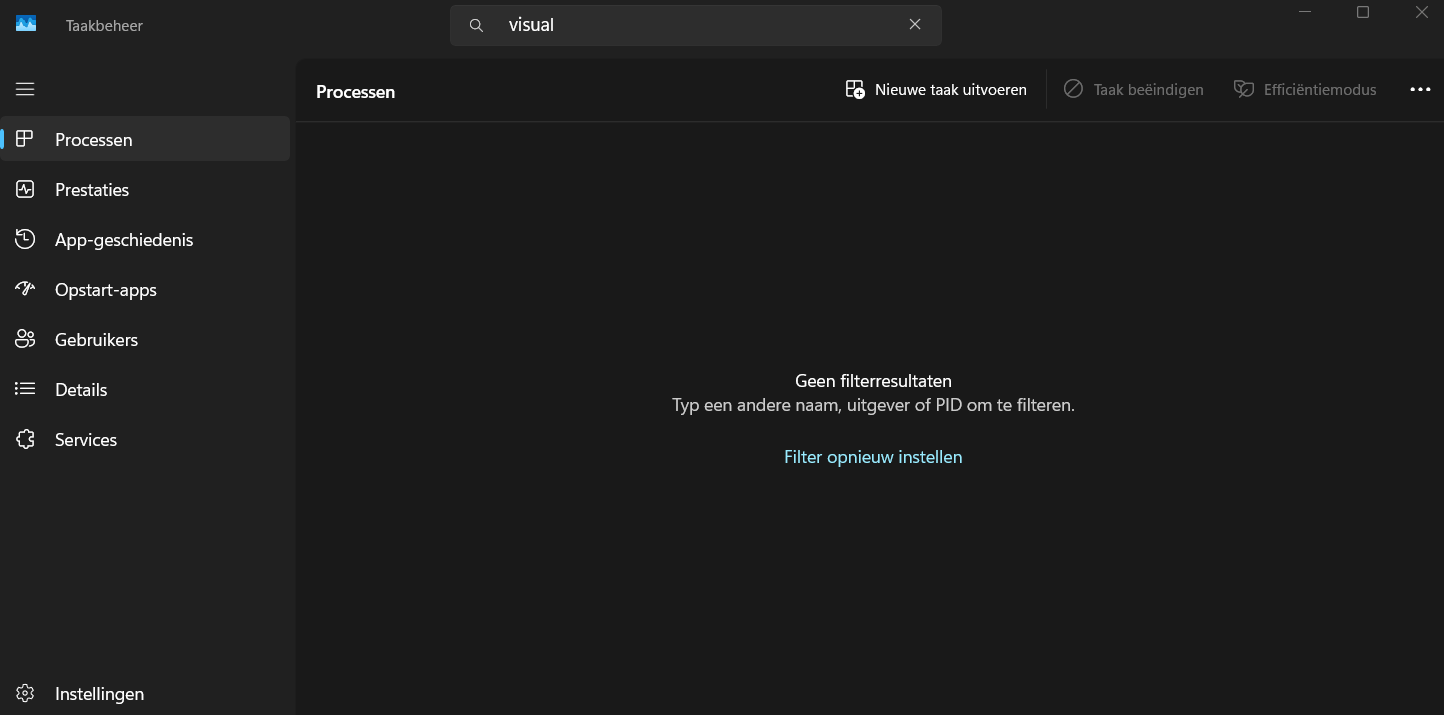
            No process with "visual" in the name according to the task manager.
            111a8440-9c95-432f-aab0-3d854da04d59-image.png
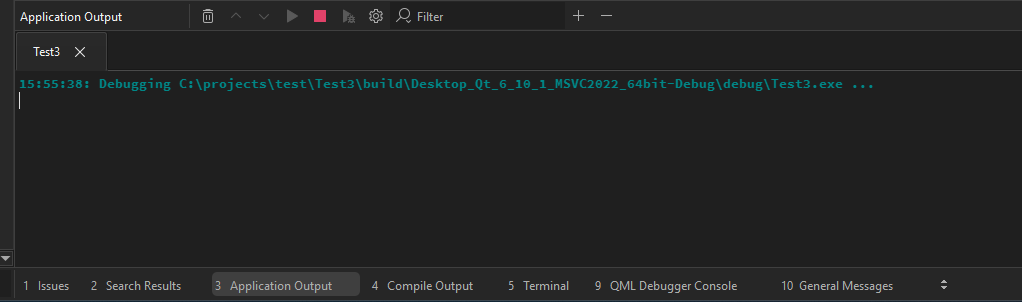
            Nothing in the application output either...

            1 Reply Last reply
            0
            • hskoglundH Offline
              hskoglundH Offline
              hskoglund
              wrote on last edited by
              #23

              Just to be sure, could you rebuild Test3 in Release mode (instead of Debug mode) and check that there's no output

              M 1 Reply Last reply
              0
              • hskoglundH hskoglund

                Just to be sure, could you rebuild Test3 in Release mode (instead of Debug mode) and check that there's no output

                M Offline
                M Offline
                MHMart_asc
                wrote on last edited by
                #24

                @hskoglund said in qDebug() doesn't show messages in Qt Creator/Application Output:

                Just to be sure, could you rebuild Test3 in Release mode (instead of Debug mode) and check that there's no output

                Unfortunately, no output

                1 Reply Last reply
                0
                • hskoglundH Offline
                  hskoglundH Offline
                  hskoglund
                  wrote on last edited by
                  #25

                  If you try the same Windows API call that Qt uses; add
                  #include "windows.h"
                  and
                  OutputDebugString(L"Hello there");
                  does that text show up in the Appliction Output?

                  M 1 Reply Last reply
                  2
                  • JonBJ Offline
                    JonBJ Offline
                    JonB
                    wrote on last edited by
                    #26

                    @MHMart_asc
                    ...And further to @hskoglund's post --- which you should try --- I believe DebugView should still work these days(?), if you download that does your output appear inside it when you run it? Not saying you will have to stick with that, just trying to track down where your messages are going....

                    1 Reply Last reply
                    1
                    • hskoglundH hskoglund

                      If you try the same Windows API call that Qt uses; add
                      #include "windows.h"
                      and
                      OutputDebugString(L"Hello there");
                      does that text show up in the Appliction Output?

                      M Offline
                      M Offline
                      MHMart_asc
                      wrote on last edited by
                      #27

                      @hskoglund said in qDebug() doesn't show messages in Qt Creator/Application Output:

                      If you try the same Windows API call that Qt uses; add
                      #include "windows.h"
                      and
                      OutputDebugString(L"Hello there");
                      does that text show up in the Appliction Output?

                      Hi @hskoglund , thanks once more for helping. Unfortunately, nope this doesn't show in the application output.

                      @JonB said in qDebug() doesn't show messages in Qt Creator/Application Output:

                      @MHMart_asc
                      ...And further to @hskoglund's post --- which you should try --- I believe DebugView should still work these days(?), if you download that does your output appear inside it when you run it? Not saying you will have to stick with that, just trying to track down where your messages are going....

                      Thanks to you as well. Tried this, the debug is not shown there either but I do get this:

                      19df4585-abfc-4712-9e2c-31bc4d9bb05e-image.png

                      JonBJ 1 Reply Last reply
                      0
                      • M MHMart_asc

                        @hskoglund said in qDebug() doesn't show messages in Qt Creator/Application Output:

                        If you try the same Windows API call that Qt uses; add
                        #include "windows.h"
                        and
                        OutputDebugString(L"Hello there");
                        does that text show up in the Appliction Output?

                        Hi @hskoglund , thanks once more for helping. Unfortunately, nope this doesn't show in the application output.

                        @JonB said in qDebug() doesn't show messages in Qt Creator/Application Output:

                        @MHMart_asc
                        ...And further to @hskoglund's post --- which you should try --- I believe DebugView should still work these days(?), if you download that does your output appear inside it when you run it? Not saying you will have to stick with that, just trying to track down where your messages are going....

                        Thanks to you as well. Tried this, the debug is not shown there either but I do get this:
                        19df4585-abfc-4712-9e2c-31bc4d9bb05e-image.png

                        JonBJ Offline
                        JonBJ Offline
                        JonB
                        wrote on last edited by JonB
                        #28

                        @MHMart_asc
                        Hmm, I don't know what that means/shows, never seen it. Might be because you are running inside debugger/VS? I don't use Windows/MSVC/VS so not sure what is going on....

                        One thing: that message says error in LldbEngine. Now, like I said I am not Windows/MSVC, but what is that doing here? So far as I know lldb is to do with Linux, why is it appearing in your Windows setup?

                        LLDB is part of the LLVM framework, and was created to work alongside of clang++, which is the LLVM C++ compiler

                        M 1 Reply Last reply
                        0
                        • hskoglundH Offline
                          hskoglundH Offline
                          hskoglund
                          wrote on last edited by
                          #29

                          Yeah, maybe the lldb debugger is the culprit, i.e. the snatcher of the debug output

                          1 Reply Last reply
                          0
                          • JonBJ JonB

                            @MHMart_asc
                            Hmm, I don't know what that means/shows, never seen it. Might be because you are running inside debugger/VS? I don't use Windows/MSVC/VS so not sure what is going on....

                            One thing: that message says error in LldbEngine. Now, like I said I am not Windows/MSVC, but what is that doing here? So far as I know lldb is to do with Linux, why is it appearing in your Windows setup?

                            LLDB is part of the LLVM framework, and was created to work alongside of clang++, which is the LLVM C++ compiler

                            M Offline
                            M Offline
                            MHMart_asc
                            wrote on last edited by
                            #30

                            @JonB said in qDebug() doesn't show messages in Qt Creator/Application Output:

                            @MHMart_asc
                            Hmm, I don't know what that means/shows, never seen it. Might be because you are running inside debugger/VS? I don't use Windows/MSVC/VS so not sure what is going on....

                            One thing: that message says error in LldbEngine. Now, like I said I am not Windows/MSVC, but what is that doing here? So far as I know lldb is to do with Linux, why is it appearing in your Windows setup?

                            LLDB is part of the LLVM framework, and was created to work alongside of clang++, which is the LLVM C++ compiler

                            What would your suggestion be for things that I could try to test and repair?

                            1 Reply Last reply
                            0
                            • hskoglundH Offline
                              hskoglundH Offline
                              hskoglund
                              wrote on last edited by
                              #31

                              Since it's probably the lldb engine inside Qt Creator that misbehaves (the call is coming from inside the house):
                              try disabling code models/debuggers etc. in your Qt Creator.

                              1 Reply Last reply
                              0
                              • cristian-adamC Offline
                                cristian-adamC Offline
                                cristian-adam
                                wrote on last edited by cristian-adam
                                #32

                                I just tried adding a qDebug() entry and ran the program under debugger on Windows with MSVC 2022. It all worked just fine. See below:
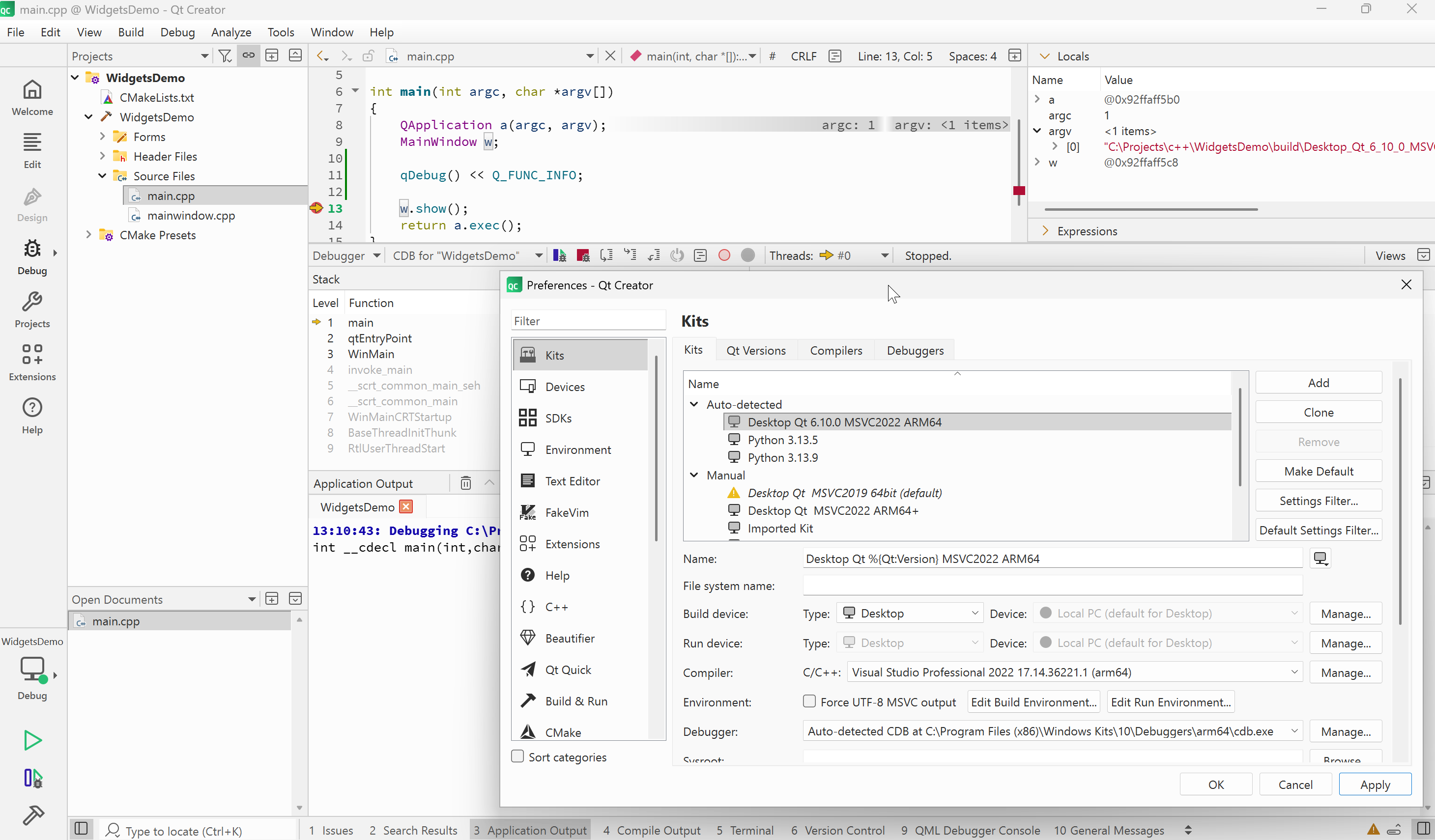
                                qt-creator-18-windows-msvc-2022-arm64-debugging.png

                                M 1 Reply Last reply
                                0
                                • cristian-adamC cristian-adam

                                  I just tried adding a qDebug() entry and ran the program under debugger on Windows with MSVC 2022. It all worked just fine. See below:

                                  qt-creator-18-windows-msvc-2022-arm64-debugging.png

                                  M Offline
                                  M Offline
                                  MHMart_asc
                                  wrote on last edited by
                                  #33

                                  @cristian-adam thanks for testing, one slight difference is that i'm using 6.10.1

                                  I think i'll reinstall

                                  cristian-adamC 1 Reply Last reply
                                  0
                                  • M MHMart_asc

                                    @cristian-adam thanks for testing, one slight difference is that i'm using 6.10.1

                                    I think i'll reinstall

                                    cristian-adamC Offline
                                    cristian-adamC Offline
                                    cristian-adam
                                    wrote on last edited by
                                    #34

                                    @MHMart_asc I've updated the screenshot to show the Debugger set for the Kit.

                                    1 Reply Last reply
                                    0
                                    • M Offline
                                      M Offline
                                      MHMart_asc
                                      wrote on last edited by
                                      #35

                                      image.png

                                      image.png

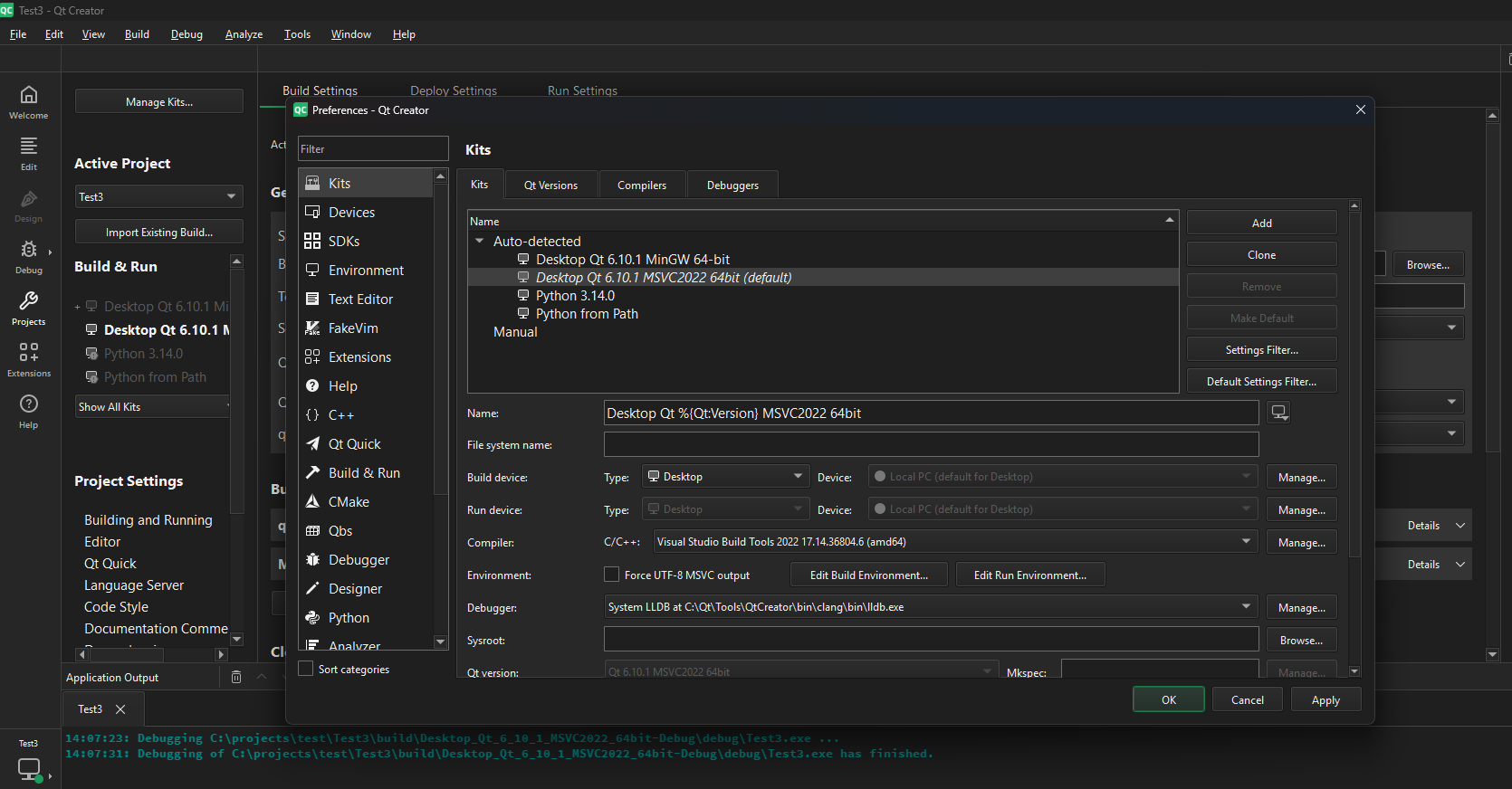
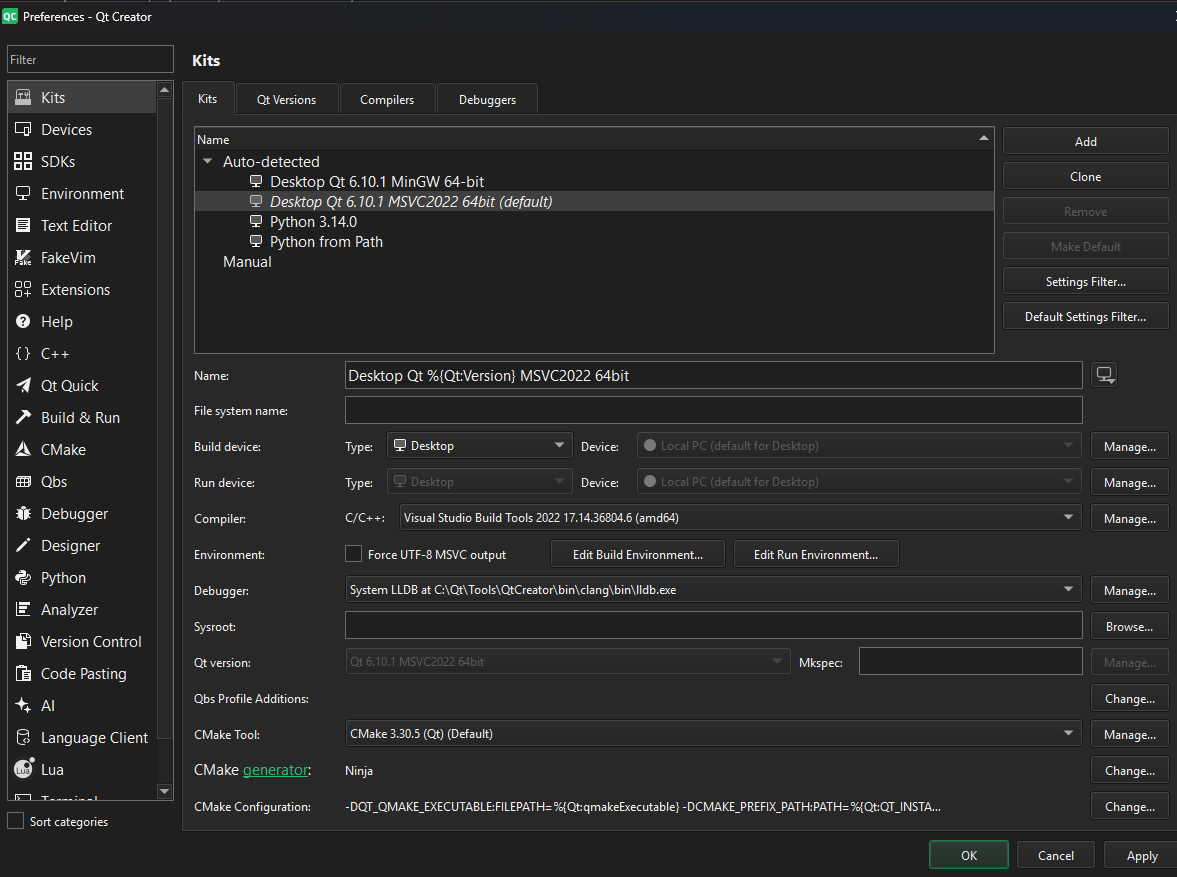
                                      Maybe I have the wrong debugger?

                                      JonBJ cristian-adamC 2 Replies Last reply
                                      0
                                      • M MHMart_asc

                                        image.png

                                        image.png

                                        Maybe I have the wrong debugger?

                                        JonBJ Offline
                                        JonBJ Offline
                                        JonB
                                        wrote on last edited by JonB
                                        #36

                                        @MHMart_asc
                                        As I wrote:: lldb is not normally a debugger you use with MSVC. It shows as in your Qt installation area. That probably comes from the MinGW you show you also have.

                                        Under Windows you have to choose between two possible toolchains. The MinGW one (like gcc + gdb or lldb) or the MSVC one (MSVC compiler & linker and Visual Studio and debugger). I think you have a cross between the two. If you wish to use the MSVC C/C++ compiler, as shown in your screenshot, you should not be using an external debugger, you should be using the one which is part of MSVC. I do not know why you have lldb or what exactly you should do to correct it, but you should do whatever to sort it out.

                                        M 1 Reply Last reply
                                        1
                                        • JonBJ JonB

                                          @MHMart_asc
                                          As I wrote:: lldb is not normally a debugger you use with MSVC. It shows as in your Qt installation area. That probably comes from the MinGW you show you also have.

                                          Under Windows you have to choose between two possible toolchains. The MinGW one (like gcc + gdb or lldb) or the MSVC one (MSVC compiler & linker and Visual Studio and debugger). I think you have a cross between the two. If you wish to use the MSVC C/C++ compiler, as shown in your screenshot, you should not be using an external debugger, you should be using the one which is part of MSVC. I do not know why you have lldb or what exactly you should do to correct it, but you should do whatever to sort it out.

                                          M Offline
                                          M Offline
                                          MHMart_asc
                                          wrote on last edited by
                                          #37

                                          @JonB said in qDebug() doesn't show messages in Qt Creator/Application Output:

                                          @MHMart_asc
                                          As I wrote:: lldb is not normally a debugger you use with MSVC. It shows as in your Qt installation area. That probably comes from the MinGW you show you also have.

                                          Under Windows you have to choose between two possible toolchains. The MinGW one (like gcc + gdb or lldb) or the MSVC one (MSVC compiler & linker and Visual Studio and debugger). I think you have a cross between the two. If you wish to use the MSVC C/C++ compiler, as shown in your screenshot, you should not be using an external debugger, you should be using the one which is part of MSVC. I do not know why you have lldb or what exactly you should do to correct it, but you should do whatever to sort it out.

                                          You were completely right! I now installed windows debugger from the maintenance tool and that helped (a bit).

                                          I now do get output when using OutputDebugString(".."). But nothing yet when using qDebug() << "...";

                                          I do get this error though:
                                          onecore\windows\directx\database\helperlibrary\lib\perappusersettingsqueryimpl.cpp(159)\directxdatabasehelper.dll!00007FF96BB8FEED: (caller: 00007FF96BB8FD30) ReturnHr(5) tid(4b1c) 80070002 Het systeem kan het opgegeven bestand niet vinden.
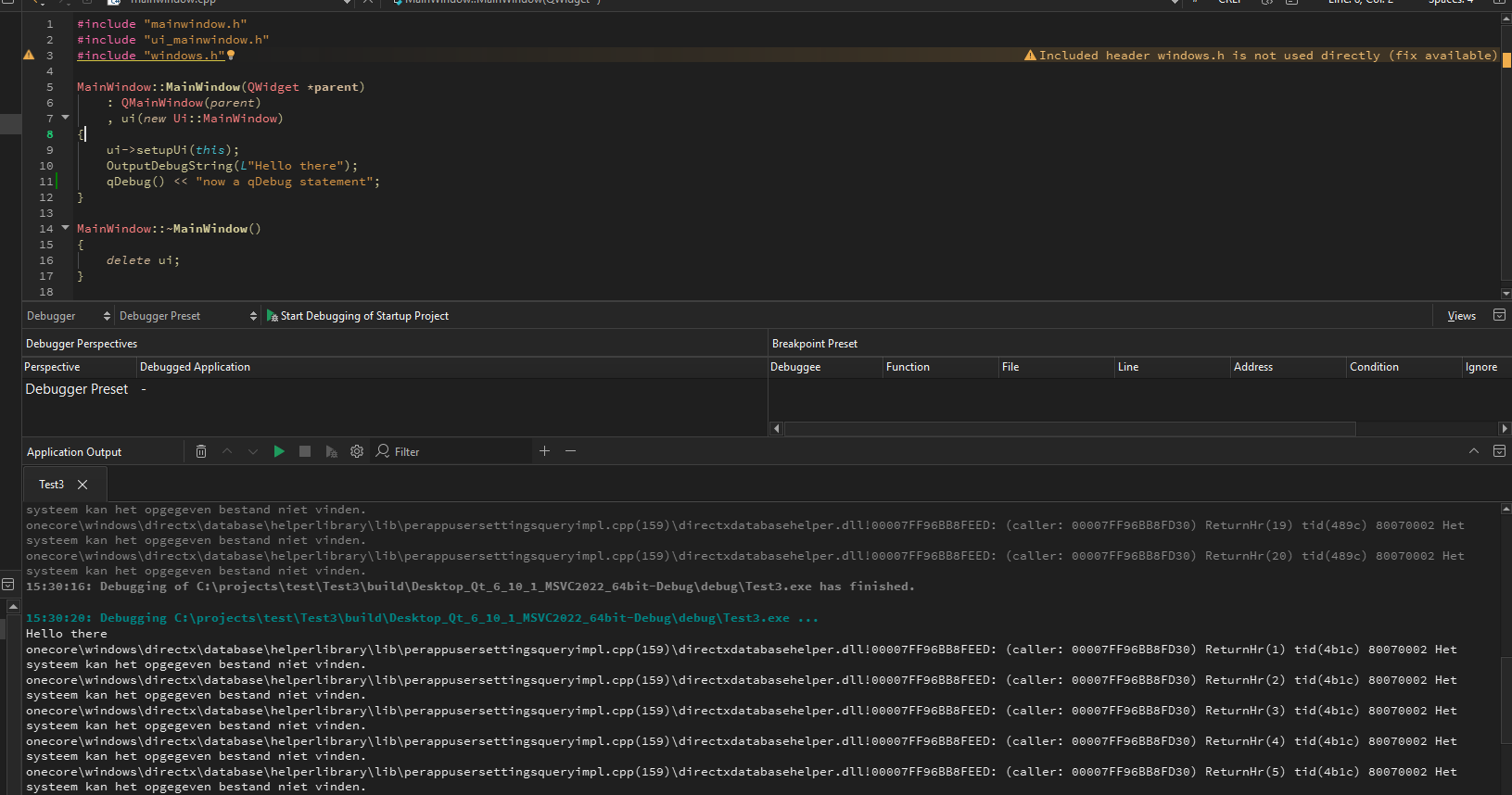
                                          0f5e95f4-95f5-4dbb-b2f9-bf9379f80a95-image.png

                                          So getting there. So dumb of me to have the wrong debugger

                                          1 Reply Last reply
                                          0

                                          • Login

                                          • Login or register to search.
                                          • First post
                                            Last post
                                          0
                                          • Categories
                                          • Recent
                                          • Tags
                                          • Popular
                                          • Users
                                          • Groups
                                          • Search
                                          • Get Qt Extensions
                                          • Unsolved