

qDebug() doesn't show messages in Qt Creator/Application Output
-
@MHMart_asc
...And further to @hskoglund's post --- which you should try --- I believe DebugView should still work these days(?), if you download that does your output appear inside it when you run it? Not saying you will have to stick with that, just trying to track down where your messages are going.... -
If you try the same Windows API call that Qt uses; add
#include "windows.h"
and
OutputDebugString(L"Hello there");
does that text show up in the Appliction Output?@hskoglund said in qDebug() doesn't show messages in Qt Creator/Application Output:
If you try the same Windows API call that Qt uses; add
#include "windows.h"
and
OutputDebugString(L"Hello there");
does that text show up in the Appliction Output?Hi @hskoglund , thanks once more for helping. Unfortunately, nope this doesn't show in the application output.
@JonB said in qDebug() doesn't show messages in Qt Creator/Application Output:
@MHMart_asc
...And further to @hskoglund's post --- which you should try --- I believe DebugView should still work these days(?), if you download that does your output appear inside it when you run it? Not saying you will have to stick with that, just trying to track down where your messages are going....Thanks to you as well. Tried this, the debug is not shown there either but I do get this:

-
@hskoglund said in qDebug() doesn't show messages in Qt Creator/Application Output:
If you try the same Windows API call that Qt uses; add
#include "windows.h"
and
OutputDebugString(L"Hello there");
does that text show up in the Appliction Output?Hi @hskoglund , thanks once more for helping. Unfortunately, nope this doesn't show in the application output.
@JonB said in qDebug() doesn't show messages in Qt Creator/Application Output:
@MHMart_asc
...And further to @hskoglund's post --- which you should try --- I believe DebugView should still work these days(?), if you download that does your output appear inside it when you run it? Not saying you will have to stick with that, just trying to track down where your messages are going....Thanks to you as well. Tried this, the debug is not shown there either but I do get this:
@MHMart_asc
Hmm, I don't know what that means/shows, never seen it. Might be because you are running inside debugger/VS? I don't use Windows/MSVC/VS so not sure what is going on....One thing: that message says error in LldbEngine. Now, like I said I am not Windows/MSVC, but what is that doing here? So far as I know lldb is to do with Linux, why is it appearing in your Windows setup?
LLDB is part of the LLVM framework, and was created to work alongside of clang++, which is the LLVM C++ compiler
-
@MHMart_asc
Hmm, I don't know what that means/shows, never seen it. Might be because you are running inside debugger/VS? I don't use Windows/MSVC/VS so not sure what is going on....One thing: that message says error in LldbEngine. Now, like I said I am not Windows/MSVC, but what is that doing here? So far as I know lldb is to do with Linux, why is it appearing in your Windows setup?
LLDB is part of the LLVM framework, and was created to work alongside of clang++, which is the LLVM C++ compiler
@JonB said in qDebug() doesn't show messages in Qt Creator/Application Output:
@MHMart_asc
Hmm, I don't know what that means/shows, never seen it. Might be because you are running inside debugger/VS? I don't use Windows/MSVC/VS so not sure what is going on....One thing: that message says error in LldbEngine. Now, like I said I am not Windows/MSVC, but what is that doing here? So far as I know lldb is to do with Linux, why is it appearing in your Windows setup?
LLDB is part of the LLVM framework, and was created to work alongside of clang++, which is the LLVM C++ compiler
What would your suggestion be for things that I could try to test and repair?
-
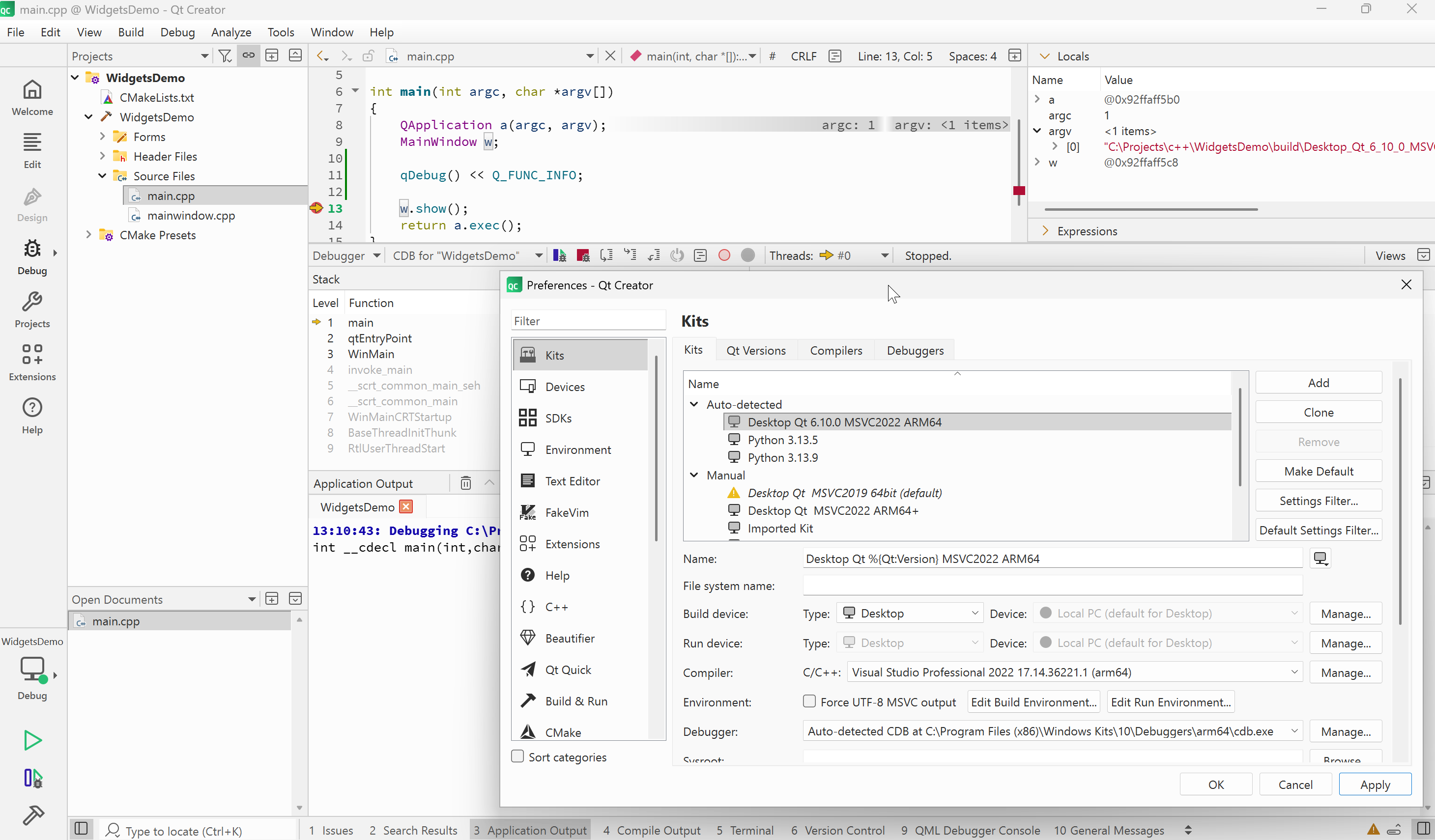
I just tried adding a qDebug() entry and ran the program under debugger on Windows with MSVC 2022. It all worked just fine. See below:
-
I just tried adding a qDebug() entry and ran the program under debugger on Windows with MSVC 2022. It all worked just fine. See below:
@cristian-adam thanks for testing, one slight difference is that i'm using 6.10.1
I think i'll reinstall
-
@cristian-adam thanks for testing, one slight difference is that i'm using 6.10.1
I think i'll reinstall
@MHMart_asc I've updated the screenshot to show the Debugger set for the Kit.
-
-
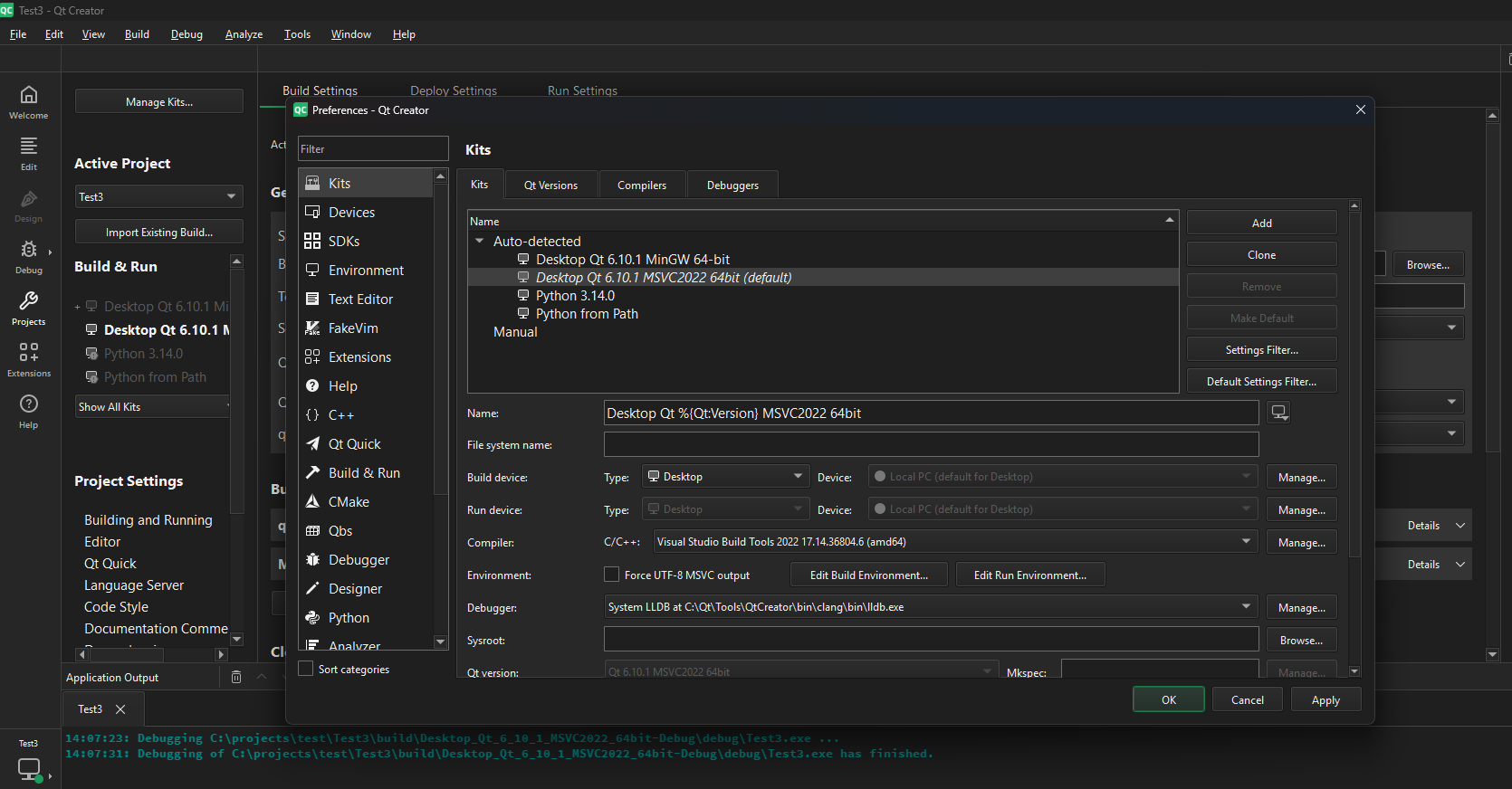
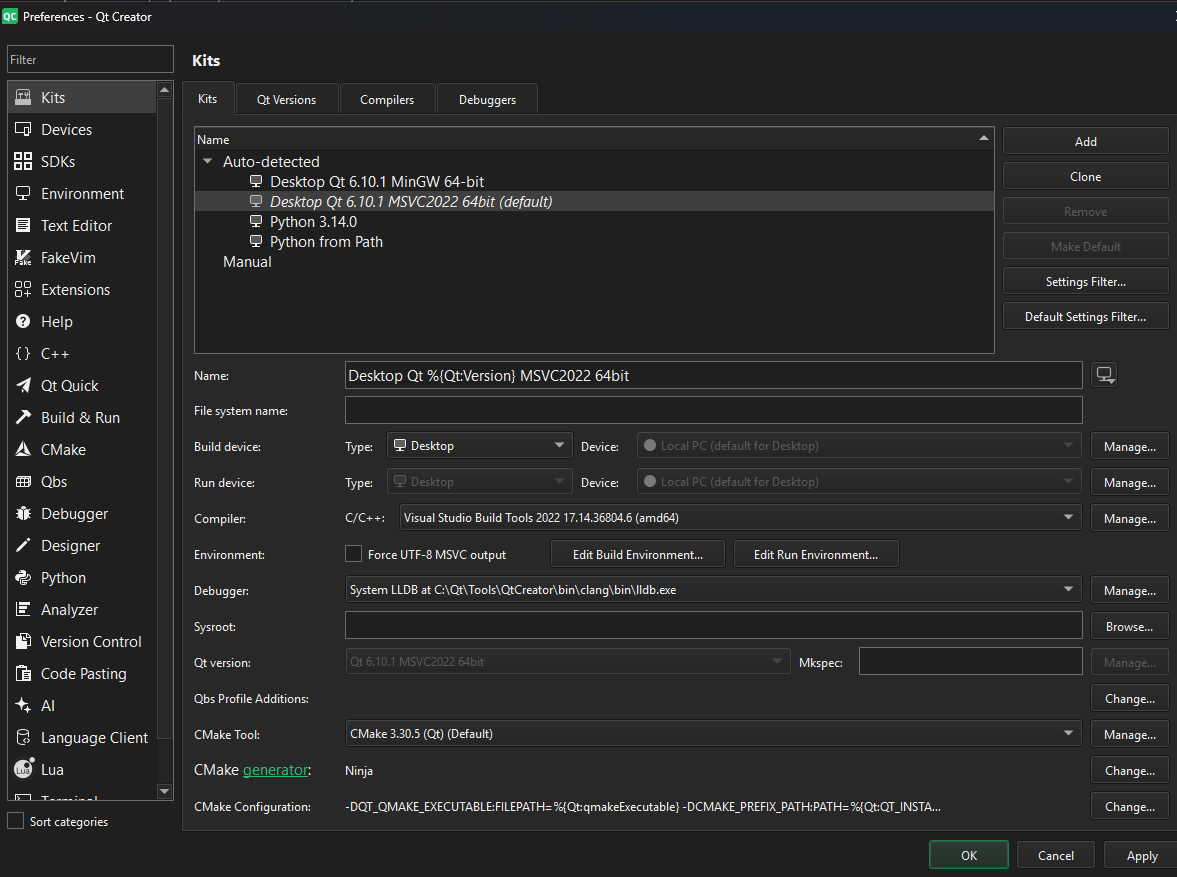
Maybe I have the wrong debugger?
@MHMart_asc
As I wrote:: lldb is not normally a debugger you use with MSVC. It shows as in yourQtinstallation area. That probably comes from the MinGW you show you also have.Under Windows you have to choose between two possible toolchains. The MinGW one (like gcc + gdb or lldb) or the MSVC one (MSVC compiler & linker and Visual Studio and debugger). I think you have a cross between the two. If you wish to use the MSVC C/C++ compiler, as shown in your screenshot, you should not be using an external debugger, you should be using the one which is part of MSVC. I do not know why you have lldb or what exactly you should do to correct it, but you should do whatever to sort it out.
-
@MHMart_asc
As I wrote:: lldb is not normally a debugger you use with MSVC. It shows as in yourQtinstallation area. That probably comes from the MinGW you show you also have.Under Windows you have to choose between two possible toolchains. The MinGW one (like gcc + gdb or lldb) or the MSVC one (MSVC compiler & linker and Visual Studio and debugger). I think you have a cross between the two. If you wish to use the MSVC C/C++ compiler, as shown in your screenshot, you should not be using an external debugger, you should be using the one which is part of MSVC. I do not know why you have lldb or what exactly you should do to correct it, but you should do whatever to sort it out.
@JonB said in qDebug() doesn't show messages in Qt Creator/Application Output:
@MHMart_asc
As I wrote:: lldb is not normally a debugger you use with MSVC. It shows as in yourQtinstallation area. That probably comes from the MinGW you show you also have.Under Windows you have to choose between two possible toolchains. The MinGW one (like gcc + gdb or lldb) or the MSVC one (MSVC compiler & linker and Visual Studio and debugger). I think you have a cross between the two. If you wish to use the MSVC C/C++ compiler, as shown in your screenshot, you should not be using an external debugger, you should be using the one which is part of MSVC. I do not know why you have lldb or what exactly you should do to correct it, but you should do whatever to sort it out.
You were completely right! I now installed windows debugger from the maintenance tool and that helped (a bit).
I now do get output when using OutputDebugString(".."). But nothing yet when using qDebug() << "...";
I do get this error though:
onecore\windows\directx\database\helperlibrary\lib\perappusersettingsqueryimpl.cpp(159)\directxdatabasehelper.dll!00007FF96BB8FEED: (caller: 00007FF96BB8FD30) ReturnHr(5) tid(4b1c) 80070002 Het systeem kan het opgegeven bestand niet vinden.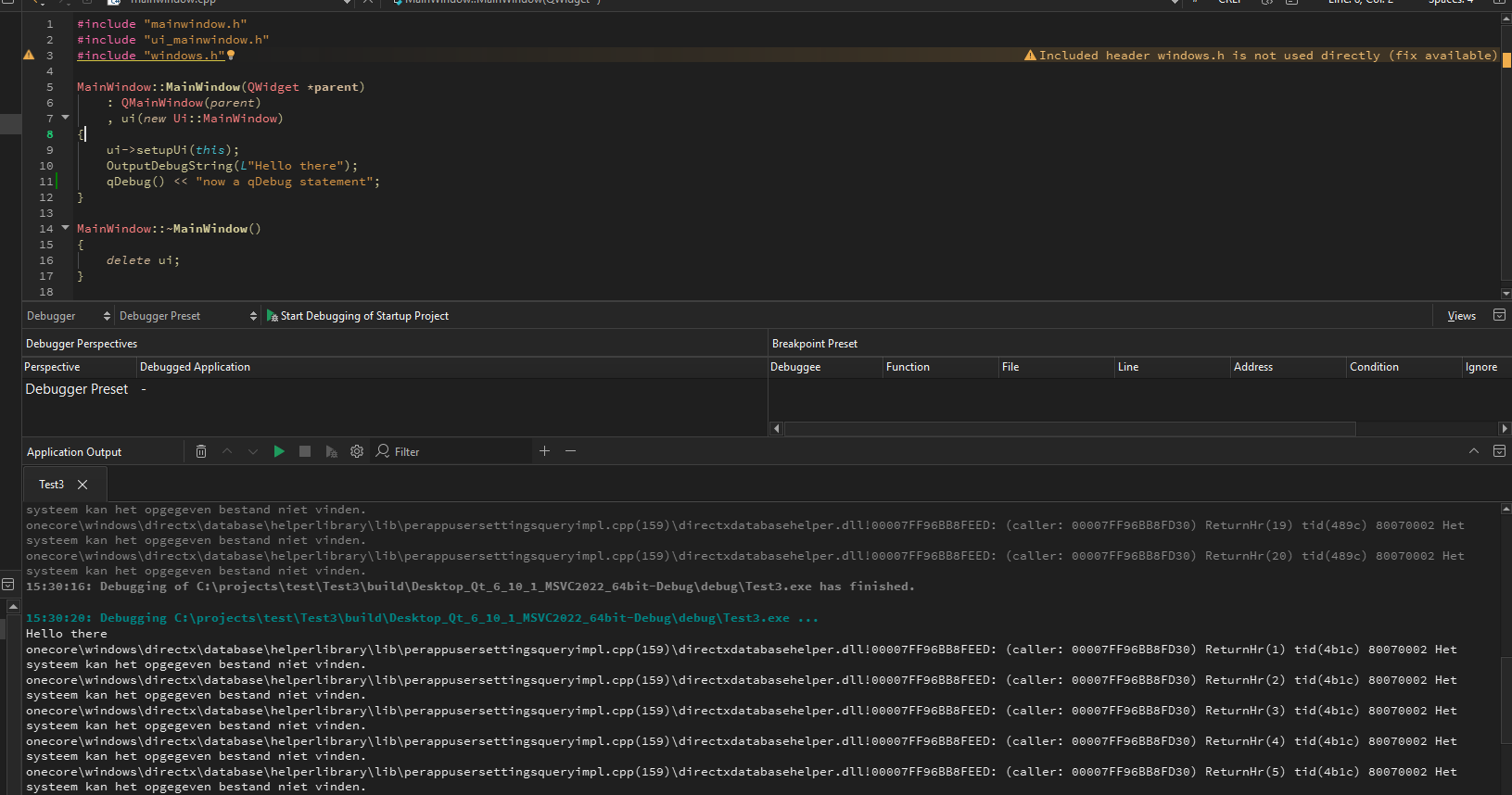
So getting there. So dumb of me to have the wrong debugger
-
Maybe I have the wrong debugger?
@MHMart_asc For some reason you got
lldbset as debugger.lldbshipped with Qt Creator can debug MSVC programs, sincelldbupstream can do this.lldbcan also do post mortem debugging by loading a minidump file, which Qt Creator withcdbcannot. It also might be faster thancdb.In order to get the
qDebug()calls printed, just make sure to:- Make sure to have Run in terminal checked
- Set the environment variable
QT_WIN_DEBUG_CONSOLE=attach
Then as seen in the picture below, things are just fine:

-
@MHMart_asc For some reason you got
lldbset as debugger.lldbshipped with Qt Creator can debug MSVC programs, sincelldbupstream can do this.lldbcan also do post mortem debugging by loading a minidump file, which Qt Creator withcdbcannot. It also might be faster thancdb.In order to get the
qDebug()calls printed, just make sure to:- Make sure to have Run in terminal checked
- Set the environment variable
QT_WIN_DEBUG_CONSOLE=attach
Then as seen in the picture below, things are just fine:
@cristian-adam said in qDebug() doesn't show messages in Qt Creator/Application Output:
@MHMart_asc For some reason you got
lldbset as debugger.lldbshipped with Qt Creator can debug MSVC programs, sincelldbupstream can do this.lldbcan also do post mortem debugging by loading a minidump file, which Qt Creator withcdbcannot. It also might be faster thancdb.In order to get the
qDebug()calls printed, just make sure to:- Make sure to have Run in terminal checked
- Set the environment variable
QT_WIN_DEBUG_CONSOLE=attach
Then as seen in the picture below, things are just fine:
Run in terminal now works, that is true! still strange that i'm not seeing this in application output though but anyhow this helps enough!
-
@MHMart_asc For some reason you got
lldbset as debugger.lldbshipped with Qt Creator can debug MSVC programs, sincelldbupstream can do this.lldbcan also do post mortem debugging by loading a minidump file, which Qt Creator withcdbcannot. It also might be faster thancdb.In order to get the
qDebug()calls printed, just make sure to:- Make sure to have Run in terminal checked
- Set the environment variable
QT_WIN_DEBUG_CONSOLE=attach
Then as seen in the picture below, things are just fine:
@cristian-adam said in qDebug() doesn't show messages in Qt Creator/Application Output:
lldb shipped with Qt Creator can debug MSVC programs, since lldb upstream can do this.
As I have written, I am not a Windows/Qt user, but always interested to learn to help others in future. When we used MSVC/VS years ago we used compiler/linker/debugger from that. Are you saying that, if you choose to develop/debug in Creator rather than Visual Studio, you use the compiler/linker from MSVC --- because these can be invoked via command line from Creator/make --- but you do not use whatever debugger MSVC/VS comes with, because that is for visual use in Visual Studio only? But Creator can "drive" some lldb debugger (or cdb) under Windows like it does on gdb from Linux, so you use one of those?
-
@cristian-adam said in qDebug() doesn't show messages in Qt Creator/Application Output:
lldb shipped with Qt Creator can debug MSVC programs, since lldb upstream can do this.
As I have written, I am not a Windows/Qt user, but always interested to learn to help others in future. When we used MSVC/VS years ago we used compiler/linker/debugger from that. Are you saying that, if you choose to develop/debug in Creator rather than Visual Studio, you use the compiler/linker from MSVC --- because these can be invoked via command line from Creator/make --- but you do not use whatever debugger MSVC/VS comes with, because that is for visual use in Visual Studio only? But Creator can "drive" some lldb debugger (or cdb) under Windows like it does on gdb from Linux, so you use one of those?
@JonB said in qDebug() doesn't show messages in Qt Creator/Application Output:
but you do not use whatever debugger MSVC/VS comes with, because that is for visual use in Visual Studio only? But Creator can "drive" some lldb debugger (or cdb) under Windows like it does on gdb from Linux, so you use one of those?
Yes. On Windows the proper debugger can only be used by Microsoft products, either Visual Studio or Visual Studio Code.
cdbis their command line debugger, part of the Windows Driver SDK, and Qt Creator has a dll extension plugin which exposes a Python interface like forgdbandlldbon Linux / macOS.But,
lldbknows how to usepdbdebugger files, and can handle MSVC binaries.This makes
lldbthe one of the few open source debuggers on Windows that can handle MSVC compiled debug programs! -
@JonB said in qDebug() doesn't show messages in Qt Creator/Application Output:
but you do not use whatever debugger MSVC/VS comes with, because that is for visual use in Visual Studio only? But Creator can "drive" some lldb debugger (or cdb) under Windows like it does on gdb from Linux, so you use one of those?
Yes. On Windows the proper debugger can only be used by Microsoft products, either Visual Studio or Visual Studio Code.
cdbis their command line debugger, part of the Windows Driver SDK, and Qt Creator has a dll extension plugin which exposes a Python interface like forgdbandlldbon Linux / macOS.But,
lldbknows how to usepdbdebugger files, and can handle MSVC binaries.This makes
lldbthe one of the few open source debuggers on Windows that can handle MSVC compiled debug programs!@cristian-adam said in qDebug() doesn't show messages in Qt Creator/Application Output:
Yes. On Windows the proper debugger can only be used by Microsoft products, either Visual Studio or Visual Studio Code.
So, to be 100% clear: the debugger I used for MSVC code from within VS is integrated with/cannot be separated from VS? It is not cdb (nor lldb), it is not a "standalone" debugger, it must be used from some visual VS thingie? So while they made MSVC compiler and link external tools they did not expose an "interface" to the debugger part? But gdb does allow external "driving"? Of course for me using the MS stuff all inside VS I didn't worry too much about what was what.
-
@cristian-adam said in qDebug() doesn't show messages in Qt Creator/Application Output:
Yes. On Windows the proper debugger can only be used by Microsoft products, either Visual Studio or Visual Studio Code.
So, to be 100% clear: the debugger I used for MSVC code from within VS is integrated with/cannot be separated from VS? It is not cdb (nor lldb), it is not a "standalone" debugger, it must be used from some visual VS thingie? So while they made MSVC compiler and link external tools they did not expose an "interface" to the debugger part? But gdb does allow external "driving"? Of course for me using the MS stuff all inside VS I didn't worry too much about what was what.
@JonB said in qDebug() doesn't show messages in Qt Creator/Application Output:
So while they made MSVC compiler and link external tools they did not expose an "interface" to the debugger part? But gdb does allow external "driving"? Of course for me using the MS stuff all inside VS I didn't worry too much about what was what.
Yes. The premium debugging experience is reserved for Microsoft products, or, if you want to be a hacker, and break their EULA https://github.com/mfussenegger/nvim-dap/discussions/869
I think CLion has their own version of
lldbin which they optimized some things.gdbon Windows can only debug DWARF, cannot do PDB. -
@JonB said in qDebug() doesn't show messages in Qt Creator/Application Output:
So while they made MSVC compiler and link external tools they did not expose an "interface" to the debugger part? But gdb does allow external "driving"? Of course for me using the MS stuff all inside VS I didn't worry too much about what was what.
Yes. The premium debugging experience is reserved for Microsoft products, or, if you want to be a hacker, and break their EULA https://github.com/mfussenegger/nvim-dap/discussions/869
I think CLion has their own version of
lldbin which they optimized some things.gdbon Windows can only debug DWARF, cannot do PDB.@cristian-adam
Very interesting, thank you. It turns out there is somevsdbg.exe, which I take to be the actual debugger as its own executable. Which you can "drive", if you know what to send it.I didn't care about DWARF, PDB etc. I was interested in which debuggers allow a host to "talk" to them and vice versa, send it commands, read variables, etc. Which is what Creator will require. I know
gdbcan do it. I didn't know there was a standalone executable for the debugger from VS, I thought it was a built in. -
This topic was also present as a bug report at https://qt-project.atlassian.net/browse/QTCREATORBUG-33741
Which I've fixed, and with Qt Creator 19 things would simply just work out of the box with
lldb.exe.


