Skip to content
  • Categories
  • Recent
  • Tags
  • Popular
  • Users
  • Groups
  • Search
  • Get Qt Extensions
  • Unsolved
Collapse
Brand Logo
  1. Home
  2. Qt Development
  3. Qt Creator and other tools
  4. Qt Vs Tools Project creation failing for Linux (SSH|WSL)
Qt 6.11 is out! See what's new in the release blog

Qt Vs Tools Project creation failing for Linux (SSH|WSL)

Scheduled Pinned Locked Moved Unsolved Qt Creator and other tools
6 Posts 3 Posters 197 Views
  • Oldest to Newest
  • Newest to Oldest
  • Most Votes
Reply
  • Reply as topic
Log in to reply
This topic has been deleted. Only users with topic management privileges can see it.
  • G Offline
    G Offline
    gbehb
    wrote last edited by
    #1

    Hi,

    I'm trying to create a Qt Project using the Qt Vs Tools with the Linux WSL target.
    I have configured the target like this:
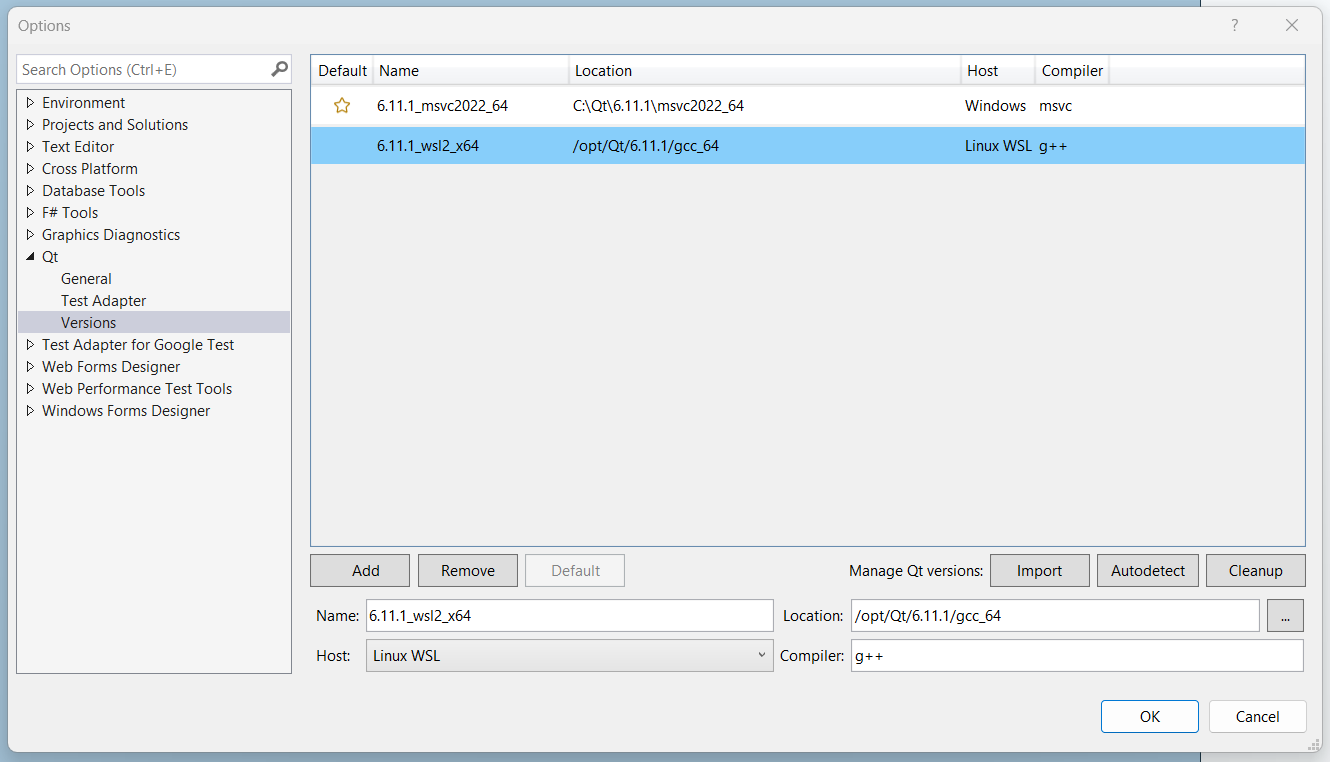
    Screenshot 2026-08-08 212856.png

    If Ithen go ahead and create a New Project > Qt Widgets Application (or Console Application) and set the configurations up as followed
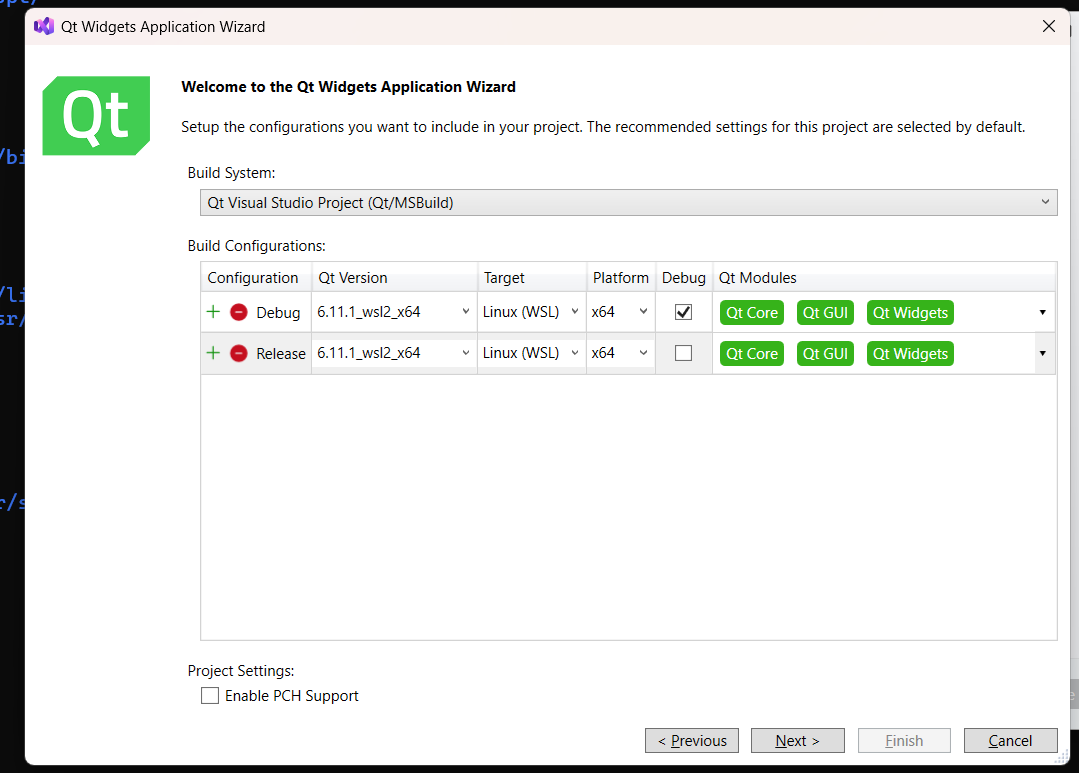
    Screenshot 2026-08-08 211646.png

    I get the following error when I complete the wizard:
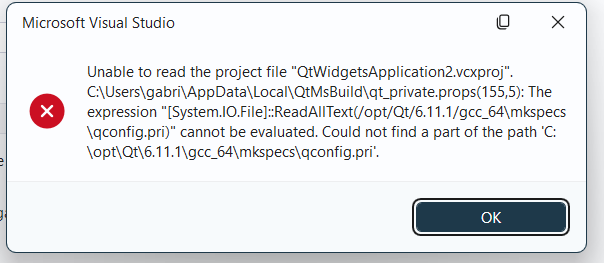
    Screenshot 2026-08-08 211700.png
    As the error message kind of implies that it's trying to lookup the linux path on the C: drive I'm inclined to believe that I'm doing something wrong but I'm unable to figure out what exactly that is, considering that a) using the 6.11.1_msvc2022_64 config works and b) creating a non-Qt cmake project for WSL use also works.

    I have verified that Qt is actually installed in the WSL instance in the /opt/Qt/6.11.1 directory and that the /opt/Qt/6.11.1/gcc_64/mkspecs/qconfig.pri file actually exists. I have also made sure that /mnt/opt is symlinked to /opt.

    Am I missing something or is this just generally broken?

    Any help would be greatly appreciated.

    1 Reply Last reply
    0
    • hskoglundH Offline
      hskoglundH Offline
      hskoglund
      wrote last edited by
      #2

      Hi, I haven't got Qt VS Tools myself so this is just a guess, but in the "Welcome to the Qt Widgets Application Wizard" sceen dump above there's a drop down choice "Platform", is there another choice than "x64" than you can try?

      1 Reply Last reply
      0
      • G Offline
        G Offline
        gbehb
        wrote last edited by
        #3

        The one thing I didn't care to try ...
        For Completeness the Dropdown contains the following entries: "x64, Win32, ARM64, ARM" while x64 is the only one that makes sense in this scenario, setting it to any other exhibits identical behaviour.

        1 Reply Last reply
        0
        • hskoglundH Offline
          hskoglundH Offline
          hskoglund
          wrote last edited by
          #4

          Maybe Qt VS Tools only supports the MSVC compiler, and not gcc?

          1 Reply Last reply
          0
          • Nils SjobergN Offline
            Nils SjobergN Offline
            Nils Sjoberg
            wrote last edited by
            #5

            Make sure that /mnt/opt is indeed mapped as a symlink before creating the kit (not just before the build), and if that doesn't help — completely bypass the Qt VS Tools Project Wizard to create the project as a regular CMake and add the Qt dependencies manually in CMakeLists.txt. It seems that the bug is specifically in the wizard component and not in the plugin's ability to work with WSL.

            "What's up, Doc?"

            1 Reply Last reply
            0
            • Christian EhrlicherC Christian Ehrlicher moved this topic from General and Desktop
            • G Offline
              G Offline
              gbehb
              wrote last edited by gbehb
              #6

              I have prodded the wizard some more and found the following:

              • If you take the above config and remove the Debug Configuration it successfully created the project. (Although there's some issues when compiling)
              • Setting the build system to "CMake Project for Qt" always fails with "Object reference not set to an instance of an object." once a linux target is selected
              • The with the project created for WSL Visual Studio complains that this is targetting WSL1 and that the QT Installation path isn't set correctly

              So yeah I guess I'll have to this very diffently than expected

              1 Reply Last reply
              0

              • Login

              • Login or register to search.
              • First post
                Last post
              0
              • Categories
              • Recent
              • Tags
              • Popular
              • Users
              • Groups
              • Search
              • Get Qt Extensions
              • Unsolved