
Qt Creator: Remote Linux Device Kit is unsuited for this Project
-
Hi All,
I am using the Qt Creator IDE on Windows and i am trying to build and run my program on an Remote Linux Device (Linux Mint on a PC).
I've established a SSH connection with my linux device and created a new Kit.
But when I try to select the kit it says: " Kit is unsuited for Project"
"Error: "Build device ... cannot handle .........\CMakeLists.txt"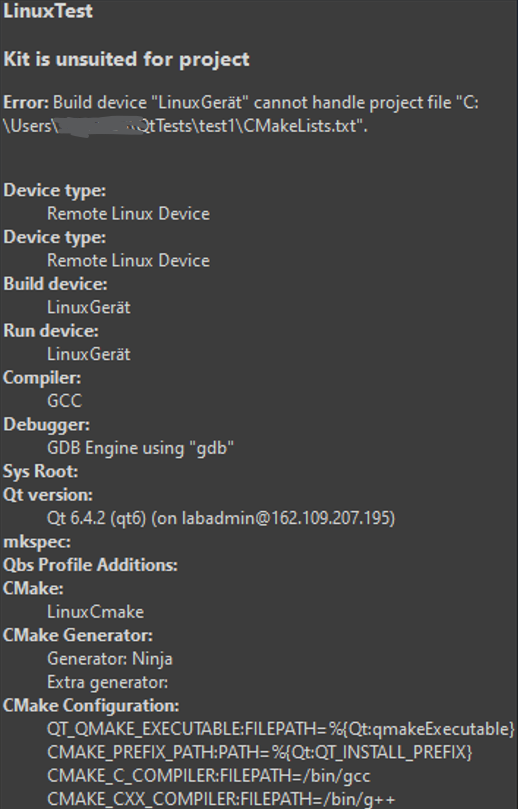
I wrote down a step by step tutorial how to setup a Linux Remote Device which I strictly followed.
Here you can find all the Infos:https://doc.qt.io/qtcreator/creator-how-to-build-on-remote-linux.html 1. Install necessary libs to your Linux Device -you need several libs for Linux: - gcc/g++ (or your compiler of choice) - cmake - qt6 - ssh - ninja - rsync - full command for ubuntu/Debian: sudo apt update && sudo apt install -y qt6-base-dev qt6-base-dev-tools qt6-tools-dev cmake openssh-client openssh-server rsync ninja-build build-essential 2. Establish a SSH connection between you and your Linux device - configure an ssh key in order to login your Linux device without Passwort - create ssh key on windows pc: ssh-keygen -t ed25519 - press enter two time for default values - show public key: type $env:USERPROFILE\.ssh\id_ed25519.pub - copy the full line - login your Linux device: ssh 'linuxUsername'@'linuxIpAdress' (e.g.: ssh labadmin@162.109.207.195) - on your Linux device: mkdir -p ~/.ssh chmod 700 ~/.ssh nano ~/.ssh/authorized_keys `` - set rights: chmod 600 ~/.ssh/authorized_keys - test connection on windows: ssh 'linuxUsername'@'linuxIpAdress' (e.g. ssh labadmin@162.109.207.195) - if you dont need to type in a password it worked - in qt creator go to preferences -> devices -> Add -> Add Remote Linux Device - name: e.g. 'myLinuxDevice' - ip adress: ip adress from your Linux device, - username: username from your Linux device, - ssh port: ssh port you use (default: 22) - click 'Test' to check your connection, if its green then its okay 3. Reference the libs for your Kit - Go to Preferences -> CMake -> Tools, and then select Add - In Path, select Remote in the dropdown menu in Browse (Choose on macOS) to add the path to the CMake executable on the remote Linux device - Go to Preferences -> Kits -> Qt Versions, and then select and hold Shift and select the Add button to add the Qt version on the remote Linux device - Go to Preferences -> Kits -> Compilers, and then select the compiler type in Add - In C compiler path, select Remote in the dropdown menu in Browse (Choose on macOS) to add the path to the compiler on the remote Linux device 4. Adding a Kit - go to Preferences -> Kits -> Add - Build Device: Remote Linux Device Device: 'myLinuxDevice' - Run Device: Remote Linux Device Device: 'myLinuxDevice' - Compiler: GCC(or any compiler) - Qt Version: the Qt version you added - CMake Tool: the CMake version you added 5. Activate a Kit - open a project for an application you want to develop for the device - select on the side Projects, then select the kit that you want to use - go to Run Settings to specify run settings. Usually, you can use the default settings -When you run the project, Qt Creator deploys the application as specified by Deploy Settings. -
 C Christian Ehrlicher moved this topic from General and Desktop on
-
To build the project on the build device you need to open the project from the build device, not a local project. In contrast to Docker support, Qt Creator doesn't do any magic mapping there.
You can open projects from the device with File > Open From Device, the device is accessible with the "f" (file system) filter in Locator (and starting with QtC 19 the device root is also accessible in File System view).
-
So your point is I need to open the project from my linux device via ssh?
But isn't the reason behind this that I dont need to install the Qt Creator IDE on my Linux device? I develop the program on my Windows device and give it via ssh to my linux device.In the past I took the hole project from Windows on to a USB Stick, copied it to my Linux device and opened it with Qt Creator on my linux device.