
Skip to content
  • Categories
  • Recent
  • Tags
  • Popular
  • Users
  • Groups
  • Search
  • Get Qt Extensions
  • Unsolved
Collapse
Brand Logo
  1. Home
  2. Qt Development
  3. Qt Creator and other tools
  4. My terminal is currently displaying a blank screen,
Forum Updated to NodeBB v4.3 + New Features

My terminal is currently displaying a blank screen,

Scheduled Pinned Locked Moved Unsolved Qt Creator and other tools
8 Posts 3 Posters 492 Views 2 Watching
  • Oldest to Newest
  • Newest to Oldest
  • Most Votes
Reply
  • Reply as topic
Log in to reply
This topic has been deleted. Only users with topic management privileges can see it.
  • 8 Offline
    8 Offline
    873578156
    wrote on last edited by
    #1

    1824d79c-f4fe-4d54-9fab-04ae0337bbc3-图片.png
    1854101d-6d57-4c74-8b40-5150b14be705-图片.png

    My terminal is currently showing as blank, and no buttons are responding.
    After I installed it, it was like this without changing the configuration file. I tried many methods but couldn't fix it. Can you tell me how to do it and help me.
    It should have been like this below,
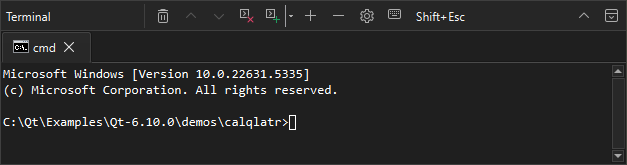
    34f9d55f-c63e-4c5e-a902-f0f8196b8482-0bdec4930eb24b3f879e0f3f5a16531b.png

    cristian-adamC 1 Reply Last reply
    0
    • Christian EhrlicherC Christian Ehrlicher moved this topic from General and Desktop on
    • SGaistS Offline
      SGaistS Offline
      SGaist
      Lifetime Qt Champion
      wrote on last edited by
      #2

      Hi and welcome to devnet,

      You need to provide more information:

      • Windows version
      • Qt Creator version
      • Method of installation
      • What exactly you did

      Interested in AI ? www.idiap.ch
      Please read the Qt Code of Conduct - https://forum.qt.io/topic/113070/qt-code-of-conduct

      1 Reply Last reply
      0
      • 8 873578156

        1824d79c-f4fe-4d54-9fab-04ae0337bbc3-图片.png
        1854101d-6d57-4c74-8b40-5150b14be705-图片.png

        My terminal is currently showing as blank, and no buttons are responding.
        After I installed it, it was like this without changing the configuration file. I tried many methods but couldn't fix it. Can you tell me how to do it and help me.
        It should have been like this below,

        34f9d55f-c63e-4c5e-a902-f0f8196b8482-0bdec4930eb24b3f879e0f3f5a16531b.png

        cristian-adamC Online
        cristian-adamC Online
        cristian-adam
        wrote on last edited by cristian-adam
        #3

        @873578156 This sounds like QTCREATORBUG-32192: Unresponsive Qt Creator on close built-in terminal, which was fixed in Qt Creator 15.0.1.

        It's not quite identical. That's why some more information would be welcomed.

        1 Reply Last reply
        1
        • 8 Offline
          8 Offline
          873578156
          wrote on last edited by
          #4

          me too and long time。

          SGaistS 1 Reply Last reply
          0
          • 8 873578156

            me too and long time。

            SGaistS Offline
            SGaistS Offline
            SGaist
            Lifetime Qt Champion
            wrote on last edited by
            #5

            @873578156 said in My terminal is currently displaying a blank screen,:

            me too and long time。

            Not to be rude but this does not help. Both @cristian-adam and me asked for more information to help you so please provide them.

            Interested in AI ? www.idiap.ch
            Please read the Qt Code of Conduct - https://forum.qt.io/topic/113070/qt-code-of-conduct

            1 Reply Last reply
            0
            • 8 Offline
              8 Offline
              873578156
              wrote last edited by
              #6

              sys:windows 10 enterprise ltsc 2019 10.0.17763,
              Qt Creator: 18.0.0
              Installation method: Online installation
              What did he do: He didn't do anything, it was like this after he installed it

              I have tested it and it is available on Windows 10 Enterprise LTSC 2021, but the 2021 version will be discontinued next year, and the 2019 version still has a 4-year support period.

              cristian-adamC 1 Reply Last reply
              0
              • 8 873578156

                sys:windows 10 enterprise ltsc 2019 10.0.17763,
                Qt Creator: 18.0.0
                Installation method: Online installation
                What did he do: He didn't do anything, it was like this after he installed it

                I have tested it and it is available on Windows 10 Enterprise LTSC 2021, but the 2021 version will be discontinued next year, and the 2019 version still has a 4-year support period.

                cristian-adamC Online
                cristian-adamC Online
                cristian-adam
                wrote last edited by
                #7

                @873578156 Right, the issue here is that Windows 10 doesn't have the ConPTY capability and WinPTY is being used by Qt Creator.

                As seen in the code as:

                bool PtyQt::isUsingConPTY()
                {
                #ifdef Q_OS_WIN
                    if (ConPtyProcess::isAvailable() && qgetenv("QTC_USE_WINPTY").isEmpty())
                        return true;
                #endif
                
                    return false;
                }
                

                I've created https://qt-project.atlassian.net/browse/QTCREATORBUG-33876 for this.

                cristian-adamC 1 Reply Last reply
                2
                • cristian-adamC cristian-adam

                  @873578156 Right, the issue here is that Windows 10 doesn't have the ConPTY capability and WinPTY is being used by Qt Creator.

                  As seen in the code as:

                  bool PtyQt::isUsingConPTY()
                  {
                  #ifdef Q_OS_WIN
                      if (ConPtyProcess::isAvailable() && qgetenv("QTC_USE_WINPTY").isEmpty())
                          return true;
                  #endif
                  
                      return false;
                  }
                  

                  I've created https://qt-project.atlassian.net/browse/QTCREATORBUG-33876 for this.

                  cristian-adamC Online
                  cristian-adamC Online
                  cristian-adam
                  wrote last edited by
                  #8

                  @873578156 I've fixed the bug yesterday and merged the fix today, check a Qt Creator 18.0.2 snapshot https://download.qt.io/snapshots/qtcreator/18.0/18.0.2/ tomorrow.

                  1 Reply Last reply
                  3

                  • Login

                  • Login or register to search.
                  • First post
                    Last post
                  0
                  • Categories
                  • Recent
                  • Tags
                  • Popular
                  • Users
                  • Groups
                  • Search
                  • Get Qt Extensions
                  • Unsolved

