

Icon for linux application
-
This also works
{
    ui->setupUi(this);
    QMainWindow::setWindowIcon(QIcon("qrc:/new/icons/img/information.png"));
}
Because at startup the taskbar still displays the standard icon
If you want to have your icon as "shortcut" / desktop icon on Linux you need to follow @JonB 's solution in the topic linked by @jsulm above.
-
A atom_352 has marked this topic as solved on
-
I am using AppImages (created with linuxdeploy and linuxdeployqt) to have portable applications. These rely on a .desktop file which is supposed to be portable between KDE and Gnome (and hopefully other desktop environments). The .desktop file plays together with the xdg-utils. You can install these with xdg-desktop-menu or xdg-desktop-icon. I'd expect that through this they would also immediately show the icon in the taskbar when launched this way. (You can even register file extensions with xdg-mime and than open file with the associated program with xdg-open–much like macOS's
opencommand.)If I am not mistaken, this is the official link for .desktop files: https://specifications.freedesktop.org/desktop-entry-spec/latest/index.html
-
To add a system tray icon in a C++ app on Ubuntu/Linux using CMake, you can use libappindicator or Qt (if using Qt framework). Here's a short summary:
Use libappindicator for GTK-based apps:
Install: sudo apt install libappindicator3-dev
Link in CMake: target_link_libraries(your_app appindicator3-0.1)
Set icon: app_indicator_set_icon_full(indicator, "icon-name", "description");
Or use Qt:
Use QSystemTrayIcon and set icon with setIcon(QIcon(":/icon.png"));
Make sure the icon file is included in your build and accessible at runtime.
-
This also works
{
    ui->setupUi(this);
    QMainWindow::setWindowIcon(QIcon("qrc:/new/icons/img/information.png"));
}
Because at startup the taskbar still displays the standard icon
If you want to have your icon as "shortcut" / desktop icon on Linux you need to follow @JonB 's solution in the topic linked by @jsulm above.
@Pl45m4 said in Icon for linux application:
QMainWindow::setWindowIcon(QIcon("qrc:/new/icons/img/information.png"));
Hello I have same issue.
When I in windows, I use like that
//Cmake

set(APP_ICON_RESOURCE_WINDOWS "${CMAKE_CURRENT_SOURCE_DIR}/icon.rc")

qt_add_executable(MyApp
    MANUAL_FINALIZATION
    ${PROJECT_SOURCES}
    ${APP_ICON_RESOURCE_WINDOWS}
)

//Icon.rc
IDI_ICON1               ICON    "Resources/icon/icon.ico"
But I can see only that :

I added also on ui,
and extra add with code
QMainWindow::setWindowIcon(QIcon("qrc:/new/icons/img/information.png"));Any opinion or advice ?
-
This should work the way you did it. Do you see that rc.exe is executed during compilation? It should create a .res file which then gets linked into the resulting executable
-
@Christian-Ehrlicher said in Icon for linux application:
This should work the way you did it.
I did something wrong probably.
@Christian-Ehrlicher said in Icon for linux application:
Do you see that rc.exe is executed during compilation?
I see only that icon :

I didn't quite understand what you meant. Are you referring to my application as rx.exe? If so, and by compilation you mean build and run, I don't see it.
@Christian-Ehrlicher said in Icon for linux application:
It should create a .res file which then gets linked into the resulting executable
When I look in the build folder, I don't see any files with a .res extension. Do I need to build it differently?
-
@Christian-Ehrlicher said in Icon for linux application:
This should work the way you did it.
I did something wrong probably.
@Christian-Ehrlicher said in Icon for linux application:
Do you see that rc.exe is executed during compilation?
I see only that icon :
I didn't quite understand what you meant. Are you referring to my application as rx.exe? If so, and by compilation you mean build and run, I don't see it.
@Christian-Ehrlicher said in Icon for linux application:
It should create a .res file which then gets linked into the resulting executable
When I look in the build folder, I don't see any files with a .res extension. Do I need to build it differently?
@Joe-von-Habsburg said in Icon for linux application:
I didn't quite understand what you meant
When you compile the application in QtCreator you see what/how the compiler is invoked. There you see a lot of output and one of them should be the invocation of rc.exe. You need to clean the build dir before or at least modify the rc file so it gets recompiled.
-
I looked at the "Compile Output" window and, it is finished succesfully. I could not see about icon or rc.exe.
[15/15 10.2/sec] Linking CXX executable MyApp
16:28:18: The command "/home/x/Qt/Tools/CMake/bin/cmake --build /home/x/Desktop/MyApp/build --target all" finished successfully.
I want to ask again, is rc.exe my app or different thing ? If different thing how can I add to my app, and why should I add ?
I clear cmake configuration, I run cmake, I clean and rebuild. Still icon does not exist.I've worked this hard on Qt in Ubuntu before. I apologize if I did anything wrong.
-
I looked at the "Compile Output" window and, it is finished succesfully. I could not see about icon or rc.exe.
[15/15 10.2/sec] Linking CXX executable MyApp
16:28:18: The command "/home/x/Qt/Tools/CMake/bin/cmake --build /home/x/Desktop/MyApp/build --target all" finished successfully.
I want to ask again, is rc.exe my app or different thing ? If different thing how can I add to my app, and why should I add ?
I clear cmake configuration, I run cmake, I clean and rebuild. Still icon does not exist.I've worked this hard on Qt in Ubuntu before. I apologize if I did anything wrong.
@Joe-von-Habsburg said in Icon for linux application:
I've worked this hard on Qt in Ubuntu before
You're aware that the rc application icon is for windows??? Please read the full thread.
-
Ok, I am sorry, I read : https://forum.qt.io/topic/102167/how-to-add-qt-application-icon-in-ubuntu
I need both of them also, .destop file and QMainWindow::setWindowIcon().I create icon.destop file and add resouces.qrc and add also to build folder.
My file :[Desktop Entry] Version=1.0 Type=Application Name=MyApp Icon=Resources/icon/icon.png Exec=MyApp Comment=MyApp Application Categories=Application Terminal=falseI could not see any thing.
And QMainWindow::setWindowIcon(). not work.

I checked, is icon null, it is return false. icon is not null.
MainWindow::MainWindow(QWidget *parent)
    : QMainWindow(parent)
    , ui(new Ui::MainWindow)
{
    ui->setupUi(this);
    QIcon ic(":/Resources/icon/icon.png");
    qDebug() << "ic.isNull" << ic.isNull(); // return false
    QMainWindow::setWindowIcon(QIcon(":/Resources/icon/icon.png"));
}
Did I create .destop file correct location ?
-
Ok, I am sorry, I read : https://forum.qt.io/topic/102167/how-to-add-qt-application-icon-in-ubuntu
I need both of them also, .destop file and QMainWindow::setWindowIcon().I create icon.destop file and add resouces.qrc and add also to build folder.
My file :[Desktop Entry] Version=1.0 Type=Application Name=MyApp Icon=Resources/icon/icon.png Exec=MyApp Comment=MyApp Application Categories=Application Terminal=falseI could not see any thing.
And QMainWindow::setWindowIcon(). not work.
I checked, is icon null, it is return false. icon is not null.
MainWindow::MainWindow(QWidget *parent)
    : QMainWindow(parent)
    , ui(new Ui::MainWindow)
{
    ui->setupUi(this);
    QIcon ic(":/Resources/icon/icon.png");
    qDebug() << "ic.isNull" << ic.isNull(); // return false
    QMainWindow::setWindowIcon(QIcon(":/Resources/icon/icon.png"));
}
Did I create .destop file correct location ?
@Joe-von-Habsburg said in Icon for linux application:
Icon=Resources/icon/icon.pngQIcon ic(":/Resources/icon/icon.png");The first looks in the filing system for
Resources/icon/icon.png, which doesn't exist. I do not think you can tell desktop to use a resource in a Qt executable, or I don't know how if you can (unless:/Resources/icon/icon.pngworks which I doubt). For the desktop shortcut I imagine you have to extract or copy the png file so you can point to that. -
@Joe-von-Habsburg said in Icon for linux application:
Icon=Resources/icon/icon.pngQIcon ic(":/Resources/icon/icon.png");The first looks in the filing system for
Resources/icon/icon.png, which doesn't exist. I do not think you can tell desktop to use a resource in a Qt executable, or I don't know how if you can (unless:/Resources/icon/icon.pngworks which I doubt). For the desktop shortcut I imagine you have to extract or copy the png file so you can point to that.@JonB said in Icon for linux application:
Icon=Resources/icon/icon.png
thay are in same directory.
-
icon.destop
-
Resources/
I added on project location and build location. So it exists.
@JonB said in Icon for linux application:
I do not think you can tell desktop to use a resource in a Qt executable,
I know what you mean. You think I'm using a file in resources.qrc, but I copied Resources/icon/icon.png to the build folder myself. So I know you can't use it from the .qrc file, it's inside the icon.desktop file.
@JonB said in Icon for linux application:
QIcon ic(":/Resources/icon/icon.png");
That was for mainwindow icon. I tested for access to icon.png file or it is null, app can access to file because it returns as false for ask is it null.
-
-
@JonB said in Icon for linux application:
Icon=Resources/icon/icon.png
thay are in same directory.
-
icon.destop
-
Resources/
I added on project location and build location. So it exists.
@JonB said in Icon for linux application:
I do not think you can tell desktop to use a resource in a Qt executable,
I know what you mean. You think I'm using a file in resources.qrc, but I copied Resources/icon/icon.png to the build folder myself. So I know you can't use it from the .qrc file, it's inside the icon.desktop file.
@JonB said in Icon for linux application:
QIcon ic(":/Resources/icon/icon.png");
That was for mainwindow icon. I tested for access to icon.png file or it is null, app can access to file because it returns as false for ask is it null.
@Joe-von-Habsburg
I do not understand your English or what you are saying..qrcis not relevant, it is only used at compilation time. Ubuntu/desktop will not look forIcon=Resources/icon/icon.pngas an embedded resource within your executable, nor if you specify it as anyIcon=:/...like you can inside Qt code.Let's say your home directory is
/home/joe. Copyicon.pngto that directory, so/home/joe/icon.png. SpecifyIcon=/home/joe/icon.pngin.desktopfile. Try that. If that does not work then perhaps you have something wrong in your.desktopfile. -
-
@Joe-von-Habsburg
I do not understand your English or what you are saying..qrcis not relevant, it is only used at compilation time. Ubuntu/desktop will not look forIcon=Resources/icon/icon.pngas an embedded resource within your executable, nor if you specify it as anyIcon=:/...like you can inside Qt code.Let's say your home directory is
/home/joe. Copyicon.pngto that directory, so/home/joe/icon.png. SpecifyIcon=/home/joe/icon.pngin.desktopfile. Try that. If that does not work then perhaps you have something wrong in your.desktopfile.@JonB said in Icon for linux application:
I do not understand your English or what you are saying.
Sorry for that.
@JonB said in Icon for linux application:
Let's say your home directory is /home/joe. Copy icon.png to that directory, so /home/joe/icon.png. Specify Icon=/home/joe/icon.png in .desktop file. Try that. If that does not work then perhaps you have something wrong in your .desktop file.
I said that. I copied the image same directory(build) with .desktop file.

-
@JonB said in Icon for linux application:
I do not understand your English or what you are saying.
Sorry for that.
@JonB said in Icon for linux application:
Let's say your home directory is /home/joe. Copy icon.png to that directory, so /home/joe/icon.png. Specify Icon=/home/joe/icon.png in .desktop file. Try that. If that does not work then perhaps you have something wrong in your .desktop file.
I said that. I copied the image same directory(build) with .desktop file.
@Joe-von-Habsburg said in Icon for linux application:
I said that. I copied the image same directory(build) with .desktop file.
It's quite simple. I suggested you:
- Copy
icon.pngto/home/joe/icon.png(whatever your home directory is). - Put
Icon=/home/joe/icon.png(that's whatever full path) in.desktopfile.
I don't know what your screenshot is supposed to be showing me. I never said to put anything anywhere near a
Resourcesdirectory or in your "build" area. And your.desktopfile is in somewhere like~/.local/share/applications/, right? - Copy
-
I add to home
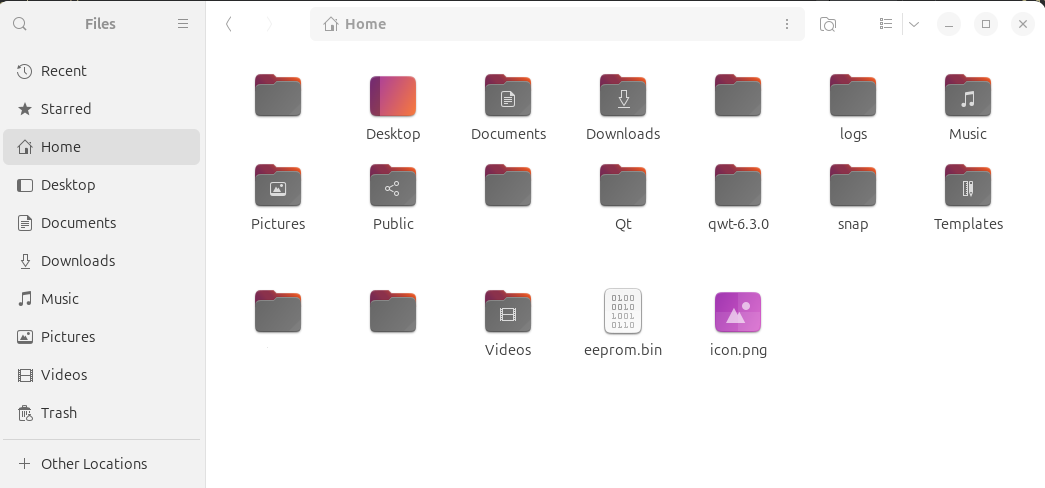
Build directory
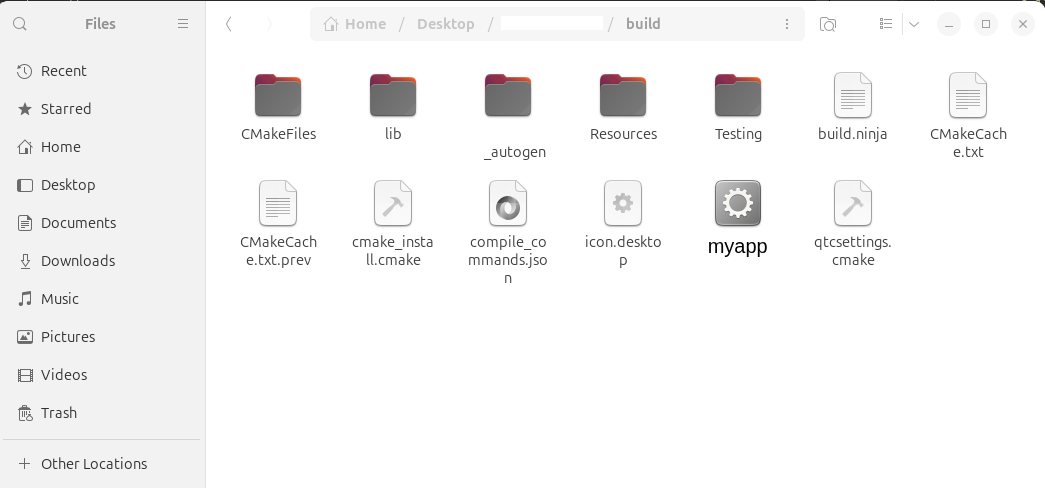
[Desktop Entry]
Version=1.0
Type=Application
Name=App
Icon=/home/x/icon.png
Exec=myapp
Comment=My Application
Categories=Application
Terminal=false
Icon is :

I saw that
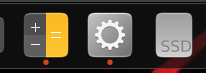
@JonB said in Icon for linux application:
desktop file is in somewhere like ~/.local/share/applications/, right?
should i create .destop file in there ?
-
I add to home
Build directory
[Desktop Entry]
Version=1.0
Type=Application
Name=App
Icon=/home/x/icon.png
Exec=myapp
Comment=My Application
Categories=Application
Terminal=false
Icon is :
I saw that
@JonB said in Icon for linux application:
desktop file is in somewhere like ~/.local/share/applications/, right?
should i create .destop file in there ?
@Joe-von-Habsburg
As I understand it, youricon.desktopfile seems to be in some build directory. I said you should have nothing to do with build directory at runtime. What makes you think Ubuntu/GNOME will look in your build directory for any.desktopfile, why should it? It does not even know it is there.- Put your
icon.pngin/home/joe. - Leave your
iconexecutable in something like/home/joe/iconproject/build/Desktop/directory. (I assume your executable is namedicon.) - Ensure
icon.desktopincludes the following 2 lines among its other content:
Icon=/home/joe/icon.png Exec=/home/joe/iconproject/build/Desktop/icon- Put/copy
icon.desktopto directory/home/joe/.local/share/applications/. That is where Ubuntu/GNOME/desktop manager looks for.desktopfiles. You might have some more there if you have any other applications with.desktopfiles, or your might be the only one.
You might have to log out of desktop and back in again after you have done item #4, to make GNOME look in
/home/joe/.local/share/applications/again for your newicon.desktopfile.When you have this working you can think again/play with lines
Icon=/home/joe/icon.png
Exec=/home/joe/iconproject/build/Desktop/icon
so that they do not necessarily have to have
/home/joein them if you want this to run/distribute elsewhere. But first get it working with the absolute paths so we know where we are. - Put your
-
Thank you so much, It works. For that kind of things, must be so explanatory. Thanks everyone :)



