Icon for linux application
-
I looked at the "Compile Output" window and, it is finished succesfully. I could not see about icon or rc.exe.
[15/15 10.2/sec] Linking CXX executable MyApp
16:28:18: The command "/home/x/Qt/Tools/CMake/bin/cmake --build /home/x/Desktop/MyApp/build --target all" finished successfully.
I want to ask again, is rc.exe my app or different thing ? If different thing how can I add to my app, and why should I add ?
I clear cmake configuration, I run cmake, I clean and rebuild. Still icon does not exist.I've worked this hard on Qt in Ubuntu before. I apologize if I did anything wrong.
-
I looked at the "Compile Output" window and, it is finished succesfully. I could not see about icon or rc.exe.
[15/15 10.2/sec] Linking CXX executable MyApp
16:28:18: The command "/home/x/Qt/Tools/CMake/bin/cmake --build /home/x/Desktop/MyApp/build --target all" finished successfully.
I want to ask again, is rc.exe my app or different thing ? If different thing how can I add to my app, and why should I add ?
I clear cmake configuration, I run cmake, I clean and rebuild. Still icon does not exist.I've worked this hard on Qt in Ubuntu before. I apologize if I did anything wrong.
@Joe-von-Habsburg said in Icon for linux application:
I've worked this hard on Qt in Ubuntu before
You're aware that the rc application icon is for windows??? Please read the full thread.
-
Ok, I am sorry, I read : https://forum.qt.io/topic/102167/how-to-add-qt-application-icon-in-ubuntu
I need both of them also, .destop file and QMainWindow::setWindowIcon().I create icon.destop file and add resouces.qrc and add also to build folder.
My file :[Desktop Entry] Version=1.0 Type=Application Name=MyApp Icon=Resources/icon/icon.png Exec=MyApp Comment=MyApp Application Categories=Application Terminal=falseI could not see any thing.
And QMainWindow::setWindowIcon(). not work.

I checked, is icon null, it is return false. icon is not null.
MainWindow::MainWindow(QWidget *parent)
    : QMainWindow(parent)
    , ui(new Ui::MainWindow)
{
    ui->setupUi(this);
    QIcon ic(":/Resources/icon/icon.png");
    qDebug() << "ic.isNull" << ic.isNull(); // return false
    QMainWindow::setWindowIcon(QIcon(":/Resources/icon/icon.png"));
}
Did I create .destop file correct location ?
-
Ok, I am sorry, I read : https://forum.qt.io/topic/102167/how-to-add-qt-application-icon-in-ubuntu
I need both of them also, .destop file and QMainWindow::setWindowIcon().I create icon.destop file and add resouces.qrc and add also to build folder.
My file :[Desktop Entry] Version=1.0 Type=Application Name=MyApp Icon=Resources/icon/icon.png Exec=MyApp Comment=MyApp Application Categories=Application Terminal=falseI could not see any thing.
And QMainWindow::setWindowIcon(). not work.
I checked, is icon null, it is return false. icon is not null.
MainWindow::MainWindow(QWidget *parent)
    : QMainWindow(parent)
    , ui(new Ui::MainWindow)
{
    ui->setupUi(this);
    QIcon ic(":/Resources/icon/icon.png");
    qDebug() << "ic.isNull" << ic.isNull(); // return false
    QMainWindow::setWindowIcon(QIcon(":/Resources/icon/icon.png"));
}
Did I create .destop file correct location ?
@Joe-von-Habsburg said in Icon for linux application:
Icon=Resources/icon/icon.pngQIcon ic(":/Resources/icon/icon.png");The first looks in the filing system for
Resources/icon/icon.png, which doesn't exist. I do not think you can tell desktop to use a resource in a Qt executable, or I don't know how if you can (unless:/Resources/icon/icon.pngworks which I doubt). For the desktop shortcut I imagine you have to extract or copy the png file so you can point to that. -
@Joe-von-Habsburg said in Icon for linux application:
Icon=Resources/icon/icon.pngQIcon ic(":/Resources/icon/icon.png");The first looks in the filing system for
Resources/icon/icon.png, which doesn't exist. I do not think you can tell desktop to use a resource in a Qt executable, or I don't know how if you can (unless:/Resources/icon/icon.pngworks which I doubt). For the desktop shortcut I imagine you have to extract or copy the png file so you can point to that.@JonB said in Icon for linux application:
Icon=Resources/icon/icon.png
thay are in same directory.
-
icon.destop
-
Resources/
I added on project location and build location. So it exists.
@JonB said in Icon for linux application:
I do not think you can tell desktop to use a resource in a Qt executable,
I know what you mean. You think I'm using a file in resources.qrc, but I copied Resources/icon/icon.png to the build folder myself. So I know you can't use it from the .qrc file, it's inside the icon.desktop file.
@JonB said in Icon for linux application:
QIcon ic(":/Resources/icon/icon.png");
That was for mainwindow icon. I tested for access to icon.png file or it is null, app can access to file because it returns as false for ask is it null.
-
-
@JonB said in Icon for linux application:
Icon=Resources/icon/icon.png
thay are in same directory.
-
icon.destop
-
Resources/
I added on project location and build location. So it exists.
@JonB said in Icon for linux application:
I do not think you can tell desktop to use a resource in a Qt executable,
I know what you mean. You think I'm using a file in resources.qrc, but I copied Resources/icon/icon.png to the build folder myself. So I know you can't use it from the .qrc file, it's inside the icon.desktop file.
@JonB said in Icon for linux application:
QIcon ic(":/Resources/icon/icon.png");
That was for mainwindow icon. I tested for access to icon.png file or it is null, app can access to file because it returns as false for ask is it null.
@Joe-von-Habsburg
I do not understand your English or what you are saying..qrcis not relevant, it is only used at compilation time. Ubuntu/desktop will not look forIcon=Resources/icon/icon.pngas an embedded resource within your executable, nor if you specify it as anyIcon=:/...like you can inside Qt code.Let's say your home directory is
/home/joe. Copyicon.pngto that directory, so/home/joe/icon.png. SpecifyIcon=/home/joe/icon.pngin.desktopfile. Try that. If that does not work then perhaps you have something wrong in your.desktopfile. -
-
@Joe-von-Habsburg
I do not understand your English or what you are saying..qrcis not relevant, it is only used at compilation time. Ubuntu/desktop will not look forIcon=Resources/icon/icon.pngas an embedded resource within your executable, nor if you specify it as anyIcon=:/...like you can inside Qt code.Let's say your home directory is
/home/joe. Copyicon.pngto that directory, so/home/joe/icon.png. SpecifyIcon=/home/joe/icon.pngin.desktopfile. Try that. If that does not work then perhaps you have something wrong in your.desktopfile.@JonB said in Icon for linux application:
I do not understand your English or what you are saying.
Sorry for that.
@JonB said in Icon for linux application:
Let's say your home directory is /home/joe. Copy icon.png to that directory, so /home/joe/icon.png. Specify Icon=/home/joe/icon.png in .desktop file. Try that. If that does not work then perhaps you have something wrong in your .desktop file.
I said that. I copied the image same directory(build) with .desktop file.

-
@JonB said in Icon for linux application:
I do not understand your English or what you are saying.
Sorry for that.
@JonB said in Icon for linux application:
Let's say your home directory is /home/joe. Copy icon.png to that directory, so /home/joe/icon.png. Specify Icon=/home/joe/icon.png in .desktop file. Try that. If that does not work then perhaps you have something wrong in your .desktop file.
I said that. I copied the image same directory(build) with .desktop file.
@Joe-von-Habsburg said in Icon for linux application:
I said that. I copied the image same directory(build) with .desktop file.
It's quite simple. I suggested you:
- Copy
icon.pngto/home/joe/icon.png(whatever your home directory is). - Put
Icon=/home/joe/icon.png(that's whatever full path) in.desktopfile.
I don't know what your screenshot is supposed to be showing me. I never said to put anything anywhere near a
Resourcesdirectory or in your "build" area. And your.desktopfile is in somewhere like~/.local/share/applications/, right? - Copy
-
I add to home
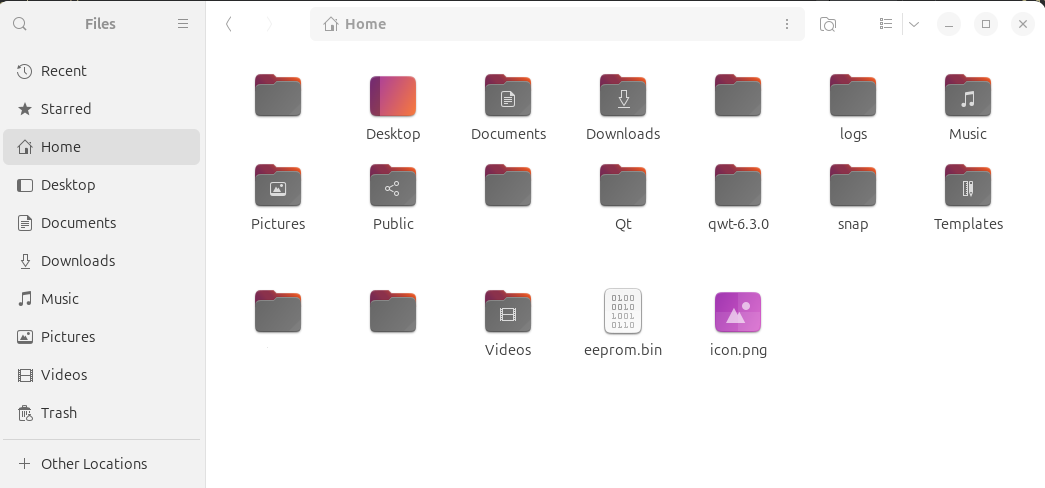
Build directory
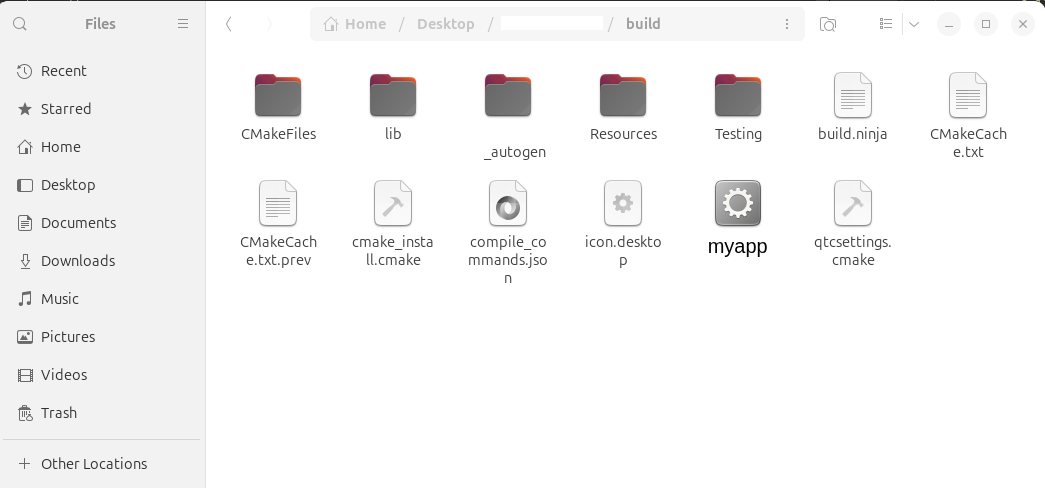
[Desktop Entry]
Version=1.0
Type=Application
Name=App
Icon=/home/x/icon.png
Exec=myapp
Comment=My Application
Categories=Application
Terminal=false
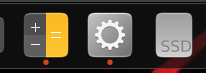
Icon is :

I saw that
@JonB said in Icon for linux application:
desktop file is in somewhere like ~/.local/share/applications/, right?
should i create .destop file in there ?
-
I add to home
Build directory
[Desktop Entry]
Version=1.0
Type=Application
Name=App
Icon=/home/x/icon.png
Exec=myapp
Comment=My Application
Categories=Application
Terminal=false
Icon is :
I saw that
@JonB said in Icon for linux application:
desktop file is in somewhere like ~/.local/share/applications/, right?
should i create .destop file in there ?
@Joe-von-Habsburg
As I understand it, youricon.desktopfile seems to be in some build directory. I said you should have nothing to do with build directory at runtime. What makes you think Ubuntu/GNOME will look in your build directory for any.desktopfile, why should it? It does not even know it is there.- Put your
icon.pngin/home/joe. - Leave your
iconexecutable in something like/home/joe/iconproject/build/Desktop/directory. (I assume your executable is namedicon.) - Ensure
icon.desktopincludes the following 2 lines among its other content:
Icon=/home/joe/icon.png Exec=/home/joe/iconproject/build/Desktop/icon- Put/copy
icon.desktopto directory/home/joe/.local/share/applications/. That is where Ubuntu/GNOME/desktop manager looks for.desktopfiles. You might have some more there if you have any other applications with.desktopfiles, or your might be the only one.
You might have to log out of desktop and back in again after you have done item #4, to make GNOME look in
/home/joe/.local/share/applications/again for your newicon.desktopfile.When you have this working you can think again/play with lines
Icon=/home/joe/icon.png
Exec=/home/joe/iconproject/build/Desktop/icon
so that they do not necessarily have to have
/home/joein them if you want this to run/distribute elsewhere. But first get it working with the absolute paths so we know where we are. - Put your
-
Thank you so much, It works. For that kind of things, must be so explanatory. Thanks everyone :)