

Selection highlight is a thin blue bar at the left of the cell.
-
I'm a relative beginner with Qt.
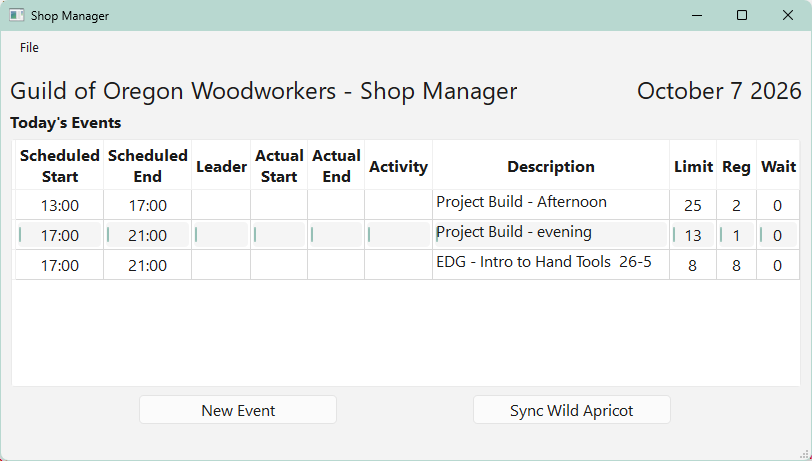
I've set up a QTableView with a QAbstractTableModel subclass, and have it working except for the selection highlight, which is just a thin blue vertical line at the left of the cells.
Google (possibly hallucinating) tells me I need to have the model's
data()method handleSizeHintRole, but that requires the view to pass its fontMetrics to the model, and then the model must calculate the text size, I don't understand why the model needs to be responsible for worrying about pixels. I've read the page about why the model specifies some formatting that is really intrinsic to the data, so it can be rendered consistently in multiple views. But even that seems like excessive coupling and blurring of the Single Responsibility principle.I'm not sure why the model should have to calculate the text size just so the view can highlight it, especially when SizeToContents already did that nicely. This seems redundant.
Question
Is Google just hallucinating, and is there a way to make the view use the already (internally) calculated text size for selection highlighting? Or, is the only recourse to create a delegate and re-do the text size calculation there?
Thanks
-
I implemented Google's suggestion, but it has no effect. Here's the interesting part of the code:
QAbstractTableModel Subclass
class ColDef:
    '''
        Store column definitions for a model

        Still a work-in-progress
    '''
    def __init__(self, header:str, attr:str, fmt:str, align:Qt.AlignmentFlag):
        self.header = header
        self.attr   = attr
        self.fmt    = fmt
        self.align  = align

    def format(self, row) -> str:
        if self.attr == '': return ''
        val = getattr(row, self.attr)

        if self.fmt == 'time':
            if isinstance(val, dt.datetime):
                return val.strftime("%H:%M")
        else: # For now...
            return str(val)

        return None

columnDefs = [
    #       Header              Field in rowset                 Format  Alignment
    #       ------------------  ------------------------------  ------- ---------------
    ColDef('Scheduled\nStart', 'start_ts',                      'time', Qt.AlignCenter),
    ColDef('Scheduled\nEnd',   'end_ts',                        'time', Qt.AlignCenter),
    ColDef('Leader',           '',                              '',     Qt.AlignLeft),
    ColDef('Actual\nStart',    '',                              '',     Qt.AlignCenter),
    ColDef('Actual\nEnd',      '',                              '',     Qt.AlignCenter),
    ColDef('Activity',         '',                              '',     Qt.AlignCenter),
    ColDef('Description',      'title',                         '',     Qt.AlignLeft),
    ColDef('Limit',            'registrations_limit',           'int',  Qt.AlignCenter),
    ColDef('Reg',              'confirmed_registrations_count', 'int',  Qt.AlignCenter),
    ColDef('Wait',             'waitlist_registration_count',   'int',  Qt.AlignCenter),
]

class SAEventsModel(QAbstractTableModel):
    def __init__(self, parent=None, * , dbEngine):
        super().__init__()

        self.dbEngine = dbEngine
        self.rowset   = []
        self.fontMetrics = None

    def setFontMetrics(self, font:QFont):
        self.fontMetrics = QFontMetrics(font)

    def refresh(self, d:dt.date):
        self.beginResetModel()

        with Session(self.dbEngine) as dbSession:
            stmt = select(DVEventSession)\
                    .where(DVEventSession.event_date==d)\
                    .order_by(DVEventSession.start_ts)
            self.rowset = dbSession.scalars(stmt).all()

        self.endResetModel()

    def headerData(self, section:int, orientation:Qt.Orientation, role:Qt.ItemDataRole):
        if orientation == Qt.Orientation.Horizontal \
                and 0 <= section < len(columnDefs) \
                and role == Qt.DisplayRole:
            return columnDefs[section].header
        return None

    def rowCount(self, _) -> int:
        return len(self.rowset)

    def columnCount(self, _) -> int:
        return len(columnDefs)

    def data(self, index:QModelIndex, role:Qt.ItemDataRole):
        if index.isValid():
            row = index.row()
            col = index.column()
            cd = columnDefs[col]

            if role in (Qt.ItemDataRole.DisplayRole, Qt.ItemDataRole.EditRole):
                # Table is read-only, return same data for Display and Edit
                return cd.format(self.rowset[row])

            elif role == Qt.ItemDataRole.SizeHintRole:
                # Recalculate the text size
                text = cd.format(self.rowset[row])
                w    = self.fontMetrics.horizontalAdvance(text)
                h    = self.fontMetrics.height()
                return QSize(w+20, h+10)

            elif role == Qt.ItemDataRole.TextAlignmentRole:
                # Return the desired alignment
                return cd.align

        return None
Main Window snippet
self.uiis loaded from a QtCreator-generated.uifile.self.ui.guildEvents' is aQTableView`td = dt.date.today() self.ui.curDate.setText(f"{td:%B} {td.day} {td:%Y}") self.model = SAEventsModel(dbEngine=dbEngine) self.model.refresh(td) self.model.setFontMetrics(self.ui.guildEvents.font()) self.ui.guildEvents.setModel(self.model) self.ui.guildEvents.horizontalHeader().setSectionResizeMode(QHeaderView.ResizeMode.ResizeToContents) self.ui.guildEvents.setSelectionBehavior(qv.SelectionBehavior.SelectRows)Main Window Display
The middle row is selected.
-
I implemented Google's suggestion, but it has no effect. Here's the interesting part of the code:
QAbstractTableModel Subclass
class ColDef:
    '''
        Store column definitions for a model

        Still a work-in-progress
    '''
    def __init__(self, header:str, attr:str, fmt:str, align:Qt.AlignmentFlag):
        self.header = header
        self.attr   = attr
        self.fmt    = fmt
        self.align  = align

    def format(self, row) -> str:
        if self.attr == '': return ''
        val = getattr(row, self.attr)

        if self.fmt == 'time':
            if isinstance(val, dt.datetime):
                return val.strftime("%H:%M")
        else: # For now...
            return str(val)

        return None

columnDefs = [
    #       Header              Field in rowset                 Format  Alignment
    #       ------------------  ------------------------------  ------- ---------------
    ColDef('Scheduled\nStart', 'start_ts',                      'time', Qt.AlignCenter),
    ColDef('Scheduled\nEnd',   'end_ts',                        'time', Qt.AlignCenter),
    ColDef('Leader',           '',                              '',     Qt.AlignLeft),
    ColDef('Actual\nStart',    '',                              '',     Qt.AlignCenter),
    ColDef('Actual\nEnd',      '',                              '',     Qt.AlignCenter),
    ColDef('Activity',         '',                              '',     Qt.AlignCenter),
    ColDef('Description',      'title',                         '',     Qt.AlignLeft),
    ColDef('Limit',            'registrations_limit',           'int',  Qt.AlignCenter),
    ColDef('Reg',              'confirmed_registrations_count', 'int',  Qt.AlignCenter),
    ColDef('Wait',             'waitlist_registration_count',   'int',  Qt.AlignCenter),
]

class SAEventsModel(QAbstractTableModel):
    def __init__(self, parent=None, * , dbEngine):
        super().__init__()

        self.dbEngine = dbEngine
        self.rowset   = []
        self.fontMetrics = None

    def setFontMetrics(self, font:QFont):
        self.fontMetrics = QFontMetrics(font)

    def refresh(self, d:dt.date):
        self.beginResetModel()

        with Session(self.dbEngine) as dbSession:
            stmt = select(DVEventSession)\
                    .where(DVEventSession.event_date==d)\
                    .order_by(DVEventSession.start_ts)
            self.rowset = dbSession.scalars(stmt).all()

        self.endResetModel()

    def headerData(self, section:int, orientation:Qt.Orientation, role:Qt.ItemDataRole):
        if orientation == Qt.Orientation.Horizontal \
                and 0 <= section < len(columnDefs) \
                and role == Qt.DisplayRole:
            return columnDefs[section].header
        return None

    def rowCount(self, _) -> int:
        return len(self.rowset)

    def columnCount(self, _) -> int:
        return len(columnDefs)

    def data(self, index:QModelIndex, role:Qt.ItemDataRole):
        if index.isValid():
            row = index.row()
            col = index.column()
            cd = columnDefs[col]

            if role in (Qt.ItemDataRole.DisplayRole, Qt.ItemDataRole.EditRole):
                # Table is read-only, return same data for Display and Edit
                return cd.format(self.rowset[row])

            elif role == Qt.ItemDataRole.SizeHintRole:
                # Recalculate the text size
                text = cd.format(self.rowset[row])
                w    = self.fontMetrics.horizontalAdvance(text)
                h    = self.fontMetrics.height()
                return QSize(w+20, h+10)

            elif role == Qt.ItemDataRole.TextAlignmentRole:
                # Return the desired alignment
                return cd.align

        return None
Main Window snippet
self.uiis loaded from a QtCreator-generated.uifile.self.ui.guildEvents' is aQTableView`td = dt.date.today() self.ui.curDate.setText(f"{td:%B} {td.day} {td:%Y}") self.model = SAEventsModel(dbEngine=dbEngine) self.model.refresh(td) self.model.setFontMetrics(self.ui.guildEvents.font()) self.ui.guildEvents.setModel(self.model) self.ui.guildEvents.horizontalHeader().setSectionResizeMode(QHeaderView.ResizeMode.ResizeToContents) self.ui.guildEvents.setSelectionBehavior(qv.SelectionBehavior.SelectRows)Main Window Display
The middle row is selected.
@Jim-G
Hi. I am travelling abroad so cannot try anything.As ever with this sort of thing, try to reduce to minimal and then build up.
I don't recall ever having a problem with selection highlighting nor doing anything at all about font, font metrics or sizes. If I were you I would:
-
Temporarily try a
QTableWidget. Put in a couple of fixed rows and a couple of columns. Try a couple ofSelectionBehaviours. Works or looks odd? -
Move to a
QTreeViewbut try aQStandardItemModelfor the model. Again put in a couple of rows and columns. How does selection look?
If problems there that is one thing. If they work but yours does not then start looking at your implementation.
P.S.
Is your issue because you did not implement theflags()override? You may need to do that for aQAbstractTableModel. You need to return at leastItemIsSelectable: because you have not I wonder of your items are just not selectable so it won't show properly? Check what your currentSAEventsModel.flags(index)is returning. It actually ought be correct without override, but just verify. -
-
The
flags()question was interesting, but the default isItemIsSelectable|ItemIsEnabled, and implementingflags()returning those values had no effect.I tried some sample code using
QTableWidget, and that works correctly. I then made sure my code sets all the same attributes on the view and the model, with no effect. I'm stumped. I guess I'm going to have to reimplement my code withQTableWidgetand see what happens.More later...
-
You
datamethod only returns something for the few roles you have specified. Otherwise you are returningNone. Try instead to returnQAbstractItemModel.data(...)(I don't know Python and can't tell you how to exactly write that). This might solve your problem, but I'm not sure. -
You
datamethod only returns something for the few roles you have specified. Otherwise you are returningNone. Try instead to returnQAbstractItemModel.data(...)(I don't know Python and can't tell you how to exactly write that). This might solve your problem, but I'm not sure.@SimonSchroeder said in Selection highlight is a thin blue bar at the left of the cell.:
You
datamethod only returns something for the few roles you have specified. Otherwise you are returningNone. Try instead to returnQAbstractItemModel.data(...)(I don't know Python and can't tell you how to exactly write that). This might solve your problem, but I'm not sure.return super().data(index, role) -
In C++ you return a default
QVariant()for default behavior. In PySide6 this maps toNone, andQVariantis not even defined or available for use. Also, in PySide6QAbstractItemModel.data()is virtual with no default implementation.Using
return super().data(index,role)raisesNotImplementedErroras expected -
OK, I think I found a bug. I closely examined some sample code I found that uses a
QStandardItemModel, and displays selection highlights correctly. Here's a screenshot: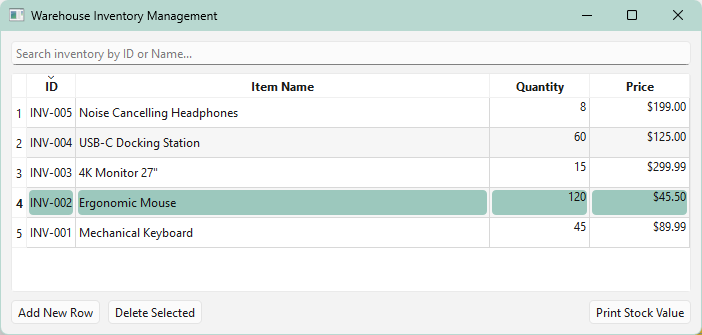
Other than the change of model class, the only other difference I could find was that in the sample code there is this:
        # Alternating row colors for data density scannability
        self.table_view.setAlternatingRowColors(True)
So I tried adding that to my code, and it fixed the issue:
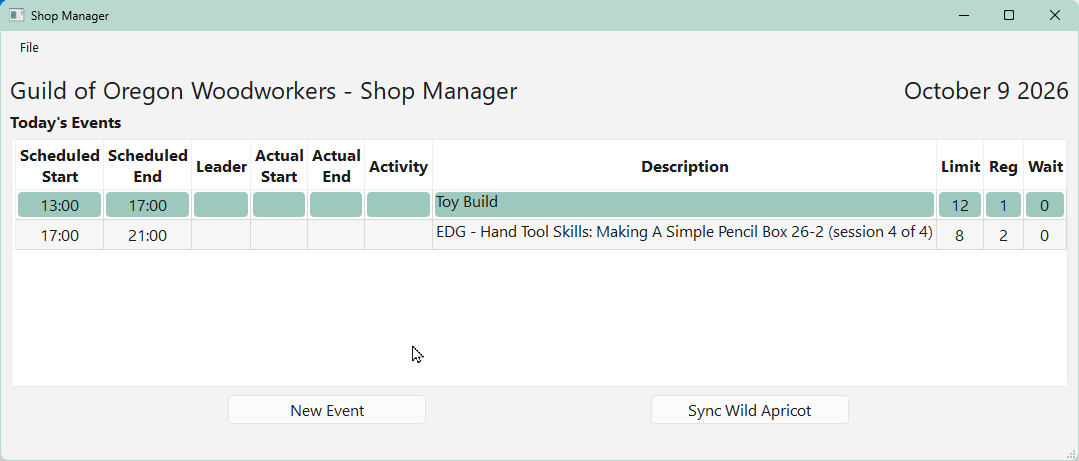
Bug?
Also note that in my earlier screenshot showing the problem, there is already alternate row highlighting which is unexpected as the default for
alternatingRowColorsisFalse. Something's amiss here. -
OK, I think I found a bug. I closely examined some sample code I found that uses a
QStandardItemModel, and displays selection highlights correctly. Here's a screenshot:Other than the change of model class, the only other difference I could find was that in the sample code there is this:
        # Alternating row colors for data density scannability
        self.table_view.setAlternatingRowColors(True)
So I tried adding that to my code, and it fixed the issue:
Bug?
Also note that in my earlier screenshot showing the problem, there is already alternate row highlighting which is unexpected as the default for
alternatingRowColorsisFalse. Something's amiss here.@Jim-G said in Selection highlight is a thin blue bar at the left of the cell.:
Bug?
No, it's the default WinUI 3 style.
-
@Jim-G said in Selection highlight is a thin blue bar at the left of the cell.:
Bug?
No, it's the default WinUI 3 style.
@Christian-Ehrlicher said in Selection highlight is a thin blue bar at the left of the cell.:
@Jim-G said in Selection highlight is a thin blue bar at the left of the cell.:
Bug?
No, it's the default WinUI 3 style. Look into your explorer to see that the highlight is gray.
I'm not following. I think we're talking about two different things. I can reproduce the issue using the sample code only.
Here's the UI including
self.table_view.setAlternatingRowColors(True)and line 4 selected: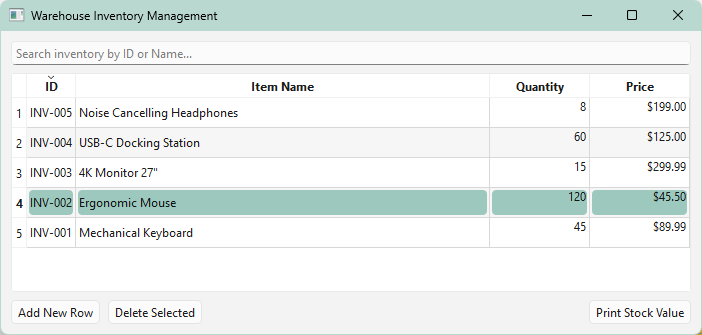
And now with that single line commented out and line 3 selected:
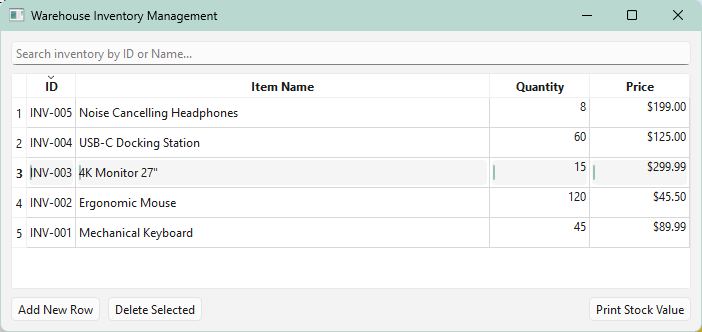
Notice the "selection" highlight in the second screenshot is just a thin blue line at the left of each cell.
It is unexpected that displaying the correct highlighting would involve the setting of
alternatingRowColors. -
@Christian-Ehrlicher said in Selection highlight is a thin blue bar at the left of the cell.:
@Jim-G said in Selection highlight is a thin blue bar at the left of the cell.:
Bug?
No, it's the default WinUI 3 style. Look into your explorer to see that the highlight is gray.
I'm not following. I think we're talking about two different things. I can reproduce the issue using the sample code only.
Here's the UI including
self.table_view.setAlternatingRowColors(True)and line 4 selected:And now with that single line commented out and line 3 selected:
Notice the "selection" highlight in the second screenshot is just a thin blue line at the left of each cell.
It is unexpected that displaying the correct highlighting would involve the setting of
alternatingRowColors.@Jim-G said in Selection highlight is a thin blue bar at the left of the cell.:
Notice the "selection" highlight in the second screenshot is just a thin blue line at the left of each cell.
And that's the correct winui3 style.
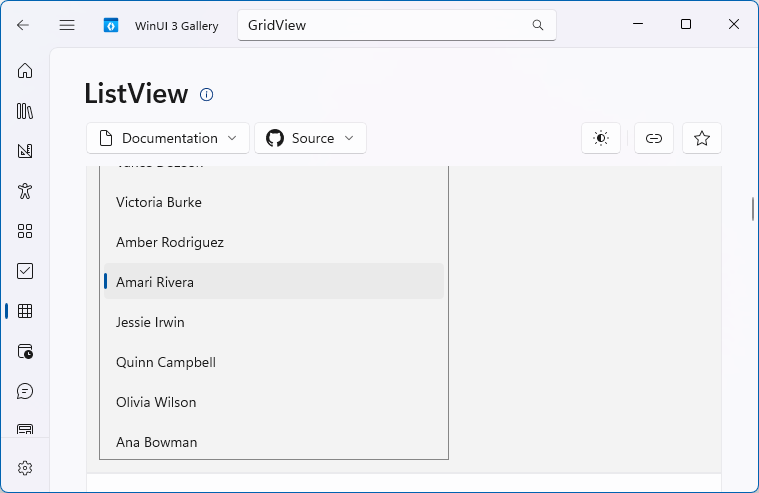
-
So why does setting
alternatingRowColorscause the change in highlight? Is that a bug?I'm not trying to be difficult. I'm still learning Qt/PySide6 (excellent tools IMO) and am puzzled by the need to set
alternatingRowColorsjust to get the expected highlight behavior. -
Also, what I see differs markedly from the example of winui 3 selection you cite. My selection indicators are only 2 pixels wide and jammed up against the left side of the text with no intervening space... actually they overlap (under) the leftmost pixel column of the text.
-
So why does setting
alternatingRowColorscause the change in highlight? Is that a bug?I'm not trying to be difficult. I'm still learning Qt/PySide6 (excellent tools IMO) and am puzzled by the need to set
alternatingRowColorsjust to get the expected highlight behavior.@Jim-G said in Selection highlight is a thin blue bar at the left of the cell.:
So why does setting alternatingRowColors cause the change in highlight? Is that a bug?
The WinUI3 style has no information about alternating row colors so this is the solution for this.
med up against the left side of the text with no intervening space
This will be fixed
-
So why does setting
alternatingRowColorscause the change in highlight? Is that a bug?I'm not trying to be difficult. I'm still learning Qt/PySide6 (excellent tools IMO) and am puzzled by the need to set
alternatingRowColorsjust to get the expected highlight behavior.@Jim-G said in Selection highlight is a thin blue bar at the left of the cell.:
So why does setting alternatingRowColors cause the change in highlight?
Qt tries to use the OS default widgets first. Alternating row colors is not supported by the OS directly. So, Qt will draw it from scratch and usually tries to mimic the OS look. Seems like it did not get updated, yet.


