

Selection highlight is a thin blue bar at the left of the cell.
-
The
flags()question was interesting, but the default isItemIsSelectable|ItemIsEnabled, and implementingflags()returning those values had no effect.I tried some sample code using
QTableWidget, and that works correctly. I then made sure my code sets all the same attributes on the view and the model, with no effect. I'm stumped. I guess I'm going to have to reimplement my code withQTableWidgetand see what happens.More later...
-
You
datamethod only returns something for the few roles you have specified. Otherwise you are returningNone. Try instead to returnQAbstractItemModel.data(...)(I don't know Python and can't tell you how to exactly write that). This might solve your problem, but I'm not sure. -
You
datamethod only returns something for the few roles you have specified. Otherwise you are returningNone. Try instead to returnQAbstractItemModel.data(...)(I don't know Python and can't tell you how to exactly write that). This might solve your problem, but I'm not sure.@SimonSchroeder said in Selection highlight is a thin blue bar at the left of the cell.:
You
datamethod only returns something for the few roles you have specified. Otherwise you are returningNone. Try instead to returnQAbstractItemModel.data(...)(I don't know Python and can't tell you how to exactly write that). This might solve your problem, but I'm not sure.return super().data(index, role) -
In C++ you return a default
QVariant()for default behavior. In PySide6 this maps toNone, andQVariantis not even defined or available for use. Also, in PySide6QAbstractItemModel.data()is virtual with no default implementation.Using
return super().data(index,role)raisesNotImplementedErroras expected -
OK, I think I found a bug. I closely examined some sample code I found that uses a
QStandardItemModel, and displays selection highlights correctly. Here's a screenshot: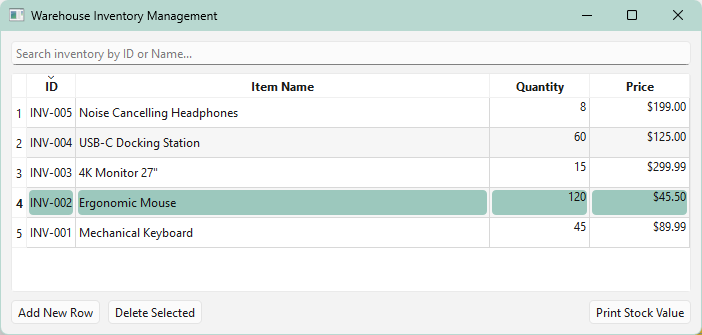
Other than the change of model class, the only other difference I could find was that in the sample code there is this:
        # Alternating row colors for data density scannability
        self.table_view.setAlternatingRowColors(True)
So I tried adding that to my code, and it fixed the issue:
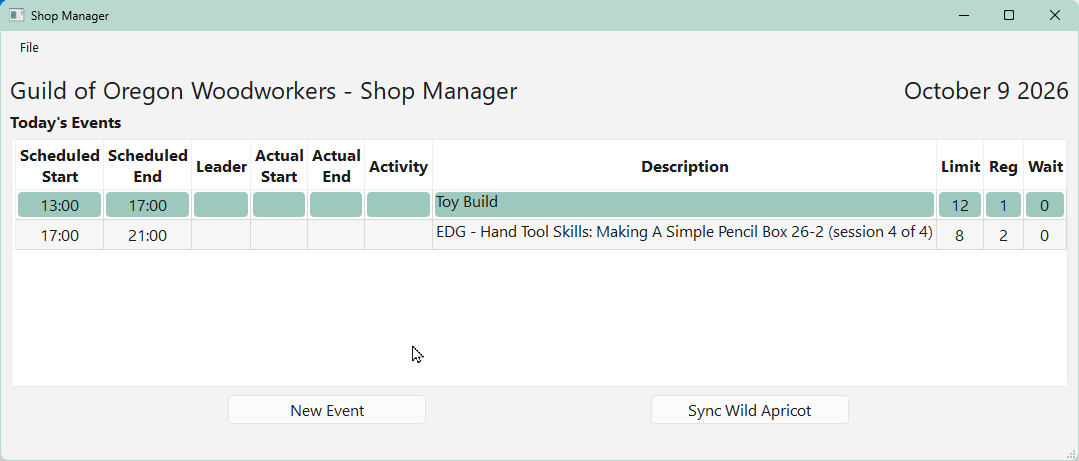
Bug?
Also note that in my earlier screenshot showing the problem, there is already alternate row highlighting which is unexpected as the default for
alternatingRowColorsisFalse. Something's amiss here. -
OK, I think I found a bug. I closely examined some sample code I found that uses a
QStandardItemModel, and displays selection highlights correctly. Here's a screenshot:Other than the change of model class, the only other difference I could find was that in the sample code there is this:
        # Alternating row colors for data density scannability
        self.table_view.setAlternatingRowColors(True)
So I tried adding that to my code, and it fixed the issue:
Bug?
Also note that in my earlier screenshot showing the problem, there is already alternate row highlighting which is unexpected as the default for
alternatingRowColorsisFalse. Something's amiss here.@Jim-G said in Selection highlight is a thin blue bar at the left of the cell.:
Bug?
No, it's the default WinUI 3 style.
-
@Jim-G said in Selection highlight is a thin blue bar at the left of the cell.:
Bug?
No, it's the default WinUI 3 style.
@Christian-Ehrlicher said in Selection highlight is a thin blue bar at the left of the cell.:
@Jim-G said in Selection highlight is a thin blue bar at the left of the cell.:
Bug?
No, it's the default WinUI 3 style. Look into your explorer to see that the highlight is gray.
I'm not following. I think we're talking about two different things. I can reproduce the issue using the sample code only.
Here's the UI including
self.table_view.setAlternatingRowColors(True)and line 4 selected: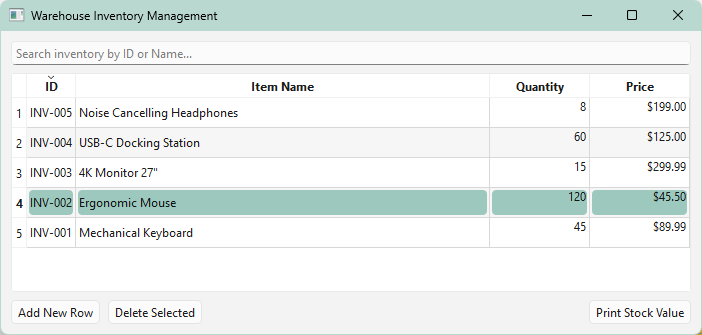
And now with that single line commented out and line 3 selected:
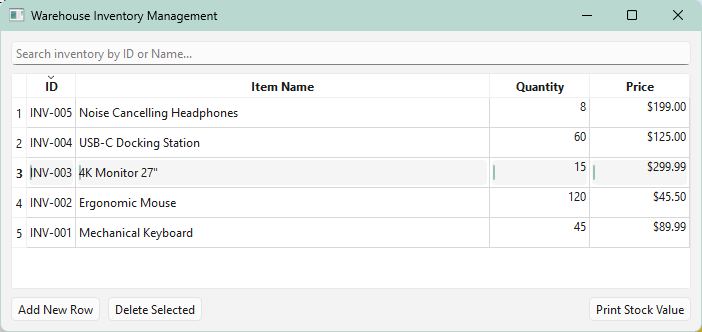
Notice the "selection" highlight in the second screenshot is just a thin blue line at the left of each cell.
It is unexpected that displaying the correct highlighting would involve the setting of
alternatingRowColors. -
@Christian-Ehrlicher said in Selection highlight is a thin blue bar at the left of the cell.:
@Jim-G said in Selection highlight is a thin blue bar at the left of the cell.:
Bug?
No, it's the default WinUI 3 style. Look into your explorer to see that the highlight is gray.
I'm not following. I think we're talking about two different things. I can reproduce the issue using the sample code only.
Here's the UI including
self.table_view.setAlternatingRowColors(True)and line 4 selected:And now with that single line commented out and line 3 selected:
Notice the "selection" highlight in the second screenshot is just a thin blue line at the left of each cell.
It is unexpected that displaying the correct highlighting would involve the setting of
alternatingRowColors.@Jim-G said in Selection highlight is a thin blue bar at the left of the cell.:
Notice the "selection" highlight in the second screenshot is just a thin blue line at the left of each cell.
And that's the correct winui3 style.

-
So why does setting
alternatingRowColorscause the change in highlight? Is that a bug?I'm not trying to be difficult. I'm still learning Qt/PySide6 (excellent tools IMO) and am puzzled by the need to set
alternatingRowColorsjust to get the expected highlight behavior. -
Also, what I see differs markedly from the example of winui 3 selection you cite. My selection indicators are only 2 pixels wide and jammed up against the left side of the text with no intervening space... actually they overlap (under) the leftmost pixel column of the text.
-
So why does setting
alternatingRowColorscause the change in highlight? Is that a bug?I'm not trying to be difficult. I'm still learning Qt/PySide6 (excellent tools IMO) and am puzzled by the need to set
alternatingRowColorsjust to get the expected highlight behavior.@Jim-G said in Selection highlight is a thin blue bar at the left of the cell.:
So why does setting alternatingRowColors cause the change in highlight? Is that a bug?
The WinUI3 style has no information about alternating row colors so this is the solution for this.
med up against the left side of the text with no intervening space
This will be fixed
-
So why does setting
alternatingRowColorscause the change in highlight? Is that a bug?I'm not trying to be difficult. I'm still learning Qt/PySide6 (excellent tools IMO) and am puzzled by the need to set
alternatingRowColorsjust to get the expected highlight behavior.@Jim-G said in Selection highlight is a thin blue bar at the left of the cell.:
So why does setting alternatingRowColors cause the change in highlight?
Qt tries to use the OS default widgets first. Alternating row colors is not supported by the OS directly. So, Qt will draw it from scratch and usually tries to mimic the OS look. Seems like it did not get updated, yet.

