
Skip to content
  • Categories
  • Recent
  • Tags
  • Popular
  • Users
  • Groups
  • Search
  • Get Qt
  • Unsolved
Collapse
Brand Logo
  1. Home
  2. Qt Development
  3. Mobile and Embedded
  4. "Android SDK installation is missing necessary packages" - but it is not!
Qt 6.11 is out! See what's new in the release blog

"Android SDK installation is missing necessary packages" - but it is not!

Scheduled Pinned Locked Moved Solved Mobile and Embedded
androidsdkinstallationqt creator 10.0ndk
11 Posts 8 Posters 4.5k Views 2 Watching
  • Oldest to Newest
  • Newest to Oldest
  • Most Votes
Reply
  • Reply as topic
Log in to reply
This topic has been deleted. Only users with topic management privileges can see it.
  • SeDiS SeDi

    I have not yet managed to compile/deploy for Android on my laptop.
    I have deleted my old SDK, NDK and uninstalled JAVA. Then, via Preferences/Devices installed it all, according to Qt's recommendations:

    C:\Program Files\Eclipse Adoptium\jdk-17.0.7.7-hotspot
    C:\android-ndk-r25c
    cmdline-tools;9.0

    Then I was prompted, that Android SDK installation is missing necessary packages. Do you want to install the missing packages? | 7 Android SDK packages shall be updated. Of course, I did that and accepted every license question.
    _missing.png
    Show Details reveals:

    • [Packages to be installed:]
    • NDK (Side by side) 21.3.6528147
    • Android SDK Platform 31
    • NDK (Side by side) 25.1.8937393
    • Android SDK Build-Tools 31
    • Android SDK Command-line Tools (latest)
    • Android SDK Platform-Tools
    • Google USB Driver installation

    After installation, I can see those packages (for example C:\AndroidSDK\SDK\extras\google\usb_driver) have indeed been installed:

    Unfortunately, Qt Creator doesn't seem to see the packages. It gives me the very same dialog again and shows a red cross instead of a check mark at

    • Android Platform SDK (version) installed
    • All essential packages installed for all installed Qt versions.
      _android settings.png

    If I accept the dialog again, Qt starts installing again, but notices the existing packages and installs into folders with a -2 suffix (for example: C:\AndroidSDK\SDK\extras\google\usb_driver-2). This behaviour is an endless loop (-3, -4...), until I hit cancel instead of ok in the dialog.

    _folder example.png
    I have repeatedly deleted the SDK and repeated the process to no avail and must now give up - any idea?

    Qt Creator 10.0.2, Windows 10

    JoeCFDJ Offline
    JoeCFDJ Offline
    JoeCFD
    wrote on last edited by
    #2

    @SeDi Click SDK Manager button to install Platform SDK.

    SeDiS 1 Reply Last reply
    0
    • JoeCFDJ JoeCFD

      @SeDi Click SDK Manager button to install Platform SDK.

      SeDiS Offline
      SeDiS Offline
      SeDi
      wrote on last edited by
      #3

      @JoeCFD Thank you for your answer, but that was exactly what I had done - tried and tried all over again. The solution came now with vigorously erasing all of AndroidSDK, upgrading Creator. Now it works!! I'll probably never know why it didn't before. :-)

      1 Reply Last reply
      0
      • SeDiS SeDi has marked this topic as solved on
      • e.sinohehE Offline
        e.sinohehE Offline
        e.sinoheh
        wrote on last edited by
        #4

        It fixed by deleting a cmdline-tools directory from SDK directory

        E.Sinoheh

        1 Reply Last reply
        0
        • A Offline
          A Offline
          AlexandreM
          wrote on last edited by AlexandreM
          #5

          I'm facing some issues trying to build QGC v4.3 to Android.
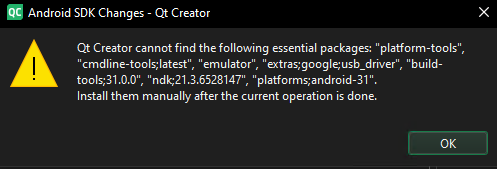
          Screenshot 2025-12-10 at 11.33.11.png

          I've checked into Android SDK folder names and versions, everything is ok. Take a loook:
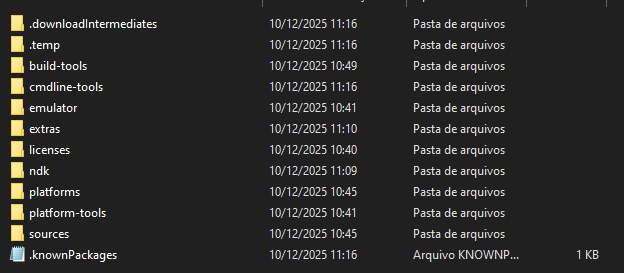
          Screenshot 2025-12-10 at 11.33.19.png

          And that's my Qt Creator SDKs setup:
          Screenshot 2025-12-10 at 11.33.32.png

          QtCreator version 18.0.0
          Windows 10

          I've tried delete Android SDK folder
          Reinstall JDK11
          Update Qt Creator
          Delete cmdline-tools folder from Android SDK

          Any help is appreciated!

          T 1 Reply Last reply
          0
          • A AlexandreM

            I'm facing some issues trying to build QGC v4.3 to Android.

            Screenshot 2025-12-10 at 11.33.11.png

            I've checked into Android SDK folder names and versions, everything is ok. Take a loook:
            Screenshot 2025-12-10 at 11.33.19.png

            And that's my Qt Creator SDKs setup:
            Screenshot 2025-12-10 at 11.33.32.png

            QtCreator version 18.0.0
            Windows 10

            I've tried delete Android SDK folder
            Reinstall JDK11
            Update Qt Creator
            Delete cmdline-tools folder from Android SDK

            Any help is appreciated!

            T Offline
            T Offline
            TN_robot
            wrote on last edited by
            #6

            @AlexandreM hey bro , how do you fix this bug???

            1 Reply Last reply
            0
            • M Offline
              M Offline
              Meliodas
              wrote last edited by Meliodas
              #7

              This fixed it for me on Ubuntu 22.04 and Qt Creator 20.0.1.

              • close Qt Creator
              • Get this version of command line tools: commandlinetools-linux-14742923_latest.zip
              • extract it somewhere so you have its cmdline-tools extracted folder
              • move the existing "latest" command line tools, ex: mv ~/Android/Sdk/cmdline-tools/latest ~/Android/Sdk/cmdline-tools/latest_UNUSED
              • move the extracted cmdline-tools to latest, ex: mv cmdline-tools ~/Android/Sdk/cmdline-tools/latest
              • open Qt Creator, go back to Edit -> Preferences -> SDKs -> Android tab
              • enjoy as it now properly detects everything

              Not sure if it matters but I'm using OpenJDK 17 as well.

              Countless times I removed ~/Android and reinstalled it using Qt Creator and/or Android Studio.
              This specific version of commandline tools was the only thing that fixed it for me.

              Gilbert LeeG 1 Reply Last reply
              1
              • M Meliodas

                This fixed it for me on Ubuntu 22.04 and Qt Creator 20.0.1.

                • close Qt Creator
                • Get this version of command line tools: commandlinetools-linux-14742923_latest.zip
                • extract it somewhere so you have its cmdline-tools extracted folder
                • move the existing "latest" command line tools, ex: mv ~/Android/Sdk/cmdline-tools/latest ~/Android/Sdk/cmdline-tools/latest_UNUSED
                • move the extracted cmdline-tools to latest, ex: mv cmdline-tools ~/Android/Sdk/cmdline-tools/latest
                • open Qt Creator, go back to Edit -> Preferences -> SDKs -> Android tab
                • enjoy as it now properly detects everything

                Not sure if it matters but I'm using OpenJDK 17 as well.

                Countless times I removed ~/Android and reinstalled it using Qt Creator and/or Android Studio.
                This specific version of commandline tools was the only thing that fixed it for me.

                Gilbert LeeG Offline
                Gilbert LeeG Offline
                Gilbert Lee
                wrote last edited by
                #8

                @Meliodas Thank you for your answer. I fixed this problem from your answer.

                I downloaded this zip file as follows.

                https://dl.google.com/android/repository/commandlinetools-linux-14742923_latest.zip

                Thank you once again.

                1 Reply Last reply
                1
                • ekkescornerE Offline
                  ekkescornerE Offline
                  ekkescorner
                  Qt Champions 2016
                  wrote last edited by ekkescorner
                  #9

                  similar issue for me on macOS
                  JDK 21

                  Qt 6.11.1 with included QtC 20.0 and Tools downloaded using QtC
                  tools contained cmdline-tools 20.0
                  all works perfect

                  Qt 6.12 Beta 3 with included QtC 20.0.1
                  tools contained cmdline-tools 23.0
                  error: packages not found

                  selecting tools w cmdline-tools 20.0: no errors

                  so I have a workaround for now - but should be fixed
                  so I opened issue https://qt-project.atlassian.net/browse/QTCREATORBUG-34905

                  Edit: THX to AI found out: with cmdline-tools 23, SDKManager is deprecated and replaced by Android CLI. Probably we have to wait until QtCreator supports Android CLI and in the meantime using cmdline-tools < 23

                  ekke ... Qt Champion 2016 | 2024 ... mobile business apps

                  1 Reply Last reply
                  1
                  • ekkescornerE Offline
                    ekkescornerE Offline
                    ekkescorner
                    Qt Champions 2016
                    wrote last edited by
                    #10

                    Issue 34905 now gets P1 priority - so hopefully soon fixed

                    ekke ... Qt Champion 2016 | 2024 ... mobile business apps

                    1 Reply Last reply
                    0
                    • ekkescornerE Offline
                      ekkescornerE Offline
                      ekkescorner
                      Qt Champions 2016
                      wrote last edited by
                      #11

                      verified wit QtCreator 20.0.2 snapshot https://download.qt.io/snapshots/qtcreator/20.0/20.0.2/664/ - it’s working now :)

                      ekke ... Qt Champion 2016 | 2024 ... mobile business apps

                      1 Reply Last reply
                      1

                      • Login

                      • Login or register to search.
                      • First post
                        Last post
                      0
                      • Categories
                      • Recent
                      • Tags
                      • Popular
                      • Users
                      • Groups
                      • Search
                      • Get Qt
                      • Unsolved