Skip to content
  • Categories
  • Recent
  • Tags
  • Popular
  • Users
  • Groups
  • Search
  • Get Qt Extensions
  • Unsolved
Collapse
Brand Logo
  1. Home
  2. Qt Development
  3. Qt Creator and other tools
  4. qDebug() doesn't show messages in Qt Creator/Application Output

qDebug() doesn't show messages in Qt Creator/Application Output

Scheduled Pinned Locked Moved Solved Qt Creator and other tools
45 Posts 8 Posters 4.8k Views 2 Watching
  • Oldest to Newest
  • Newest to Oldest
  • Most Votes
Reply
  • Reply as topic
Log in to reply
This topic has been deleted. Only users with topic management privileges can see it.
  • Christian EhrlicherC Christian Ehrlicher

    I would guess there is an external logging config somewhere. Please read https://doc.qt.io/qt-6/qloggingcategory.html#configuring-categories

    JonBJ Online
    JonBJ Online
    JonB
    wrote on last edited by JonB
    #7

    @Christian-Ehrlicher
    To be fair the OP reports

    Running in debug mode, qDebug() doesn't show messages in Qt Creator/Application Output, but when running a terminal manually, it shows.

    Assuming the executable is compiled the same (e.g. either debug or release) whether it is run from Creator or from a terminal how would some "external logging config" allow for output to terminal in the latter case but not the former? Unless you mean the environment differs such that this logging file is picked up when running from Creator but not outside?

    @jronald
    You might verify that if compiled for release instead the behaviour is the same? Also if executed from Creator but as Run rather than Debug does that make any difference?

    jronaldJ 1 Reply Last reply
    0
    • Axel SpoerlA Axel Spoerl

      Hi and welcome @jronald !
      please add qInfo() << QT_VERSION_STR << QT_DEBUG and post the output here.
      Cheers
      Axel

      jronaldJ Offline
      jronaldJ Offline
      jronald
      wrote on last edited by
      #8

      @Axel-Spoerl said in qDebug() doesn't show messages in Qt Creator/Application Output:

      Hi and welcome @jronald !
      please add qInfo() << QT_VERSION_STR << QT_DEBUG and post the output here.
      Cheers
      Axel

      #include <QDebug>
      #include <QtVersion>
      
      int main()
      {
      #ifdef QT_DEBUG
          qDebug() << "Test123";
          qInfo() << QT_VERSION_STR;
      #else
          qDebug() << "Test456";
          qInfo() << QT_VERSION_STR;
      #endif
          return 0;
      }
      

      can't output QT_DEBUG as QT_VERSION_STR does, so do it as above.
      Still no output in "Qt Creator/Application Output", but when run it in a terminal manually, it outputs as below:

      Test123
      6.10.1
      
      1 Reply Last reply
      0
      • JonBJ JonB

        @Christian-Ehrlicher
        To be fair the OP reports

        Running in debug mode, qDebug() doesn't show messages in Qt Creator/Application Output, but when running a terminal manually, it shows.

        Assuming the executable is compiled the same (e.g. either debug or release) whether it is run from Creator or from a terminal how would some "external logging config" allow for output to terminal in the latter case but not the former? Unless you mean the environment differs such that this logging file is picked up when running from Creator but not outside?

        @jronald
        You might verify that if compiled for release instead the behaviour is the same? Also if executed from Creator but as Run rather than Debug does that make any difference?

        jronaldJ Offline
        jronaldJ Offline
        jronald
        wrote on last edited by
        #9

        @JonB said in qDebug() doesn't show messages in Qt Creator/Application Output:

        You might verify that if compiled for release instead the behaviour is the same? Also if executed from Creator but as Run rather than Debug does that make any difference?

        I've tried debug only.
        I tried release just now, same as debug, no output in "Qt Creator/Application Output", output in a terminal.

        1 Reply Last reply
        0
        • jronaldJ Offline
          jronaldJ Offline
          jronald
          wrote on last edited by
          #10

          If check "Projects/Run Settings/Run in terminal", it will show the messages by qDebug() and qInfo().

          1 Reply Last reply
          0
          • jronaldJ Offline
            jronaldJ Offline
            jronald
            wrote on last edited by
            #11

            It works after adding QT_ASSUME_STDERR_HAS_CONSOLE=1 in "Projects/Run Settings/Environment".
            But I don't know why.

            jronaldJ 1 Reply Last reply
            0
            • jronaldJ jronald

              It works after adding QT_ASSUME_STDERR_HAS_CONSOLE=1 in "Projects/Run Settings/Environment".
              But I don't know why.

              jronaldJ Offline
              jronaldJ Offline
              jronald
              wrote on last edited by jronald
              #12

              https://bbs.archlinux.org/viewtopic.php?id=259035

              Log from Qt Creator is redirected to systemd journal.
              Maybe Arch Linux maintainers should change some build flag(s) for Qt Creator.

              I've checked journalctl, the outputs are there.
              It should be the cause of archlinux, not intuitive, and leaves unnecessary footprints.

              JonBJ 1 Reply Last reply
              1
              • jronaldJ jronald

                https://bbs.archlinux.org/viewtopic.php?id=259035

                Log from Qt Creator is redirected to systemd journal.
                Maybe Arch Linux maintainers should change some build flag(s) for Qt Creator.

                I've checked journalctl, the outputs are there.
                It should be the cause of archlinux, not intuitive, and leaves unnecessary footprints.

                JonBJ Online
                JonBJ Online
                JonB
                wrote on last edited by
                #13

                @jronald
                That looks like it to me for Arch, well found! I can only say I always have Qt from Ubuntu repo and it works, you don't need to set an environment variable.

                jronaldJ 1 Reply Last reply
                2
                • jronaldJ jronald has marked this topic as solved on
                • JonBJ JonB

                  @jronald
                  That looks like it to me for Arch, well found! I can only say I always have Qt from Ubuntu repo and it works, you don't need to set an environment variable.

                  jronaldJ Offline
                  jronaldJ Offline
                  jronald
                  wrote on last edited by jronald
                  #14

                  @JonB said in qDebug() doesn't show messages in Qt Creator/Application Output:

                  I can only say I always have Qt from Ubuntu repo and it works, you don't need to set an environment variable.

                  It's the default behaivor of Qt to output to journelctl on linux, https://doc.qt.io/qt-6/qtlogging.html#qDebug

                  qDebug(const char *format, ...)
                  Logs debug message format to the central message handler.
                  

                  I think ubuntu has changed this in a good way.

                  JonBJ 1 Reply Last reply
                  0
                  • jronaldJ jronald

                    @JonB said in qDebug() doesn't show messages in Qt Creator/Application Output:

                    I can only say I always have Qt from Ubuntu repo and it works, you don't need to set an environment variable.

                    It's the default behaivor of Qt to output to journelctl on linux, https://doc.qt.io/qt-6/qtlogging.html#qDebug

                    qDebug(const char *format, ...)
                    Logs debug message format to the central message handler.
                    

                    I think ubuntu has changed this in a good way.

                    JonBJ Online
                    JonBJ Online
                    JonB
                    wrote on last edited by
                    #15

                    @jronald said in qDebug() doesn't show messages in Qt Creator/Application Output:

                    It's the default behaivor of Qt to output to journelctl on linux, https://doc.qt.io/qt-6/qtlogging.html#qDebug

                    I do not see anything at that link or on that page which mentions journalctl or the systemd journal. I think the "central message handler" in the docs refers to Qt's own QtMessageHandler qInstallMessageHandler(QtMessageHandler handler), which is how qDebug() etc. output their messages. When I Googled for your issue and QT_ASSUME_STDERR_HAS_CONSOLE it came across that this behaviour is specifically in the Arch pre-built. We would come across a lot more questions about this if it applied widely across Linuxes.

                    jronaldJ 1 Reply Last reply
                    0
                    • JonBJ JonB

                      @jronald said in qDebug() doesn't show messages in Qt Creator/Application Output:

                      It's the default behaivor of Qt to output to journelctl on linux, https://doc.qt.io/qt-6/qtlogging.html#qDebug

                      I do not see anything at that link or on that page which mentions journalctl or the systemd journal. I think the "central message handler" in the docs refers to Qt's own QtMessageHandler qInstallMessageHandler(QtMessageHandler handler), which is how qDebug() etc. output their messages. When I Googled for your issue and QT_ASSUME_STDERR_HAS_CONSOLE it came across that this behaviour is specifically in the Arch pre-built. We would come across a lot more questions about this if it applied widely across Linuxes.

                      jronaldJ Offline
                      jronaldJ Offline
                      jronald
                      wrote on last edited by
                      #16

                      @JonB said in qDebug() doesn't show messages in Qt Creator/Application Output:

                      this behaviour is specifically in the Arch pre-built

                      But the build script is clean: https://gitlab.archlinux.org/archlinux/packaging/packages/qtcreator/-/blob/main/PKGBUILD?ref_type=heads

                      1 Reply Last reply
                      0
                      • JonBJ Online
                        JonBJ Online
                        JonB
                        wrote on last edited by JonB
                        #17

                        Then for all I know other non-Arch distros compile with QT_ASSUME_STDERR_HAS_CONSOLE=1. Whatever, if you Google like I did it seems to me this is Arch but not typical Linux distro, that's all I know.

                        FWIW, if you don't wish to recompile Qt itself and you don't wish to have to set environment variable QT_ASSUME_STDERR_HAS_CONSOLE before running to get desired behaviour, be ware you might either:

                        • qputenv("QT_ASSUME_STDERR_HAS_CONSOLE", "1") as the very first statement in main(), before Q[Core]Application creation; or
                        • Use qInstallMessageHandler() to install your own message handler which does write to stderr or similar.
                        1 Reply Last reply
                        2
                        • jronaldJ Offline
                          jronaldJ Offline
                          jronald
                          wrote on last edited by
                          #18

                          reported: https://qt-project.atlassian.net/browse/QTCREATORBUG-33823

                          1 Reply Last reply
                          1
                          • aha_1980A Offline
                            aha_1980A Offline
                            aha_1980
                            Lifetime Qt Champion
                            wrote on last edited by
                            #19

                            @jronald And to add to @JonB: You can set the environment variables for a Qt Creator Kit in Edit > Preferences > Kits > Kits. It will then be used for all new projects automatically.

                            Regards

                            Qt has to stay free or it will die.

                            1 Reply Last reply
                            0
                            • M Offline
                              M Offline
                              MHMart_asc
                              wrote on last edited by MHMart_asc
                              #20

                              I have the same issue in Windows 11;
                              Qt Creator 18.0.0
                              Qt 6.10.1 (Desktop_Qt_6_10_1_MSVC2022_64bit)

                              I tried the solution of adding:
                              QT_ASSUME_STDERR_HAS_CONSOLE =1

                              Did so in:

                              • projects > run settings > environment
                              • edit > preferences > kits > (default) > environment (both)

                              Unfortunately, nothing is shown in the application output. Running a completely new project (Qt widget application) with the completely new project settings and only one line added:
                              qDebug() << "hi!";

                              Any thoughts?

                              ps. Enabling the "run in terminal" checkbox in projects > run settings does not show me any output either in the terminal.

                              1 Reply Last reply
                              0
                              • hskoglundH Offline
                                hskoglundH Offline
                                hskoglund
                                wrote on last edited by
                                #21

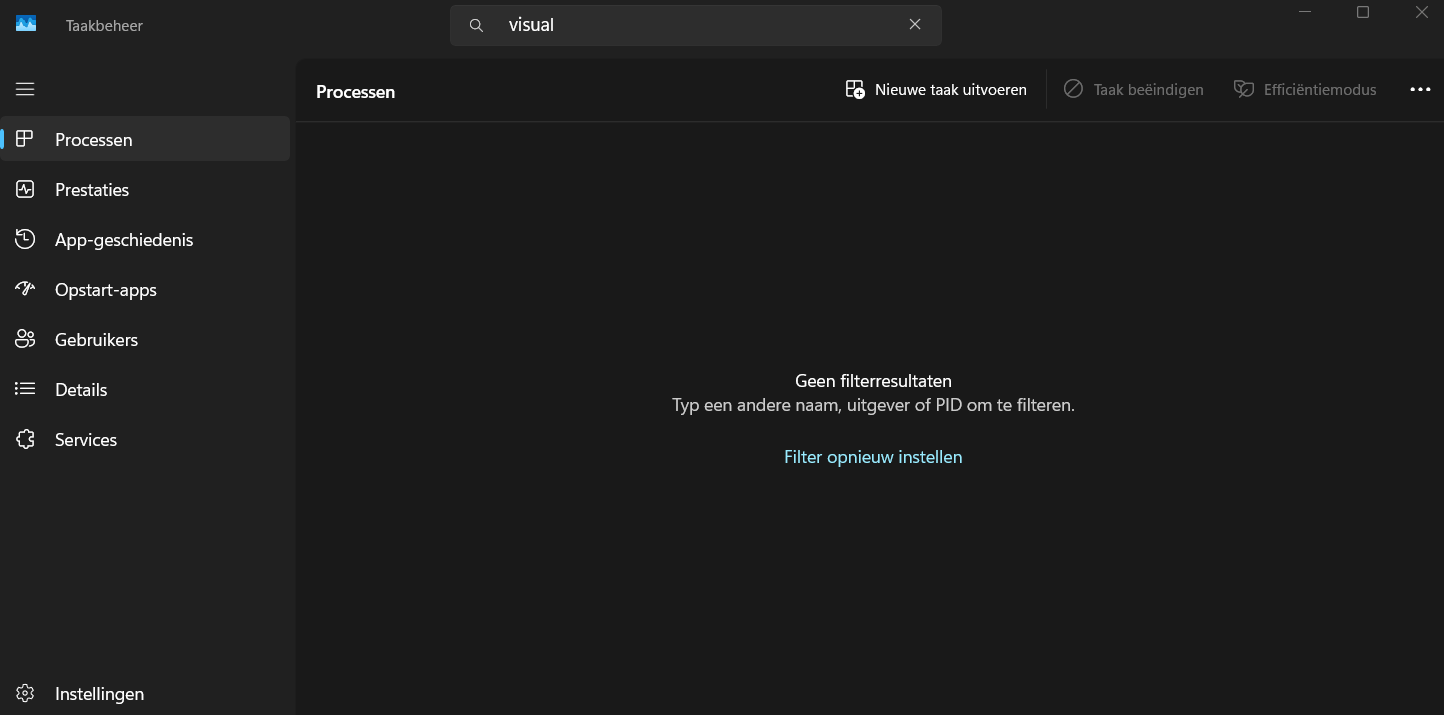
                                Hi, maybe you have a Visual Studio instance running (behind Qt Creator) that snatches the debug output?
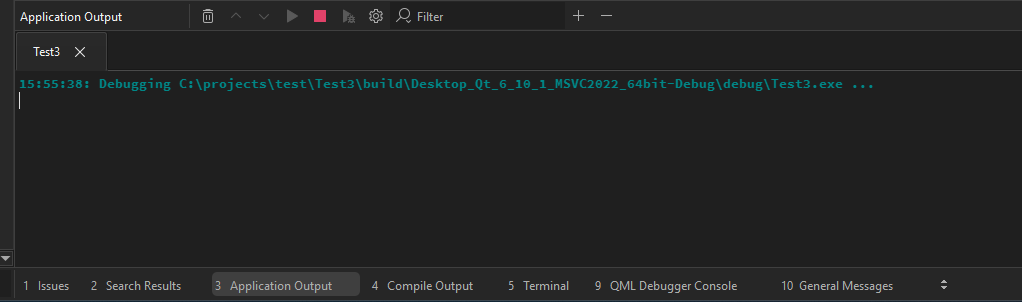
                                A telltale sign is the text "Cannot retrieve debugging output." in Qt Creator's Application Output.

                                M 1 Reply Last reply
                                0
                                • hskoglundH hskoglund

                                  Hi, maybe you have a Visual Studio instance running (behind Qt Creator) that snatches the debug output?
                                  A telltale sign is the text "Cannot retrieve debugging output." in Qt Creator's Application Output.

                                  M Offline
                                  M Offline
                                  MHMart_asc
                                  wrote on last edited by
                                  #22

                                  @hskoglund thank you for the suggestion
                                  22a54ef4-43f2-4a1d-9246-361e6cd9131d-image.png
                                  No process with "visual" in the name according to the task manager.
                                  111a8440-9c95-432f-aab0-3d854da04d59-image.png
                                  Nothing in the application output either...

                                  1 Reply Last reply
                                  0
                                  • hskoglundH Offline
                                    hskoglundH Offline
                                    hskoglund
                                    wrote on last edited by
                                    #23

                                    Just to be sure, could you rebuild Test3 in Release mode (instead of Debug mode) and check that there's no output

                                    M 1 Reply Last reply
                                    0
                                    • hskoglundH hskoglund

                                      Just to be sure, could you rebuild Test3 in Release mode (instead of Debug mode) and check that there's no output

                                      M Offline
                                      M Offline
                                      MHMart_asc
                                      wrote on last edited by
                                      #24

                                      @hskoglund said in qDebug() doesn't show messages in Qt Creator/Application Output:

                                      Just to be sure, could you rebuild Test3 in Release mode (instead of Debug mode) and check that there's no output

                                      Unfortunately, no output

                                      1 Reply Last reply
                                      0
                                      • hskoglundH Offline
                                        hskoglundH Offline
                                        hskoglund
                                        wrote on last edited by
                                        #25

                                        If you try the same Windows API call that Qt uses; add
                                        #include "windows.h"
                                        and
                                        OutputDebugString(L"Hello there");
                                        does that text show up in the Appliction Output?

                                        M 1 Reply Last reply
                                        2
                                        • JonBJ Online
                                          JonBJ Online
                                          JonB
                                          wrote on last edited by
                                          #26

                                          @MHMart_asc
                                          ...And further to @hskoglund's post --- which you should try --- I believe DebugView should still work these days(?), if you download that does your output appear inside it when you run it? Not saying you will have to stick with that, just trying to track down where your messages are going....

                                          1 Reply Last reply
                                          1

                                          • Login

                                          • Login or register to search.
                                          • First post
                                            Last post
                                          0
                                          • Categories
                                          • Recent
                                          • Tags
                                          • Popular
                                          • Users
                                          • Groups
                                          • Search
                                          • Get Qt Extensions
                                          • Unsolved