Skip to content
  • Categories
  • Recent
  • Tags
  • Popular
  • Users
  • Groups
  • Search
  • Get Qt Extensions
  • Unsolved
Collapse
Brand Logo
  1. Home
  2. Qt Development
  3. Mobile and Embedded
  4. why Qt4android can not show images has format SVG??

why Qt4android can not show images has format SVG??

Scheduled Pinned Locked Moved Mobile and Embedded
qmlsvgshowandroid
7 Posts 3 Posters 3.2k Views 3 Watching
  • Oldest to Newest
  • Newest to Oldest
  • Most Votes
Reply
  • Reply as topic
Log in to reply
This topic has been deleted. Only users with topic management privileges can see it.
  • stackprogramerS Offline
    stackprogramerS Offline
    stackprogramer
    wrote on last edited by stackprogramer
    #1

    hi,i created my app for android,
    when i usesjpg image it is showed in mingw mode and android mode correctly.

    when i uses SVG image it is not showed in mode android but it is showed correctly in mingw mode!!!
    i mention that my app android uses QML and js language
    i even test

    QT += svg
    

    it is same before.how we can show SVG format images in android!!!!!!!
    see image my app4android it is not show SVG!!
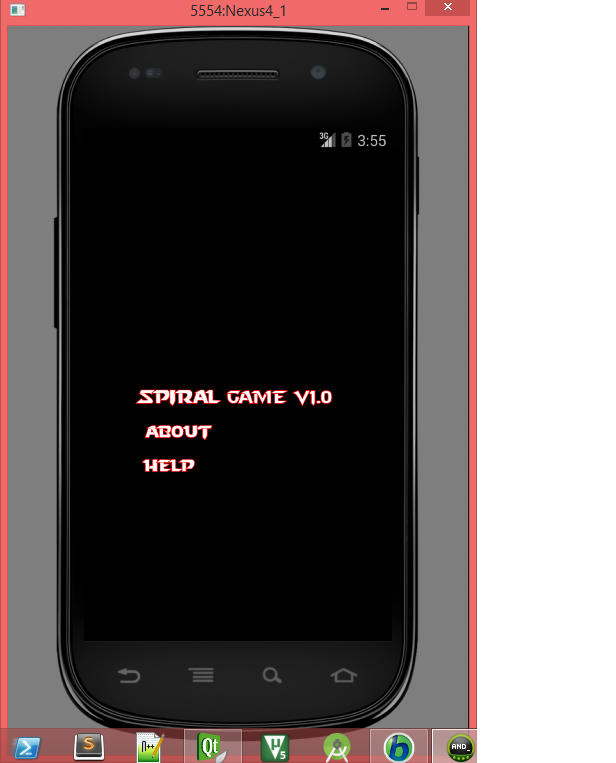
    image Qt show svg errors4android
    please guide me

    1 Reply Last reply
    0
    • SGaistS Offline
      SGaistS Offline
      SGaist
      Lifetime Qt Champion
      wrote on last edited by
      #2

      Hi,

      Did you check that the SVG module and plugin are properly deployed ?

      Interested in AI ? www.idiap.ch
      Please read the Qt Code of Conduct - https://forum.qt.io/topic/113070/qt-code-of-conduct

      stackprogramerS 1 Reply Last reply
      0
      • SGaistS SGaist

        Hi,

        Did you check that the SVG module and plugin are properly deployed ?

        stackprogramerS Offline
        stackprogramerS Offline
        stackprogramer
        wrote on last edited by stackprogramer
        #3

        @SGaist
        sorry fo my delay.
        i uses Qml in my app.i didn't use c++. which module should i used in Qt?
        in only add

         QT+=svg
        

        i don't want use c++.i want to use qml and jsonly.
        thanks

        1 Reply Last reply
        0
        • SGaistS Offline
          SGaistS Offline
          SGaist
          Lifetime Qt Champion
          wrote on last edited by
          #4

          The language used is not the question, it's providing the dependencies.

          All the items you use in QML are backed up by C++ code.

          Interested in AI ? www.idiap.ch
          Please read the Qt Code of Conduct - https://forum.qt.io/topic/113070/qt-code-of-conduct

          1 Reply Last reply
          0
          • V Offline
            V Offline
            vlada
            wrote on last edited by
            #5

            Try to delete the deployment folder. When I first compiled my Android application, SVG pictures were missing. So i added the

            QT += svg
            

            but it didn't help. But when I deleted the deployment folder and compiled my program again, it started to work. There probably remains something in this directory which is not correctly overwritten.

            1 Reply Last reply
            0
            • SGaistS Offline
              SGaistS Offline
              SGaist
              Lifetime Qt Champion
              wrote on last edited by
              #6

              Usually when you change the list of modules used by your application, it's a good idea to re-run qmake before building.

              Interested in AI ? www.idiap.ch
              Please read the Qt Code of Conduct - https://forum.qt.io/topic/113070/qt-code-of-conduct

              stackprogramerS 1 Reply Last reply
              0
              • SGaistS SGaist

                Usually when you change the list of modules used by your application, it's a good idea to re-run qmake before building.

                stackprogramerS Offline
                stackprogramerS Offline
                stackprogramer
                wrote on last edited by stackprogramer
                #7

                @SGaist @vlada
                thanks
                finally i built for apk android it works.....
                it's image
                image test svg for android
                goodluck

                1 Reply Last reply
                0

                • Login

                • Login or register to search.
                • First post
                  Last post
                0
                • Categories
                • Recent
                • Tags
                • Popular
                • Users
                • Groups
                • Search
                • Get Qt Extensions
                • Unsolved