-
QML Preview
We've had a thing called "QML Preview" for a number of years now. You can be forgiven for not having noticed. It's well hidden deep in the guts of Qt Design Studio where it's quietly doing what it does: it runs your design through the
qmltool and gets notified when you change some file. Then it re-loads the currently visible scene, without re-starting the process, making your changes visible. This way you get faster turnaround when prototyping different designs.There's a secret to this, though: QML Preview is actually not restricted to Qt Design Studio. You can also use it from Qt Creator (
Build->QML Preview) and with a command-line tool shipped as part of Qt and calledqmlpreview. It also isn't restricted to theqmltool as host for your QML files. You can preview any application through Qt Creator or withqmlpreviewto preview the QML code it uses.Re-loading
Re-loading the scene from scratch has one great advantage: it is the only thing you can implement without understanding what changed. Delete everything, build it again, and whatever the new document says is what you get. That is why it worked that way. Concretely, on every file change QML Preview deletes all the objects it has created, clears the singletons, clears the component cache, purges the pixmap cache, and instantiates the component again. The only thing it deliberately carries over is the window position. Even that only works if the OS and/or window manager play ball. Modern operating systems have grown increasingly reluctant to let an application position its windows at will.
Throwing away the previous scene means severing the connection between your QML code and any application logic you may have, which may just as well crash your application. The latter can be worked around but I trust you not to have thought of this.
From a usability point of view, re-loading is also quite a drawback: on every change we throw the UI state away and re-load the whole scene from scratch. So, if you have navigated through five screens to get to the place where your change takes effect, then you have to navigate through five screens again after performing the change, in order to see its effect.
Event replay
There is an obvious way to soften this, and we do have the machinery for it since Qt 6.11, even if we never got around to announcing it: you can record the user's input events and replay them into the fresh scene until you arrive roughly where you were. The QML Profiler service has always been able to record the input events your application receives, and with the right options it can refrain from recording anything else. The event replay service, when given the events, can then funnel them back into a running program. The replay runs animations at a thousand times their normal speed and replays the events as quickly as the application will process them. Restoring a deep state like that takes a moment rather than a re-enactment in real time. Qt Creator, from version 19, records and replays events using these services when it re-loads your scene via QML Preview.
Event replay faces a few challenges, though. First of all, it will still crash your program if it's not ready to handle the case of the whole UI going away and re-appearing. In addition, data fetched from a backend may have changed between the two re-loads, or may simply be expensive to fetch again. Event replay is not robust against larger geometry changes, because the moment your edit moves a button, the recorded click lands next to it rather than on it. If you've been playing Pong, it will only ever get you to the Game Over screen. In Pong (and other applications that move UI elements spontaneously), the targets for the input events are dependent on timing. That won't fly when the service replays events as quickly as possible. An ordinary screen transition is enough to run into this: animations advance once per frame, and replay can deliver a whole session's clicks within a frame or two, so a click meant for the screen you navigated to lands on the screen you navigated from. Replay gets you close, on a good day, to something that resembles where you were.
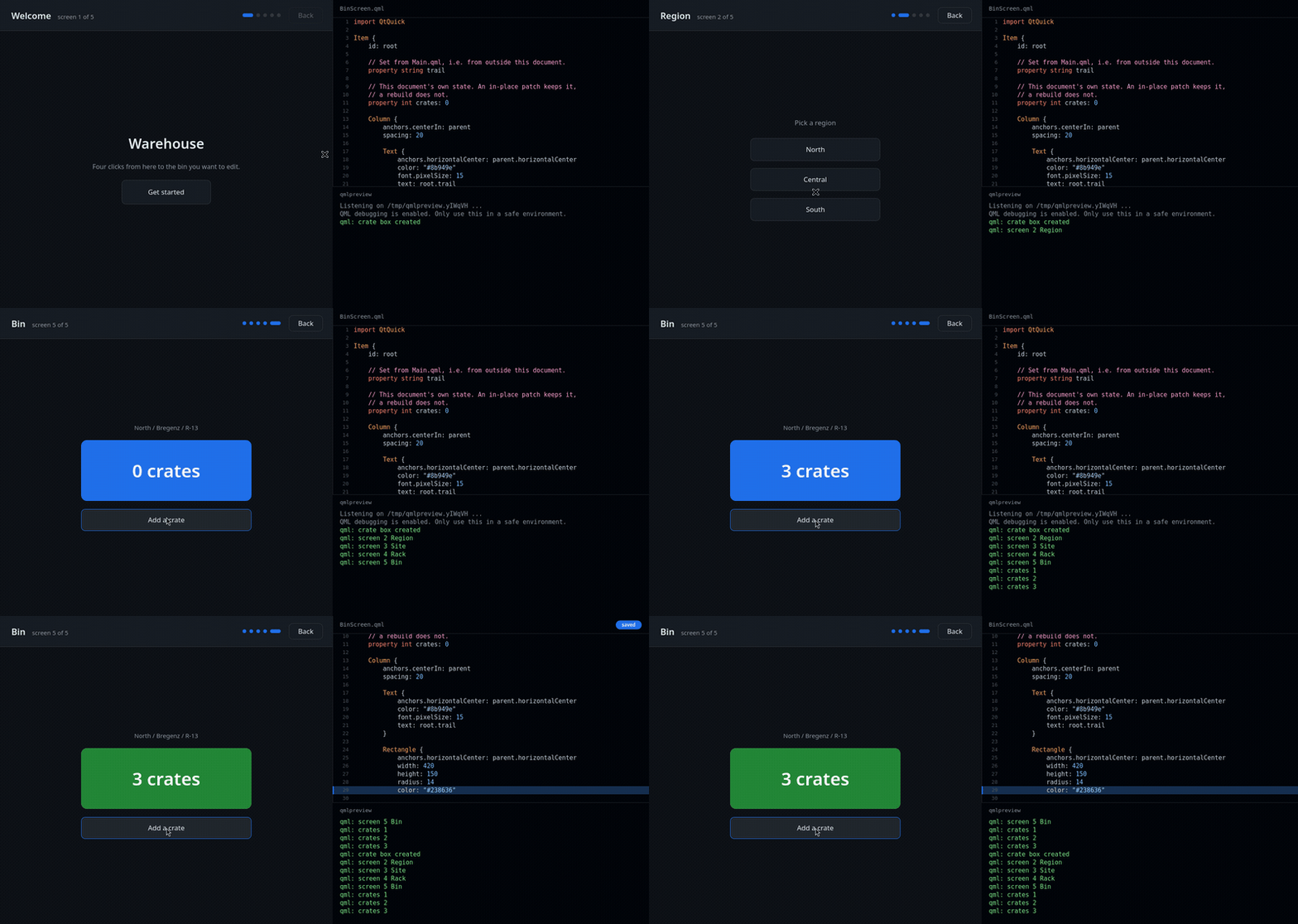
The application on the left is five screens deep; the file being edited is on the right, and whatqmlpreviewprints is underneath. Watch it re-walk through all the UI states in fast-forward when the color is changed.Hot reload
So much for reproducing the state. The alternative is to not destroy it in the first place: update only the QML data of the application, and leave the C++ objects alive wherever we can. That is what Qt 6.12 does (most of the time).
We compare what you have just written with what the application is already running, and change only the parts that differ. Your objects stay alive, your window keeps its identity, and any state you didn't change stays where it was. If all you did was adjust a color, a size, a binding, or the body of some function, nothing is re-created at all. The application keeps running and merely looks different from one moment to the next. You stay on the fifth screen.
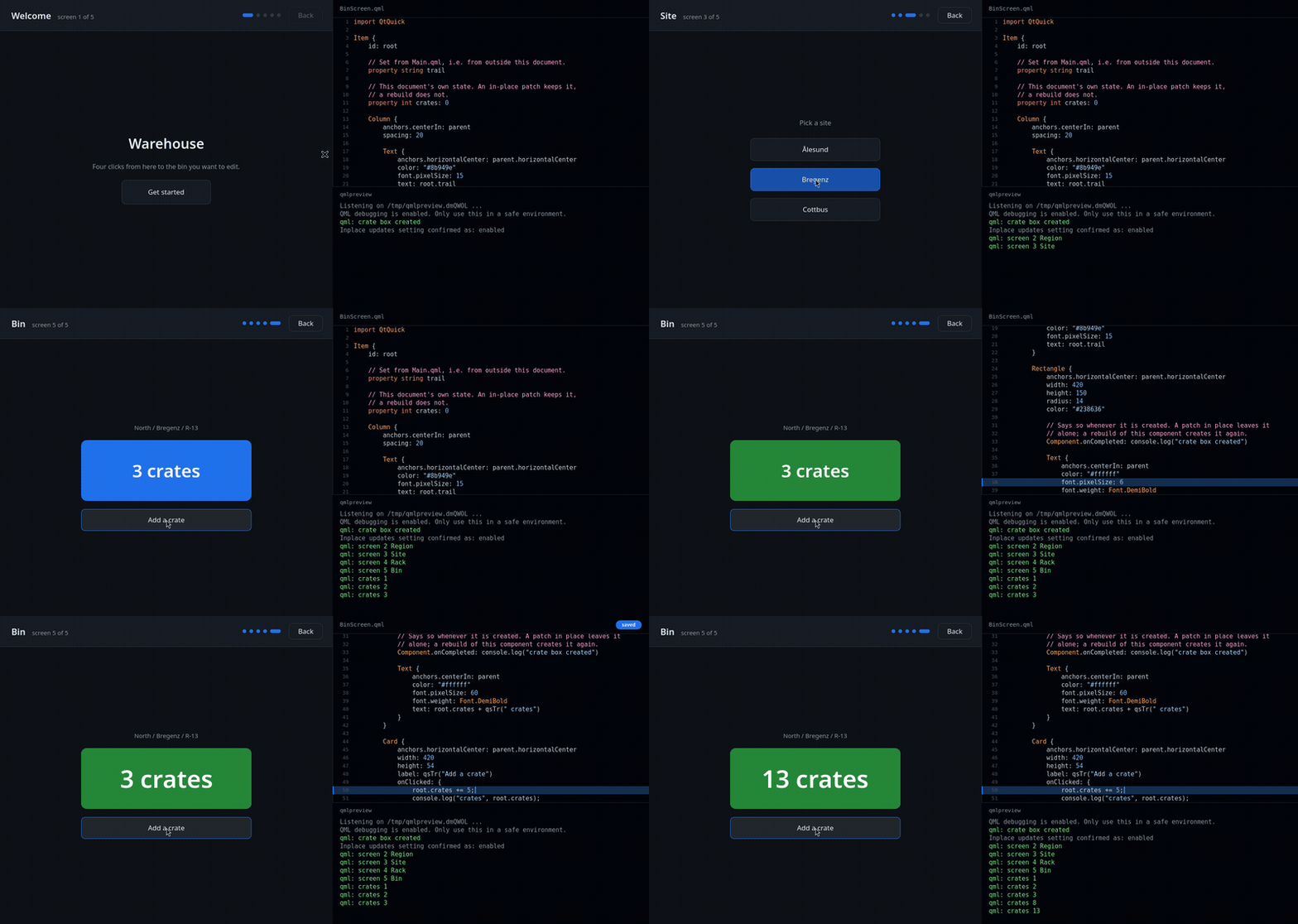
The same application and the same five screens, this time with hot reload doing the work. Watch it stay on the fifth screen when the QML code is changed.The “most of the time” parenthesis above is not decoration, though. Some changes we can only apply by rebuilding part of the scene, and a few we cannot apply at all. Much of the rest of this post is about where those lines run.
Now that the concepts are clear, let's look at the practicalities. How does one actually use this?
Getting it running
If you are using Qt Creator, you most commonly just click on
Buildand then onQML Preview. That starts the preview, and it will update whenever you change some QML file it has loaded. You may need to explicitly enable "QML Debugging and Profiling" in the build settings if it isn't enabled automatically. For debug builds it should be.If you're not using Qt Creator, you always need to make sure your application is built with QML debugging enabled. You can pass an option to CMake when configuring your build directory to make it happen:
cmake -DCMAKE_CXX_FLAGS_INIT=-DQT_QML_DEBUG <source-dir>That keeps it to the one build you actually preview with, which is where you want it. If you would rather have it permanently in some development build, the following snippet in your
CMakeLists.txtworks:target_compile_definitions(myapp PRIVATE QT_QML_DEBUG)Mind you, either way this opens a debug port. The application will tell you so on startup, in as many words:
QML debugging is enabled. Only use this in a safe environment.Take it at its word. Don't ship it.
After that, you can run the tool by hand:
qmlpreview ./myappThis, however, is not necessarily a good idea since it now your application only sees the QML files in its resource file system and
qmlpreview"watches" those for changes. You can hardly change the resource file system in a running application, and therefore nothing will ever update (unless you're actually loading the QML from the host file system, but don't). For this case, there is a special option--resourceforqmlpreview. Using that option, you can pass it the.qrcfiles your resource file system was built from, and with that information it can map the QML files in the resource file system to files in the host file system and watch those instead. When using CMake, you don't need to figure out all the (generated).qrcfiles yourself. You can let the build system do it. For every executable that has a QML module, Qt 6.12 generates an additional build target:ninja myapp_qmlpreviewBuilding that target doesn't build anything in the usual sense. It starts
qmlpreviewwith the arguments your application happens to need, which in practice mostly means passing--resourcefor each of the.qrcfiles generated for your QML module.I've written "QML module" here, and I mean it. This only works if you've actually written
qt_add_qml_modulein yourCMakeLists.txt, not if you've packaged your QML files using some obscure incantation that QML Preview doesn't understand. See https://doc-snapshots.qt.io/qt6-dev/qt-add-qml-preview.html#description for more details.Hot reload itself is on by default. Edit a file, save it, and the running application changes. You can turn it off if you really want. To do that, add
QMLPREVIEW_HOTRELOAD=0to the environment.With that out of the way, let's take a peek behind the scenes and find out what hot reload actually does.
What happens when you save a file
When it gets notified of the change, the debug service recompiles the changed document and diffs the result against what the application is currently running. Then it decides what to do about the differences. Three things can happen, depending on what kind of diff we get:
Diff is trivial: Patch in place
This is the happy path. Nothing is destroyed at all: no
QObjectis deleted, no metaobject is rebuilt. Live JavaScript expressions are pointed at their recompiled counterparts and re-evaluated, and that's it. A diff counts as trivial if it only changes existing bindings and the bodies of existing functions. That covers most of what you typically do while pushing a UI around:- Changing a literal: colors, sizes, margins, strings,
true, andfalse. - Changing a binding expression from one script to another.
- Changing the body of any JavaScript function or signal handler.
- Reformatting, adding comments, moving whitespace around. Changes that only
move source locations have no runtime effect, and cost nothing.
Let's assume you have something like this:
import QtQuick

Rectangle {
    id: root
    property int ponies: 2

    width: 400; height: 300
    color: "pink"

    Text {
        anchors.centerIn: parent
        text: root.ponies + " ponies"
        font.pixelSize: 20
    }

    MouseArea {
        anchors.fill: parent
        onClicked: root.ponies *= 2
    }
}
Click a few times, then change the color, or the font size, or the body of the
onClickedhandler. Then click again. The ponies keep multiplying (unless you've made them do something else). The number does not go back to the initial2.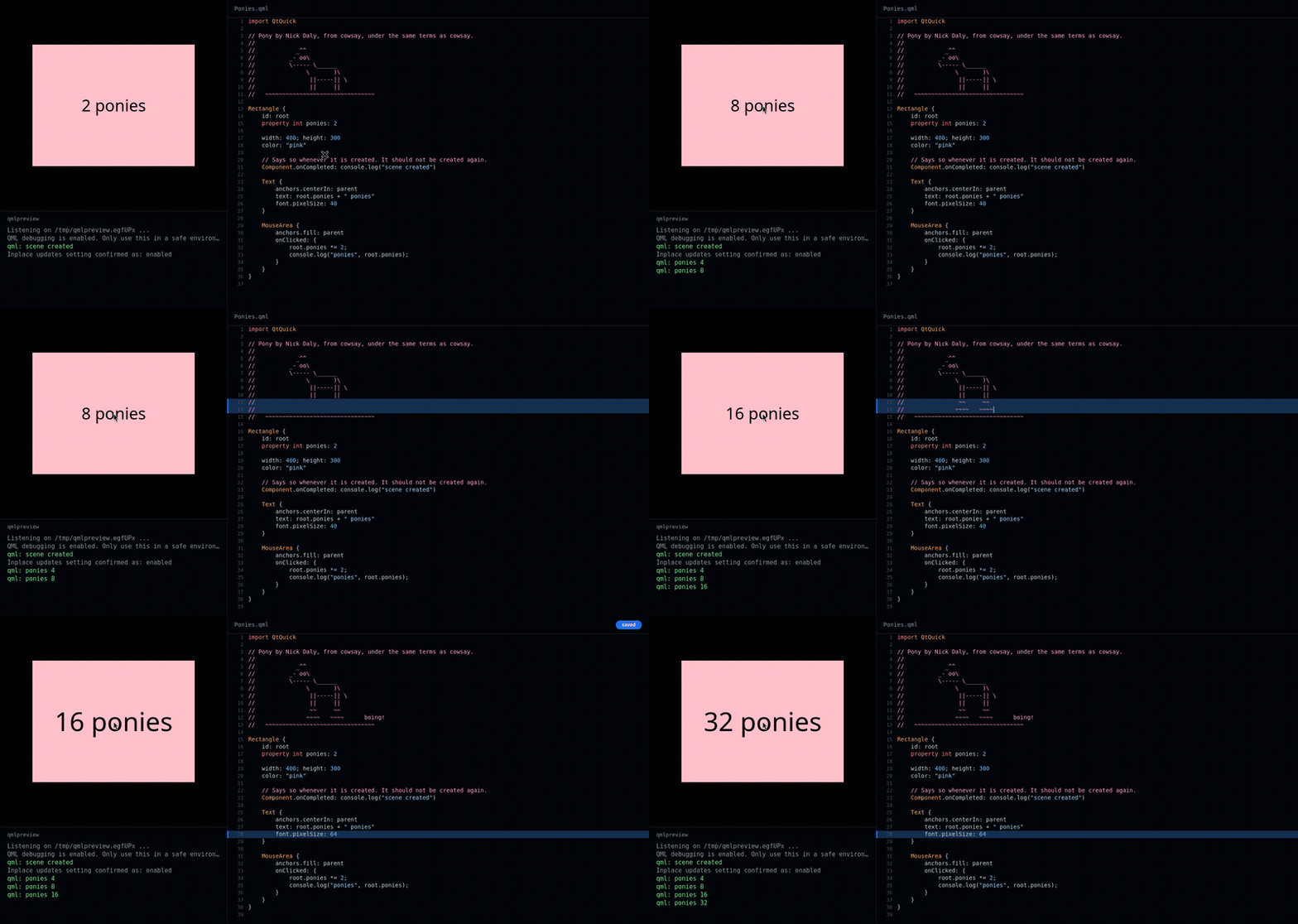
The ponies keep multiplying when the font size changes. Changing the comment has no effect on the preview.Diff is structural: Rebuild component
"Structural" means that you're adding or removing an object, a property, a signal, or a binding (or other interesting things I can show you if you bring protective eyewear). Clearly, none of these can be done by swapping a value, because the shape of the object changes. In that case we rebuild the whole component. The root object of the component is re-used and re-populated. This means that your typical window keeps its identity and its geometry. However, the QML-created objects below it are created anew.
Even here we don't throw away everything inside the component. Before rebuilding, the preview stashes state that the document being updated did not produce itself: property values that were overridden from C++ or from other QML documents, bindings installed from outside, signal handlers connected from outside. It walks into grouped properties, attached objects, and child objects to find them, and restores them afterwards. State written from outside the rebuilt document survives, and state the document has created itself is re-created.
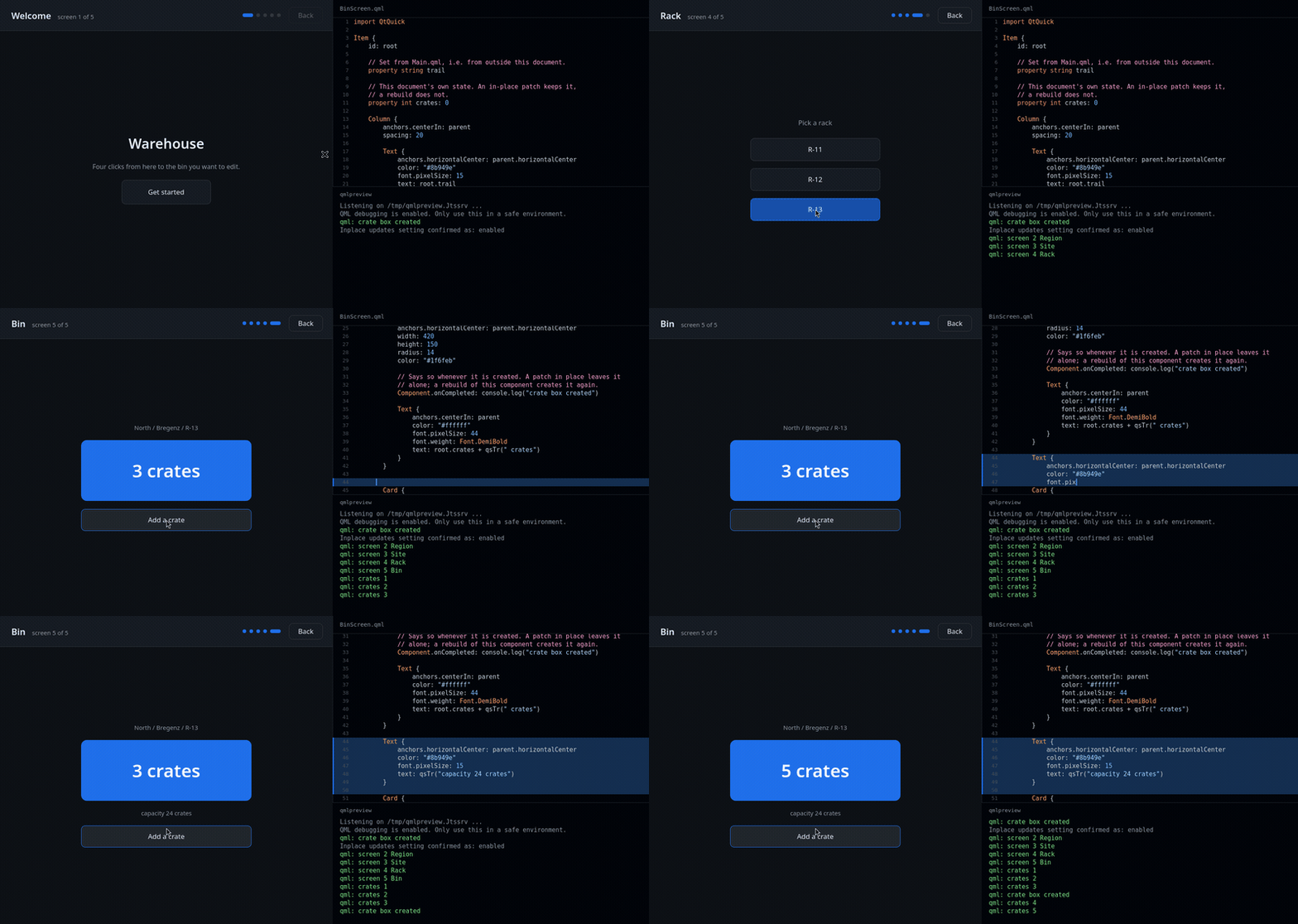
The shape of the component is changed and its internals (e.g. the crate box) are re-created. The root object is retained. Procedurally modified state (the crate count) is restored. No input events are replayed.Some components can't be rebuilt in place no matter what. If the C++ base type of a component root changed, the object we would be re-using is still an instance of the old class, and no amount of re-populating fixes that. If it carries deferred bindings (such as a
Control'sbackgroundorcontentItem), we can't re-install them. The handling of deferred bindings is the type's own business and we can't see into it from the debug service. In both cases we walk up the context hierarchy and rebuild the enclosing component instead. The awkward object is then created from scratch, as an instance of the right class, with its deferred bindings properly handled.Here is an awkward object.
MyButton.qml:import QtQuick.Controls Button { background: Rectangle { radius: 4 color: parent.down ? "#c0392b" : "#e74c3c" } }And
Main.qml, which uses it:import QtQuick Item { MyButton { text: "Launch" anchors.centerIn: parent } }Now add a property or another element to
MyButton.qml. That's a structural change, soMyButton.qml's component has to be rebuilt - but its root object is aButton, andbackgroundis one ofButton's deferred properties. TheRectangleyou see there is not created along with the rest of the object;Buttonkeeps the binding aside and runs it itself, when it completes, so that the style's own background never has to be instantiated. We can't reproduce that from the outside. So we don't rebuild theButton. Rather, we rebuild the component that created it:Main.qml's rootItem. TheItemis re-used and re-populated, theMyButtoninside it is created from scratch, and this timeButtonhandles its ownbackgroundas it always does.The base type case reads the same way: change
MyButton.qml's root fromButtontoRectangle, and the object inMain.qmlis still aQQuickButtonthat can't be turned into aQQuickRectangle, so again the enclosingItemis what gets rebuilt.The price, in both cases, is that the rebuild is wider than your edit. The other objects in
Main.qml's root component are re-created, too, although you didn't touch them.Diff can't be applied: Restart application
Walking up the context hierarchy only fails when we run out of contexts, which usually means you changed the C++ base type of the outermost document's root itself - a root
Itemthat became a rootWindow, say. The debug service reports the failure, and the client is supposed to restart the application and replay your recorded input to get the UI roughly back to where it was. Withqmlpreview, you'll see it happen:Error: Hot reload failure: Could not apply diffQt Creator does the right thing silently, as far as event replay can be silent.
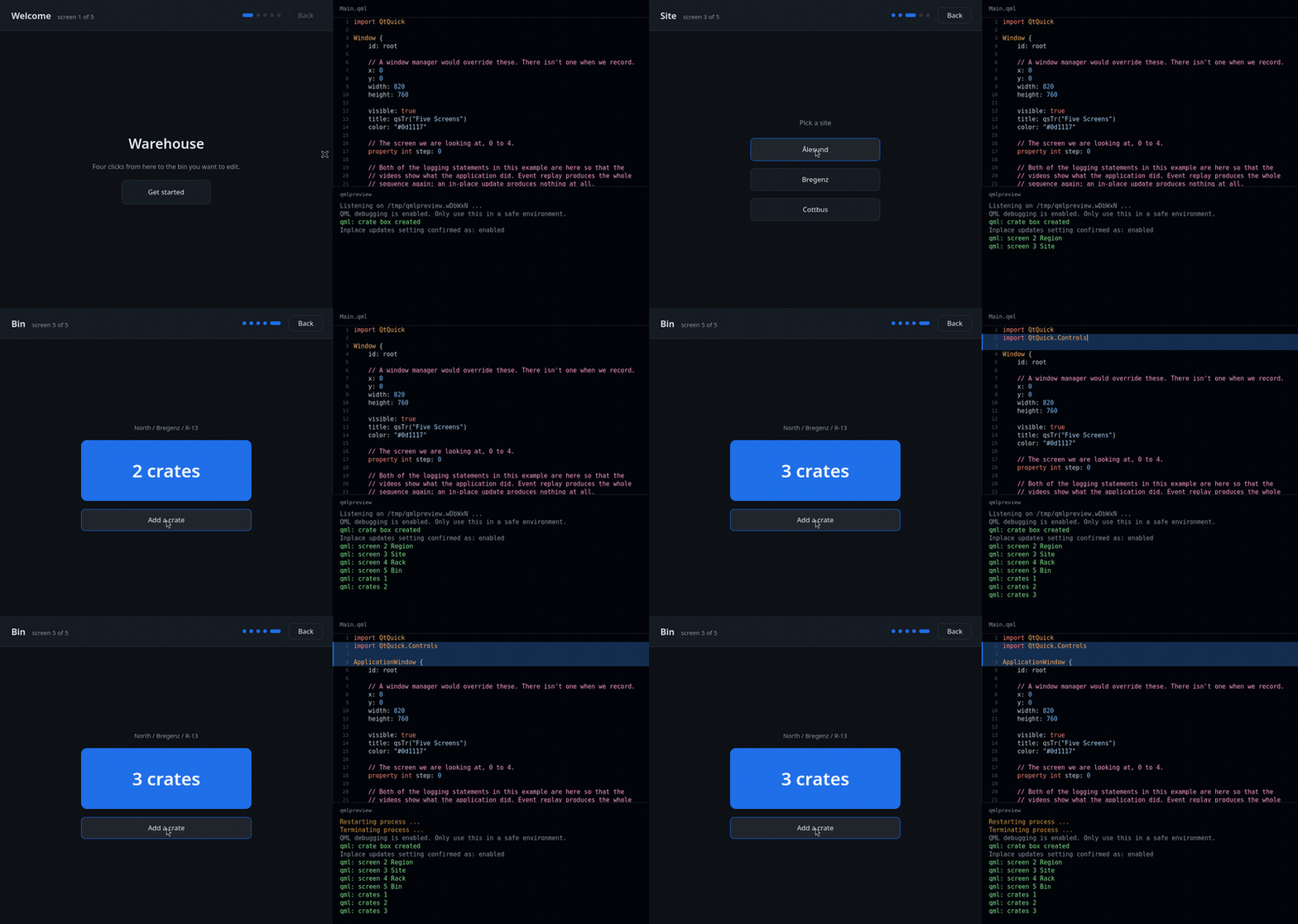
Change the base type of the window itself. Watch the application restart and the input events getting replayed.In both cases, you lose the session, but with some luck it still gets you back to the right UI state.
Interactive mode and recorded sessions
Pass
--interactive- the generated CMake target already does - and, since Qt 6.12, you get a prompt, modeled on the oneqmlprofilerhas had for a while:Connected. Type a command ('help' shows the list). >The commands are these:
Command Alias Effect helphShow the list of available commands. output [file]oWrite recorded input event stream to a .qtdfile.load [file]lLoad a .qtdfile and replay it.replayReplay the events recorded so far into the running target. clearcDiscard the events recorded so far. restartrRestart the target application and replay the events. killkTerminate the target application. quitqSave to the --outputfile, if configured, then quit.In contrast to
qmlprofiler, you can kill and restart the target here. When you notice that the preview couldn't handle some change,restartgives you a clean application with your interaction replayed into it, and you can try the edit again without clicking your way back through five screens (unless you were playing Pong).A session doesn't have to die with the process, either. You can persist recorded events in QML Profiler's existing
.qtdformat:qmlpreview --output session.qtd ./myapp qmlpreview --replay session.qtd ./myapp--outputwrites the recorded event stream when you quit;--replayloads one at startup and plays it back into the fresh application. A recorded session being a file, you can also attach one to a bug report, or keep one next to a test case.When hot reload succeeds, the recorded events are deliberately not replayed. Replaying them would apply your clicks a second time, which rather defeats the purpose. Replay only happens after an actual restart.
What doesn't work
This is the first release of any of this, and there is a fair amount of it that I'd rather have finished.
Changing the kind of a binding forces a rebuild. Turning a literal into a script binding, or either of them into a translated string, means installing or dropping a live binding rather than changing a value, and we can't do that in place yet. Neither can we move a binding from one property to another. Both fall back to rebuilding the component root. Rebuilding is generally more error-prone than patching in place. We make an effort to retain procedural changes to the objects in question, but there's a limit to this. If you've procedurally created additional inner objects, for example, those are lost when the outer object is rebuilt from the declarative QML code in the original component. If you notice that something is off, you can always trigger a manual
restartvia theqmlpreviewconsole.Changing the C++ base type of an object cannot be patched in place at all; we always have to rebuild something. Usually that something is the enclosing component, and what you may notice is that the objects inside it are new. Ideally we'd at least be able to preserve the inner objects that don't change and inject them into the rebuilt object. That, however, was tried and turned out to be incredibly complicated and fragile.
Without hot reload, the first thing that happens after startup is that the debug service hides your scene and creates its own clone that it fully controls. With that setup, things like loading other documents or explicitly re-creating the scene are possible, and there are commands for that in the protocol that's spoken between the debug service and its client.
With hot reload, the scene your application creates is the scene that updates. Asking the preview to load some unrelated document instead, or to throw the scene away and instantiate it again from scratch, stops meaning very much, and the service will refuse to do either. The
qmlpreviewtool never asks for those, so you are unlikely to run into it. A preview client that does ask for them will misbehave. Qt Creator has UI to load a specific document into a running QML Preview. You're now the first one to understand what it does. You've also been waiting for me to write "foot gun".Most seriously: QML Preview is not safe if you have QML engines on multiple threads. Patching in place manipulates compilation units that may be exposed to several engines, and the type references in them are not protected against data races. It works if all your engines live on the same thread, or if you can otherwise guarantee that nothing pokes at the type references while an update is in flight. We've accepted this for now because, conceptually, those type references should be immutable, and we didn't want to burden every other use case with the locking required to make this safe for QML Preview.
If you hit any of this in a way that stops you working, please file a bug. The patching logic depends quite precisely on the shape of your edit, so a before-and-after pair of QML files is worth a great deal more than a description, and a
.qtdrecording alongside it is better still. If you want to check whether something is hot reload's fault, setQMLPREVIEW_HOTRELOAD=0in the environment of the previewed application. That gets you the Qt 6.11 behavior back for comparison.What comes next
There are still quite a few kinds of edits that could be handled with in-place patching but currently trigger a rebuild: adding and removing properties, functions, and bindings do not fundamentally need a full rebuild. However, it will take some groundwork to first reduce the diff volume generated by such changes and then make the QML-generated metaobjects tolerate shape changes. Some work towards that end has already been done.
We're also working on a VS Code integration, and on an AI skill that lets a coding agent drive the preview loop itself.
- Changing a literal: colors, sizes, margins, strings,
-
U Ulf Hermann has marked this topic as solved
-
U Ulf Hermann marked this topic as a regular topic
-
Nice !
That looks awesome :-) -
really cool - thx :)
-
 A Axel Spoerl moved this topic from QML and Qt Quick
-
This looks to be a quite nice feature and an extremely well-written overview (which deserves to be on
doc.qt.iosite somewhere 😉).I have not yet read the entire write-up.
But for many, many months now I have wanted to ask where is the "missing" replacement for the
dummydatafolder thatqmlsceneknew how to use?Reading this part of today's (present) forum thread post:
...not destroy it in the first place: update only the QML data of the application, and leave the C++ objects alive wherever we can.
(emphasis mine)
If all you did was adjust a color, a size, a binding, or the body of some function, nothing is re-created at all. The application keeps running and merely looks different from one moment to the next. You stay on the fifth screen.
(emphasis mine)
From what I am reading so far, this "QML Preview" is still running my complete app, including my C++ production application logic. Yes?
The reason I continue to cling to
qmlscene(even building it from source as needed when it fails to install on some platform for some newer Qt version)...Is that
qmlscene(with the key aspect ofdummydata) lets me "swap in" a fully QML-mocked backend. This capability has made rapid prototyping of QML screens and their transitions, animations, and error-handling modes go extremely rapidly.Now that
qmlsceneis deprecated, where does that concept live? Is that a dead concept?I want to "run only my QML" without loading or running any of the C++. I want to have "shadow viewModel" classes implemented as QML
dummydata. Am I the only one who clings to this workflow?(Feel free to spin this out into its own separate thread if I have gone too off the rails. However, I think there is some important overlap that justifies me asking this question here and now, because my question also implies a kind of critique of where the current preview-tool development effort is heading, potentially.)
Thank you for your consideration! Again: bravo on a great write-up!
-
This looks to be a quite nice feature and an extremely well-written overview (which deserves to be on
doc.qt.iosite somewhere 😉).I have not yet read the entire write-up.
But for many, many months now I have wanted to ask where is the "missing" replacement for the
dummydatafolder thatqmlsceneknew how to use?Reading this part of today's (present) forum thread post:
...not destroy it in the first place: update only the QML data of the application, and leave the C++ objects alive wherever we can.
(emphasis mine)
If all you did was adjust a color, a size, a binding, or the body of some function, nothing is re-created at all. The application keeps running and merely looks different from one moment to the next. You stay on the fifth screen.
(emphasis mine)
From what I am reading so far, this "QML Preview" is still running my complete app, including my C++ production application logic. Yes?
The reason I continue to cling to
qmlscene(even building it from source as needed when it fails to install on some platform for some newer Qt version)...Is that
qmlscene(with the key aspect ofdummydata) lets me "swap in" a fully QML-mocked backend. This capability has made rapid prototyping of QML screens and their transitions, animations, and error-handling modes go extremely rapidly.Now that
qmlsceneis deprecated, where does that concept live? Is that a dead concept?I want to "run only my QML" without loading or running any of the C++. I want to have "shadow viewModel" classes implemented as QML
dummydata. Am I the only one who clings to this workflow?(Feel free to spin this out into its own separate thread if I have gone too off the rails. However, I think there is some important overlap that justifies me asking this question here and now, because my question also implies a kind of critique of where the current preview-tool development effort is heading, potentially.)
Thank you for your consideration! Again: bravo on a great write-up!
@KH-219Design We're moving a bit away from the topic of hot-reload, but the
qmltool in Qt 6 still has the dummy-data option (it's deprecated however).
Our (QML team's) recommendation (which also works with hot reload) would be to put your data into a singleton into a separate a backend module.
Then, you can create a dummy module outside of your normal hierarchy:/project |-MyQmlModule |-CMakeLists.txt |-Main.qml |-CustomButton.qml |-FancyLines.h |-FancyLines.cpp |-backend |-CMakeLists.txt |-config.h // povides Config singleton |-config.cpp |-dummy |-MyQmlModule |-backend |-Config.qml |-qmldirAnd add the
dummyfolder as an extra import path so that it will be preferred (and its Config singleton will be picked up). With the qml tool, by passing-I /path/to/dummy, with a C++ runner by one of the ways outlined in https://doc.qt.io/qt-6/qtqml-syntax-imports.html#qml-import-path -
@FKosmale Thank you for elaborating on a workable approach to achieve my use case of "running only my QML." Thank you for humoring me on this tangent.
I will try out
qmlpreviewhot-reload in 6.12.Keeping in mind, of course, that:
QML debugging is enabled. Only use this in a safe environment.And with the reminder: Don't ship it.
For the projects that I contribute to, I can certainly see use cases 🤝 for both "running only my QML," and for using hot-reload with my entire production C++ backend logic running. Some of the use cases overlap, meaning that I could solve my problem or rapidly fix some bug using either approach.
I'll point out one use case where they do not overlap:
- letting the pure-QML authors on a project "run ahead of" the "backend" team.
One large project that I am on currently has a highly skilled contributor (and interaction designer) who works entirely in QML. They have been able to spin up what are practically entire "sub applications" in the project (such as a new heads-up display for messaging that sits overlaid atop the main app), and they get an entire prototype of the feature (a.k.a. sub application) working in only QML, with a
dummydataprototype QML backend to mock up the states and state transitions. We have benefited greatly with adummydatastyle approach, so that this contributor is never blocked on needing someone to have a C++ model or C++ viewModel ready for "plugging in."It might be rare to have a C++ based project with "purely QML fluent contributors" as part of the team, but in our current case it has been phenomenally productive.

Qt 6.11 is out! See what's new in the release
blog