Qt 6.11 is out! See what's new in the release
blog
Setting up Android SDK for Qt Creator on Linux
-
I am trying to set up the Android SDK on Qt Creator 20.0.1 on Linux (Ubuntu 26.04 LTS) but keep getting an error about missing essential packages.
Qt Creator cannot find the following essential packages: "platform-tools", "cmdline-tools;latest", "emulator", "ndk;27.2.12479018", "platforms;android-36", "build-tools;36.0.0".
Install them manually after the current operation is done.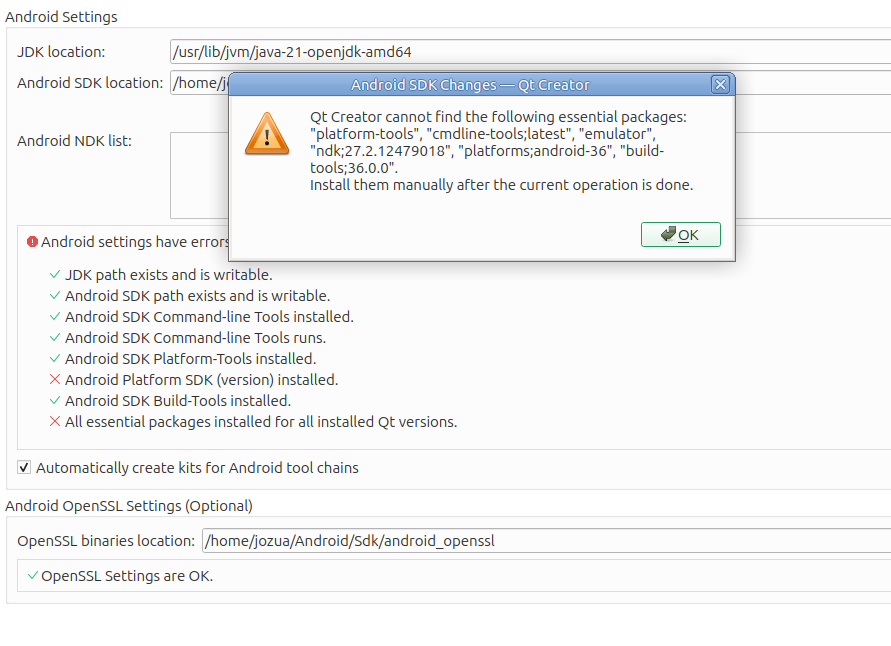
According to sdkmanager --list_installed all the mentioned packeges are installed
Installed packages:
  build-tools/36.0.0                                            36.0.0            Android SDK Build-Tools 36
  cmdline-tools/latest                                          23.0.0            Android SDK Command-line Tools (latest)
  emulator                                                      37.1.11           Android Emulator
  ndk/27.2.12479018                                             27.2.12479018     NDK (Side by side) 27.2.12479018
  platform-tools                                                37.0.1            Android SDK Platform-Tools
  platforms/android-36                                          2.0.0             Android SDK Platform 36
  system-images/android-36/google_apis_playstore/x86_64         7.0.0             Google Play Intel x86_64 Atom System Image
I have confirmed that the SDK installation works in Android Studio, and also works to build other (non-Qt) apps.
What would be the next steps in resolving this issue?
Thank you.
-
JDK ישן ב-Qt Creator גורם לזיהוי כוזב - עדכן ל-JDK 17.
-
R Random_Weirdo491 has marked this topic as solved
-
Qt Creator 20.0.2 fixed the problem.