
Submodule QML module not found (MySubmoduleName)
-
Hello fellow Qt Devs,
I was following this tutorial "QML Modules": https://academy.qt.io/content-details/338477721/2
and ran into the issue where text processor throws an error(which is also visible in the tutorial):

and of course then the methods described in that module do not get highlighted:
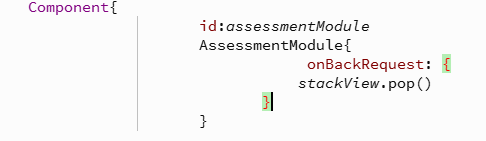
however when I build everything runs fine as expected and the submodules contents get loaded and built libraries are there.Cheers, DSU
-
Hi,
You need to add some details:
- Which version of Qt Creator are you using ?
- Which version of Qt ?
- Did you change any settings related to the code model ?
-
Hello fellow Qt Devs,
I was following this tutorial "QML Modules": https://academy.qt.io/content-details/338477721/2
and ran into the issue where text processor throws an error(which is also visible in the tutorial):
and of course then the methods described in that module do not get highlighted:
however when I build everything runs fine as expected and the submodules contents get loaded and built libraries are there.Cheers, DSU
@DSpUz That error comes from the old QML code model.
Please enable the new QML Language Server: https://doc.qt.io/qtcreator/creator-how-to-use-qml-language-server.html
-
@SGaist QtCreator 20.0.1, in this case its Qt 6.11.1 but same error occurs with Qt 6.9.3. I did reset code model same as in video, but that error persists so it doesnt really matter.
@JKSH I did enable QML Language Server as you said, and it went from red to yellow :)

Also another warning popped up where it claims QQuickItem doesnt have pressed property for the button:

-
@SGaist QtCreator 20.0.1, in this case its Qt 6.11.1 but same error occurs with Qt 6.9.3. I did reset code model same as in video, but that error persists so it doesnt really matter.
@JKSH I did enable QML Language Server as you said, and it went from red to yellow :)
Also another warning popped up where it claims QQuickItem doesnt have pressed property for the button:
@DSpUz said in Submodule QML module not found (MySubmoduleName):
@SGaist QtCreator 20.0.1, in this case its Qt 6.11.1 but same error occurs with Qt 6.9.3. I did reset code model same as in video, but that error persists so it doesnt really matter.
The old code model doesn't understand the CMake outputs for the QML modules; no amount of resetting will help. You need to use the new QML Language Server instead.
@JKSH I did enable QML Language Server as you said, and it went from red to yellow :)
Great! That proves that the QML Language Server is active.
Next:
- Have you built and run your project? You need to build at least once for the module files to be generated for the QML Language Server to see.
- I see that the tutorial uses a slightly complex folder structure, and sets
QT_QML_OUTPUT_DIRECTORYto compensate. Have you done the same?
(Note: Ideally you shouldn't need to set additional fields, but there are currently some limitations in the QML tools. See https://qt-project.atlassian.net/browse/QTBUG-137199 for the nitty gritty details)
Also another warning popped up where it claims QQuickItem doesnt have pressed property for the button:
Yes, that is correct.
parent's type isItem.Itemhas many properties, butpressedis not one of them: https://doc.qt.io/qt-6/qml-qtquick-item.html#propertiesI suggest giving an ID to your Button (for example,
id: btn) and then writecolor: btn.pressed ? ... -
@JKSH
the QT_QML_OUTPUT_DIRECTORY is setting is not covered in the video tutorial itself, it is only in the github repository, one of the recent rating comments does hint at this:
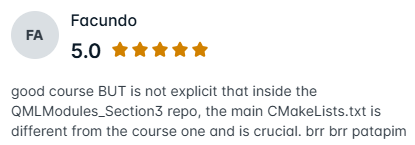
I think if one includes it in the CMake file then it is enough (though i didn't test it), no need to use QML Language Server.
Also your identifier tip solved the other warning, thanks.
-
D DSpUz has marked this topic as solved on

