
Skip to content
  • Categories
  • Recent
  • Tags
  • Popular
  • Users
  • Groups
  • Search
  • Get Qt Extensions
  • Unsolved
Collapse
Brand Logo
  1. Home
  2. Qt Development
  3. QML and Qt Quick
  4. QtGraphs: QML GraphsView margin between grid and X axis
Qt 6.11 is out! See what's new in the release blog

QtGraphs: QML GraphsView margin between grid and X axis

Scheduled Pinned Locked Moved Unsolved QML and Qt Quick
2 Posts 2 Posters 53 Views
  • Oldest to Newest
  • Newest to Oldest
  • Most Votes
Reply
  • Reply as topic
Log in to reply
This topic has been deleted. Only users with topic management privileges can see it.
  • M Offline
    M Offline
    MarNem
    wrote last edited by MarNem
    #1

    Hi!
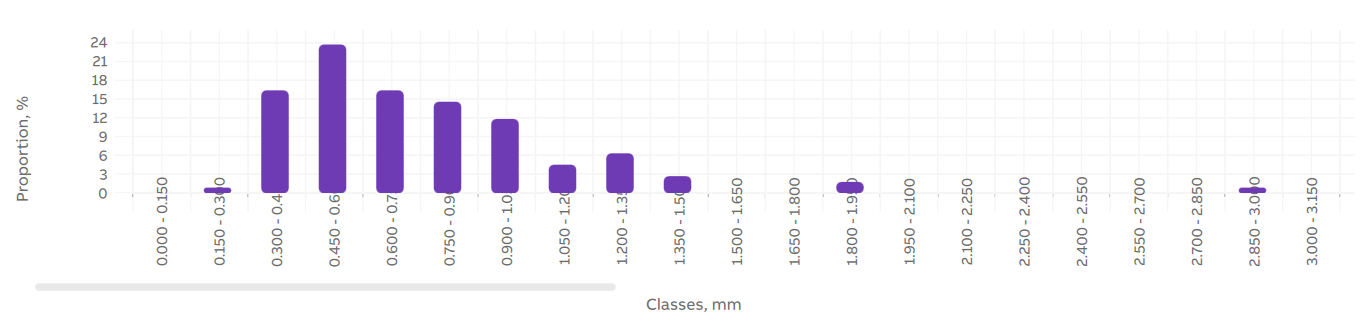
    When I have too much data to show in the bar graph, I need to scroll horizontally and change label angle to -90. When I do that, the labels cross the grid itself.
    Is there a way to change the distance between the grid and the x axis labels?
    Can't find any setting for it.
    79182a12-b066-46ad-a752-503c1597b6c5-image.png
    Thank you.

    1 Reply Last reply
    0
    • Nils SjobergN Offline
      Nils SjobergN Offline
      Nils Sjoberg
      wrote last edited by
      #2

      There is no built-in property for spacing between a label and a grid in Qt Charts - the only practical solution is to add a space/character at the beginning of each category text to visually push the label away from the grid.

      "What's up, Doc?"

      1 Reply Last reply
      0

      • Login

      • Login or register to search.
      • First post
        Last post
      0
      • Categories
      • Recent
      • Tags
      • Popular
      • Users
      • Groups
      • Search
      • Get Qt Extensions
      • Unsolved