Skip to content
  • Categories
  • Recent
  • Tags
  • Popular
  • Users
  • Groups
  • Search
  • Get Qt Extensions
  • Unsolved
Collapse
Brand Logo
  1. Home
  2. Qt Development
  3. Qt Creator and other tools
  4. Qt desktop app crashing at startup
Qt 6.11 is out! See what's new in the release blog

Qt desktop app crashing at startup

Scheduled Pinned Locked Moved Solved Qt Creator and other tools
13 Posts 5 Posters 296 Views 3 Watching
  • Oldest to Newest
  • Newest to Oldest
  • Most Votes
Reply
  • Reply as topic
Log in to reply
This topic has been deleted. Only users with topic management privileges can see it.
  • J Offline
    J Offline
    Jennise Hall
    wrote last edited by
    #1

    Code that has been working suddenly started crashing at startup. I didn't update any thing between working and crash state. (e.g. xcode) The stack trace isn't providing information that makes any sense. My initial application has been running for months without start up issues. I am hoping someone can help me find a trouble shooting direction. (Or, if I'm lucky, an 'Ah ha' moment.)

    I have a minimal example. This was created with QtCreator's basic template. I added a QListWidget and QPushButton in the .ui file (not included here but I can upload it.)

    I appreciate any help you can give.

    main.cpp

    #include "DummyMainWindow.h"
    
    #include <QApplication>
    #include <QDebug>
    
    int main(int argc, char *argv[])
    {
        QApplication a(argc, argv);
        DummyMainWindow w;
        w.show();
        qDebug() << "Is Application running";
        maireturn a.exec();
    }
    

    DummyMainWindow.h

    #ifndef DUMMYMAINWINDOW_H
    #define DUMMYMAINWINDOW_H
    
    #include <QMainWindow>
    
    QT_BEGIN_NAMESPACE
    namespace Ui {
    class DummyMainWindow;
    }
    QT_END_NAMESPACE
    
    class DummyMainWindow : public QMainWindow
    {
        Q_OBJECT
    
    public:
        DummyMainWindow(QWidget *parent = nullptr);
        ~DummyMainWindow();
    
    private:
        Ui::DummyMainWindow *ui;
    };
    #endif // DUMMYMAINWINDOW_H


    DummyMainWindow.cpp

    #include "DummyMainWindow.h"
    #include "ui_DummyMainWindow.h"
    
    DummyMainWindow::DummyMainWindow(QWidget *parent)
        : QMainWindow(parent)
        , ui(new Ui::DummyMainWindow)
    {
        ui->setupUi(this);
    }
    
    DummyMainWindow::~DummyMainWindow()
    {
        delete ui;
    }


    An image of the stack trace:
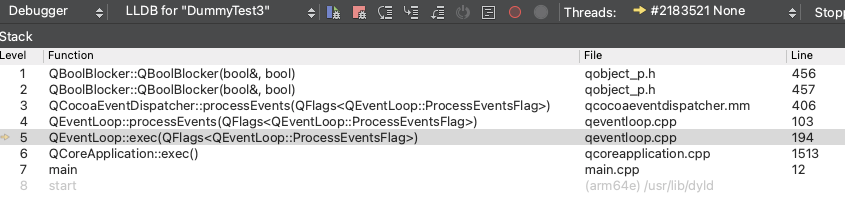
    qtCoreStackImage.png


    My environment:
    Apple M4Pro
    MacOs - Sequoia 15.7.3
    Apple clang version 17.0.0 (clang-1700.0.13.3)
    Target: arm64-apple-darwin24.6.0
    Thread model: posix
    Apple Swift version 6.1 (swiftlang-6.1.0.110.21 clang-1700.0.13.3)
    Target: arm64-apple-macosx15.0
    C++17
    Product: Qt Creator 15.0.0
    Based on: Qt 6.8.1 (Clang 15.0 (Apple), arm64)
    Built on: Nov 27 2024 08:36:08
    From revision: 3ac6a5956d

    1 Reply Last reply
    0
    • Nils SjobergN Offline
      Nils SjobergN Offline
      Nils Sjoberg
      wrote last edited by Nils Sjoberg
      #2

      Change to maireturn a.exec();

      1 Reply Last reply
      0
      • SGaistS Offline
        SGaistS Offline
        SGaist
        Lifetime Qt Champion
        wrote last edited by
        #3

        Hi,

        Which version of Qt are you using ?
        Is maireturn a typo ?

        Interested in AI ? www.idiap.ch
        Please read the Qt Code of Conduct - https://forum.qt.io/topic/113070/qt-code-of-conduct

        1 Reply Last reply
        0
        • J Offline
          J Offline
          Jennise Hall
          wrote last edited by Jennise Hall
          #4

          Darn it. It is a typo. Now it's working. I apologize for wasting your time. I'm not sure when the typo creeped in. I'm going to strip down my application in to the simplest repeatable case.

          Qt 6.8.1

          JonBJ 1 Reply Last reply
          0
          • J Jennise Hall

            Darn it. It is a typo. Now it's working. I apologize for wasting your time. I'm not sure when the typo creeped in. I'm going to strip down my application in to the simplest repeatable case.

            Qt 6.8.1

            JonBJ Offline
            JonBJ Offline
            JonB
            wrote last edited by
            #5

            @Jennise-Hall said in Qt desktop app crashing at startup:

            Darn it. It is a typo. Now it's working.

            Pardon?

            You pasted maireturn a.exec(); which obviously means your code could not compile. So how come there is a stack trace showing showing it running and inside the exec() and you say it crashed?

            1 Reply Last reply
            0
            • J Offline
              J Offline
              Jennise Hall
              wrote last edited by
              #6

              Yes, That has me stumped. You're right it wouldn't have compiled with the typo. So, the typo must have happened when I pasted the code but, I'm no longer sure because once I fixed that line of code the program started running consistently. Nothing about this crash makes any sense to me. I am going to strip the actual application down to the simplest point that generated a crash. I'm also thinking I should update to Qt 6.11.

              1 Reply Last reply
              0
              • SGaistS Offline
                SGaistS Offline
                SGaist
                Lifetime Qt Champion
                wrote last edited by
                #7

                I would also check whether you have somewhere a macro that has that name or maybe a define.

                Interested in AI ? www.idiap.ch
                Please read the Qt Code of Conduct - https://forum.qt.io/topic/113070/qt-code-of-conduct

                1 Reply Last reply
                0
                • JonBJ Offline
                  JonBJ Offline
                  JonB
                  wrote last edited by JonB
                  #8

                  The word "maireturn" is a Tagalog (Filipino) verb that translates to "to be able to return" or "can be returned" in English

                  :)

                  Pl45m4P 1 Reply Last reply
                  0
                  • JonBJ JonB

                    The word "maireturn" is a Tagalog (Filipino) verb that translates to "to be able to return" or "can be returned" in English

                    :)

                    Pl45m4P Offline
                    Pl45m4P Offline
                    Pl45m4
                    wrote last edited by Pl45m4
                    #9

                    @JonB

                    "Mai" is month May in German.
                    So maireturn a.exec() should return an int 10 :))
                    (months to May)

                    :P


                    If debugging is the process of removing software bugs, then programming must be the process of putting them in.

                    ~E. W. Dijkstra

                    1 Reply Last reply
                    0
                    • SGaistS Offline
                      SGaistS Offline
                      SGaist
                      Lifetime Qt Champion
                      wrote last edited by
                      #10

                      I wasn't expecting a linguistic analysis for a typo :-D

                      Interested in AI ? www.idiap.ch
                      Please read the Qt Code of Conduct - https://forum.qt.io/topic/113070/qt-code-of-conduct

                      J 1 Reply Last reply
                      0
                      • SGaistS SGaist

                        I wasn't expecting a linguistic analysis for a typo :-D

                        J Offline
                        J Offline
                        Jennise Hall
                        wrote last edited by
                        #11

                        @SGaist

                        LOL

                        useful information though.

                        SGaistS 1 Reply Last reply
                        0
                        • J Offline
                          J Offline
                          Jennise Hall
                          wrote last edited by
                          #12

                          Well, my application is back to running. I got frustrated trying to strip down my application and decided to throw a couple of spitballs at the wall. Not for the first time, I deleted the pro.user file making sure some of the settings that were not included in the DummyMainWindow project. Re-opening the project after that and the project was once again running. I am not really sure what happened but I'm working again. So I am going to close this topic.

                          Thanks for catching the typo...and for the "linguistic analysis" of the typo. LOL

                          1 Reply Last reply
                          0
                          • J Jennise Hall has marked this topic as solved
                          • J Jennise Hall

                            @SGaist

                            LOL

                            useful information though.

                            SGaistS Offline
                            SGaistS Offline
                            SGaist
                            Lifetime Qt Champion
                            wrote last edited by
                            #13

                            @Jennise-Hall said in Qt desktop app crashing at startup:

                            @SGaist

                            LOL

                            useful information though.

                            Agreed ! :-)

                            Interested in AI ? www.idiap.ch
                            Please read the Qt Code of Conduct - https://forum.qt.io/topic/113070/qt-code-of-conduct

                            1 Reply Last reply
                            0

                            • Login

                            • Login or register to search.
                            • First post
                              Last post
                            0
                            • Categories
                            • Recent
                            • Tags
                            • Popular
                            • Users
                            • Groups
                            • Search
                            • Get Qt Extensions
                            • Unsolved