
Qt6.11.1 / Ubuntu(latest), both debug and release are built on top of each other in same folder
-
Long-time user of Qt on Windows but new to developing for Ubuntu. All Windows releases I have used build the releases in separate folders for debug and release - and that has seemed pretty sensible and convenient. I want a similar configuration on Ubuntu, but have failed in my attempts to do this. Does anyone know whether this is possible, and if so, where to find the relevant config details?
-
Hi,
How are you doing that on Linux ?
Which project manager are you using ? -
Don't understand your first question - I basically installed Qt started porting apps. Also don't know about which "project manager". Some projects are built using CMake, some using vanilla Make. I used the default QtCreator "Kit", but had to specify a few details like which compilers to use. Happy to provide any specific details, but there are lots of details and I haven't a clue which specific ones might be useful.
-
Why do you want Qt debug libs on Linux at all? It's just MS which needs separate debug and release libs. So on Linux simply compile as release or if you want as RelWithDebInfo
-
Please correct me if this is incorrect, but my experience has led me to believe that the debug packages cannot be subjected to the same level of optimism as the release versions. so I always want actually to use the release versions - better performance. Unfortunately, despite my best efforts at testing, I occasionally find unexpected behaviors. It has proven quite convenient to have a debug version ready at hand to investigate a bit "under the hood".
My existing linux install means I only have one version at any time - either fully optimized release version or debug version. And I always need to fully clean up and rebuild everything to switch between versions.
-
Maybe I am misunderstanding what it is that you build. Is it Qt itself, from sources, or is it your own apps linked with Qt libraries?
If it is Qt itself I have never done that so cannot comment on where debug vs release might be placed in its build areas.
But if it is your own apps built with Qt: certainly from Qt Creator, if that is your IDE, when you create a project you are set up initially with configurations for Debug, Release and some others. And these build into their own separate subdirectories, so do not interfere with each other.
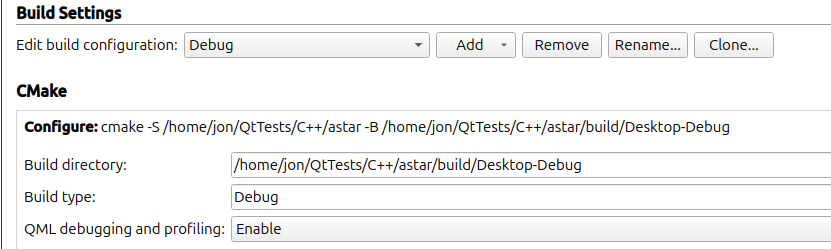
The Build directory path changes at the end as you change the configuration type.
Is that not what you are talking about?
-
Please correct me if this is incorrect, but my experience has led me to believe that the debug packages cannot be subjected to the same level of optimism as the release versions. so I always want actually to use the release versions - better performance. Unfortunately, despite my best efforts at testing, I occasionally find unexpected behaviors. It has proven quite convenient to have a debug version ready at hand to investigate a bit "under the hood".
My existing linux install means I only have one version at any time - either fully optimized release version or debug version. And I always need to fully clean up and rebuild everything to switch between versions.
@drmhkelley said in Qt6.11.1 / Ubuntu(latest), both debug and release are built on top of each other in same folder:
My existing linux install means I only have one version at any time
Simply install/compile in two different directories
either fully optimized release version or debug version.
No, read my post above
And I always need to fully clean up and rebuild everything to switch between versions.
No, use different build directories if you really need a Qt debug only build for whatever reason.
-
Thank you JonB and Christian Ehrlicher. I am travelling at the moment and do not have access to my linux box until I return to provide a bit more explicit detail about settings. JonB, I installed the binary Qt package and am building my own apps. What you suggest is precisely what I am trying to accomplish. To both, I have tried to duplicate on the linux system the settings on I have on the Windows platforms. I have set them to specify separate debug/release folders. Unfortunately, that is not what actually happens.
i presume that either 1) there is some setting[s] somewhere that I have not yet found and corrected that leads to the observed behavior or 2) the version of QtCreator delivered for Ubuntu is sufficiently different from that delivered with Windows to cause the problem. I am looking for an appropriately detailed description reference/tutorial/example of the part of QtCreator to figure out where the problem. everything I have is rather (putting it politely) terse, vague, and superficial. -
Thank you JonB and Christian Ehrlicher. I am travelling at the moment and do not have access to my linux box until I return to provide a bit more explicit detail about settings. JonB, I installed the binary Qt package and am building my own apps. What you suggest is precisely what I am trying to accomplish. To both, I have tried to duplicate on the linux system the settings on I have on the Windows platforms. I have set them to specify separate debug/release folders. Unfortunately, that is not what actually happens.
i presume that either 1) there is some setting[s] somewhere that I have not yet found and corrected that leads to the observed behavior or 2) the version of QtCreator delivered for Ubuntu is sufficiently different from that delivered with Windows to cause the problem. I am looking for an appropriately detailed description reference/tutorial/example of the part of QtCreator to figure out where the problem. everything I have is rather (putting it politely) terse, vague, and superficial.@drmhkelley
It comes "out of the box" the way you want, separate directories for each configuration build. So you have presumably done something to alter that. When you return it should be easy enough to see in your setup, like the Build Settings screen I showed. -
Thank you JonB and Christian Ehrlicher. I am travelling at the moment and do not have access to my linux box until I return to provide a bit more explicit detail about settings. JonB, I installed the binary Qt package and am building my own apps. What you suggest is precisely what I am trying to accomplish. To both, I have tried to duplicate on the linux system the settings on I have on the Windows platforms. I have set them to specify separate debug/release folders. Unfortunately, that is not what actually happens.
i presume that either 1) there is some setting[s] somewhere that I have not yet found and corrected that leads to the observed behavior or 2) the version of QtCreator delivered for Ubuntu is sufficiently different from that delivered with Windows to cause the problem. I am looking for an appropriately detailed description reference/tutorial/example of the part of QtCreator to figure out where the problem. everything I have is rather (putting it politely) terse, vague, and superficial.@drmhkelley hi,
Check that you did not disable Shadow builds in Qt Creator.


