
Assert in QTabWidgwt
-
Use QTableWidget like this (Qt6.8.3 msvc2022_64):
#include <qapplication.h>
#include <QtWidgets/QHBoxLayout>
#include <QtWidgets/QTreeWidget>class TestWidget : public QWidget
{
public:
TestWidget(QWidget* pParent = nullptr)
: QWidget(pParent)
{
QHBoxLayout* mainLayout = new QHBoxLayout(this);
auto* m_pTabWidget = new QTabWidget(this);
mainLayout->addWidget(m_pTabWidget);
QWidget* pTabDocWidget = new QWidget(m_pTabWidget);
m_pTabWidget->addTab(pTabDocWidget, QString("aaa"));
}
};int main(int argc, char* argv[])
{
QApplication app(argc, argv);
TestWidget wid;
wid.show();
return app.exec();
}An assert occourred in Debug Mode at "m_pTabWidget->addTab(pTabDocWidget, QString("aaa"));" , release mode is ok.
this is the callstack:
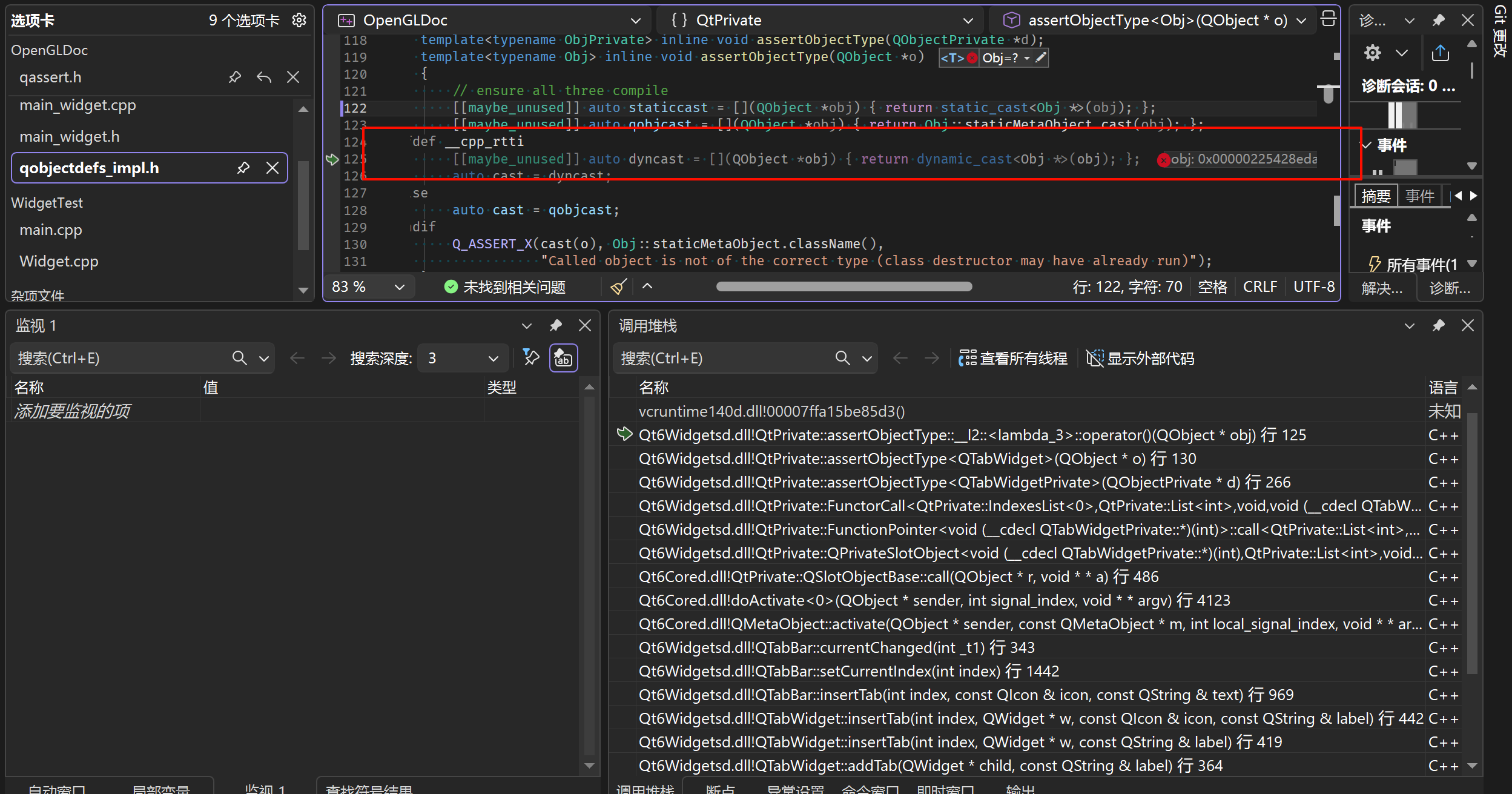
Is there any problem with my codes ?
-
Your code above is correct so you either mix debug and release libraries (e.g. you compile your app in release mode but using debug Qt libs) or you don't show your full code.
-
Your code above is correct so you either mix debug and release libraries (e.g. you compile your app in release mode but using debug Qt libs) or you don't show your full code.
@Christian-Ehrlicher said in Assert in QTabWidgwt:
Your code is correct. Either you’re mixing debug and release libraries together (for example, compiling your app in release mode but using debug Qt libraries), or you’re not showing the entire code.
That’s all my code above. I encountered this issue in my project using Qt 6.7.2 (compiled by myself). I simplified the code as shown above, but the issue still persists. I think it may be a bug of qt, so i install an official release version of qt 6.8.3 and try again, but the issue still exists.
-
@Christian-Ehrlicher said in Assert in QTabWidgwt:
Your code is correct. Either you’re mixing debug and release libraries together (for example, compiling your app in release mode but using debug Qt libraries), or you’re not showing the entire code.
That’s all my code above. I encountered this issue in my project using Qt 6.7.2 (compiled by myself). I simplified the code as shown above, but the issue still persists. I think it may be a bug of qt, so i install an official release version of qt 6.8.3 and try again, but the issue still exists.
@Shayne Hi,
It's not your code that is doubted, it is whether there is a mix between your application being built in release mode but using debug libraries when running or vice versa. Can you check whether you are using the libraries matching your application build type ?
-
@Shayne Hi,
It's not your code that is doubted, it is whether there is a mix between your application being built in release mode but using debug libraries when running or vice versa. Can you check whether you are using the libraries matching your application build type ?
@SGaist said in Assert in QTabWidgwt:
It's not your code that is doubted, it is whether there is a mix between your application being built in release mode but using debug libraries when running or vice versa. Can you check whether you are using the libraries matching your application build type ?
I use CMAKE to manage the dependencies, and do not add any lib manually. This issue just happened in Debug mode. I check (by my IDE , visual studio 2026 ) all libs used in my project , all of them are Debug mode. And i also check the libs in "Install directory", there is no problem either. I start the exe ( double click ) in install directory, it also has runtime crash with the message box "Debug error! xxx.exe abort() has been called ".

