Guidance Required for Smooth Progress Fill Rendering in Qt (QML + C++)
-
I am working on a Qt application using QML with a C++ backend and am facing an issue with rendering a fill/progress indicator inside a custom-shaped component.
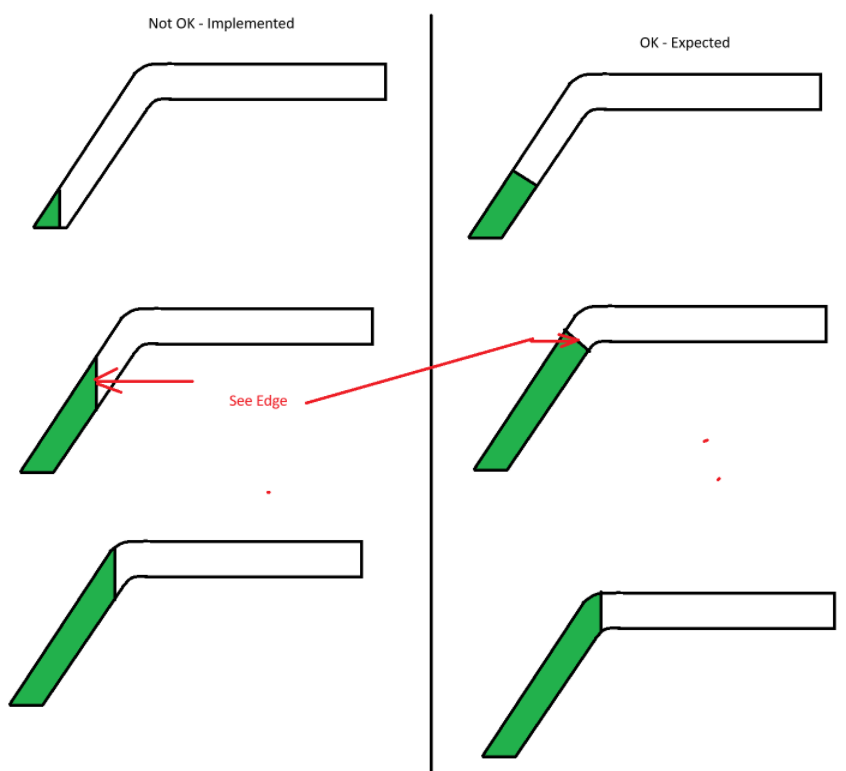
Currently, the fill progresses correctly along the shape, but at the transition between the inclined section and the horizontal section, a visible edge/gap is appearing, as shown in the attached image ("Not OK - Implemented"). The expected behavior is a smooth and continuous fill without any noticeable edge, as shown on the right side of the image ("OK - Expected").
Could you please suggest how this can be achieved in Qt?
Specifically, I would like to understand:
What would be the recommended approach in QML/Qt Quick for rendering such a shape with a smooth filling animation?
Should this be implemented using Canvas, Shape/ShapePath, ShaderEffect, or a custom QQuickPaintedItem/QSGNode in C++?
How can the fill be clipped or drawn so that the transition between segments remains seamless without visible edges?
I have attached the reference image for clarity.