
Skip to content
  • Categories
  • Recent
  • Tags
  • Popular
  • Users
  • Groups
  • Search
  • Get Qt Extensions
  • Unsolved
Collapse
Brand Logo
  1. Home
  2. Qt Development
  3. General and Desktop
  4. Old Macbook Air Error during installation process
Qt 6.11 is out! See what's new in the release blog

Old Macbook Air Error during installation process

Scheduled Pinned Locked Moved Unsolved General and Desktop
5 Posts 4 Posters 630 Views
  • Oldest to Newest
  • Newest to Oldest
  • Most Votes
Reply
  • Reply as topic
Log in to reply
This topic has been deleted. Only users with topic management privileges can see it.
  • L Offline
    L Offline
    lukutis222
    wrote last edited by lukutis222
    #1

    Hello. I am using old macbook air (2015)
    version: 12.7.6 (21H1320)

    I have downloaded latest version of QT Installer (4.11.0) from:
    https://www.qt.io/development/download-qt-installer-oss

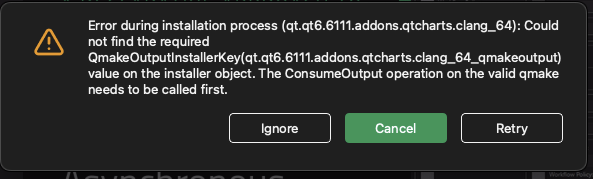
    During the installation process I have received error:

    Error during installation process (qt.qt6.6111.addons.qtmultimedia.clang_64): Could not find the required
    

    and if I ignore it proceeds returning errors for other addons such as:

    Error during installation process (qt.qt6.6111.addons.qtcharts.clang_64): Could not find the required
    

    ed7042bf-c087-4f2e-a43b-f2b69b889d27-image.png

    Is that an issue from Qt side or my Macbook side? Appreciate any advice.

    1 Reply Last reply
    0
    • jsulmJ Offline
      jsulmJ Offline
      jsulm
      Lifetime Qt Champion
      wrote last edited by
      #2

      I think you need at least Mac OS 13, see https://doc.qt.io/qt-6/macos.html
      If that is not possible look for an older Qt version which supports Mac OS 12.x.

      https://forum.qt.io/topic/113070/qt-code-of-conduct

      L 1 Reply Last reply
      0
      • K Offline
        K Offline
        kim533
        Banned
        wrote last edited by
        #3
        This post is deleted!
        1 Reply Last reply
        0
        • jsulmJ jsulm

          I think you need at least Mac OS 13, see https://doc.qt.io/qt-6/macos.html
          If that is not possible look for an older Qt version which supports Mac OS 12.x.

          L Offline
          L Offline
          lukutis222
          wrote last edited by lukutis222
          #4

          @jsulm
          Damn thats unfortunate. 10 year old macbook and cannot do anything with it.

          1 Reply Last reply
          0
          • hskoglundH Offline
            hskoglundH Offline
            hskoglund
            wrote last edited by
            #5

            If you have 3GB of memory (or more) in your MacBook you could try upgrading to Sonoma via the OpenCore Legacy Patcher

            1 Reply Last reply
            1

            • Login

            • Login or register to search.
            • First post
              Last post
            0
            • Categories
            • Recent
            • Tags
            • Popular
            • Users
            • Groups
            • Search
            • Get Qt Extensions
            • Unsolved