
How to clear TextEdit's textDocument.source?
-
Hello. I am making a recreation of Window 7's notepad in QT Quick and Python. As my main text editing body, i am using... The TextEdit QML Type. When the user creates a new file, I would like the QQuickTextDocument's source to be reset (it makes sense, right?). However, no matter what I try, nothing works.
TextEdit.textDocument.source.clear()does not exist.
TextEdit.textDocument.source = ""provides aQML ... (parent or ancestor of TextDocument): does not exist
TextEdit.textDocument.source = undefinedprovides me aError: Cannot assign [undefined] to QUrl
TextEdit.textDocument.source = new URL()provides me aError: Invalid amount of arguments
TextEdit.clear()clears everything... besidestextDocument.source
I am all calling these with JS in the QML file.I need something, anything! Is it even possible?!
-
Hello. I am making a recreation of Window 7's notepad in QT Quick and Python. As my main text editing body, i am using... The TextEdit QML Type. When the user creates a new file, I would like the QQuickTextDocument's source to be reset (it makes sense, right?). However, no matter what I try, nothing works.
TextEdit.textDocument.source.clear()does not exist.
TextEdit.textDocument.source = ""provides aQML ... (parent or ancestor of TextDocument): does not exist
TextEdit.textDocument.source = undefinedprovides me aError: Cannot assign [undefined] to QUrl
TextEdit.textDocument.source = new URL()provides me aError: Invalid amount of arguments
TextEdit.clear()clears everything... besidestextDocument.source
I am all calling these with JS in the QML file.I need something, anything! Is it even possible?!
@jayrickaby said in How to clear TextEdit's textDocument.source?:
TextEdit.textDocument.source.clear()
This should actually work.
source is a QUrl, which has https://doc.qt.io/qt-6/qurl.html#clear method. -
That's what I thought too, yet...
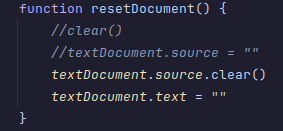
.../NotepadDocument.qml:38: TypeError: Property 'clear' of object is not a function -
That's what I thought too, yet...
.../NotepadDocument.qml:38: TypeError: Property 'clear' of object is not a function@jayrickaby
https://doc.qt.io/qt-6/qml-qtquick-textdocument.html#source-prop
Not my area, just trying to help. Says it's "preliminary" and requires Qt 6.7+ --- are you at least using that? Then:The source property cannot be changed while the document's modified state is true. If the user has modified the document contents, you should prompt the user whether to save(), or else discard changes by setting modified = false before setting the source property to a different URL.
Is it worth checking/clearing the
modifiedproperty? Otherwise you might check what is actually insourceand what methods it has --- Googlingjavascript show all functions of an objectgives something like https://stackoverflow.com/questions/2257993/how-to-display-all-methods-of-an-objectvar methods = []; for (var m in obj) { if (typeof obj[m] == "function") { methods.push(m); } } alert(methods.join(","));or just print out each
mregardless of type.Also https://stackoverflow.com/questions/73830468/modify-a-qtextdocument-of-a-qml-textarea-element says
I read in the documentation that the QQuickTextDocument::textDocument() is read-only and that I can not modify its internal state
so that might be a problem?
Finally you might retry
TextEdit.textDocument.source = new URL()with some parameter acceptable to tonew URL()? -
I am on Qt 6.11.1. I doubt it would let me use anything on QQuickTextDocument if I was < Qt 6.7.
When I tried thenew URL()approach, I tried with parameters""andundefined. Neither were valid urls (as blurted by console)When you try to change the source when it is flagged as modified, a message is outputted console to notify why the source didnt change because of this. This isn't happening here as there is no message.
I tried to adapt that little script to print functions; I couldn't get it to work.
Despite the
QML ... (parent or ancestor of TextDocument): does not existerror,textDocument.source = Qt.resolvedUrl("")IS working how I need it to (even if it doing it in a broken way).
I hope proper support can be added -
Hi,
Did you set
modifiedto false before changesource's value as per the property documentation ? (Just an idea, I haven't used that type) -
Hello. I am making a recreation of Window 7's notepad in QT Quick and Python. As my main text editing body, i am using... The TextEdit QML Type. When the user creates a new file, I would like the QQuickTextDocument's source to be reset (it makes sense, right?). However, no matter what I try, nothing works.
TextEdit.textDocument.source.clear()does not exist.
TextEdit.textDocument.source = ""provides aQML ... (parent or ancestor of TextDocument): does not exist
TextEdit.textDocument.source = undefinedprovides me aError: Cannot assign [undefined] to QUrl
TextEdit.textDocument.source = new URL()provides me aError: Invalid amount of arguments
TextEdit.clear()clears everything... besidestextDocument.source
I am all calling these with JS in the QML file.I need something, anything! Is it even possible?!
@jayrickaby said in How to clear TextEdit's textDocument.source?:
When the user creates a new file, I would like the QQuickTextDocument's source to be reset (it makes sense, right?).
@jayrickaby said in How to clear TextEdit's textDocument.source?:
Despite the QML ... (parent or ancestor of TextDocument): does not exist error, textDocument.source = Qt.resolvedUrl("") IS working how I need it to (even if it doing it in a broken way).
I hope proper support can be addedThe described program structure isn't clear to me. Creating a new
TextEditshould create a newTextDocumentwith an emptysource. Is this program instead overwriting thetextof an existingTextEdit?The program below works as I expect with Qt 6.8.7, based on the documentation. When
textDocument.modified== false,textDocument.sourcecan be set to an empty string, but that results in a loading error.import QtQuick import QtQuick.Layouts import QtQuick.Controls Window { visible: true ColumnLayout { anchors.fill: parent TextInput { id: source focus: true Layout.fillWidth: true onEditingFinished: edit.textDocument.source = text Rectangle { border.width: 1 border.color: "black" anchors.fill: parent z: -1 } } CheckBox { id: cb text: "modified" checkState: edit.textDocument.modified ? Qt.Checked : Qt.Unchecked onClicked: if (Qt.Unchecked == checkState) edit.textDocument.modified = false; } Text { text: "source: " + edit.textDocument.source + "\nstatus: " + edit.textDocument.status } TextEdit { id: edit Layout.fillWidth: true Layout.fillHeight: true Rectangle { border.width: 1 border.color: "black" anchors.fill: parent z: -1 } } } } -
Hello. I am making a recreation of Window 7's notepad in QT Quick and Python. As my main text editing body, i am using... The TextEdit QML Type. When the user creates a new file, I would like the QQuickTextDocument's source to be reset (it makes sense, right?). However, no matter what I try, nothing works.
TextEdit.textDocument.source.clear()does not exist.
TextEdit.textDocument.source = ""provides aQML ... (parent or ancestor of TextDocument): does not exist
TextEdit.textDocument.source = undefinedprovides me aError: Cannot assign [undefined] to QUrl
TextEdit.textDocument.source = new URL()provides me aError: Invalid amount of arguments
TextEdit.clear()clears everything... besidestextDocument.source
I am all calling these with JS in the QML file.I need something, anything! Is it even possible?!
@jayrickaby Regarding textDocument.source reset in QT Quick:
I can see you're frustrated — this is a genuinely tricky QQuickTextDocument limitation!
The short answer: You cannot directly "unset" textDocument.source once it's been set via QML/JS. Qt doesn't expose a clean reset method for it.
The real solution — handle it from Python backend:
pythonfrom PySide6.QtCore import QObject, Slot, Signalclass Backend(QObject):
fileCleared = Signal()
requestSaveAs = Signal()def __init__(self): super().__init__() self.current_path = None # None = unsaved new file @Slot() def new_file(self): self.current_path = None self.fileCleared.emit() # Tell QML to clear the text @Slot(str) def save_file(self, text): if self.current_path is None: self.requestSaveAs.emit() else: with open(self.current_path, 'w') as f: f.write(text) @Slot(str) def open_file(self, path): self.current_path = pathqmlTextEdit {
id: textEdit
}Connections {
target: backend
function onFileCleared() {
textEdit.clear()
// Don't touch textDocument.source at all
}
}
Why your attempts failed:source = "" — Qt tries to resolve empty string as a URL, document loses context
source = undefined — QUrl binding is strict, doesn't accept undefined
new URL() — wrong argument count for QUrl constructor
textEdit.clear() — works but leaves source stale (which is fine!)The key insight: textDocument.source is only meant for loading files. For a "New File" action, just track the file path in Python as None, call textEdit.clear() in QML, and never touch textDocument.source until the user actually opens or saves a real file. The stale source does not affect editing at all.
Edit: removed spam content


