
QWidget in QMainToolBar can not hide ?
-
I want to use a QPushButton to hide Breadcrumb Navigation and show QLineEdit of path in FileManager.
I found QWidget in QMainToolBar can not hide.ui->mainToolBar->insertWidget(ui->action_edit_location, scrollArea); lineEdit_location = new QLineEdit(path, this); ui->mainToolBar->insertWidget(ui->action_edit_location, lineEdit_location); connect(lineEdit_location, SIGNAL(returnPressed()), this, SLOT(lineEditLocationReturnPressed())); lineEdit_location->hide(); connect(ui->action_edit_location, &QAction::triggered, [=]{ scrollArea->hide(); lineEdit_location->show(); });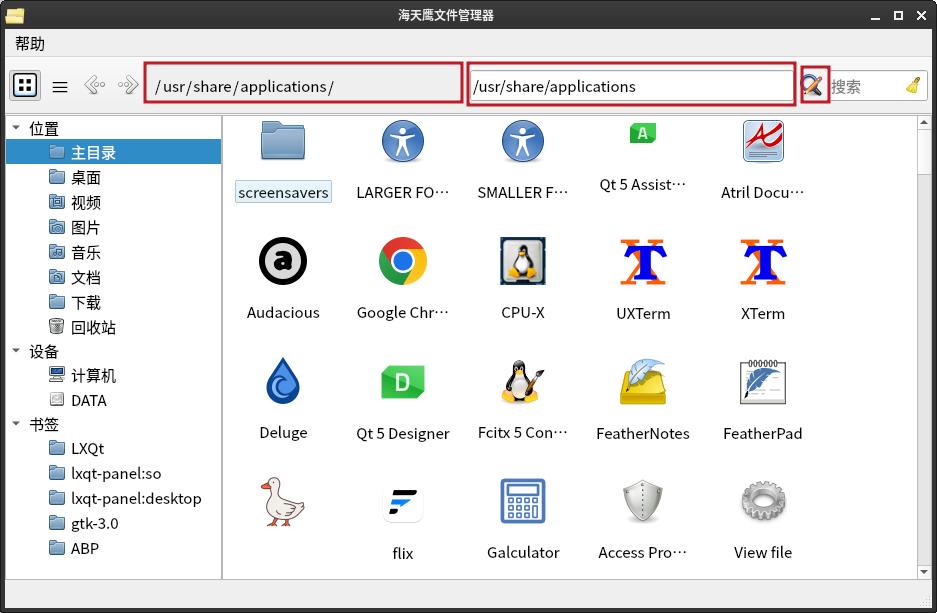
-
I want to use a QPushButton to hide Breadcrumb Navigation and show QLineEdit of path in FileManager.
I found QWidget in QMainToolBar can not hide.ui->mainToolBar->insertWidget(ui->action_edit_location, scrollArea); lineEdit_location = new QLineEdit(path, this); ui->mainToolBar->insertWidget(ui->action_edit_location, lineEdit_location); connect(lineEdit_location, SIGNAL(returnPressed()), this, SLOT(lineEditLocationReturnPressed())); lineEdit_location->hide(); connect(ui->action_edit_location, &QAction::triggered, [=]{ scrollArea->hide(); lineEdit_location->show(); });Note: You should use QAction::setVisible() to change the visibility of the widget. Using QWidget::setVisible(), QWidget::show() and QWidget::hide() does not work.(from: https://doc.qt.io/qt-6/qtoolbar.html#insertWidget)
So try:
auto* scrollAreaAction = ui->mainToolBar->insertWidget(ui->action_edit_location, scrollArea); lineEdit_location = new QLineEdit(path, this); auto* lineEditLocationAction = ui->mainToolBar->insertWidget(ui->action_edit_location, lineEdit_location); lineEditLocationAction->setVisible(false); connect(ui->action_edit_location, &QAction::triggered, [=]{ scrollAreaAction->setVisible(false); lineEditLocationAction->setVisible(true); });
If debugging is the process of removing software bugs, then programming must be the process of putting them in.
~E. W. Dijkstra
-
does your slot function work ? &QAction::triggered might send signal
-
does your slot function work ? &QAction::triggered might send signal
@Joe-von-Habsburg
Although OP's exact problem/explanation is not very clear, I am assuming the slot/connection is not actually relevant? OP starts withlineEdit_location->hide();outside of action/slot but shows both widgets, includinglineEditas already shown, which is wrong and presumably illustrates "I found QWidget in QMainToolBar can not hide". It would be nice to have OP's confirmation of this, or whether they are only talking about what is supposed to happen in the signal/slot?@sonichy
Normally the better way to show one widget at a time, while hiding other(s), is to put them both on aQStackedWidgetrather than showing/hiding each one. However I am not sure that would help your problem here. -
I want to use a QPushButton to hide Breadcrumb Navigation and show QLineEdit of path in FileManager.
I found QWidget in QMainToolBar can not hide.ui->mainToolBar->insertWidget(ui->action_edit_location, scrollArea); lineEdit_location = new QLineEdit(path, this); ui->mainToolBar->insertWidget(ui->action_edit_location, lineEdit_location); connect(lineEdit_location, SIGNAL(returnPressed()), this, SLOT(lineEditLocationReturnPressed())); lineEdit_location->hide(); connect(ui->action_edit_location, &QAction::triggered, [=]{ scrollArea->hide(); lineEdit_location->show(); });Note: You should use QAction::setVisible() to change the visibility of the widget. Using QWidget::setVisible(), QWidget::show() and QWidget::hide() does not work.(from: https://doc.qt.io/qt-6/qtoolbar.html#insertWidget)
So try:
auto* scrollAreaAction = ui->mainToolBar->insertWidget(ui->action_edit_location, scrollArea); lineEdit_location = new QLineEdit(path, this); auto* lineEditLocationAction = ui->mainToolBar->insertWidget(ui->action_edit_location, lineEdit_location); lineEditLocationAction->setVisible(false); connect(ui->action_edit_location, &QAction::triggered, [=]{ scrollAreaAction->setVisible(false); lineEditLocationAction->setVisible(true); });
If debugging is the process of removing software bugs, then programming must be the process of putting them in.
~E. W. Dijkstra
-
 Note: You should use QAction::setVisible() to change the visibility of the widget.
 Using QWidget::setVisible(), QWidget::show() and QWidget::hide() does not work.
(from: https://doc.qt.io/qt-6/qtoolbar.html#insertWidget)
So try:
auto* scrollAreaAction = ui->mainToolBar->insertWidget(ui->action_edit_location, scrollArea); lineEdit_location = new QLineEdit(path, this); auto* lineEditLocationAction = ui->mainToolBar->insertWidget(ui->action_edit_location, lineEdit_location); lineEditLocationAction->setVisible(false); connect(ui->action_edit_location, &QAction::triggered, [=]{ scrollAreaAction->setVisible(false); lineEditLocationAction->setVisible(true); }); -
@Pl45m4 Understand, can not hide QWidget directly, can setVisible of QAction.
QAction *action = ui->mainToolBar->insertWidget(QAction, QWidget);
action->setVisible(false);@sonichy said in QWidget in QMainToolBar can not hide ?:
@Pl45m4 QWidget::setVisible() is useless too.
This is what he wrote...
"Note: You should use QAction::setVisible() to change the visibility of the widget.
Using QWidget::setVisible(), QWidget::show() and QWidget::hide() does not work." -
 S sonichy has marked this topic as solved



