
QMenu doesn't show up from QAction addded to QToolBar in Qt6.
-
The following code shows up the QMenu on clicking the QToolButton in Qt5. But not in Qt6. Is this an behavioral change in Qt6 ? I could not find anything in the documentation.
import sys from qtpy.QtWidgets import (QApplication, QAction, QMenu, QWidget, QVBoxLayout, QToolBar) class Widget(QWidget): def __init__(self, parent=None): super().__init__(parent=parent) layout = QVBoxLayout(self) toolbar = QToolBar(parent=self) menu = QMenu() menu.addAction('one') menu.addAction('two') menu.addAction('three') action = QAction( "Number", self) action.setMenu(menu) toolbar.addAction(action) layout.addWidget(toolbar) if __name__ == '__main__': app = QApplication(sys.argv) icons.init() wid = Widget() wid.show() sys.exit(app.exec()) -
Works fine for me with Qt6.11 on windows:
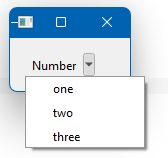
int main(int argc, char* argv[]) { QApplication app(argc, argv); QWidget w; auto layout = new QVBoxLayout(&w); auto tb = new QToolBar(&w); auto menu = new QMenu(&w); menu->addAction("one"); menu->addAction("two"); menu->addAction("three"); auto action = new QAction("Number"); action->setMenu(menu); tb->addAction(action); layout->addWidget(tb); w.show(); return app.exec(); } -
Hi and welcome to devnet,
Can you check the same with:
import sys from qtpy.QtWidgets import (QApplication, QAction, QMenu, QWidget, QVBoxLayout, QToolBar) class Widget(QWidget): def __init__(self, parent=None): super().__init__(parent=parent) layout = QVBoxLayout(self) toolbar = QToolBar(parent=self) self.menu = QMenu() self.menu.addAction('one') self.menu.addAction('two') self.menu.addAction('three') self.action = QAction( "Number", self) self.action.setMenu(self.menu) toolbar.addAction(self.action) layout.addWidget(toolbar) if __name__ == '__main__': app = QApplication(sys.argv) icons.init() wid = Widget() wid.show() sys.exit(app.exec()) -
Works fine for me with Qt6.11 on windows:
int main(int argc, char* argv[]) { QApplication app(argc, argv); QWidget w; auto layout = new QVBoxLayout(&w); auto tb = new QToolBar(&w); auto menu = new QMenu(&w); menu->addAction("one"); menu->addAction("two"); menu->addAction("three"); auto action = new QAction("Number"); action->setMenu(menu); tb->addAction(action); layout->addWidget(tb); w.show(); return app.exec(); }Thanks for checking.
I observer this this issue on Mac, I am not sure if the behavior is different on other platforms.
-
Hi and welcome to devnet,
Can you check the same with:
import sys from qtpy.QtWidgets import (QApplication, QAction, QMenu, QWidget, QVBoxLayout, QToolBar) class Widget(QWidget): def __init__(self, parent=None): super().__init__(parent=parent) layout = QVBoxLayout(self) toolbar = QToolBar(parent=self) self.menu = QMenu() self.menu.addAction('one') self.menu.addAction('two') self.menu.addAction('three') self.action = QAction( "Number", self) self.action.setMenu(self.menu) toolbar.addAction(self.action) layout.addWidget(toolbar) if __name__ == '__main__': app = QApplication(sys.argv) icons.init() wid = Widget() wid.show() sys.exit(app.exec())Hi @SGaist ,
Thank you for the suggestion.
I think, I find the issue.
Setting a parent to
QMenufixed the issue.menu = QMenu(parent=toolbar)or
menu = QMenu(parent=self).Your suggestion - setting the menu as instance variable , also works fine for me.
Thanks again.
-
It's a question of object lifetime or rather garbage collection. I have got hit by this one some years ago.

