Skip to content
  • Categories
  • Recent
  • Tags
  • Popular
  • Users
  • Groups
  • Search
  • Get Qt Extensions
  • Unsolved
Collapse
Brand Logo
  1. Home
  2. Qt Development
  3. Qt for Python
  4. QMenu doesn't show up from QAction addded to QToolBar in Qt6.
Qt 6.11 is out! See what's new in the release blog

QMenu doesn't show up from QAction addded to QToolBar in Qt6.

Scheduled Pinned Locked Moved Unsolved Qt for Python
6 Posts 3 Posters 203 Views 1 Watching
  • Oldest to Newest
  • Newest to Oldest
  • Most Votes
Reply
  • Reply as topic
Log in to reply
This topic has been deleted. Only users with topic management privileges can see it.
  • N Offline
    N Offline
    Noushadali
    wrote last edited by
    #1

    The following code shows up the QMenu on clicking the QToolButton in Qt5. But not in Qt6. Is this an behavioral change in Qt6 ? I could not find anything in the documentation.

    import sys
    
    from qtpy.QtWidgets import (QApplication, QAction, QMenu, QWidget,
                                QVBoxLayout, QToolBar)
    
    
    class Widget(QWidget):
        def __init__(self, parent=None):
            super().__init__(parent=parent)
            layout = QVBoxLayout(self)
            toolbar = QToolBar(parent=self)
    
            menu = QMenu()
            menu.addAction('one')
            menu.addAction('two')
            menu.addAction('three')
    
            action = QAction( "Number", self)
            action.setMenu(menu)
            toolbar.addAction(action)
    
            layout.addWidget(toolbar)
    
    
    if __name__ == '__main__':
        app = QApplication(sys.argv)
        icons.init()
        wid = Widget()
        wid.show()
        sys.exit(app.exec())
    
    1 Reply Last reply
    0
    • Christian EhrlicherC Offline
      Christian EhrlicherC Offline
      Christian Ehrlicher
      Lifetime Qt Champion
      wrote last edited by
      #2

      Works fine for me with Qt6.11 on windows:
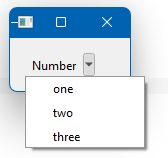
      grafik.png

      int main(int argc, char* argv[])
      {
          QApplication app(argc, argv);
          QWidget w;
          auto layout = new QVBoxLayout(&w);
          auto tb = new QToolBar(&w);
          auto menu = new QMenu(&w);
          menu->addAction("one");
          menu->addAction("two");
          menu->addAction("three");
          auto action = new QAction("Number");
          action->setMenu(menu);
          tb->addAction(action);
          layout->addWidget(tb);
          w.show();
          return app.exec();
      }
      

      Qt Online Installer direct download: https://download.qt.io/official_releases/online_installers/
      Visit the Qt Academy at https://academy.qt.io/catalog

      N 1 Reply Last reply
      0
      • SGaistS Offline
        SGaistS Offline
        SGaist
        Lifetime Qt Champion
        wrote last edited by
        #3

        Hi and welcome to devnet,

        Can you check the same with:

        import sys
        
        from qtpy.QtWidgets import (QApplication, QAction, QMenu, QWidget,
                                    QVBoxLayout, QToolBar)
        
        
        class Widget(QWidget):
            def __init__(self, parent=None):
                super().__init__(parent=parent)
                layout = QVBoxLayout(self)
                toolbar = QToolBar(parent=self)
        
                self.menu = QMenu()
                self.menu.addAction('one')
                self.menu.addAction('two')
                self.menu.addAction('three')
        
                self.action = QAction( "Number", self)
                self.action.setMenu(self.menu)
                toolbar.addAction(self.action)
        
                layout.addWidget(toolbar)
        
        
        if __name__ == '__main__':
            app = QApplication(sys.argv)
            icons.init()
            wid = Widget()
            wid.show()
            sys.exit(app.exec())
        

        Interested in AI ? www.idiap.ch
        Please read the Qt Code of Conduct - https://forum.qt.io/topic/113070/qt-code-of-conduct

        N 1 Reply Last reply
        1
        • Christian EhrlicherC Christian Ehrlicher

          Works fine for me with Qt6.11 on windows:

          grafik.png

          int main(int argc, char* argv[])
          {
              QApplication app(argc, argv);
              QWidget w;
              auto layout = new QVBoxLayout(&w);
              auto tb = new QToolBar(&w);
              auto menu = new QMenu(&w);
              menu->addAction("one");
              menu->addAction("two");
              menu->addAction("three");
              auto action = new QAction("Number");
              action->setMenu(menu);
              tb->addAction(action);
              layout->addWidget(tb);
              w.show();
              return app.exec();
          }
          
          N Offline
          N Offline
          Noushadali
          wrote last edited by
          #4

          Hi @Christian-Ehrlicher

          Thanks for checking.

          I observer this this issue on Mac, I am not sure if the behavior is different on other platforms.

          1 Reply Last reply
          0
          • SGaistS SGaist

            Hi and welcome to devnet,

            Can you check the same with:

            import sys
            
            from qtpy.QtWidgets import (QApplication, QAction, QMenu, QWidget,
                                        QVBoxLayout, QToolBar)
            
            
            class Widget(QWidget):
                def __init__(self, parent=None):
                    super().__init__(parent=parent)
                    layout = QVBoxLayout(self)
                    toolbar = QToolBar(parent=self)
            
                    self.menu = QMenu()
                    self.menu.addAction('one')
                    self.menu.addAction('two')
                    self.menu.addAction('three')
            
                    self.action = QAction( "Number", self)
                    self.action.setMenu(self.menu)
                    toolbar.addAction(self.action)
            
                    layout.addWidget(toolbar)
            
            
            if __name__ == '__main__':
                app = QApplication(sys.argv)
                icons.init()
                wid = Widget()
                wid.show()
                sys.exit(app.exec())
            
            N Offline
            N Offline
            Noushadali
            wrote last edited by Noushadali
            #5

            Hi @SGaist ,

            Thank you for the suggestion.

            I think, I find the issue.

            Setting a parent to QMenu fixed the issue.

            menu = QMenu(parent=toolbar) or
            menu = QMenu(parent=self).

            Your suggestion - setting the menu as instance variable , also works fine for me.

            Thanks again.

            1 Reply Last reply
            1
            • SGaistS Offline
              SGaistS Offline
              SGaist
              Lifetime Qt Champion
              wrote last edited by
              #6

              It's a question of object lifetime or rather garbage collection. I have got hit by this one some years ago.

              Interested in AI ? www.idiap.ch
              Please read the Qt Code of Conduct - https://forum.qt.io/topic/113070/qt-code-of-conduct

              1 Reply Last reply
              0

              • Login

              • Login or register to search.
              • First post
                Last post
              0
              • Categories
              • Recent
              • Tags
              • Popular
              • Users
              • Groups
              • Search
              • Get Qt Extensions
              • Unsolved