
Condense redundant ComboBox signal/slot code
-
Hello,
I am having trouble figuring out how I can condense some redundant code, and was hoping to get some help. I am making a QUI that has 4 QLineEdits, each one connected to a ComboBox, which has two options: Default, and Custom. If the user selects Default, then the QLineEdit is set to readOnly(True), and a default value is set in the QLineEdit box. If the user selects Custom, then the QLineEdit box is set to readOnly(False), and the user may input a custom value.
Problem and Question
The problem I have is that I have 4 code blocks that handle the logic described above, each for a separate pair of QLineEdit & ComboBox. What would be the best way to condense these redundant code blocks in the cleanest and shortest way possible so I don't fill up my MainWindow.cpp file? Is there a way to integrate them into one function that does all of the logic instead of 4 separate code blocks?Clarification of the code below
I have attached the code from my mainwindow.cpp file. Each void function was automatically created using the Go to Slot option in the Qt Creator for the ComboBoxes. The "R", "gamma", "T0", and "P0" are the names of the variables that the user is suppoed to enter into the QLineEdits, which is why I included them in the names of the associated widgets. There is a validator to check for doubles, and an if statement to determine whether the user selected Custom or Default. I have default values defined for each of the QLineEdits. I also put a stylesheet that formats the QLineEdits differently when they are set to ReadOnly.Specifications
I am using Qt6, with QtCreator 19.0.2. I am using a Windows 11 installation, and I installed Qt as per the instructions set forth on the official website.Thank you in advance for any help offered!
void MainWindow::on_comboBox_R_activated(int index) { QDoubleValidator doubleValidator(this); if (index == 0) // Default { ui->lineEdit_R->setReadOnly(true); ui->lineEdit_R->setText("53.352"); ui->lineEdit_R->setStyleSheet("background-color: #636363; color: #D6D6D6"); } if (index == 1) // Custom { ui->lineEdit_R->setReadOnly(false); ui->lineEdit_R->setStyleSheet(""); } } void MainWindow::on_comboBox_gamma_activated(int index) { QDoubleValidator doubleValidator(this); if (index == 0) // Default { ui->lineEdit_gamma->setReadOnly(true); ui->lineEdit_gamma->setText("1.4"); ui->lineEdit_gamma->setStyleSheet("background-color: #636363; color: #D6D6D6"); } if (index == 1) // Custom { ui->lineEdit_gamma->setReadOnly(false); ui->lineEdit_gamma->setStyleSheet(""); } } void MainWindow::on_comboBox_P0_activated(int index) { QDoubleValidator doubleValidator(this); if (index == 0) // Default { ui->lineEdit_inletP0->setReadOnly(true); ui->lineEdit_inletP0->setText("14.696"); ui->lineEdit_inletP0->setStyleSheet("background-color: #636363; color: #D6D6D6"); } if (index == 1) // Custom { ui->lineEdit_inletP0->setReadOnly(false); ui->lineEdit_inletP0->setStyleSheet(""); } } void MainWindow::on_comboBox_T0_activated(int index) { QDoubleValidator doubleValidator(this); if (index == 0) // Default { ui->lineEdit_inletT0->setReadOnly(true); ui->lineEdit_inletT0->setText("518.67"); ui->lineEdit_inletT0->setStyleSheet("background-color: #636363; color: #D6D6D6"); } if (index == 1) // Custom { ui->lineEdit_inletT0->setReadOnly(false); ui->lineEdit_inletT0->setStyleSheet(""); } } -
Hello,
I am having trouble figuring out how I can condense some redundant code, and was hoping to get some help. I am making a QUI that has 4 QLineEdits, each one connected to a ComboBox, which has two options: Default, and Custom. If the user selects Default, then the QLineEdit is set to readOnly(True), and a default value is set in the QLineEdit box. If the user selects Custom, then the QLineEdit box is set to readOnly(False), and the user may input a custom value.
Problem and Question
The problem I have is that I have 4 code blocks that handle the logic described above, each for a separate pair of QLineEdit & ComboBox. What would be the best way to condense these redundant code blocks in the cleanest and shortest way possible so I don't fill up my MainWindow.cpp file? Is there a way to integrate them into one function that does all of the logic instead of 4 separate code blocks?Clarification of the code below
I have attached the code from my mainwindow.cpp file. Each void function was automatically created using the Go to Slot option in the Qt Creator for the ComboBoxes. The "R", "gamma", "T0", and "P0" are the names of the variables that the user is suppoed to enter into the QLineEdits, which is why I included them in the names of the associated widgets. There is a validator to check for doubles, and an if statement to determine whether the user selected Custom or Default. I have default values defined for each of the QLineEdits. I also put a stylesheet that formats the QLineEdits differently when they are set to ReadOnly.Specifications
I am using Qt6, with QtCreator 19.0.2. I am using a Windows 11 installation, and I installed Qt as per the instructions set forth on the official website.Thank you in advance for any help offered!
void MainWindow::on_comboBox_R_activated(int index) { QDoubleValidator doubleValidator(this); if (index == 0) // Default { ui->lineEdit_R->setReadOnly(true); ui->lineEdit_R->setText("53.352"); ui->lineEdit_R->setStyleSheet("background-color: #636363; color: #D6D6D6"); } if (index == 1) // Custom { ui->lineEdit_R->setReadOnly(false); ui->lineEdit_R->setStyleSheet(""); } } void MainWindow::on_comboBox_gamma_activated(int index) { QDoubleValidator doubleValidator(this); if (index == 0) // Default { ui->lineEdit_gamma->setReadOnly(true); ui->lineEdit_gamma->setText("1.4"); ui->lineEdit_gamma->setStyleSheet("background-color: #636363; color: #D6D6D6"); } if (index == 1) // Custom { ui->lineEdit_gamma->setReadOnly(false); ui->lineEdit_gamma->setStyleSheet(""); } } void MainWindow::on_comboBox_P0_activated(int index) { QDoubleValidator doubleValidator(this); if (index == 0) // Default { ui->lineEdit_inletP0->setReadOnly(true); ui->lineEdit_inletP0->setText("14.696"); ui->lineEdit_inletP0->setStyleSheet("background-color: #636363; color: #D6D6D6"); } if (index == 1) // Custom { ui->lineEdit_inletP0->setReadOnly(false); ui->lineEdit_inletP0->setStyleSheet(""); } } void MainWindow::on_comboBox_T0_activated(int index) { QDoubleValidator doubleValidator(this); if (index == 0) // Default { ui->lineEdit_inletT0->setReadOnly(true); ui->lineEdit_inletT0->setText("518.67"); ui->lineEdit_inletT0->setStyleSheet("background-color: #636363; color: #D6D6D6"); } if (index == 1) // Custom { ui->lineEdit_inletT0->setReadOnly(false); ui->lineEdit_inletT0->setStyleSheet(""); } }@lukester88
There are several shortening-code optimizations you could implement, depending on how much you want to reduce it to. Here are some starters....Write your own shared function which can service any of the 4 via parameters:
void MainWindow::on_some_comboBox_activated(int index, QLineEdit *lineEdit, const QString &defaultText)
{
    QDoubleValidator doubleValidator(this);

    if (index == 0) // Default
    {
        lineEdit->setReadOnly(true);
        lineEdit->setText(defaultText);
        lineEdit->setStyleSheet("background-color: #636363; color: #D6D6D6");
    }

    if (index == 1) // Custom
    {
        lineEdit->setReadOnly(false);
        lineEdit->setStyleSheet("");
    }
}
Now your existing
on_comboBox_??_activated()slots become one-liners calling the shared function:void MainWindow::on_comboBox_R_activated(int index) { on_some_comboBox_activated(index, ui->lineEdit_R, "53.352"); } void MainWindow::on_comboBox_gamma_activated(int index) { on_some_comboBox_activated(index, ui->lineEdit_gamma, "1.4"); } ...That's a big start. You can change what is in the shared
on_some_comboBox_activated()method without having to alter the body of each specificon_??_comboBox_activated(), maybe just altering what parameters they pass if required.To keep this one simple I will write a second post shortly of further optimizations which are a bit more advanced you could make if you wish.
While we are here, I don't think your
QDoubleValidator doubleValidator(this);declaration in each method does anything. It is just a local variable which gets destroyed on exit from the function. You should create 4 separate instances of that outside of this code and attach to eachQLineEditin outside/initialization code, nothing to do with when the combobox is activated. Or you could use aQDoubleSpinBoxwidget instead of aQLineEditfor accepting the number: you may not care about the up/down arrows but it will validate typed input for a floating point number. I leave that part as an exercise for you. -
You can write your own class that does the forwarding:
class LineEditWithDefaultMapper : public QObject
{
    Q_OBJECT
    QLineEdit *lineEdit = nullptr;
    QString defaultText;
public:
    LineEditWithDefaultMapper(QLineEdit *lineEdit, const QString defaultText, QObject *parent) : QObject(parent), lineEdit(lineEdit), defaultText(defaultText) {}
public slots:
    void onComboBoxActivated(int index)
    {
        if(index == 0) // Default
        {
            lineEdit->setReadOnly(true);
            lineEdit->setText(defaultText);
            lineEdit->setStyleSheet("background-color: #636363; color: #D6D6D6");
        }

        if(index == 1) // Custom
        {
            lineEdit->setReadOnly(false);
            lineEdit->setStyleSheet("");
        }
    }
}
You should then create a
LineEditWithDefaultMapperusingnewand provide the corresponding combo box as parent. Also, you need to manually connect to theonComboBoxActivatedslot.With your current slot names it looks like you are relying on automatic slot connections. This can get messy if your project grows. You should do your connections explicitly. This might even make it a little shorter:
connect(ui->comboBox_inletT0, &QComboBox::currentIndexChanged, ui->lineEdit_inletT0, &QLineEdit::setReadOnly);
connect(ui->comboBox_inletT0, &QComboBox::currentIndexChanged, ui->lineEdit_inletT0, [ui](int index){ if(index == 0) ui->lineEdit_inletT0->setText("518.67"););
// setStyleSheet also with a lambda like setText
This is also repetetive, so I would most likely resort to a macro in this case. Then, there is also QSignalMapper which might help.
-
@lukester88
Well, @SimonSchroeder has not given me enough time to type the second part of my answer! Yes, I was going to move on to using lambdas in explicitconnect()s as he shows. They look intimidating when you are new to them, but you get used to them and they are very useful in C++, especially in signal connections. You would no longer use the "Go to Slot option in the Qt Creator": most of us do not, they are limited, have some issues and can be replaced by aconnect()statement in code which is more flexible.Simon chooses to suggest separate
connect()statements with their own lambdas for each action, e.g. setting read only, setting the text, setting the stylesheet.... I would not do this. It gets messy to read and maintain, especially if the number of actions grows. Here I would stick to writing the "shared"on_some_comboBox_activated(), which contains the code, and a singleconnect()for each one with a lambda passing necessary parameters:connect(ui->comboBox_inletT0, &QComboBox::currentIndexChanged, ui->lineEdit_inletT0, [this](int index) { on_some_comboBox_activated(index, ui->lineEdit_inletT0, "518.67"); }); -
Finally, what happens if the number of combobox-lineedit pairs grows, and perhaps the number of parameters/actions does too? For that you might add a (list of) data structures for that, which you set at initialization. Something like:
struct Something {
    QComboBox *comboBox;
    QLineEdit *lineEdit;
    QString defaultText;
    ...
};

QList<Something> somethings {
    { ui->comboBox_R, ui->lineEdit_R, "53.352", ... },
    { ui->comboBox_gamma, ui->lineEdit_gamma, "1.4", ... },
    ...
};
Now, without my writing it for you, you can get rid of all the specific
on_comboBox_??_activateddefinitions and just call some common function (via a lambdaconnect()on each combobox, with just the combobox as a single parameter). That looks up the combobox parameter in thesomethingslist (QListfor simplicity here, can be made faster lookup as aQMapif desired) and from there gets all the parameters it needs for that combobox to do its actions. The code is effectively driven from the data in a common list instead of hard-coded into each call, which is usually better for readability/maintainability. Depends how much factoring you wish to do :) -
Thank you both so much for your help, I was able to implement the custom function that took care of the logic, and use the lambda functions to call said custom function. It works like a charm! I also removed the automatically generated slots created by Qt Creator. I will be using custom connect statements from now on. I do have one more question however:
In my code, I initialize the user input boxes (the lineEdits) to be readonly(true) and with a background color. However, I have to do this for as many lineEdits that I have in the GUI, which gets very repetitive. I was hoping to refactor this into something sleeker and more robust, so I created a function:
void MainWindow::lineEdit_setup(QLineEdit *lineEdit, QDoubleValidator *doubleValidator)
{
    lineEdit->setReadOnly(true);
    lineEdit->setStyleSheet("background-color: #636363; color: #D6D6D6");
    lineEdit->setValidator(doubleValidator);
}
However, I wanted to implement a lambda function similar to how you suggested, that uses the function defined above, where I can simply call the lambda for each lineEdit and pass in the lineEdit widget and validator into the lineEdit_setup function.
QDoubleValidator *inputValidator;

    [this] (QLineEdit *lineEdit, QDoubleValidator *doubleValidator) {lineEdit_setup(ui->lineEdit_R, inputValidator); };
For some reason, when I set it up this way, I get this:
mainwindow.cpp:14:101: Variable 'inputValidator' cannot be implicitly captured in a lambda with no capture-default specified (fixes available)
mainwindow.cpp:12:23: 'inputValidator' declared here
mainwindow.cpp:14:5: lambda expression begins here
Here is a better look at the setup code for reference
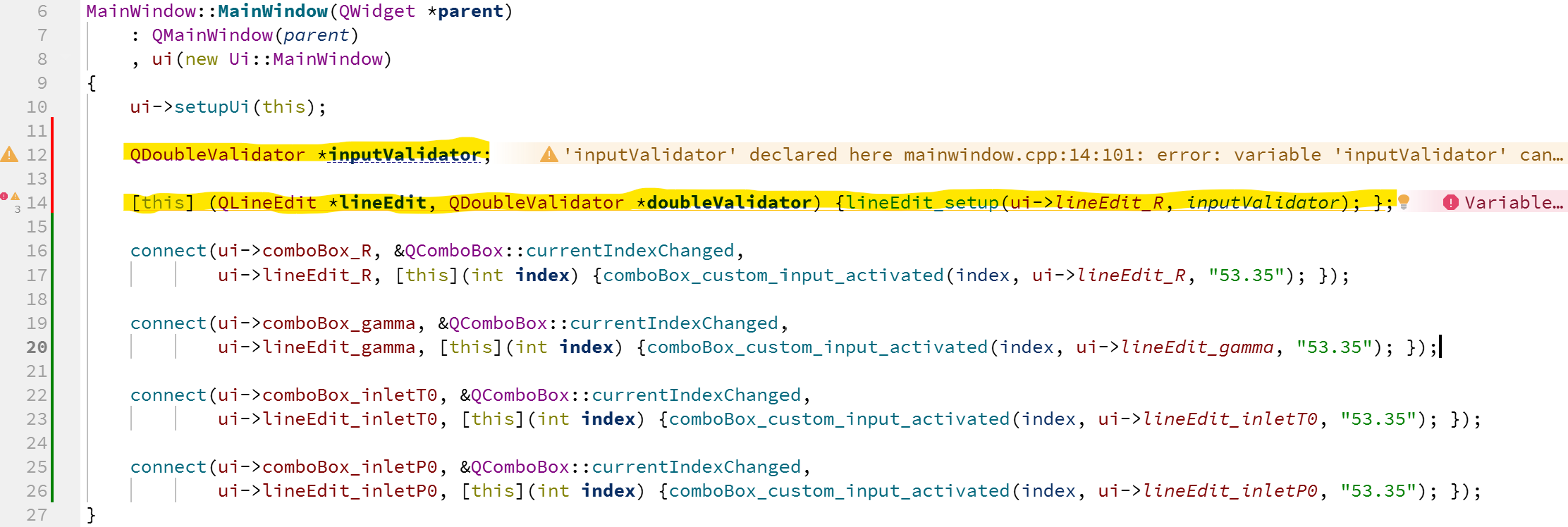
Thank you again for your time and assistance.
-
Thank you both so much for your help, I was able to implement the custom function that took care of the logic, and use the lambda functions to call said custom function. It works like a charm! I also removed the automatically generated slots created by Qt Creator. I will be using custom connect statements from now on. I do have one more question however:
In my code, I initialize the user input boxes (the lineEdits) to be readonly(true) and with a background color. However, I have to do this for as many lineEdits that I have in the GUI, which gets very repetitive. I was hoping to refactor this into something sleeker and more robust, so I created a function:
void MainWindow::lineEdit_setup(QLineEdit *lineEdit, QDoubleValidator *doubleValidator)
{
    lineEdit->setReadOnly(true);
    lineEdit->setStyleSheet("background-color: #636363; color: #D6D6D6");
    lineEdit->setValidator(doubleValidator);
}
However, I wanted to implement a lambda function similar to how you suggested, that uses the function defined above, where I can simply call the lambda for each lineEdit and pass in the lineEdit widget and validator into the lineEdit_setup function.
QDoubleValidator *inputValidator;

    [this] (QLineEdit *lineEdit, QDoubleValidator *doubleValidator) {lineEdit_setup(ui->lineEdit_R, inputValidator); };
For some reason, when I set it up this way, I get this:
mainwindow.cpp:14:101: Variable 'inputValidator' cannot be implicitly captured in a lambda with no capture-default specified (fixes available)
mainwindow.cpp:12:23: 'inputValidator' declared here
mainwindow.cpp:14:5: lambda expression begins here
Here is a better look at the setup code for reference
Thank you again for your time and assistance.
@lukester88
For the initialisations of your line edits you neither need nor want to use any lambda. You are over-thinking/using. You want simply to call the function you have written, once for each line edit you want initialised, just as you callconnect()once for each. You also need to create theQDoubleValidatorinstance:lineEdit_setup(ui->lineEdit_R, new QDoubleValidator(ui->lineEdit_R)); lineEdit_setup(ui->lineEdit_gamma, new QDoubleValidator(ui->lineEdit_gamma)); ...(Or you could push the creation of the validator down into
lineEdit_setup(QLineEdit *lineEdit)instead of passing it as a paremeter.)A lambda is an anonymous function: it is effectively the same as writing an actual function definition. Note that the lambda itself is a definition not a call. You use it where you need to pass a (reference to a) function to something else. For example,
connect()accepts a reference to a function as a parameter for each of the signal and slot objects. That would normally be a reference to a defined function, we can also pass it a reference to an "anonymous" function by passing a lambda. -
BTW, I just thought of something: You don't need to change the style sheet every time. Here is an example from the Qt documentation:
QLineEdit { color: red }
QLineEdit[readOnly="true"] { color: gray }
Just by setting readOnly to true or false you should get different stylings.
-
BTW, I just thought of something: You don't need to change the style sheet every time. Here is an example from the Qt documentation:
QLineEdit { color: red }
QLineEdit[readOnly="true"] { color: gray }
Just by setting readOnly to true or false you should get different stylings.
@SimonSchroeder Ahh ok that's much easier than what I am doing now. Thank you!
-
L lukester88 has marked this topic as solved
