
Qt Widgets or Qt Quick/QML for this application?
-
Hi,
I need a framework for my new project. I would like to use Qt for this, but I can not figure out if to use Qt Widget or a Qt Quick/QML based GUI.
It will be an audio application, somewhat like this:
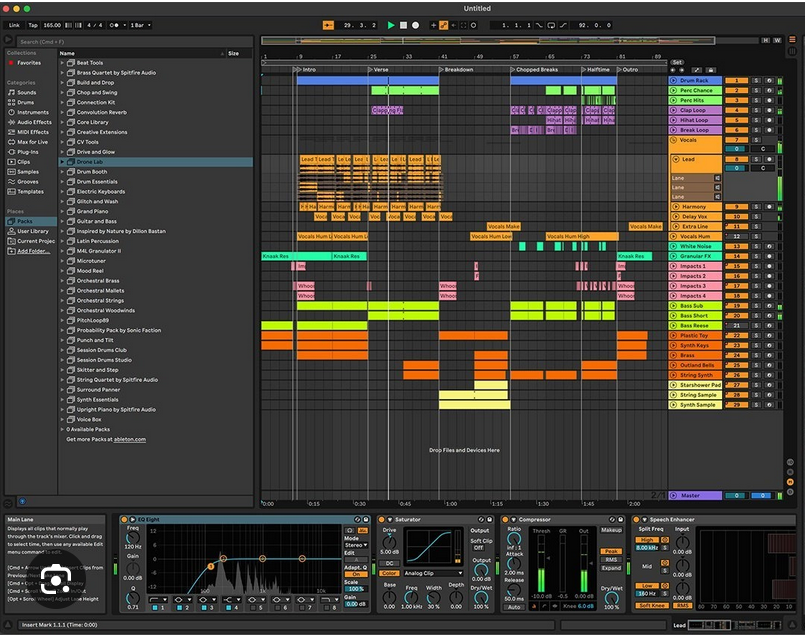
Important features:
1 - several panes that can be changed in size, docked, undocked etc.
2 - big time view/edit window that should scroll and zoom fast (and update real time)
3 - lots of knobs, sliders envelop editors etc arranged in control panels (lower part of picture) and that update in real time
4 - it should be possible that users can define such control panels
5 - lots of spectrograms that update in real time (not shown in picture above)
6 - modern look and feel, lots of animated knobs, sliders etc
7 - I would like that (at least the control panels) can run on tablets tooI have experience with Qt Widgets. I think I can do this all with Qt Widgets. But it will probable not be fast enough because I really like to have a lot of stuff that updates real time.
I have no experience with Qt Quick/QML. Will it be suitable for this? Is it faster because of GPU support? Is Qt Quick/QML more handy because I want users to be able to define control panels? Can it handle pane resizing, docking and undocking?So what to do?
- all Qt Widgets?
- all Qt Quick/QML?
- combination?
Any help and advise is very welcome.
-
For your use case QML is the right call. Real-time spectrograms, animated controls, zooming waveform views — that's exactly what the GPU-accelerated scene graph is built for. Tablet support comes for free, and is greatly reduced for QWidgets. User-definable panels are a natural fit too, you can load QML components dynamically at runtime via
LoaderandQt.createComponent.Since you already know Widgets,
QQuickWidgetlets you embed QML into an existing Widget hierarchy. That's a useful stepping stone — you can start with a Widgets shell and progressively replace parts with QML, rather than rewriting everything at once, if you already have some useable QWidgets, or want to stick with at least some stuff you're already familiar with.IIRC QML does not natively have Docking support, compared to QWidgets, but take a look at KDDockWidgets by KDAB. It's GPL, commercial license available from KDAB. Used in production by NVIDIA among others, so it's not a toy project.
For the heavy real-time views (spectrogram, waveform) I'd skip QML properties entirely and go straight to
QSGNode— gives you full GPU control with no overhead.So: pure QML + KDDockWidgets, no Widgets needed. But if the learning curve feels steep,
QQuickWidgetgives you a smooth migration path. -
For your use case QML is the right call. Real-time spectrograms, animated controls, zooming waveform views — that's exactly what the GPU-accelerated scene graph is built for. Tablet support comes for free, and is greatly reduced for QWidgets. User-definable panels are a natural fit too, you can load QML components dynamically at runtime via
LoaderandQt.createComponent.Since you already know Widgets,
QQuickWidgetlets you embed QML into an existing Widget hierarchy. That's a useful stepping stone — you can start with a Widgets shell and progressively replace parts with QML, rather than rewriting everything at once, if you already have some useable QWidgets, or want to stick with at least some stuff you're already familiar with.IIRC QML does not natively have Docking support, compared to QWidgets, but take a look at KDDockWidgets by KDAB. It's GPL, commercial license available from KDAB. Used in production by NVIDIA among others, so it's not a toy project.
For the heavy real-time views (spectrogram, waveform) I'd skip QML properties entirely and go straight to
QSGNode— gives you full GPU control with no overhead.So: pure QML + KDDockWidgets, no Widgets needed. But if the learning curve feels steep,
QQuickWidgetgives you a smooth migration path. -
Thanks.
I studied QML a bit more, plus the OSG stuff. Very interesting and I think the way to go for me. But I will have to do a lot of learning here ;-)
@Simmania said in Qt Widgets or Qt Quick/QML for this application?:
plus the OSG stuff
This might be a misunderstanding. The Qt Quick 2 scene graph isn't OpenSceneGraph.
-
@Simmania said in Qt Widgets or Qt Quick/QML for this application?:
plus the OSG stuff
This might be a misunderstanding. The Qt Quick 2 scene graph isn't OpenSceneGraph.
@jeremy_k said in Qt Widgets or Qt Quick/QML for this application?:
@Simmania said in Qt Widgets or Qt Quick/QML for this application?:
plus the OSG stuff
This might be a misunderstanding. The Qt Quick 2 scene graph isn't OpenSceneGraph.
Sorry, I ment the QSG.


