
QPushButton->setMenu(QMenu) transparent removal not working
-
Hi,
We have migrated Qt4.8.7 to Qt5.15.12 along with C++, we are facing on interface level issues.
Here is the details:
import sys
from PyQt5.QtWidgets import *
from PyQt5.QtWidgets import *
from PyQt5 import QtCore, QtGui
from PyQt5.QtGui import *
from PyQt5.QtCore import *
import sys
QApplication, QWidget, QVBoxLayout, QPushButton, QHBoxLayoutapp = QApplication(sys.argv)
Main container to hold both variations side-by-side
main_window = QWidget()
main_window.setWindowTitle("setContentsMargins Comparison")setting geometry
main_window.setGeometry(100, 100, 650, 400)
main_layout = QHBoxLayout(main_window)--- PANEL 1: WITH DEFAULT MARGINS ---
widget_with_margins = QWidget()
widget_with_margins.setStyleSheet("background-color: #333; border: 5px solid #ff4444; margin: 0.5px; border-top-left-radius: 20px; border-bottom-left-radius: 20px; border-right-color: #808080 ")
layout1 = QHBoxLayout(widget_with_margins)Leaving margins at default!
a1 = QPushButton("Button A1")
font = a1.font()
font.setBold(True)
a1.setFont(font)
layout1.addWidget(a1)
a2 = QPushButton("Button A2")
layout1.addWidget(a2)menu = QMenu()
for i in range(0, 24):
menu.addAction(str(i))
a2.setMenu(menu)menu.setContentsMargins(98, 16, 0, 16)
menu.setStyleSheet(
"QMenu {"
"padding: 0;"
"margin: 0;"
"background: rgba(215, 215, 215, 0);;"
"}"
"QMenu::item {"
"width: 30px;"
"height: 16px;"
# "min-width: 60px;"
"font-size: 15px;"
"font-weight: bold;"
"border: 0;"
"border-radius: 0;"
"border-left: 2px solid #ff4444;"
"background-color: white;"
"margin: 0;"
"padding: 6px 11px 2px 14px;"
"}"
"QMenu::item:selected {"
"background-color: green ;"
"}"
)menu is not displaying as expected,
Expecting is: the contents of the hours menu moving left to the 98px, and starts displaying from there, moving the contents menu is working as expected. but the background color is showing light grey, that is not expecting,
from left pixels (0 to 98), need to avoid/remove that background color for that used1. Add the mandatory Qt 5 transparency attribute flag
menu.setAttribute(Qt.WA_TranslucentBackground, True)
// 2. Strips title bars and drop shadows that cause black rendering blocks
pMenu->setWindowFlags(pMenu->windowFlags() | Qt::FramelessWindowHint | Qt::NoDropShadowWindowHint);But still, am seeing the same issue.
In short :
When we move the menu contents from 0th position to 98px position menu items are working as expected, but when it dragged from 0th to 98px position the background color is still visible it is fully opaque background.Even i tried with this option ( found in the internet )
In Qt, every widget goes through a one-time "polish" step the first time it's about to be shown. During polish, the style engine and the windowing system decide things like:
whether the top-level window backing this widget has an alpha channel (i.e. can be truly translucent), or
whether it gets an opaque framebuffer (which then forces the background to be a solid colour — usually the platform's default light grey).
Qt::WA_TranslucentBackground is read at that polish moment. If the attribute is already true when polish happens, Qt asks the compositor/EGL surface for an ARGB (32-bit, with alpha) surface — and transparency works. If the attribute is set after polish, the window has already been created as RGB (no alpha), and toggling the flag later does nothing visible — you keep seeing the grey panel underneath.For a QMenu the polish typically happens the first time it is popped up (or as soon as something like ensurePolished() / a size query is triggered). So the rule of thumb is:
Things that "polish too early" and trap you with an opaque surface:
Calling setMenu(...), addAction(...), setStyleSheet(...), sizeHint(), show(), popup() before setting WA_TranslucentBackground.
Reparenting the menu after it has already been shown once.
On embedded Linux/Wayland/EGLFS (your Zynq target), the compositor may not support per-pixel alpha at all for popups — in that case no flag order will help and you have to paint the gutter colour yourself (e.g. give the gutter the same colour as the underlying parent widget instead of relying on transparency).But still, the background color is visible if i update with specific color still it is Opaque ( stopping to view the background contents )
-
Hi,
please format code with the </> code formatting tags. Qt 5.15 is already EOL and there won't be any fixes going into this branch.
Better to update to Qt 6.8 or later right away. -
Thanks for the reply @Axel-Spoerl,
int main(int argc, char *argv[])
{
QApplication app(argc, argv);
QWidget win;
win.setWindowTitle("Margins test");
win.setGeometry(100, 100, 650, 400);QHBoxLayout *mainLay = new QHBoxLayout(&win); QWidget *w1 = new QWidget(); w1->setStyleSheet("background:#333; border:5px solid #ff4444; border-top-left-radius:20px; border-bottom-left-radius:20px;"); QHBoxLayout *lay1 = new QHBoxLayout(w1); QPushButton *btnA1 = new QPushButton("A1"); QPushButton *btnA2 = new QPushButton("A2"); lay1->addWidget(btnA1); lay1->addWidget(btnA2); QMenu *m = new QMenu(&win); for (int i = 0; i < 24; ++i) m->addAction(QString::number(i)); btnA2->setMenu(m); m->setAttribute(Qt::WA_TranslucentBackground); m->setWindowFlags(m->windowFlags() | Qt::FramelessWindowHint | Qt::NoDropShadowWindowHint); m->setStyleSheet("QMenu{background:transparent; padding:16px 0 16px 98px;} QMenu::item{width:30px; height:16px; background:white;} QMenu::item:selected{background:green;}"); QWidget *w2 = new QWidget(); w2->setStyleSheet("background:#333; border:5px solid #00c851;"); QVBoxLayout *lay2 = new QVBoxLayout(w2); lay2->setContentsMargins(244, 115, 0, 60); lay2->addWidget(new QPushButton("B1")); lay2->addWidget(new QPushButton("B2")); mainLay->addWidget(w1); mainLay->addWidget(w2); win.show(); return app.exec();}
We strictly adhere with Qt 5.15, for the time being not able to switch any higher versions.
-
If you want someone in the forum to copy and test your code, please format all of it correctly, not just a part.
We strictly adhere with Qt 5.15, for the time being not able to switch any higher versions.
Why is that? There is no technical reason or advantage in sticking to an EOL Version, where nothing will be fixed. Please share more details about why you think this the right thing to do.
Which operating system are you using?
-
Okay, Here am going to attaching the clean up code, along with the expected output and Actual Output.
Actual Output:
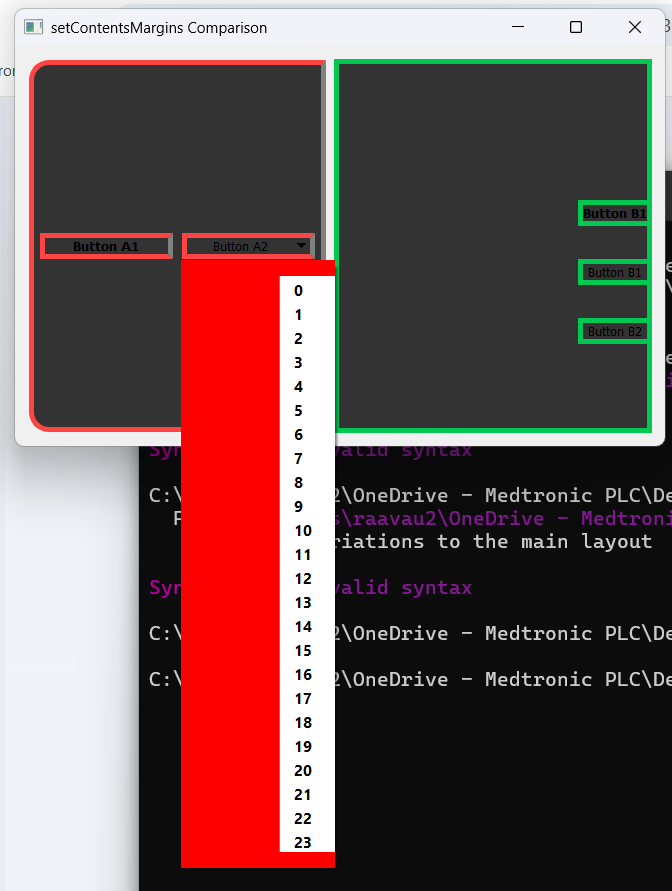
Expected Output:
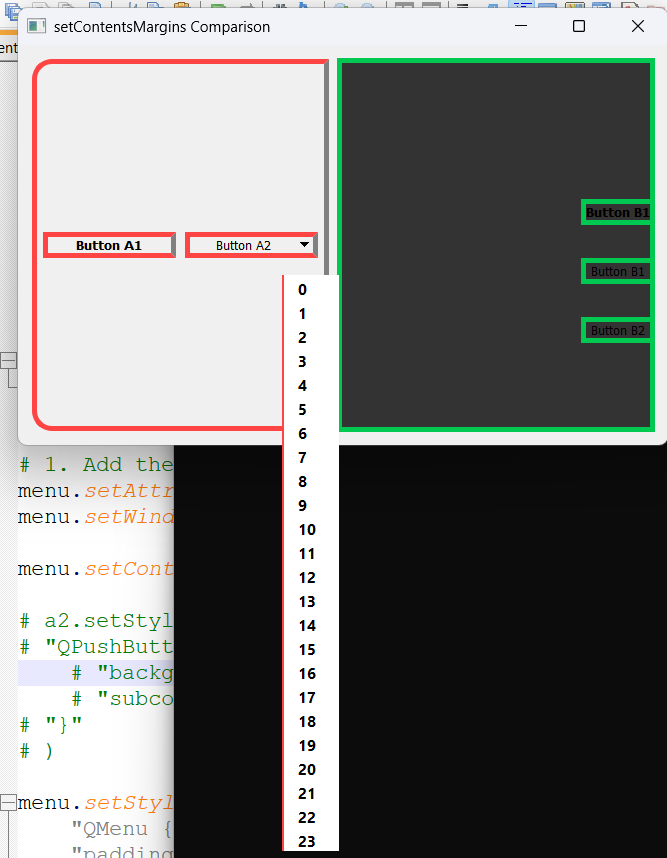
// Main container to hold both variations side-by-side
QWidget main_window;
main_window.setWindowTitle("setContentsMargins Comparison");
main_window.setGeometry(100, 100, 650, 400);

QHBoxLayout *main_layout = new QHBoxLayout(&main_window);

// --- PANEL 1: WITH DEFAULT MARGINS ---
QWidget *widget_with_margins = new QWidget();
widget_with_margins->setStyleSheet(
    "background-color: #333; "
    "border: 5px solid #ff4444; "
    "margin: 0.5px; "
    "border-top-left-radius: 20px; "
    "border-bottom-left-radius: 20px; "
    "border-right-color: #808080;"
);

QHBoxLayout *layout1 = new QHBoxLayout(widget_with_margins);
// Leaving margins at default!

QPushButton *a1 = new QPushButton("Button A1");
QFont font1 = a1->font();
font1.setBold(true);
a1->setFont(font1);
layout1->addWidget(a1);

QPushButton *a2 = new QPushButton("Button A2");
layout1->addWidget(a2);

QMenu *menu = new QMenu(&main_window);
for (int i = 0; i < 24; ++i) {
    menu->addAction(QString::number(i));
}
a2->setMenu(menu);

// C++ Window Management and Transparency Attributes
menu->setAttribute(Qt::WA_TranslucentBackground, true);
menu->setWindowFlags(menu->windowFlags() | Qt::FramelessWindowHint | Qt::NoDropShadowWindowHint);

// Note: Replaced setContentsMargins with pure QSS layout mechanics to avoid layout breakdown
menu->setStyleSheet(
    "QMenu {"
    "   background-color: transparent;"
    "   margin: 0px;"
    "   padding: 16px 0px 16px 98px;"
    "}"
    "QMenu::item {"
    "   width: 30px;"
    "   height: 16px;"
    "   font-size: 15px;"
    "   font-weight: bold;"
    "   border: 0;"
    "   border-radius: 0;"
    "   border-left: 1px solid #ff4444;"
    "   background-color: white;"
    "   margin: 0;"
    "   padding: 6px 11px 2px 14px;"
    "}"
    "QMenu::item:selected {"
    "   background-color: green;"
    "}"
);

a1->setStyleSheet("QPushButton:focus { outline: none; }");

// --- PANEL 2: ZERO MARGINS ---
QWidget *widget_no_margins = new QWidget();
widget_no_margins->setStyleSheet("background-color: #333; border: 5px solid #00c851;");

QVBoxLayout *layout2 = new QVBoxLayout(widget_no_margins);
layout2->setContentsMargins(240 + 4, 115, 0, 60); // (L, T, R, B)

QPushButton *b1 = new QPushButton("Button B1");
QFont font2 = b1->font();
font2.setBold(true);
b1->setFont(font2);

layout2->addWidget(b1);
layout2->addWidget(new QPushButton("Button B1"));
layout2->addWidget(new QPushButton("Button B2"));

// Add both variations to the main layout
main_layout->addWidget(widget_with_margins);
main_layout->addWidget(widget_no_margins);

main_window.show();
return app.exec();
}
In short: The Backgroung Menu Layout Window color not able to change tried with different approaches via setStyleSheet( boarder-color:) color changing , Even by adding setAttribute(Qt.WA_TranslucentBackground, true),
But still no use by default light gray area is appreaing ( need to avoid that grey color also it should be expected image) -
Think of like this :
@Axel-Spoerl
Pushbutton along with menu used for hours selection with that i decided the menu contents should be present form the defined pixles, then when i click on button menu is populaitng along with the contents in the expected pixles position, but the problem is the gutter space is filling with grey color..!
how to get rid of it. gutter space should be clean ( fully transparent it should not be opaque )
Gutter Means: From left corner menu indicator i.e. 0px to upto 98px dragging between this space is occupied. need to remove that spaceI am developing a Qt/PyQt application with a QPushButton that opens a QMenu for hour selection.
Requirement:
- The menu contents (actions/widgets) must appear aligned from a specific pixel position inside the popup menu.
- Currently, the content positioning works correctly.
- However, the unused gutter/margin area of the QMenu is getting painted with a default grey opaque background.
Problem:
- The gutter space should NOT display any grey background.
- That unused area must be fully transparent.
- The popup should visually blend with the parent/background without any opaque painting artifacts.
Need:
-
Root-cause analysis of why QMenu paints the gutter/background.
-
Proper Qt/PyQt solution to make the gutter area completely transparent.
-
Correct use of:
- Qt::WA_TranslucentBackground
- QMenu styling
- QWidgetAction / custom delegates if needed
- paintEvent override if required
-
Robust cross-platform approach (Windows/Linux).
-
Explain whether the issue comes from:
- native window painting,
- style engine,
- viewport background,
- menu frame,
- action area rendering,
- or compositor limitations.
Important:
- Do NOT provide generic stylesheet-only answers unless technically valid.
- Explain internal Qt painting behavior.
- Include debugging techniques to identify which layer paints the grey region.
-
To make one thing clear: People answering questions like yours on the forum do it in their free time. I am a Qt employee, but I handle the forum voluntarily outside my working hours.
You are stating your requirements very clearly, including the answers that you do NOT want to get. The wording looks like AI generated.
On the other hand, you fail to comply with the simplest rules: Format your code correctly, answer all the questions from those who offer you help (as for me: hand typed).- Your code is not formatted correctly (first part still unformatted, dangling unformatted
}at the end) and it doesn't compile. - You have not answered my question why you are not willing to upgrade to Qt 6. That's an important question: It's easier to help you migrate to a recent, supported Qt version than to help you work around a bug in incomplete, ill-formatted code that doesn't compile.
Especially the "Important" section that instructs me how to deal with your issue in my free time, is slightly offensive.
To proceed here:
- Answer my remaining question
- Provide a minimal, compilable reproducer as a code snippet here in the forum
- Write by yourself, do not use an AI agent to instruct human beings volunteering to help
- Your code is not formatted correctly (first part still unformatted, dangling unformatted
-
Think of like this :
@Axel-Spoerl
Pushbutton along with menu used for hours selection with that i decided the menu contents should be present form the defined pixles, then when i click on button menu is populaitng along with the contents in the expected pixles position, but the problem is the gutter space is filling with grey color..!
how to get rid of it. gutter space should be clean ( fully transparent it should not be opaque )
Gutter Means: From left corner menu indicator i.e. 0px to upto 98px dragging between this space is occupied. need to remove that spaceI am developing a Qt/PyQt application with a QPushButton that opens a QMenu for hour selection.
Requirement:
- The menu contents (actions/widgets) must appear aligned from a specific pixel position inside the popup menu.
- Currently, the content positioning works correctly.
- However, the unused gutter/margin area of the QMenu is getting painted with a default grey opaque background.
Problem:
- The gutter space should NOT display any grey background.
- That unused area must be fully transparent.
- The popup should visually blend with the parent/background without any opaque painting artifacts.
Need:
-
Root-cause analysis of why QMenu paints the gutter/background.
-
Proper Qt/PyQt solution to make the gutter area completely transparent.
-
Correct use of:
- Qt::WA_TranslucentBackground
- QMenu styling
- QWidgetAction / custom delegates if needed
- paintEvent override if required
-
Robust cross-platform approach (Windows/Linux).
-
Explain whether the issue comes from:
- native window painting,
- style engine,
- viewport background,
- menu frame,
- action area rendering,
- or compositor limitations.
Important:
- Do NOT provide generic stylesheet-only answers unless technically valid.
- Explain internal Qt painting behavior.
- Include debugging techniques to identify which layer paints the grey region.
@Narasimha said in QPushButton->setMenu(QMenu) transparent removal not working:
Important:
- Explain internal Qt painting behavior.
To add to @Axel-Spoerl :
I mean regarding this point, you could look it up yourself, if you care...
Qt has a very nice and detailed documentation.Basically you demand a final and ready-to-use solution while refusing to do little work yourself. And you also did not mention if it worked with Qt 4.8 before.
Edit:
Also, your code compared to your expected output does not make any sense...
You apply a background-color
#333to both of your widgets A and B while your expected result shows a light gray background color for the left widget (assuming widget A).
That makes me doubt that you've really taken the time to seriously look into the code or the problem.

