
qwindowgeometry not working as command line option
-
Whether I try to open Qt Creator or other tools (
linguist, for example) passing an argument-qwindowgeometryor justgeometryisn't working for me. I am running Linux Ubuntu 24.04 on Xorg with GNOME, and this is with Qt Creator 19 and Linguist from Qt 6.11.0.I would like to open
linguistmaximized, but it doesn't seem to remember from the previous session that I had maximized the window, so I try setting thegeometryto a size which is just a little smaller than the actual screen dimensions -- which on my laptop are 1920x1200 pixels or 16:10 aspect ratio. Here are two screenshots which illustrate the problem:
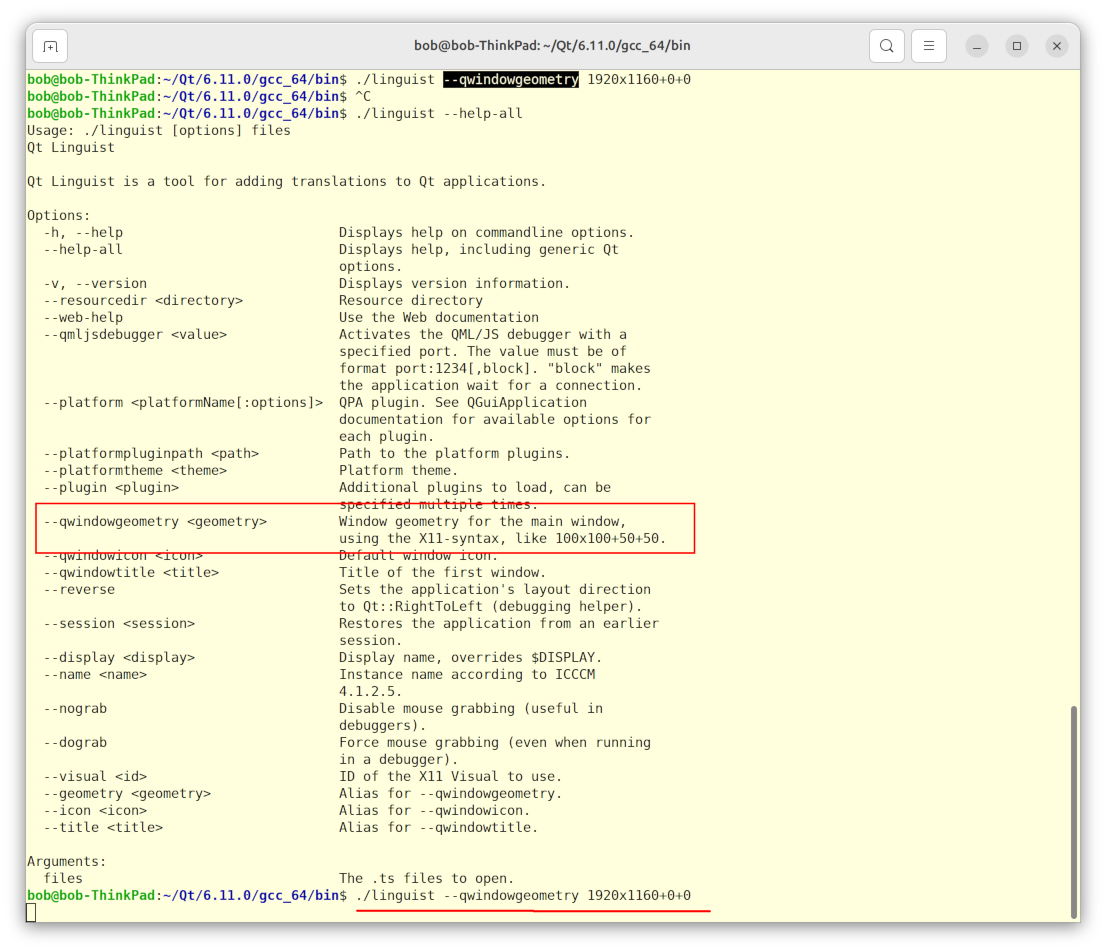
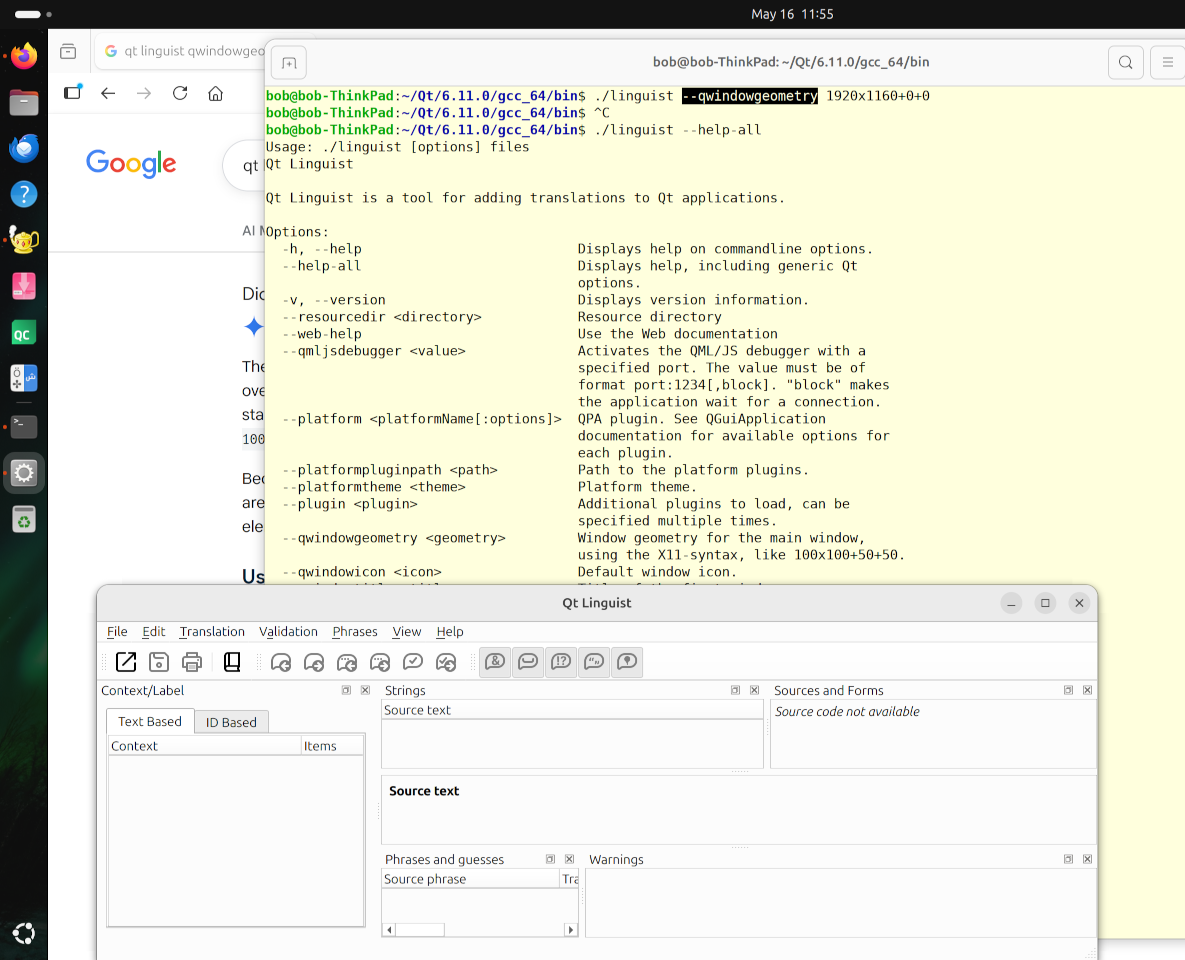
As you can see from the second screenshot, thelinguistwindow opens at the bottom left area of the screen and is nowhere near filling out the size requested.Do I need to set some environment variable to get this to work? Or is it just ignoring the value, in spite of the command line help saying otherwise?
-
Whether I try to open Qt Creator or other tools (
linguist, for example) passing an argument-qwindowgeometryor justgeometryisn't working for me. I am running Linux Ubuntu 24.04 on Xorg with GNOME, and this is with Qt Creator 19 and Linguist from Qt 6.11.0.I would like to open
linguistmaximized, but it doesn't seem to remember from the previous session that I had maximized the window, so I try setting thegeometryto a size which is just a little smaller than the actual screen dimensions -- which on my laptop are 1920x1200 pixels or 16:10 aspect ratio. Here are two screenshots which illustrate the problem:
As you can see from the second screenshot, thelinguistwindow opens at the bottom left area of the screen and is nowhere near filling out the size requested.Do I need to set some environment variable to get this to work? Or is it just ignoring the value, in spite of the command line help saying otherwise?
@Robert-Hairgrove said in qwindowgeometry not working as command line option:
an argument
-qwindowgeometryLet's start with: the help tells you the argument is
--qwindowgeometry. So either you are not passing that or you have told us incorrectly what you are passing? -
Please look at the bottom of the first screenshot ... this is what I did (command is underlined in red).
-
If you were using Wayland (default for Ubuntu GNOME) I would not be surprised. If you are sure you are using Xorg then that is not applicable.
1920 wide for a window seems too large for your desktop. FWIW why don't you test it with, say, 1300x900+100+100 so you know whether it is ignoring or respecting anything? That is what I would do. Having said that I don't know what the problem is, just suggesting basic stuff.
-
If you were using Wayland (default for Ubuntu GNOME) I would not be surprised. If you are sure you are using Xorg then that is not applicable.
1920 wide for a window seems too large for your desktop. FWIW why don't you test it with, say, 1300x900+100+100 so you know whether it is ignoring or respecting anything? That is what I would do. Having said that I don't know what the problem is, just suggesting basic stuff.
-
@JonB When I enter this in the terminal:
echo $XDG_SESSION_TYPEit says:
x11I think I tried the suggestion to use smaller coordinates, but it didn't matter, if I remember correctly.
@Robert-Hairgrove
Fair enough. If it were me I would try a quick one line Qt GUI program of my own to see whether it respects--qwindowgeometry(that's one of the command line arguments any Qt program picks up), plus save/restore if you're wanting to check that, to see where you start from.
