
CPack. qt.qpa.plugin: Could not find the Qt platform plugin "wayland" in ""
-
I can run my app by name (type this in console)
"$HOME/Ubuntu_Wayland_Build_Qt_widgets/example/build-host/myexample"
But I want to have the app inside .deb pack so I use CPack. I can install itsudo dpkg -i "$HOME/Ubuntu_Wayland_Build_Qt_widgets/example/build-host/myexample-0.1.2-Linux.deb"And call my app
$ /opt/myapp/bin/myexample
qt.qpa.plugin: Could not find the Qt platform plugin "wayland" in ""
qt.qpa.plugin: Could not find the Qt platform plugin "xcb" in ""
This application failed to start because no Qt platform plugin could be initialized. Reinstalling the application may fix this problem.

Aborted                    (core dumped) /opt/myapp/bin/myexample
I tried to apply tricks with LD_LIBRARY_PATH without success
$ LD_LIBRARY_PATH="/opt/myapp/lib/" /opt/myapp/bin/myexample
qt.qpa.plugin: Could not find the Qt platform plugin "wayland" in ""
qt.qpa.plugin: Could not find the Qt platform plugin "xcb" in ""
This application failed to start because no Qt platform plugin could be initialized. Reinstalling the application may fix this problem.

Aborted                    (core dumped) LD_LIBRARY_PATH="/opt/myapp/lib/" /opt/myapp/bin/myexample
How to open my app from .deb?
This is what inside my .deb
$ dpkg-deb -c "$HOME/Ubuntu_Wayland_Build_Qt_widgets/example/build-host/myexample-0.1.2-Linux.deb"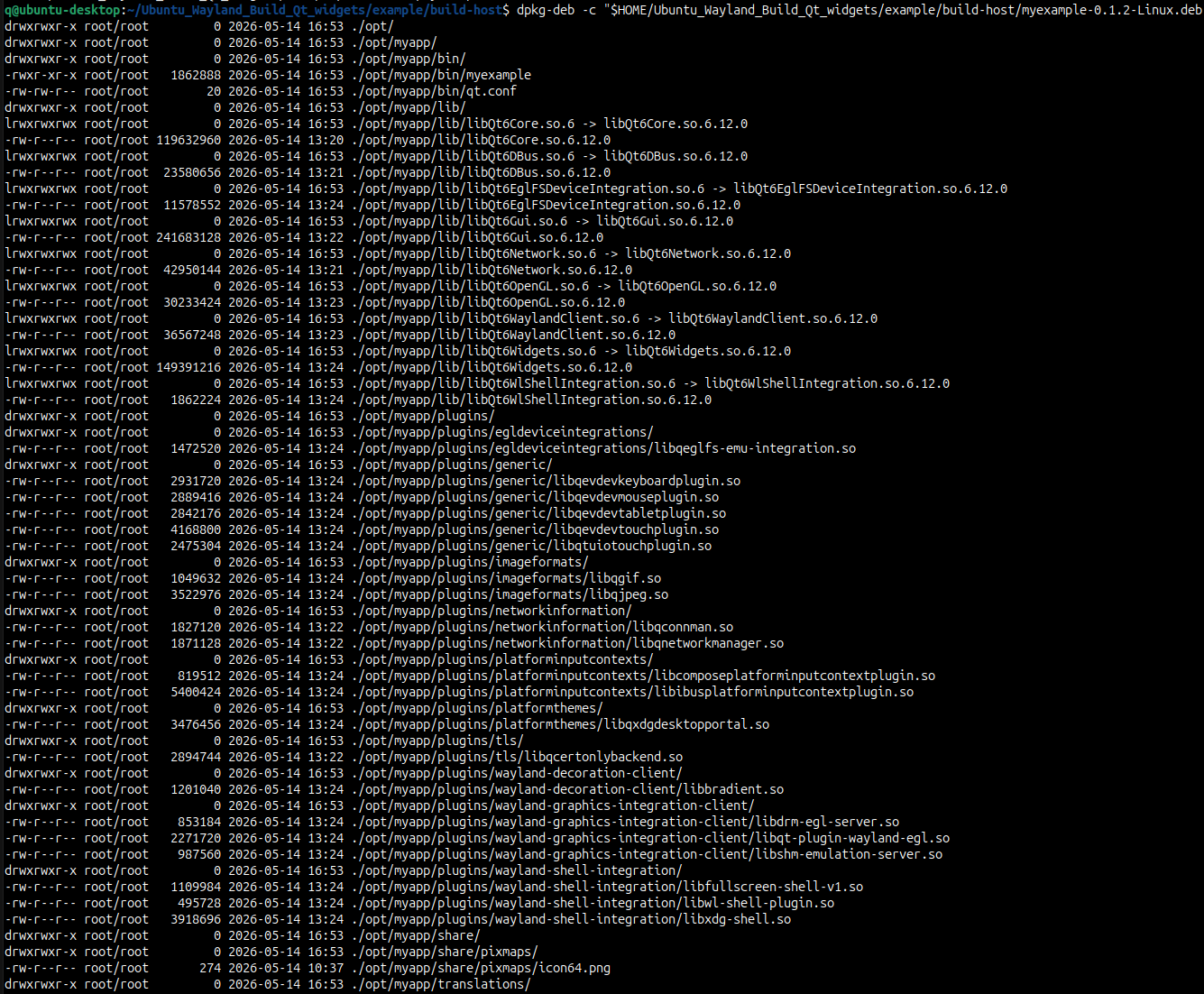
This is my repo (copy). I use last Qt version from git dev branch
$ git log --oneline -1 e5a39cd6 (HEAD -> dev, origin/dev, origin/HEAD) Fix icu provisioning for Debian 11 -
I can run my app by name (type this in console)
"$HOME/Ubuntu_Wayland_Build_Qt_widgets/example/build-host/myexample"
But I want to have the app inside .deb pack so I use CPack. I can install itsudo dpkg -i "$HOME/Ubuntu_Wayland_Build_Qt_widgets/example/build-host/myexample-0.1.2-Linux.deb"And call my app
$ /opt/myapp/bin/myexample
qt.qpa.plugin: Could not find the Qt platform plugin "wayland" in ""
qt.qpa.plugin: Could not find the Qt platform plugin "xcb" in ""
This application failed to start because no Qt platform plugin could be initialized. Reinstalling the application may fix this problem.

Aborted                    (core dumped) /opt/myapp/bin/myexample
I tried to apply tricks with LD_LIBRARY_PATH without success
$ LD_LIBRARY_PATH="/opt/myapp/lib/" /opt/myapp/bin/myexample
qt.qpa.plugin: Could not find the Qt platform plugin "wayland" in ""
qt.qpa.plugin: Could not find the Qt platform plugin "xcb" in ""
This application failed to start because no Qt platform plugin could be initialized. Reinstalling the application may fix this problem.

Aborted                    (core dumped) LD_LIBRARY_PATH="/opt/myapp/lib/" /opt/myapp/bin/myexample
How to open my app from .deb?
This is what inside my .deb
$ dpkg-deb -c "$HOME/Ubuntu_Wayland_Build_Qt_widgets/example/build-host/myexample-0.1.2-Linux.deb"This is my repo (copy). I use last Qt version from git dev branch
$ git log --oneline -1 e5a39cd6 (HEAD -> dev, origin/dev, origin/HEAD) Fix icu provisioning for Debian 11@DungeonLords
I don't know anything about your situation with "app"s and "deb packs". But for further diagnostics as to where exactly Qt is looking for what when it issues those "Could not find the Qt platform plugin" messages you might get some extra information if you firstexport QT_DEBUG_PLUGINS=1in the shell before running your program.
-
@DungeonLords
I don't know anything about your situation with "app"s and "deb packs". But for further diagnostics as to where exactly Qt is looking for what when it issues those "Could not find the Qt platform plugin" messages you might get some extra information if you firstexport QT_DEBUG_PLUGINS=1in the shell before running your program.
-
@DungeonLords said in CPack. qt.qpa.plugin: Could not find the Qt platform plugin "wayland" in "":
@JonB this doesn't add any new message. Or probably I use this wrong way?
Hi,
How exactly are you using it ?
-
This looks more like a Qt deployment issue than a CPack problem itself. The reason it works from your build directory is probably because Qt can still see the plugin folders there. But once installed from the .deb, it no longer knows where the wayland and xcb platform plugins are located.
The key part is: Could not find the Qt platform plugin "wayland" in ""
That empty path usually means no Qt plugin path is being picked up at runtime. So even though your libraries may exist under /opt/myapp/lib, the actual Qt plugin directories (platforms/, Wayland plugins, xcb plugins, etc.) are probably missing from the package or not being referenced correctly.
a lot of people avoid packaging Qt manually with CPack for exactly this reason and use tools like linuxdeployqt, because it automatically bundles the required Qt plugins and fixes paths. -
I can run my app by name (type this in console)
"$HOME/Ubuntu_Wayland_Build_Qt_widgets/example/build-host/myexample"
But I want to have the app inside .deb pack so I use CPack. I can install itsudo dpkg -i "$HOME/Ubuntu_Wayland_Build_Qt_widgets/example/build-host/myexample-0.1.2-Linux.deb"And call my app
$ /opt/myapp/bin/myexample
qt.qpa.plugin: Could not find the Qt platform plugin "wayland" in ""
qt.qpa.plugin: Could not find the Qt platform plugin "xcb" in ""
This application failed to start because no Qt platform plugin could be initialized. Reinstalling the application may fix this problem.

Aborted                    (core dumped) /opt/myapp/bin/myexample
I tried to apply tricks with LD_LIBRARY_PATH without success
$ LD_LIBRARY_PATH="/opt/myapp/lib/" /opt/myapp/bin/myexample
qt.qpa.plugin: Could not find the Qt platform plugin "wayland" in ""
qt.qpa.plugin: Could not find the Qt platform plugin "xcb" in ""
This application failed to start because no Qt platform plugin could be initialized. Reinstalling the application may fix this problem.

Aborted                    (core dumped) LD_LIBRARY_PATH="/opt/myapp/lib/" /opt/myapp/bin/myexample
How to open my app from .deb?
This is what inside my .deb
$ dpkg-deb -c "$HOME/Ubuntu_Wayland_Build_Qt_widgets/example/build-host/myexample-0.1.2-Linux.deb"This is my repo (copy). I use last Qt version from git dev branch
$ git log --oneline -1 e5a39cd6 (HEAD -> dev, origin/dev, origin/HEAD) Fix icu provisioning for Debian 11@DungeonLords said in CPack. qt.qpa.plugin: Could not find the Qt platform plugin "wayland" in "":
I can run my app by name (type this in console)
"$HOME/Ubuntu_Wayland_Build_Qt_widgets/example/build-host/myexample"
But I want to have the app inside .deb pack so I use CPack. I can install itsudo dpkg -i "$HOME/Ubuntu_Wayland_Build_Qt_widgets/example/build-host/myexample-0.1.2-Linux.deb"And call my app
$ /opt/myapp/bin/myexample
qt.qpa.plugin: Could not find the Qt platform plugin "wayland" in ""
qt.qpa.plugin: Could not find the Qt platform plugin "xcb" in ""
This application failed to start because no Qt platform plugin could be initialized. Reinstalling the application may fix this problem.

Aborted                    (core dumped) /opt/myapp/bin/myexample
I tried to apply tricks with LD_LIBRARY_PATH without success
$ LD_LIBRARY_PATH="/opt/myapp/lib/" /opt/myapp/bin/myexample
qt.qpa.plugin: Could not find the Qt platform plugin "wayland" in ""
qt.qpa.plugin: Could not find the Qt platform plugin "xcb" in ""
This application failed to start because no Qt platform plugin could be initialized. Reinstalling the application may fix this problem.

Aborted                    (core dumped) LD_LIBRARY_PATH="/opt/myapp/lib/" /opt/myapp/bin/myexample
How to open my app from .deb?
This is what inside my .deb
$ dpkg-deb -c "$HOME/Ubuntu_Wayland_Build_Qt_widgets/example/build-host/myexample-0.1.2-Linux.deb"This is my repo (copy). I use last Qt version from git dev branch
$ git log --oneline -1 e5a39cd6 (HEAD -> dev, origin/dev, origin/HEAD) Fix icu provisioning for Debian 11@DungeonLords said in CPack. qt.qpa.plugin: Could not find the Qt platform plugin "wayland" in "":
I can run my app by name (type this in console)
"$HOME/Ubuntu_Wayland_Build_Qt_widgets/example/build-host/myexample"
But I want to have the app inside .deb pack so I use CPack. I can install itsudo dpkg -i "$HOME/Ubuntu_Wayland_Build_Qt_widgets/example/build-host/myexample-0.1.2-Linux.deb"And call my app
$ /opt/myapp/bin/myexample
qt.qpa.plugin: Could not find the Qt platform plugin "wayland" in ""
qt.qpa.plugin: Could not find the Qt platform plugin "xcb" in ""
This application failed to start because no Qt platform plugin could be initialized. Reinstalling the application may fix this problem.

Aborted                    (core dumped) /opt/myapp/bin/myexample
I tried to apply tricks with LD_LIBRARY_PATH without success
$ LD_LIBRARY_PATH="/opt/myapp/lib/" /opt/myapp/bin/myexample
qt.qpa.plugin: Could not find the Qt platform plugin "wayland" in ""
qt.qpa.plugin: Could not find the Qt platform plugin "xcb" in ""
This application failed to start because no Qt platform plugin could be initialized. Reinstalling the application may fix this problem.

Aborted                    (core dumped) LD_LIBRARY_PATH="/opt/myapp/lib/" /opt/myapp/bin/myexample
How to open my app from .deb?
This is what inside my .deb
$ dpkg-deb -c "$HOME/Ubuntu_Wayland_Build_Qt_widgets/example/build-host/myexample-0.1.2-Linux.deb"This is my repo (copy). I use last Qt version from git dev branch
$ git log --oneline -1
e5a39cd6 (HEAD -> dev, origin/dev, origin/HEAD) Fix icu provisioning for Debian 11
From your picture I see there're truly no platform plugins. Usually they are under
/opt/myapp/plugins/platformsbut I didn't see that directory? -
You might also want to check the Qt cmake deployment guide.


