
CPack. qt.qpa.plugin: Could not find the Qt platform plugin "wayland" in ""
-
I can run my app by name (type this in console)
"$HOME/Ubuntu_Wayland_Build_Qt_widgets/example/build-host/myexample"
But I want to have the app inside .deb pack so I use CPack. I can install itsudo dpkg -i "$HOME/Ubuntu_Wayland_Build_Qt_widgets/example/build-host/myexample-0.1.2-Linux.deb"And call my app
$ /opt/myapp/bin/myexample
qt.qpa.plugin: Could not find the Qt platform plugin "wayland" in ""
qt.qpa.plugin: Could not find the Qt platform plugin "xcb" in ""
This application failed to start because no Qt platform plugin could be initialized. Reinstalling the application may fix this problem.

Aborted                    (core dumped) /opt/myapp/bin/myexample
I tried to apply tricks with LD_LIBRARY_PATH without success
$ LD_LIBRARY_PATH="/opt/myapp/lib/" /opt/myapp/bin/myexample
qt.qpa.plugin: Could not find the Qt platform plugin "wayland" in ""
qt.qpa.plugin: Could not find the Qt platform plugin "xcb" in ""
This application failed to start because no Qt platform plugin could be initialized. Reinstalling the application may fix this problem.

Aborted                    (core dumped) LD_LIBRARY_PATH="/opt/myapp/lib/" /opt/myapp/bin/myexample
How to open my app from .deb?
This is what inside my .deb
$ dpkg-deb -c "$HOME/Ubuntu_Wayland_Build_Qt_widgets/example/build-host/myexample-0.1.2-Linux.deb"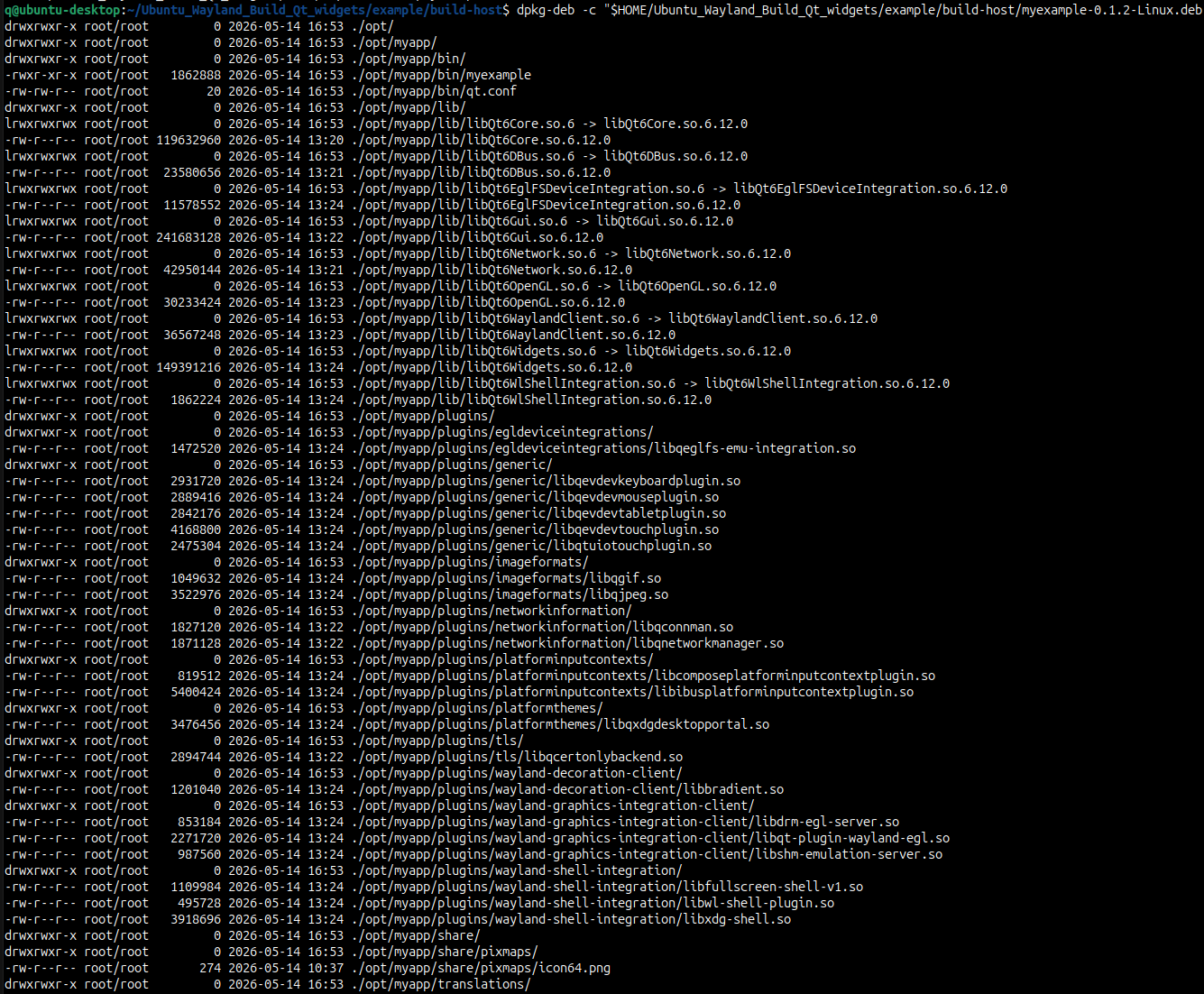
This is my repo (copy). I use last Qt version from git dev branch
$ git log --oneline -1 e5a39cd6 (HEAD -> dev, origin/dev, origin/HEAD) Fix icu provisioning for Debian 11 -
I can run my app by name (type this in console)
"$HOME/Ubuntu_Wayland_Build_Qt_widgets/example/build-host/myexample"
But I want to have the app inside .deb pack so I use CPack. I can install itsudo dpkg -i "$HOME/Ubuntu_Wayland_Build_Qt_widgets/example/build-host/myexample-0.1.2-Linux.deb"And call my app
$ /opt/myapp/bin/myexample
qt.qpa.plugin: Could not find the Qt platform plugin "wayland" in ""
qt.qpa.plugin: Could not find the Qt platform plugin "xcb" in ""
This application failed to start because no Qt platform plugin could be initialized. Reinstalling the application may fix this problem.

Aborted                    (core dumped) /opt/myapp/bin/myexample
I tried to apply tricks with LD_LIBRARY_PATH without success
$ LD_LIBRARY_PATH="/opt/myapp/lib/" /opt/myapp/bin/myexample
qt.qpa.plugin: Could not find the Qt platform plugin "wayland" in ""
qt.qpa.plugin: Could not find the Qt platform plugin "xcb" in ""
This application failed to start because no Qt platform plugin could be initialized. Reinstalling the application may fix this problem.

Aborted                    (core dumped) LD_LIBRARY_PATH="/opt/myapp/lib/" /opt/myapp/bin/myexample
How to open my app from .deb?
This is what inside my .deb
$ dpkg-deb -c "$HOME/Ubuntu_Wayland_Build_Qt_widgets/example/build-host/myexample-0.1.2-Linux.deb"This is my repo (copy). I use last Qt version from git dev branch
$ git log --oneline -1 e5a39cd6 (HEAD -> dev, origin/dev, origin/HEAD) Fix icu provisioning for Debian 11@DungeonLords
I don't know anything about your situation with "app"s and "deb packs". But for further diagnostics as to where exactly Qt is looking for what when it issues those "Could not find the Qt platform plugin" messages you might get some extra information if you firstexport QT_DEBUG_PLUGINS=1in the shell before running your program.
-
@DungeonLords
I don't know anything about your situation with "app"s and "deb packs". But for further diagnostics as to where exactly Qt is looking for what when it issues those "Could not find the Qt platform plugin" messages you might get some extra information if you firstexport QT_DEBUG_PLUGINS=1in the shell before running your program.
