

PySide6 QMenuBar Issue on MacOS
-
I developed a PySide6 app in VS Code on Windows and let GitHub Actions make MacOS executables. Everything works very well, except that the QMenuBar doesn't work on MacOS. It doesn't show all the actions/submenus. I don't know much about development for MacOS. Any advice most appreciated!
Code snippet:
class CustomMenuBar(QMenuBar):
    def __init__(self, view, app, experiment_controller):
        super().__init__()
        self.view = view
        self.app = app
        self.experiment_controller = experiment_controller
        file_menu = self.addMenu("Application")
        quit_action = file_menu.addAction("Quit")
        quit_action.triggered.connect(self.quit_app)

        experiment_menu = self.addMenu("Experiment")
        open_experiment_action = experiment_menu.addAction("Open Experiment File")
        open_experiment_action.triggered.connect(self.load_experiment_file)
        exp_submenu = QMenu("Configure Experiment", self)
        experiment_menu.addMenu(exp_submenu)
        create_new_exp_action = QAction("Create new experiment", self)
        exp_submenu.addAction(create_new_exp_action)
        create_new_exp_action.triggered.connect(self.show_blank_experiment_configuration_form)
        experiment_menu.addMenu(exp_submenu)
        edit_current_exp_action = QAction("Edit current experiment", self)
        exp_submenu.addAction(edit_current_exp_action)
        edit_current_exp_action.triggered.connect(self.show_loaded_experiment_configuration_form)
        close_experiment_action = experiment_menu.addAction("Close Experiment")
        close_experiment_action.triggered.connect(self.close_experiment)
        save_experiment_action = experiment_menu.addAction("Save Current")
        save_experiment_action.triggered.connect(self.save_experiment)

        help_menu = self.addMenu("Help")
        welcome_action = help_menu.addAction("Welcome")
        welcome_action.triggered.connect(self.show_welcome)
        manual_action = help_menu.addAction("User's Manual")
        manual_action.triggered.connect(self.show_manual)

        new_submenu = QMenu("Theme", self)
        help_menu.addMenu(new_submenu)
        dark_theme_action = QAction("Dark", self)
        new_submenu.addAction(dark_theme_action)
        dark_theme_action.triggered.connect(self.set_dark_theme)

        light_theme_action = QAction("Light", self)
        new_submenu.addAction(light_theme_action)
        light_theme_action.triggered.connect(self.set_light_theme)
Pictures of how the code works well on Windows:
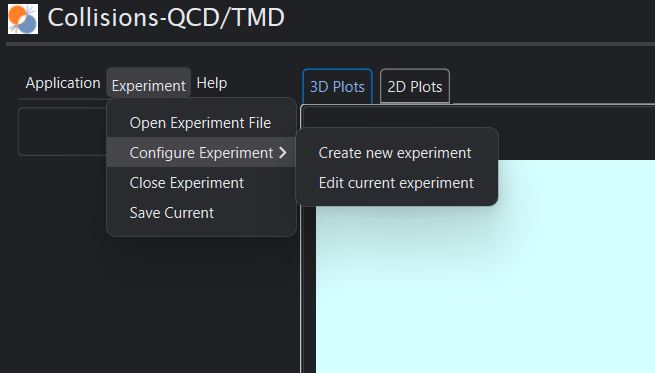
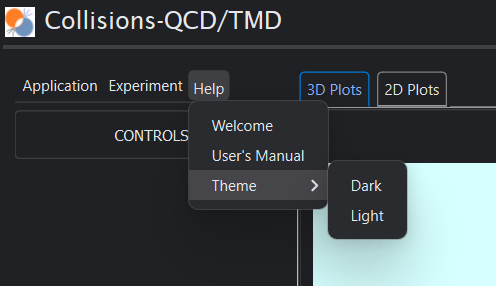
On MacOS, the QMenuBar items get pushed up into the MacOS menu bar itself. But the Experiment->Configure Experiment submenu does not appear, and the Application menu does not appear. The help->Theme->Dark/Light do appear, so the issue isn't specific to side-submenus.
I tried
setNativeMenuBar(False)but it only made the entire menu bar vanish.
If this menu bar is just not workable on MacOS, I will have to remove the menu bar and use buttons/popups.
Many thanks for any tips.
-
SOLVED. There may be other solutions, but my solution was a semantic one. I got rid of strings that sound like menu items: configure, close, and edit. I also removed the Application menu, since Quit was likely to trigger the OS to put the menu in the MacOS menu bar.
Perhaps only removing the application menu was necessary. Anyway, it's fixed.
-
J JimRyan has marked this topic as solved on
-
Hi and welcome to devnet,
macOS has certain rules (as other OS do as well) to have a consistent user experience and Qt helps to put things into the right place automatically.
For example, the settings are under Preferences in the application's name menu. User don't have to hunt down for these kind of things.On macOS the default QMainWindow menu bar is indeed at the top of the screen which is normal and expected.
Taking a look at your code and the picture you posted, I would suggest to redesign things a bit. For example, having the dark/light theme switch under Help is rather unexpected.
