Skip to content
  • Categories
  • Recent
  • Tags
  • Popular
  • Users
  • Groups
  • Search
  • Get Qt Extensions
  • Unsolved
Collapse
Brand Logo
  1. Home
  2. Qt Development
  3. General and Desktop
  4. Qt5 to Qt6 style changes
Qt 6.11 is out! See what's new in the release blog

Qt5 to Qt6 style changes

Scheduled Pinned Locked Moved Unsolved General and Desktop
14 Posts 3 Posters 1.0k Views 1 Watching
  • Oldest to Newest
  • Newest to Oldest
  • Most Votes
Reply
  • Reply as topic
Log in to reply
This topic has been deleted. Only users with topic management privileges can see it.
  • J Offline
    J Offline
    james b-s
    wrote on last edited by
    #1

    We are in the process of moving from qt5.15 to Qt6. In the process, we've noticed that the style has changed on linux, not so much on windows. This is documented in Qt documentation.

    We are tying to get the style on linux to look more like it did in Qt5 which is also the way it still looks on windows.

    What I have found is that I should be able to do this using QApplication::setStyle like this:

    QApplication::setStyle("fusion");
    

    I've tried "fusion" and "windows" and various other methods and styles. None of them seem to make a difference. What is the proper way of setting the linux style to match either what was in Qt5 or what it is on windows in Qt6?

    1 Reply Last reply
    0
    • SGaistS Offline
      SGaistS Offline
      SGaist
      Lifetime Qt Champion
      wrote on last edited by
      #2

      Hi,

      Which version of Qt are you using ? The one from your installer or the one from your distribution ?
      Note that OS specific styles are not available on all platforms because they contain OS specific code.

      Interested in AI ? www.idiap.ch
      Please read the Qt Code of Conduct - https://forum.qt.io/topic/113070/qt-code-of-conduct

      J 1 Reply Last reply
      0
      • SGaistS SGaist

        Hi,

        Which version of Qt are you using ? The one from your installer or the one from your distribution ?
        Note that OS specific styles are not available on all platforms because they contain OS specific code.

        J Offline
        J Offline
        james b-s
        wrote on last edited by james b-s
        #3

        @SGaist 6.7-3. From an installer from Qt. We did not build it ourselves.

        Online it says that fusion should work to make things look like they did in Qt5.
        We are noticing background color changes, especially in various widgets, probably QLineEdit. The widget's background has changed from the white it is in Qt5 and qt6 windows, to a grey that makes it look readonly.

        1 Reply Last reply
        0
        • J Offline
          J Offline
          james b-s
          wrote on last edited by
          #4

          QApplication::setDesktopSettingsAware(false); seems to do what I want.

          1 Reply Last reply
          0
          • J james b-s has marked this topic as solved on
          • J james b-s has marked this topic as solved on
          • J Offline
            J Offline
            james b-s
            wrote on last edited by
            #5

            I spoke too soon. This wasn't the proper solution. There are several other issues that need to be resolved and they are all documented as being resolved via the fusion style.

            1 Reply Last reply
            0
            • J james b-s has marked this topic as unsolved on
            • J Offline
              J Offline
              james b-s
              wrote on last edited by james b-s
              #6

              More information:
              QApplication::setStyle("fusion") returns a non-null value indicating success, but it still doesn't do anything. As near as I can tell, there aren't any other calls to QApplication::setStyle in the application

              Adding -style fusion to the command line also does nothing

              1 Reply Last reply
              0
              • J Offline
                J Offline
                james b-s
                wrote on last edited by
                #7

                Maybe I don't understand what "fusion" means. According to the online documentation, fusion style should make the GUI for all the operating systems the same and make Qt6 look like Qt5. Maybe someone can correct me if I am wrong.

                I set the style as I mentioned above. I added some checks to see what the style is by printing out QApplication::style()->objectName() to a trace file. The style gets changed to fusion and stays at fusion. But the GUI looks completely different in linux between Qt5 and Qt6. Windows looks the same between 5 and 6. And the GUI looks different between linux and windows.

                Colors in linux are different from qt5, mostly having to do with backgrounds, the file browser is different.

                1 Reply Last reply
                0
                • J Offline
                  J Offline
                  james b-s
                  wrote on last edited by james b-s
                  #8

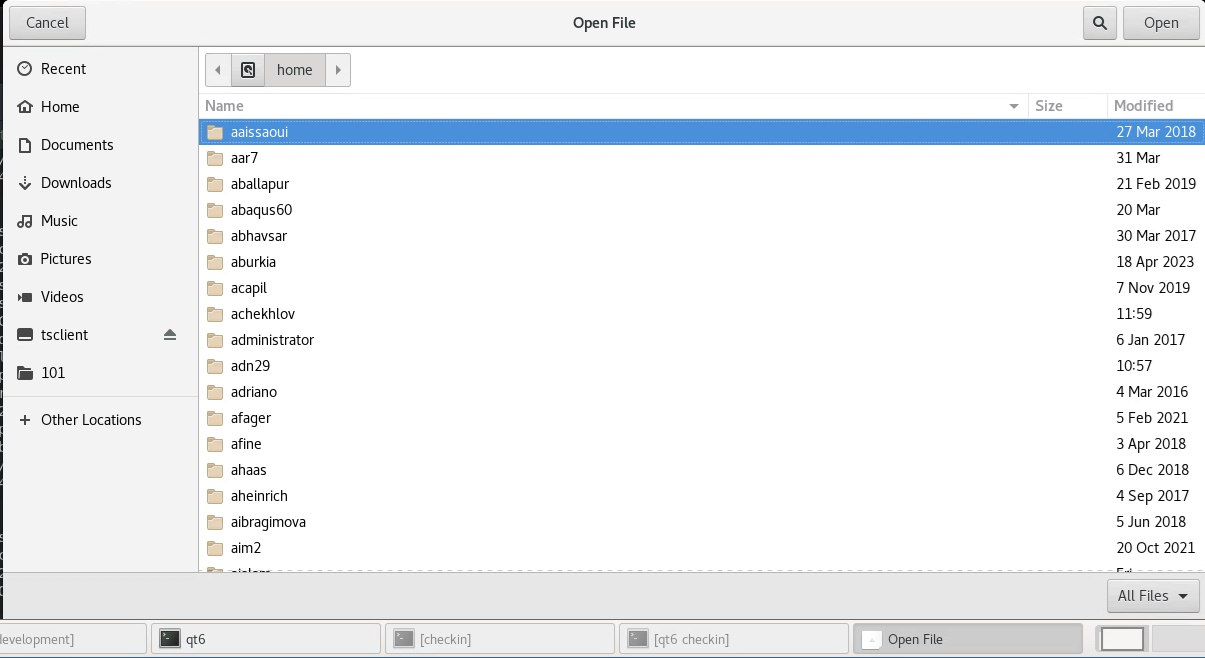
                  Fusion is documented as using the same file browser in qt6 that was used in Qt5 (basically the windows file browser). Here is some code:

                  int main(int argc, char **argv)
                  {
                  const QStyle* pStyle2 = QApplication::setStyle("Fusion");
                      
                  QApplication app(argc, argv);   assert(pStyle2 != nullptr);
                  
                  QString fileName = QFileDialog::getOpenFileName(
                        nullptr,                   // Parent widget (nullptr for standalone)
                        "Open File",               // Dialog title
                        "/home",                   // Starting directory
                        "All Files (*);;Text (*.txt)" // File filters (separated by ;; )
                      );
                  }
                  

                  This results in
                  Untitled.png

                  1 Reply Last reply
                  0
                  • Christian EhrlicherC Offline
                    Christian EhrlicherC Offline
                    Christian Ehrlicher
                    Lifetime Qt Champion
                    wrote on last edited by
                    #9

                    Your example is using the file browser provided by the operating system in Qt5 and Qt6 when the platform integration is available for your os

                    Qt Online Installer direct download: https://download.qt.io/official_releases/online_installers/
                    Visit the Qt Academy at https://academy.qt.io/catalog

                    J 1 Reply Last reply
                    0
                    • Christian EhrlicherC Christian Ehrlicher

                      Your example is using the file browser provided by the operating system in Qt5 and Qt6 when the platform integration is available for your os

                      J Offline
                      J Offline
                      james b-s
                      wrote on last edited by
                      #10

                      @Christian-Ehrlicher Can you explain?

                      I was under the impression that fusion would change the file browser.

                      I'm also going to post an example of some code that shows how QEditLine format changes even though I have fusion set.

                      Christian EhrlicherC 1 Reply Last reply
                      0
                      • J james b-s

                        @Christian-Ehrlicher Can you explain?

                        I was under the impression that fusion would change the file browser.

                        I'm also going to post an example of some code that shows how QEditLine format changes even though I have fusion set.

                        Christian EhrlicherC Offline
                        Christian EhrlicherC Offline
                        Christian Ehrlicher
                        Lifetime Qt Champion
                        wrote on last edited by
                        #11

                        @james-b-s said in Qt5 to Qt6 style changes:

                        Christian-Ehrlicher Can you explain?

                        I was under the impression that fusion would change the file browser.

                        Please read the documentation:https://doc.qt.io/qt-6/qfiledialog.html#getOpenFileName

                        On Windows, and macOS, this static function uses the native file dialog and not a QFileDialog. Note that the macOS native file dialog does not show a title bar.

                        Qt Online Installer direct download: https://download.qt.io/official_releases/online_installers/
                        Visit the Qt Academy at https://academy.qt.io/catalog

                        J 1 Reply Last reply
                        0
                        • J Offline
                          J Offline
                          james b-s
                          wrote on last edited by james b-s
                          #12

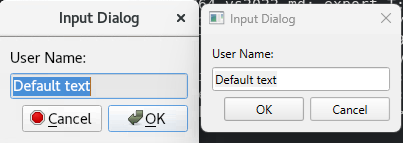
                          Here is some code showing the original problem that I was working on

                          This code:

                          const QStyle* pStyle2 = QApplication::setStyle("Fusion");
                              QApplication app(argc, argv);
                          
                              assert(pStyle2 != nullptr);
                          
                              bool ok;
                              QString text = QInputDialog::getText(nullptr, "Input Dialog",
                                      "User Name:", QLineEdit::Normal,
                                      "Default text", &ok);
                          

                          Produces the image on the left in linux and the image on the right in Qt5 and in windows on qt6
                          Untitled.png

                          1 Reply Last reply
                          0
                          • Christian EhrlicherC Christian Ehrlicher

                            @james-b-s said in Qt5 to Qt6 style changes:

                            Christian-Ehrlicher Can you explain?

                            I was under the impression that fusion would change the file browser.

                            Please read the documentation:https://doc.qt.io/qt-6/qfiledialog.html#getOpenFileName

                            On Windows, and macOS, this static function uses the native file dialog and not a QFileDialog. Note that the macOS native file dialog does not show a title bar.

                            J Offline
                            J Offline
                            james b-s
                            wrote on last edited by james b-s
                            #13

                            @Christian-Ehrlicher I've read the documentation. I've read tons of documentation. I'm trying to solve the problem where Qt6 changes the look and feel of linux builds. The documentation that I've been reading all say that the fusion style will solve my problem. Some of the information that I have found also seems to claim that it would solve the file browser problem also. Maybe that last is incorrect, but reading more documentation is not going to solve the problem.

                            As you can see in other stuff that I posted, It doesn't solve the problem with the style differences either.

                            1 Reply Last reply
                            0
                            • Christian EhrlicherC Offline
                              Christian EhrlicherC Offline
                              Christian Ehrlicher
                              Lifetime Qt Champion
                              wrote on last edited by
                              #14

                              The left input dialog is not fusion but another style.

                              Qt Online Installer direct download: https://download.qt.io/official_releases/online_installers/
                              Visit the Qt Academy at https://academy.qt.io/catalog

                              1 Reply Last reply
                              1

                              • Login

                              • Login or register to search.
                              • First post
                                Last post
                              0
                              • Categories
                              • Recent
                              • Tags
                              • Popular
                              • Users
                              • Groups
                              • Search
                              • Get Qt Extensions
                              • Unsolved