
How to style QWidget descendants when parent is being hovered?
-
Hello. I'm new to this forum, and I'd like to ask how this can be achieved.
My current project is more of made for fun, and it's a custom client I'm making for Revolt chat and Discord. Currently, I'm able to layout the whole chat window to display server-specific chats and interactions. Now, I switched from
QListWidgettoQScrollAreadue to the former's limitations (especially for auto-adjustingQLabels in my custom widget when added as an item). However, I do miss the highlighting effect thatQListWidgetprovides for its items, and I am currently trying to mimic its effect, albeit more simple if possible.Initially, I used stylesheets to style the
ChatMessage's descendants. (Provided stylesheets was for testing purposes before actual styling)ChatMessage:hover * { background-color: cyan; }Unfortunately, it seems it doesn't follow usual CSS rules considering that it should, theoretically, apply the styles to its descendants when a
ChatMessageis only being hovered; instead, it applied the styling regardless. If there's a way to actually do this kind of conditional styling (e.g. style descendants when parent is being hovered), please let me know. :)Some additional information if you need:
TheChatMessagecustom widget code (simplified):class ChatMessage(QtWidgets.QWidget): def __init__(self, parent = None): super(ChatMessage, self).__init__(parent) self.reactions = {} self.edited = False ... self.content = QtWidgets.QLabel() self.content.setWordWrap(True) ... message_header = QtWidgets.QWidget(self) message_header_layout = QtWidgets.QHBoxLayout() self.author = QtWidgets.QLabel() self.author.setTextFormat(QtCore.Qt.TextFormat.RichText) ... self.timestamp = QtWidgets.QLabel() ... self.message_toolbar = QtWidgets.QToolBar(self) ... # quick react bar test self.message_toolbar.addActions(self.reaction_actions) ... message_header_layout.addWidget(self.author) message_header_layout.addWidget(self.timestamp) message_header_layout.addStretch() message_header_layout.addWidget(self.message_toolbar) message_header.setLayout(message_header_layout) ... layout = QtWidgets.QVBoxLayout() layout.setSpacing(0) layout.addWidget(message_header) layout.addWidget(self.content) ... self.reaction_bar = QtWidgets.QToolBar(self) ... layout.addWidget(self.reaction_bar) ... self.setLayout(layout) ... # The rest of the actual code is mostly custom hover # event overrides to briefly show the quick react bar # on hover, a few helper methods, and slots to actions.Screenshots to demo the behavior:
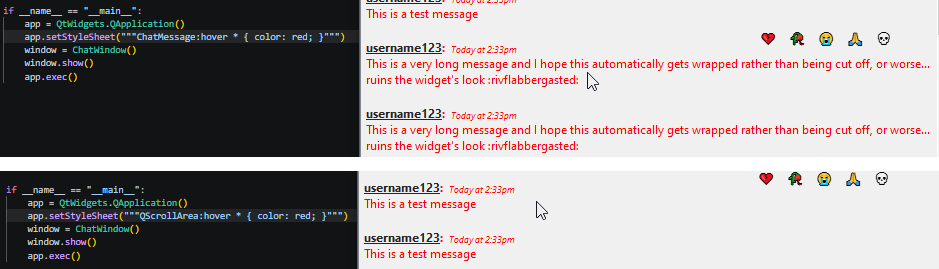
-
Update...
So I was able to just use the overridden hover event methods to apply the stylesheets as I wanted. But I do feel that there might be a better way to do this.
For now, I'll be using this method instead as it works as I wanted.
