
Skip to content
  • Categories
  • Recent
  • Tags
  • Popular
  • Users
  • Groups
  • Search
  • Get Qt Extensions
  • Unsolved
Collapse
Brand Logo
  1. Home
  2. Qt Development
  3. General and Desktop
  4. QtGraphs: GraphsView shifted when plotting more than one LineSeries
Qt 6.11 is out! See what's new in the release blog

QtGraphs: GraphsView shifted when plotting more than one LineSeries

Scheduled Pinned Locked Moved Solved General and Desktop
5 Posts 2 Posters 235 Views 1 Watching
  • Oldest to Newest
  • Newest to Oldest
  • Most Votes
Reply
  • Reply as topic
Log in to reply
This topic has been deleted. Only users with topic management privileges can see it.
  • M Offline
    M Offline
    mweiss
    wrote on last edited by
    #1

    Hello,

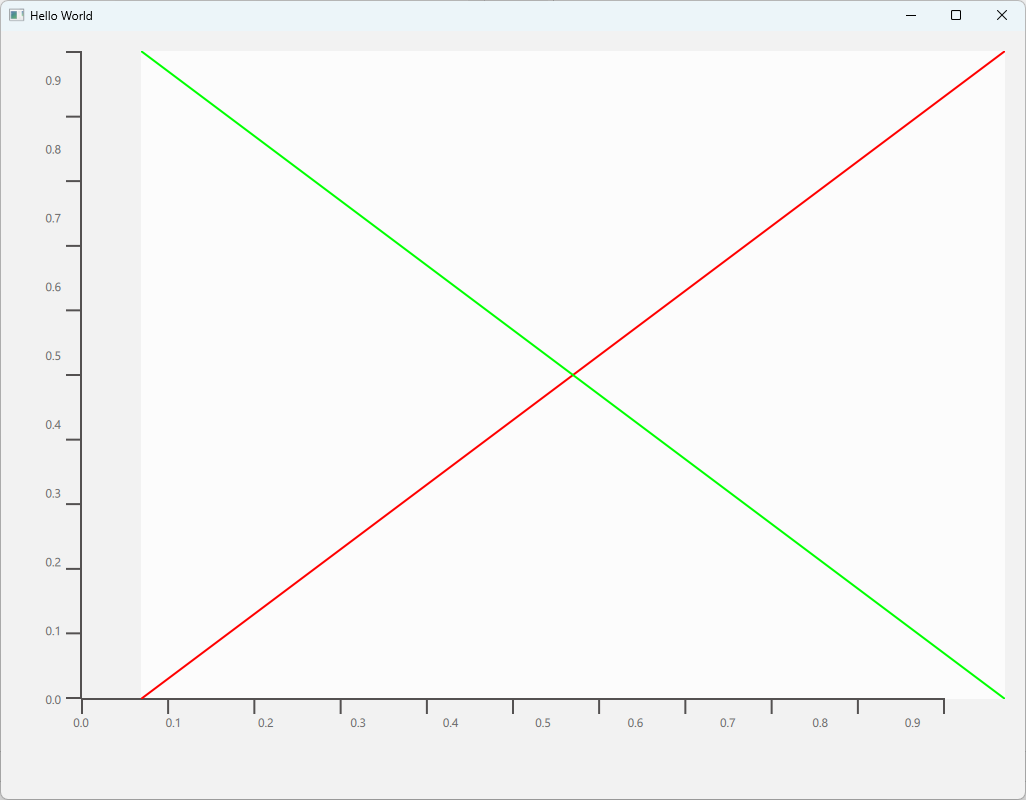
    i am seeing a strange shift when adding more than one LineSeries to a GraphsView.
    The View gets shifted to the right by about 10% of the xaxis range, and the tickmarks on the x and y-axis also get displaced. When commenting out the second LineSeries the GraphsView looks fine.

    A minimal example is below, problem occurs under Qt 6.11.
    Am I doing something wrong, or is this a bug in QtGraphs ?

    I would be thankful for any hints on this,

    Markus

    Main.qml:

    import QtQuick
    import QtGraphs
    
    Window {
        width: 1024
        height: 768
        visible: true
        title: qsTr("Hello World")
    
        GraphsView {
            anchors.fill: parent
            LineSeries {
                id:series1
                axisX: xaxis
                axisY: yaxis
                color: "#ff0000"
                ValueAxis {
                    id: xaxis
                    min: 0
                    max: 1
                }
                ValueAxis {
                    id: yaxis
                    min: 0
                    max: 1
                }
                XYPoint {
                    x:0
                    y:0
                }
                XYPoint {
                    x:1
                    y:1
                }
            }
            LineSeries {
                id:series2
                axisX: xaxis
                axisY: yaxis
                color: "#00ff00"
                XYPoint {
                    x:0
                    y:1
                }
                XYPoint {
                    x:1
                    y:0
                }
            }
        }
    }
    

    2LineSeries.png

    1 Reply Last reply
    0
    • M Offline
      M Offline
      mweiss
      wrote on last edited by
      #2

      OK, so looking at the hellographs example, it looks like for more than one Series per GraphsView, axisX and axisY have to be defined in the GraphsView, and not in the Series.

      If anyone from Qt is reading this, can you please, please update the docs in

      https://doc.qt.io/qt-6/qml-qtgraphs-scatterseries.html

      which do not describe this correctly.

      Thanks, Markus

      1 Reply Last reply
      1
      • M mweiss has marked this topic as solved on
      • SGaistS Offline
        SGaistS Offline
        SGaist
        Lifetime Qt Champion
        wrote on last edited by
        #3

        Hi,

        This is possible but you are welcome to submit a patch to fix the documentation :-)

        Interested in AI ? www.idiap.ch
        Please read the Qt Code of Conduct - https://forum.qt.io/topic/113070/qt-code-of-conduct

        1 Reply Last reply
        0
        • M Offline
          M Offline
          mweiss
          wrote last edited by
          #4

          So it looks like it was a bug in QtGraphs, which was fixed in 6.11.1:
          https://qt-project.atlassian.net/browse/QTBUG-144579
          The documentation is correct as is, no need to update.

          Thanks, Markus

          1 Reply Last reply
          0
          • SGaistS Offline
            SGaistS Offline
            SGaist
            Lifetime Qt Champion
            wrote last edited by
            #5

            Nice !
            Thanks for the follow-up :-)

            Interested in AI ? www.idiap.ch
            Please read the Qt Code of Conduct - https://forum.qt.io/topic/113070/qt-code-of-conduct

            1 Reply Last reply
            0

            • Login

            • Login or register to search.
            • First post
              Last post
            0
            • Categories
            • Recent
            • Tags
            • Popular
            • Users
            • Groups
            • Search
            • Get Qt Extensions
            • Unsolved