
MCP Server and Warp Terminal, Connection Issue
-
I've enabled the MCP Server in About Plugins in Qt Creator 19.0.0 and I can connect to it via the MCP Inspector via this command in a command prompt window:
npx @modelcontextprotocol/inspector
which downloads and initiates the MCP Inspector in your browser. I was successful in connecting and using tools to open a file in Qt Creator.
When I add this JSON configuration in Warp's Settings / MCP Servers / Add:
{
"QtCreator": {
"type": "sse",
"url": "http://127.0.0.1:3001/sse"
}
}and Save the MCP Server configuration with the Save button, I get this error on the screen and in the log:
2026-04-02 19:30:14.785 | [error] MCP: Failed to connect to server: Transport creation error: Unexpected status code: 204 No Content
Any help would be appreciated.
-
well, i use Cursor, so i do NOT know if it is the exact same config, but what i have in Cursor is this:
"qt-creator": { "url": "http://localhost:3001", "transport": "http" }, -
Thanks Dave,
I tried your suggestion and it still gives me the same error. I think it's expecting a reply that it's not getting. Warp Terminal is not just a terminal, it is the glue that ties your MCP Server to the LLM's. It supports multiple LLM's and is a terminal / IDE environment. -
Thanks Dave,
I tried your suggestion and it still gives me the same error. I think it's expecting a reply that it's not getting. Warp Terminal is not just a terminal, it is the glue that ties your MCP Server to the LLM's. It supports multiple LLM's and is a terminal / IDE environment.See the comments of Qt Creator 19 released for details of a possible workaround.
钟勇
After testing, it turned out that the real reason is quite simple: VSCode does not support MCP servers using the SSE protocol.
However, it does support HTTP. Therefore, I had Copilot write a proxy (Streamable HTTP ↔ SSE), and now VSCode can interact with QtCreator normally.VS Code uses the Streamable HTTP protocol (sending requests via POST and receiving results in the HTTP response body), while Qt Creator uses the SSE protocol (establishing an event stream via GET, sending requests via POST, and receiving responses asynchronously through the SSE stream).
What the proxy does:
On startup: Establishes a persistent SSE connection with Qt Creator, with a background thread continuously reading the event stream and routing responses to the corresponding waiters based on their id.
When receiving a POST request from VS Code:
Parses the JSON-RPC message and extracts the id.
Forwards it to Qt Creator (POST /sse).
If there is an id (it's a request): Blocks and waits for the response with the matching id in the SSE stream, then returns it as the HTTP response body to VS Code.
If there is no id (it's a notification): Forwards it directly and returns a 202.
When receiving a GET request from VS Code: Provides an SSE stream and forwards notifications actively pushed by Qt Creator.
In short: VS Code [Streamable HTTP] ↔ Proxy ↔ [SSE] Qt Creator
Alternatively you can try Qt Creator 20 snapshots. In Qt Creator 20 we rewrote the network connection part. We also have now an ACP Client that allows you to chat with any of these ACP compatible agents e.g. Claude Agent, Cursor, Codex CLI, or OpenCode.
Lastly Thank you @davecotter for the initial work with the mcp server plugin. Without this we wouldn't have all of this. 🙏
-
this is what i did, and it started working. first make a local branch of my mcp project, i put it at Z:\depot.
build and install the mcp plugin, then run Qt Creator. when it is running, then issue this command:
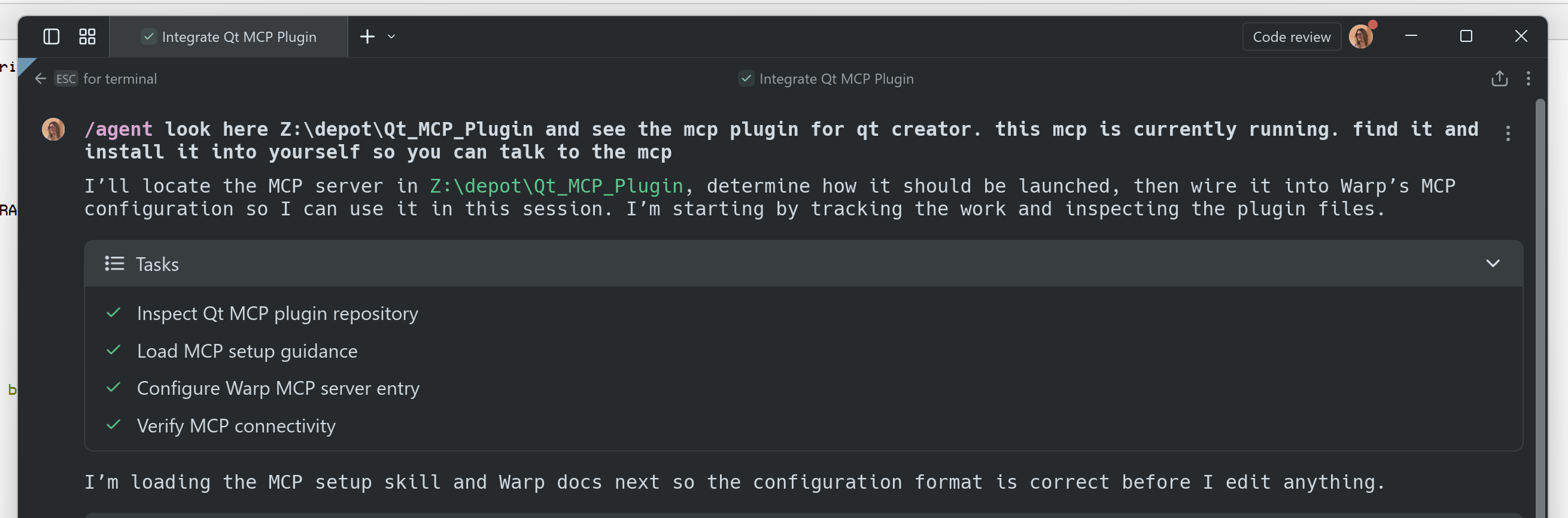
-
I got it to work with help from Dave Cotter. I used his version of the MCP Server and had Warp Terminal and it's Agent to modify the code to do essentially the same thing mentioned by @cristian-adam above. npx @modelcontextprotocol/inspector on Windows 11 shows that the transport is Streamable HTTP with a URL of http://localhost:3001/sse through a Proxy. Warp Terminal now shows the Qt Creator MCP Server along with the 20+ commands that it supports. I've given the code changes to Dave and I'm waiting to hear back to see if he's going to integrate that into the GitHub repository. If anyone needs the changes that I have that made it work, I'm happy to share. Thanks.
-
D Dean_Wittmann has marked this topic as solved on
-
i do not have access to the Qt repo. i've tried several times to email them to tell them to pull my updates, but i never hear back.
-
See the comments of Qt Creator 19 released for details of a possible workaround.
After testing, it turned out that the real reason is quite simple: VSCode does not support MCP servers using the SSE protocol.
However, it does support HTTP. Therefore, I had Copilot write a proxy (Streamable HTTP ↔ SSE), and now VSCode can interact with QtCreator normally.VS Code uses the Streamable HTTP protocol (sending requests via POST and receiving results in the HTTP response body), while Qt Creator uses the SSE protocol (establishing an event stream via GET, sending requests via POST, and receiving responses asynchronously through the SSE stream).
What the proxy does:
On startup: Establishes a persistent SSE connection with Qt Creator, with a background thread continuously reading the event stream and routing responses to the corresponding waiters based on their id.
When receiving a POST request from VS Code:
Parses the JSON-RPC message and extracts the id.
Forwards it to Qt Creator (POST /sse).
If there is an id (it's a request): Blocks and waits for the response with the matching id in the SSE stream, then returns it as the HTTP response body to VS Code.
If there is no id (it's a notification): Forwards it directly and returns a 202.
When receiving a GET request from VS Code: Provides an SSE stream and forwards notifications actively pushed by Qt Creator.
In short: VS Code [Streamable HTTP] ↔ Proxy ↔ [SSE] Qt Creator
Alternatively you can try Qt Creator 20 snapshots. In Qt Creator 20 we rewrote the network connection part. We also have now an ACP Client that allows you to chat with any of these ACP compatible agents e.g. Claude Agent, Cursor, Codex CLI, or OpenCode.
Lastly Thank you @davecotter for the initial work with the mcp server plugin. Without this we wouldn't have all of this. 🙏
@cristian-adam said in MCP Server and Warp Terminal, Connection Issue:
We also have now an ACP Client
wait what? okay how do i use that? do you mean i can open a chat window from inside Qt Creaor and then talk to all the LLMs provided by my Cursor subscription?
if so, how do i do that? note i do not compile Qt nor Qt Creator, i'm expecting to just 'update' like i normally doyes? please?
-
@cristian-adam said in MCP Server and Warp Terminal, Connection Issue:
We also have now an ACP Client
wait what? okay how do i use that? do you mean i can open a chat window from inside Qt Creaor and then talk to all the LLMs provided by my Cursor subscription?
if so, how do i do that? note i do not compile Qt nor Qt Creator, i'm expecting to just 'update' like i normally doyes? please?
@davecotter said in MCP Server and Warp Terminal, Connection Issue:
@cristian-adam said in MCP Server and Warp Terminal, Connection Issue:
We also have now an ACP Client
wait what? okay how do i use that? do you mean i can open a chat window from inside Qt Creaor and then talk to all the LLMs provided by my Cursor subscription?
Yes. All the https://agentclientprotocol.com/get-started/registry would be able to talk to Qt Creator.
if so, how do i do that? note i do not compile Qt nor Qt Creator, i'm expecting to just 'update' like i normally do
yes? please?
We have Qt Creator 20 snapshots. No need to compile Qt Creator. Enable the ACP Client plugin, go to Settings > AI > ACP Servers and then configure Cursor. You would have to figure out the Launch command and the Launch arguments.
The UI is far from final 😅
-
Okay, well, i'll wait until it gets into the "Preview" section of the
MaintenanceToolinstaller app.But this is AWESOME news!

