
Design time layout different from runtime
-
I design a dialog with
QFormLayout:
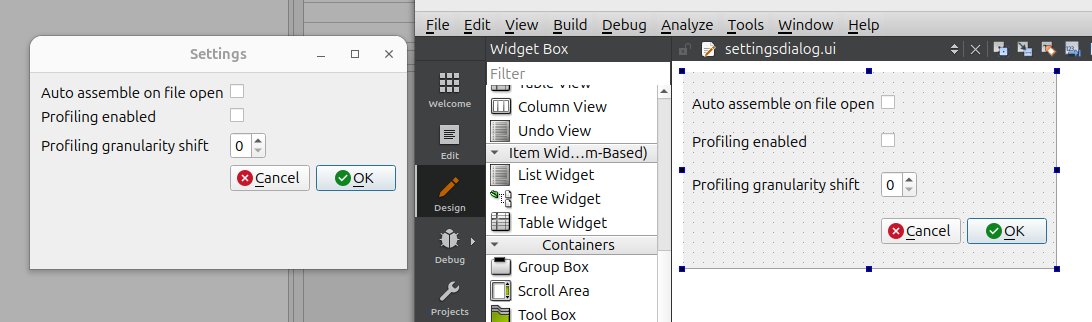
Why is the layout on the left at runtime so different from the layout at design time on the right? If it's going to squeeze the rows vertically at runtime that's fine, but why show them spread out vertically at design time then? This sort of discrepancy is annoying.
I have no special settings/spacings etc. on the dialog or layout. I have to use Creator 13, I know it's not the latest but I doubt it's a version issue? Using Qt 6.4.2 under Ubuntu 24.04, GNOME, with Xorg.
-
Your are missing a layout and/or a proper spacer between the widgets and the dialog button box.It's a feature of QFormLayout - it creates a properly aligned two-column layout and aligns them on top
Qt Online Installer direct download: https://download.qt.io/official_releases/online_installers/
Visit the Qt Academy at https://academy.qt.io/catalog -
Your are missing a layout and/or a proper spacer between the widgets and the dialog button box.It's a feature of QFormLayout - it creates a properly aligned two-column layout and aligns them on top
@Christian-Ehrlicher said in Design time layout different from runtime:
It's a feature of QFormLayout - it creates a properly aligned two-column layout and aligns them on top
I'm sure it is, that was not the question. The question is: given that, why does it not show that at design time (it shows the horizontal positioning but not correctly the vertical positioning), why only at runtime? It knows it's a
QFormLayoutjust as much when designing as running.If you are going to have a visual editor, part of the whole point is that it shows at design as it will at run. I know there are difficult or edge or even platform-specific cases where that might not possible, but what makes it so here? I don't think this is a trivial point/question, could you give an indication as to why this case does not work like that? Is this specific to
QFormLayout, it makes me have no trust that e.g. any layout will look the same when it seems easy to make it so? -
@Christian-Ehrlicher said in Design time layout different from runtime:
It's a feature of QFormLayout - it creates a properly aligned two-column layout and aligns them on top
I'm sure it is, that was not the question. The question is: given that, why does it not show that at design time (it shows the horizontal positioning but not correctly the vertical positioning), why only at runtime? It knows it's a
QFormLayoutjust as much when designing as running.If you are going to have a visual editor, part of the whole point is that it shows at design as it will at run. I know there are difficult or edge or even platform-specific cases where that might not possible, but what makes it so here? I don't think this is a trivial point/question, could you give an indication as to why this case does not work like that? Is this specific to
QFormLayout, it makes me have no trust that e.g. any layout will look the same when it seems easy to make it so?@JonB said in Design time layout different from runtime:
It knows it's a QFormLayout just as much when designing as running.
What guidline should it follow during design? https://doc.qt.io/qt-6/qformlayout.html#details
Qt Online Installer direct download: https://download.qt.io/official_releases/online_installers/
Visit the Qt Academy at https://academy.qt.io/catalog -
@JonB said in Design time layout different from runtime:
It knows it's a QFormLayout just as much when designing as running.
What guidline should it follow during design? https://doc.qt.io/qt-6/qformlayout.html#details
- Either the same one as you designing/running on (I never set the style, so it's always platform default); and
- Looking at the 4 dialog style pictures in https://doc.qt.io/qt-6/qformlayout.html#details and assuming they are runtime pix, although I admit it's hard to tell none of them show any evidence of "vertical stretching" of the rows. Unless that is the case on some platforms (is it actually?), the obvious answer is to show "squeezed" rather than "spaced" at design time too....
I know you are not a great fan of UI design. I am not too, and I won't die over it. But when one does use it one wants it to be as close as possible to runtime, unless there is a good reason not to be.
Btw, is there a way in Designer to preview the final look at runtime without having to run the program? I kinda thought I remembered an Alt-D but that does not seem to do so, maybe mixing up with another IDE.
-
- Either the same one as you designing/running on (I never set the style, so it's always platform default); and
- Looking at the 4 dialog style pictures in https://doc.qt.io/qt-6/qformlayout.html#details and assuming they are runtime pix, although I admit it's hard to tell none of them show any evidence of "vertical stretching" of the rows. Unless that is the case on some platforms (is it actually?), the obvious answer is to show "squeezed" rather than "spaced" at design time too....
I know you are not a great fan of UI design. I am not too, and I won't die over it. But when one does use it one wants it to be as close as possible to runtime, unless there is a good reason not to be.
Btw, is there a way in Designer to preview the final look at runtime without having to run the program? I kinda thought I remembered an Alt-D but that does not seem to do so, maybe mixing up with another IDE.
@JonB said in Design time layout different from runtime:
Btw, is there a way in Designer to preview the final look at runtime without having to run the program? I kinda thought I remembered an Alt-D but that does not seem to do so, maybe mixing up with another IDE.
Tools->Form Editor->Preview...(alt-shift-r on macOS)
ThePreview Insubmenu below it offers previews in a few styles.Asking a question about code? http://eel.is/iso-c++/testcase/
-
@JonB said in Design time layout different from runtime:
Btw, is there a way in Designer to preview the final look at runtime without having to run the program? I kinda thought I remembered an Alt-D but that does not seem to do so, maybe mixing up with another IDE.
Tools->Form Editor->Preview...(alt-shift-r on macOS)
ThePreview Insubmenu below it offers previews in a few styles.@jeremy_k
Thanks for that one. Alt+Shift+R for me Linux too. I would not have realised this was a Tools menu thing.I'd still like to know whether the
QFormLayoutvertical spacing is "unavoidable" because it varies per style at runtime or whether it should really be shown "squeezed" at design time because all styles do so anyway....


