

Combobox no dropdown under Debian
-
Hi @all,
in a project of mine, I use a combobox where items are displayed from a databank.
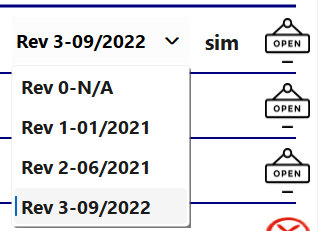
Under Windows in simulation the dropdown menu is shown as wanted when I click it:
 == >
== > 
When I run the same program under Debian 12 (bookworm), detailed infos from Linux-terminal below:
pi@RevPi136238:~$ cat /etc/os-release
PRETTY_NAME="Debian GNU/Linux 12 (bookworm)"
NAME="Debian GNU/Linux"
VERSION_ID="12"
VERSION="12 (bookworm)"
VERSION_CODENAME=bookworm
ID=debian
HOME_URL="https://www.debian.org/"
SUPPORT_URL="https://www.debian.org/support"
BUG_REPORT_URL="https://bugs.debian.org/"
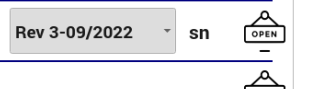
I get this behaviour:
 ==>
==> 
To be independent from any faulty settings I might have set in QtDesigner, I have then tried this example from: https://www.pythonguis.com/docs/qcombobox/
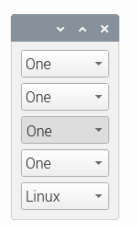
with this code:from PySide6.QtWidgets import QComboBox, QMainWindow, QApplication, QWidget, QVBoxLayout from PySide6.QtGui import QIcon import sys class MainWindow(QMainWindow): def __init__(self): super().__init__() combobox1 = QComboBox() combobox1.addItem('One') combobox1.addItem('Two') combobox1.addItem('Three') combobox1.addItem('Four') combobox2 = QComboBox() combobox2.addItems(['One', 'Two', 'Three', 'Four']) combobox3 = QComboBox() combobox3.addItems(['One', 'Two', 'Three', 'Four']) combobox3.insertItem(2, 'Hello!') combobox4 = QComboBox() combobox4.addItems(['One', 'Two', 'Three', 'Four']) combobox4.insertItems(2, ['Hello!', 'again']) combobox5 = QComboBox() icon_penguin = QIcon('animal-penguin.png') icon_monkey = QIcon('animal-monkey.png') icon_bauble = QIcon('bauble.png') combobox5.addItem(icon_penguin, 'Linux') combobox5.addItem(icon_monkey, 'Monkeyix') combobox5.insertItem(1, icon_bauble, 'Baublix') layout = QVBoxLayout() layout.addWidget(combobox1) layout.addWidget(combobox2) layout.addWidget(combobox3) layout.addWidget(combobox4) layout.addWidget(combobox5) container = QWidget() container.setLayout(layout) self.setCentralWidget(container) def current_text_changed(self, s): print("Current text: ", s) app = QApplication(sys.argv) w = MainWindow() w.show() app.exec()which is also not showing its popup-entries on click, but appears in the same way, under Debian:
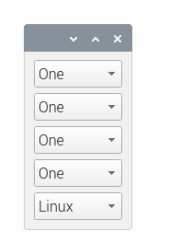 == >
== > 
An update to the latest pyside6-version did not do the trick!
Any ideas how to get this to work?Thanks in advance
-
Hi and welcome to devnet,
Are you using the Qt version that comes with your distribution ?
Which window manager are you using ? -
Thank you for the warm welcome!
I use this QT-version:Name: PySide6 Version: 6.7.2 Summary: Python bindings for the Qt cross-platform application and UI framework Home-page: Author: Author-email: Qt for Python Team <pyside@qt-project.org> License: LGPL Location: /home/pi/.local/lib/python3.11/site-packages Requires: PySide6-Addons, PySide6-Essentials, shiboken6 Required-by:
