
Qt 6.10: QComboBox with groups: Select items
-
Hi!
I've developed a class where I use QComboBox with a model containing a QTreeView. With it I can display groups in a QComboBox and select an item. This works well. But I want also be able to select an item and I can't find out how to do this. To make clear what I did, I show the code here:
#include <QComboBox>
#include <QTreeView>
#include <QStandardItemModel>
#include <QLineEdit>

#include "telementbordername.h"
#include "tgraphics.h"

#define SEL_NONE   -1
#define SEL_TOP     0

using namespace Graphics;

TElementBorderName::TElementBorderName(const QString& brd, const QString& name, QWidget *parent)
    : QWidget(parent),
      mName(name)
{
    QList<FAMILY_t> borders = TGraphics::Current().getBorders();

    mCombo = new QComboBox(this);
    mTreeView = new QTreeView(mCombo);
    mTreeView->setHeaderHidden(true);
    mTreeView->setRootIsDecorated(true);
    mTreeView->setExpandsOnDoubleClick(true);
    mTreeView->setUniformRowHeights(true);
    mCombo->setView(mTreeView);

    mModel = new QStandardItemModel(mCombo);
    mModel->setColumnCount(1);
    mModel->setHorizontalHeaderLabels(QStringList() << "Items");

    mParentItem = mModel->invisibleRootItem();
    QStandardItem *top = new QStandardItem("none");
    top->setData(SEL_NONE);
    mParentItem->appendRow(top);
    mSelected = 0;

    for (FAMILY_t border : borders)
    {
        top = new QStandardItem(border.name);
        top->setData(SEL_TOP);
        top->setFlags(top->flags() & ~Qt::ItemIsSelectable);
        mParentItem->appendRow(top);

        for (QString member : border.member)
            top->appendRow(item);
    }

    mCombo->setModel(mModel);
    mCombo->setModelColumn(0);

    if (!brd.isEmpty())
        setBorder(brd);

    connect(mCombo, &QComboBox::currentTextChanged, this, &TElementBorderName::onComboTextChanged);
}

void TElementBorderName::setBorder(const QString& border)
{
    mBorder = border;

    if (!border.isEmpty())
    {
        QLineEdit *line = mCombo->lineEdit();    // This doesn't work! Always nullptr.

        if (!line)
            return;

        line->setText(border);
    }
}
The data coming from
TGraphics::Current().getBorders()are looking like this:void TGraphics::initBorderFamily() { FAMILY_t family; family.name = "2D Standard"; family.member.push_back("Single Line"); family.member.push_back("Double Line"); family.member.push_back("Quad Line"); family.member.push_back("Picture Frame"); mDraw.borders.push_back(family); family.member.clear(); family.name = "Circles"; family.member.push_back("Circle 15"); family.member.push_back("Circle 25"); family.member.push_back("Circle 35"); family.member.push_back("Circle 45"); family.member.push_back("Circle 55"); family.member.push_back("Circle 65"); family.member.push_back("Circle 75"); family.member.push_back("Circle 85"); family.member.push_back("Circle 95"); family.member.push_back("Circle 105"); family.member.push_back("Circle 115"); family.member.push_back("Circle 125"); family.member.push_back("Circle 135"); family.member.push_back("Circle 145"); family.member.push_back("Circle 155"); family.member.push_back("Circle 165"); family.member.push_back("Circle 175"); family.member.push_back("Circle 185"); family.member.push_back("Circle 195"); mDraw.borders.push_back(family); ... }As you can see, the name assigned to
family.nameis the group name and the other names are members of the group.
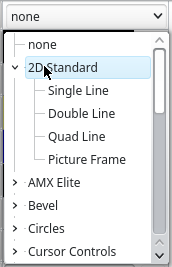
My problem is that I can select the group names withQComboBox::setCurrentIndex()but I can't find a way to select any of the group members. But that's what I need.
To clarify. I can select any group member in the QComboBox and the signalQComboBox::currentTextChanged()is executed. So I get the selected group member. So far so well. When I create the class I give a previously selected group member to the class and I want this member be visible as a selected member on initialization. This doesn't work and I don't see a way to do it. Does anybody have an idea of how I can do this?A.T.
-
T TheoSys marked this topic as a regular topic on
-
Because I found the solution in the meantime I reply to my own post. The following code sets the selection as expected:
void TElementBorderName::setBorder(const QString& border)
{
    mBorder = border;

    const QModelIndexList matches = mModel->match(mModel->index(0, 0), Qt::DisplayRole, border, 1, Qt::MatchExactly | Qt::MatchRecursive);

    if (!matches.isEmpty())
    {
        const QModelIndex modelIdx = matches.first();
        // Temporarily set the root to the parent to allow row-based selection
        mCombo->setRootModelIndex(modelIdx.parent());
        mCombo->setCurrentIndex(modelIdx.row());
        // Restore the original root to show the full tree
        mCombo->setRootModelIndex(QModelIndex());
    }
}

A.T.