
Help with Qt6/QtLocation
-
One way you could help diagnose and fast track this issue is by running your app through Heaptrack to find out what leaks (with debug informations and optimizations)
-
Thanks for the replies.
I originally tried running Maplibre JS via Webengine and that worked but the performance was terrible on an embedded system (based on Raspberry Pi CM4). The native mapping is far superior in pretty much every way.
Good call on Heaptrack I actually did that last week but I only had a basic report so maybe I need to look at debug optimizations if I understand what you said correctly.
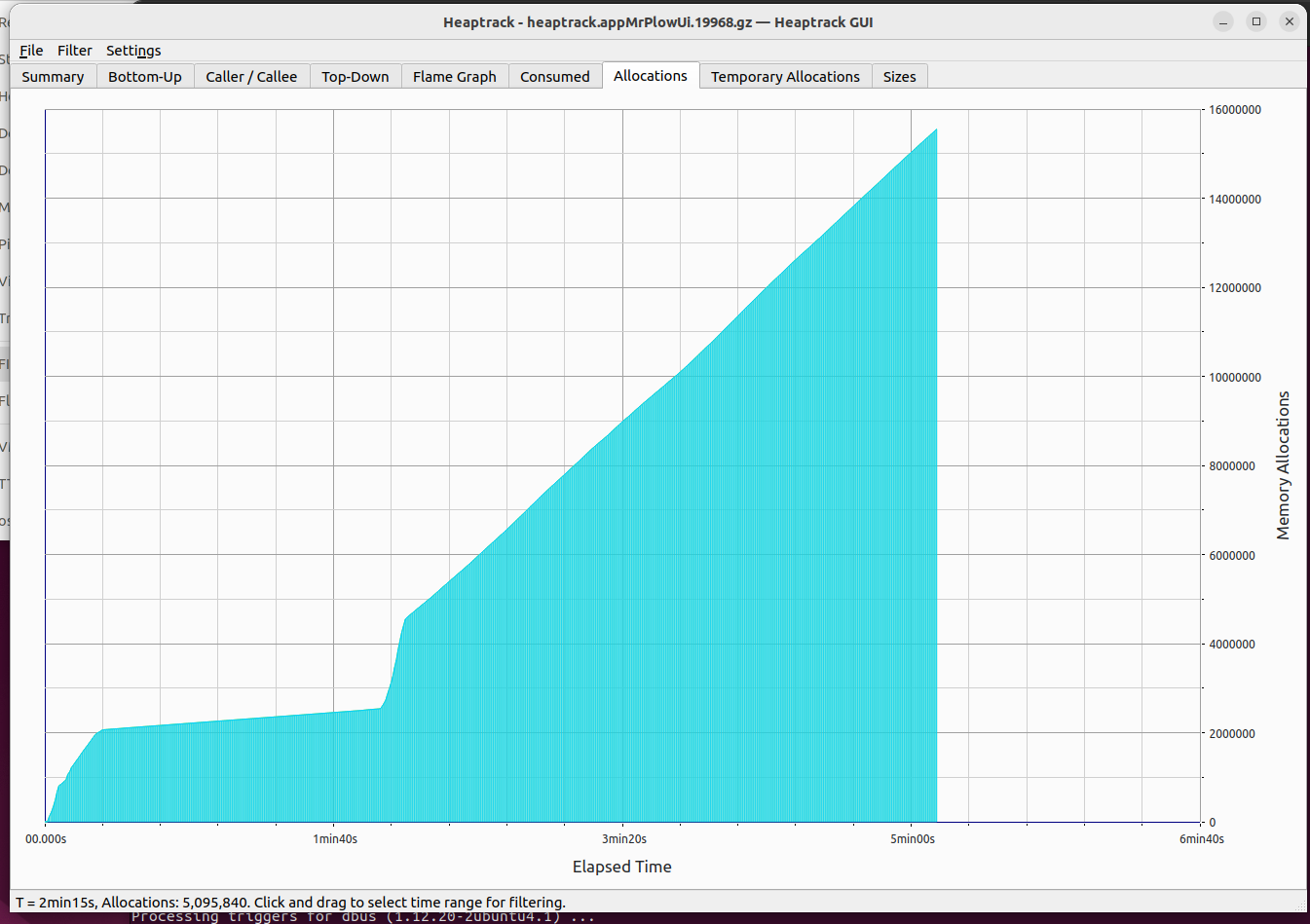
Here is a graph from heaptrack that confirms there is absolutely an issue. It is allocating memory linearly and from what Heaptrack said the allocations are mostly 32-64 bytes in size.
I have isolated the issue to anything that recenters/rotates/tilts the map view. If disable all this the memory growth stops. If I adjust the frequency of recentering/rotation the map I can adjust how fast the memory grows. The problem is that to make the map a smooth experience akin to say Google maps these parameters need to be animated at like 30fps at least to achieve really smooth navigation.
Also since I ruled out the Maplibre plugin (because it happens with the osm plugin too) I am leaning more toward there being a bug in QtLocation/QtPositioning that allows unbounded memory growth. I haven't been able to find a bug yet though still looking.
-
Any possible culprits in the called functions list of Heaptrack?
-
No the caller list just lists one unresolved function. I tried cross compiling the UI with debug symbols to run on my embedded system with heaptrack but I got the same result.
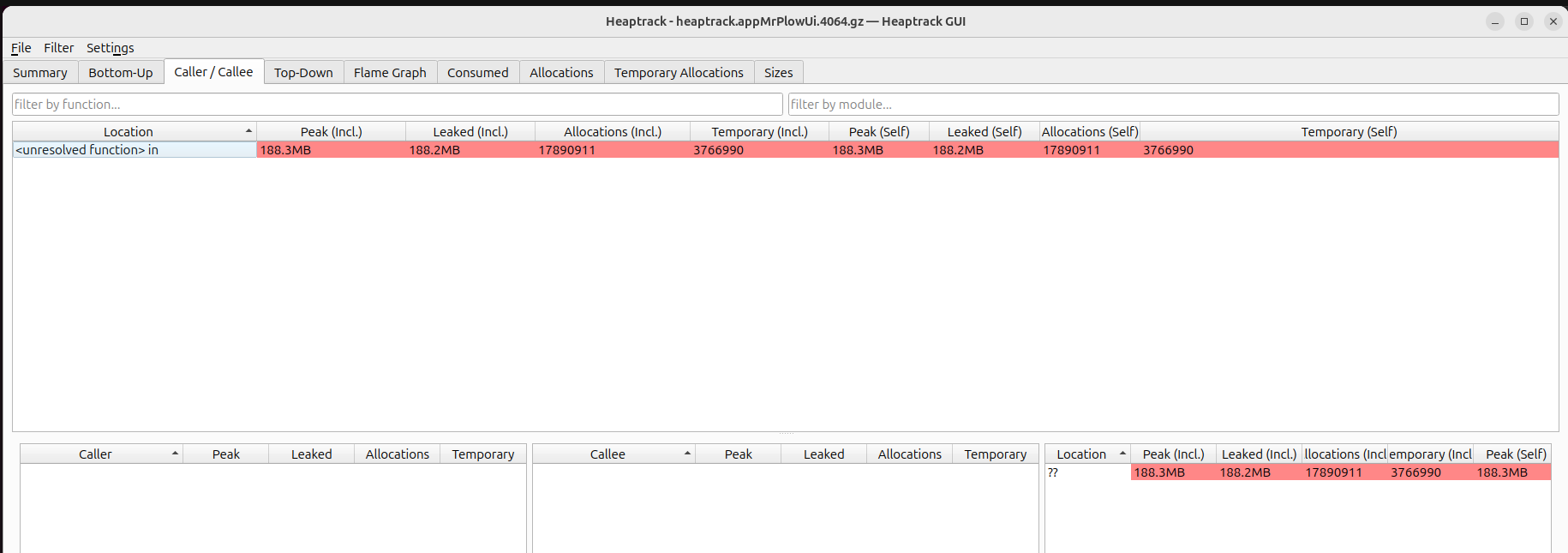
I tried running Valgrind on it too but I think to make that really work I need to setup a native Linux Qt development environment.
I already tried that but I did it in a VM and it was weird. Open street maps had no issue with ram it was steady on the Linux VM. But Maplibre wouldn't run and I suspect its the VMware graphics drivers causing it to fail to start.
I did change something that I believe had a huge impact. My map was a singleton and I tried just putting the map straight into the qml and it seemed to really reduce the memory growth. I'm not sure what to make of it.
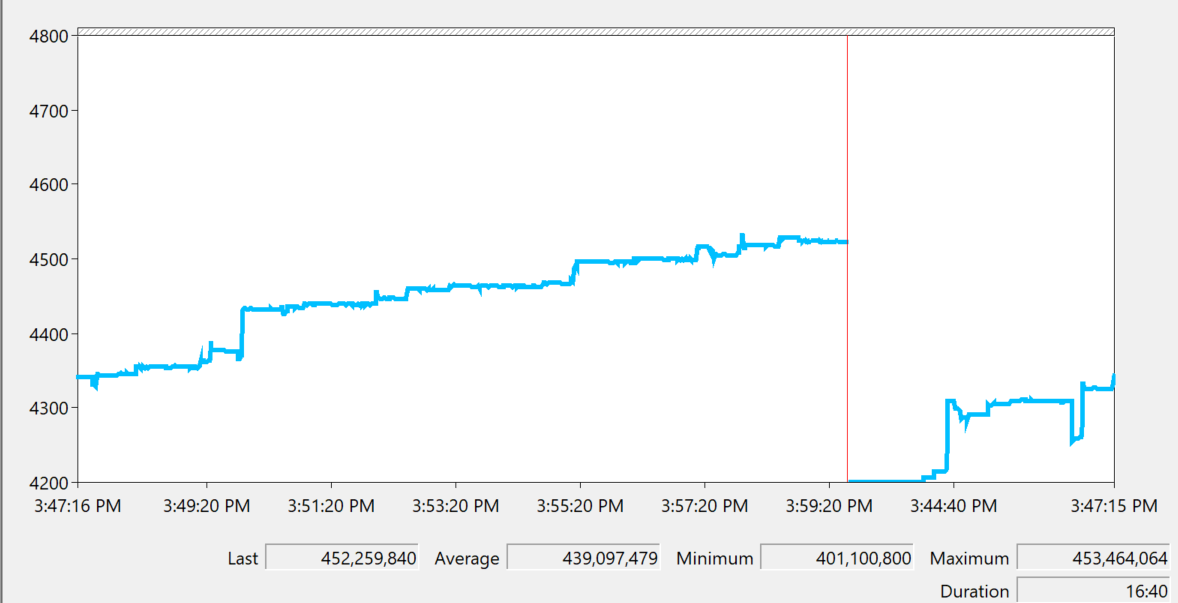
On Windows this is what I'm seeing now with the Private Bytes. Though from what I've read this isn't really a good indication of a memory problem but it does look kind of linear.
-
Partially Solved!
Ok I have good and bad news related to this issue.
The good news is that for my Linux x64 Ubuntu VM and for my Yocto embedded aarch64 Linux system I was able to solve the issue.
The problem was that the qt maplibre native github repo was v3.0.0 when I started off this whole mapping project. However when I updated to Qt 6.10.2 I pulled the github repo and it had been incremented to v4.0.0.
Maplibre Native Qt v4.0.0 is still in active development and is not an official release.
Simply reverting to Maplibre Native Qt v3.0.0 fixed the issue on my Linux VM and embedded Linux system. All while using the latest Qt 6.10.2.
Bad News
On Windows there is still a huge memory growth issue. It starts off around like 400MB and rises like 1MB every couple seconds. This happens with using the Maplibre v3.0.0 plugin as well as the OSM plugin.
I discovered something interesting though with a single line of code:
//in main.cpp if I set this which is required for the maplibre plugin to work the memory growth
// issue occurs with Maplibre and OSM mapping
//with the OSM ram starts at 450MB, grows 1MB every couple seconds

QQuickWindow::setGraphicsApi(QSGRendererInterface::OpenGL);

//if I switch over to using this instead, Maplibre stops working but the OSM plugin still works and the memory is stable
//with the OSM plugin in use I observed the ram use starting at 280MB which grew to about 290MB and leveled off
//if there was any growth it was small, it was stable not out of control growth like with OpenGL

QQuickWindow::setGraphicsApi(QSGRendererInterface::Direct3D11);

//I didn't test this but I assume this would also not have a problem too I will try it later

QQuickWindow::setGraphicsApi(QSGRendererInterface::Direct3D12);
So at this point I believe there is a bug in the Qt 6.10.2 framework related to utilizing QSGRendererInterface::OpenGL specifically on Windows.
I am thinking about making a Qt bug report for it. I have a test application mocked up that replicates the issue. It is either an issue with QtLocation/Positioning specifically or it might be a more widespread issue that is exacerbated by constant map updates trigger lots of rendering.
If you have any ideas on things I could try on Windows please let me know.
-
Partially Solved!
Ok I have good and bad news related to this issue.
The good news is that for my Linux x64 Ubuntu VM and for my Yocto embedded aarch64 Linux system I was able to solve the issue.
The problem was that the qt maplibre native github repo was v3.0.0 when I started off this whole mapping project. However when I updated to Qt 6.10.2 I pulled the github repo and it had been incremented to v4.0.0.
Maplibre Native Qt v4.0.0 is still in active development and is not an official release.
Simply reverting to Maplibre Native Qt v3.0.0 fixed the issue on my Linux VM and embedded Linux system. All while using the latest Qt 6.10.2.
Bad News
On Windows there is still a huge memory growth issue. It starts off around like 400MB and rises like 1MB every couple seconds. This happens with using the Maplibre v3.0.0 plugin as well as the OSM plugin.
I discovered something interesting though with a single line of code:
//in main.cpp if I set this which is required for the maplibre plugin to work the memory growth
// issue occurs with Maplibre and OSM mapping
//with the OSM ram starts at 450MB, grows 1MB every couple seconds

QQuickWindow::setGraphicsApi(QSGRendererInterface::OpenGL);

//if I switch over to using this instead, Maplibre stops working but the OSM plugin still works and the memory is stable
//with the OSM plugin in use I observed the ram use starting at 280MB which grew to about 290MB and leveled off
//if there was any growth it was small, it was stable not out of control growth like with OpenGL

QQuickWindow::setGraphicsApi(QSGRendererInterface::Direct3D11);

//I didn't test this but I assume this would also not have a problem too I will try it later

QQuickWindow::setGraphicsApi(QSGRendererInterface::Direct3D12);
So at this point I believe there is a bug in the Qt 6.10.2 framework related to utilizing QSGRendererInterface::OpenGL specifically on Windows.
I am thinking about making a Qt bug report for it. I have a test application mocked up that replicates the issue. It is either an issue with QtLocation/Positioning specifically or it might be a more widespread issue that is exacerbated by constant map updates trigger lots of rendering.
If you have any ideas on things I could try on Windows please let me know.
@MyUsernameIsUsername said in Help with Qt6/QtLocation:
QQuickWindow::setGraphicsApi(QSGRendererInterface::OpenGL);
I use it for Windows, but I've never needed it for Linux(Ubuntu). I'm glad you solved the problem. I hadn't thought of this issue because I assumed you were using QML.
-
Oh this application it is mostly QML I'd say 99% of it is. The C++ is very minimal and mostly just sets up the UI then after than its all JSON messages to/from a C# backend. For the mapping stuff in particular I am not using any of that from C++ its purely QML.
I'm not sure I really have a solution to this Windows memory growth other than to make a bug report and see how it goes. I'm still brainstorming though.
Unfortunately the OSM plugin even though that would avoid the issue on Linux + Windows is a non starter because the raster map tiles take up too much disk space compared to Maplibre vector tiles.
-
Just a quick update. I made a bug report for this with an attached example application if anyone wants to try and run it. The example application just loops a route over and over on a map.
On my system the UI starts up at about 250MB of memory in use and then goes up about 250MB every 10-15min. Its steady and never levels off. In main.cpp if you change to used Direct3D11 it almost immediately stabilizes.
Bug Report
QTBUG-145376
Hopefully I made it very clear and easy to replicate on their end but we'll see.
-
Solved!
I am certain I solved the Windows memory leak with the Qt mapping. I'm going to let my UI/map loop all weekend to be absolutely sure. I've had my loop running for 20+ min now and the RAM use actually went down. Its behavior is drastically different than before. This applies to use the OSM and Maplibre plugin on Windows with Qt 6.10.2.
The fix?
Given that changing the render backend from OpenGL to Direct3D11 had such a big impact I wondered if maybe updating my graphics driver would have an impact. I have an Nvidia Quadro RTX 4000 laptop GPU and my driver before updating was like 580.82, after updating I am on 595.97 which is years out of date.
Updating the Nvidia GPU drivers fixed the memory leak!
This issue was dumb luck to have two issues with the same symptom at the same time with one impacting Windows and the other Linux.
Well this is a good way to end the week! Just wish I hadn't had to spend 2 weeks to solve this but it is what it is.
-
M MyUsernameIsUsername has marked this topic as solved on
-
Update the fraphics driver solved before my problem MAP. But I am not sure is it the correct solution?
And you can set some settings on NVIDIA APP.
I'm glad you were able to solve your problem :)

