
The image is cropped diagonally
-
Hello!
I'm developing an Android application.
When deploying an application to an emulator, an element of type "Image" (or "VideoOutput") is cropped diagonally.
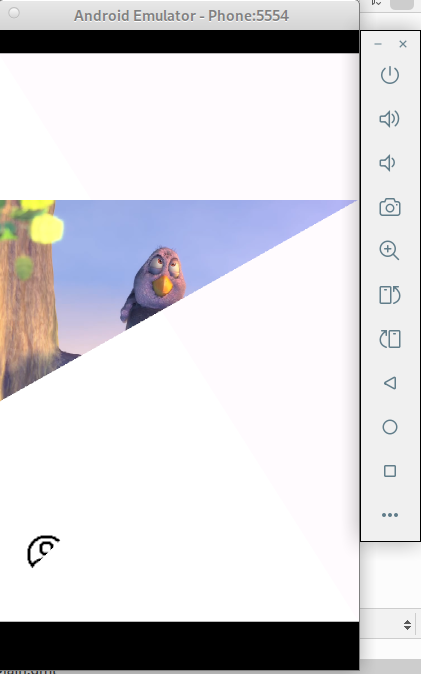
But on a real smartphone everything is fine.
The Qt version is 6.10.1.
Has anyone come across this?
Thanks in advance! -
Here is my code snippet:
...
                Button {
                    id: customButton
                    contentItem: ColumnLayout {
                            spacing: 10

                            Image {
                                width: 130; height: 100
                                fillMode: Image.PreserveAspectFit
                                source: "qrc:/images/profile.png"
                                Layout.alignment: Qt.AlignHCenter
                            }
                            Label {
                                id: textLabel
                                text: "Go to your account"
                                Layout.alignment: Qt.AlignHCenter
                                font: customButton.font
                            }
                    }
                    onClicked: {
                        stackView.push(detailPage)
                    }
                }
...
.
-
Here is a simple code:
ApplicationWindow  {
    id: mainwindow
    width: 640
    height: 480
    visible: true
    title: qsTr("Hello World")

    Rectangle {
        width: 130; height: 100
        color: "#4dcc51"
        border.color: "black"
        anchors.centerIn: parent
    }
}
.
This is what the emulator displays:
 image url)
. -
Here is a simple code:
ApplicationWindow  {
    id: mainwindow
    width: 640
    height: 480
    visible: true
    title: qsTr("Hello World")

    Rectangle {
        width: 130; height: 100
        color: "#4dcc51"
        border.color: "black"
        anchors.centerIn: parent
    }
}
.
This is what the emulator displays:

.@woodpecker Interesting. I wonder if it's related to https://qt-project.atlassian.net/browse/QTBUG-134245 (although that's meant to be fixed in Qt 6.10.0)
Does it help if you set the environment variable,
QT_DISABLE_SHADER_DISK_CACHE=1? -
Here is a simple code:
ApplicationWindow  {
    id: mainwindow
    width: 640
    height: 480
    visible: true
    title: qsTr("Hello World")

    Rectangle {
        width: 130; height: 100
        color: "#4dcc51"
        border.color: "black"
        anchors.centerIn: parent
    }
}
.
This is what the emulator displays:

.@JKSH said in The image is cropped diagonally:
Does it help if you set the environment variable, QT_DISABLE_SHADER_DISK_CACHE=1 ?
I added the following line as the first line in the main function:
qputenv("QT_DISABLE_SHADER_DISK_CACHE", "1");
but it didn't help. -
@JKSH said in The image is cropped diagonally:
Does it help if you set the environment variable, QT_DISABLE_SHADER_DISK_CACHE=1 ?
I added the following line as the first line in the main function:
qputenv("QT_DISABLE_SHADER_DISK_CACHE", "1");
but it didn't help.@woodpecker said in The image is cropped diagonally:
I added the following line as the first line in the main function:
qputenv("QT_DISABLE_SHADER_DISK_CACHE", "1");
but it didn't help.Thanks for checking. OK, it's a different issue then.
Would you be willing to try Qt 6.10.2? And if the problem persists, would you be willing to submit a bug report to https://qt-project.atlassian.net/ ?
-
Okay, I'll give it a try.
I've never written a bug report before... -
Okay, I'll give it a try.
I've never written a bug report before...@woodpecker said in The image is cropped diagonally:
Okay, I'll give it a try.
I've never written a bug report before...Don't worry, it's not as complicated as it might sound:
- Describe precisely your issue
- Give the full context on when/how it happens (what action(s) must be done to trigger it)
- Provide a minimal compilable project that shows that behaviour / allows to trigger it.
And done !
-
I too am facing the same issue of rectangle cropped diagonally in Android emulator, but works fine with kit as desktop
The Qt version is 6.5.3
My desktop PC do not have GPU
When i run the emulator from terminal i get the following message
ERROR | Your GPU cannot be used for hardware rendering. Consider using software rendering.Could this be the problem

