Skip to content
  • Categories
  • Recent
  • Tags
  • Popular
  • Users
  • Groups
  • Search
  • Get Qt Extensions
  • Unsolved
Collapse
Brand Logo
  1. Home
  2. Qt Development
  3. General and Desktop
  4. pixmap in QLabel or icon in QPushButton is gone after add some other widgets

pixmap in QLabel or icon in QPushButton is gone after add some other widgets

Scheduled Pinned Locked Moved Unsolved General and Desktop
6 Posts 4 Posters 58 Views 1 Watching
  • Oldest to Newest
  • Newest to Oldest
  • Most Votes
Reply
  • Reply as topic
Log in to reply
This topic has been deleted. Only users with topic management privileges can see it.
  • H Offline
    H Offline
    Hedwig13
    wrote last edited by
    #1

    I am a new comer learning QT, after I added up some QLabels and QPushButton with QT Designers and compile the project with Visual studio, and run the application.
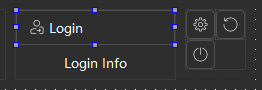
    ab342d37-d3f3-4d1f-8e42-b89524d168fb-image.png
    The icons or pixmaps show, but after that, if I want to add a QTimer to show system time(for example) and set it at the construction function of the MainWindow(after SetupUi()),

    result: the application can run but the icons and pixmaps gone. the icon I set for window gone, too. But the texts are stiil there.

    7fc3115b-8945-49e9-b5aa-119ad5bece29-image.png
    Could you please tell me how to deal with this situation if I have to add other widgets in the Mainwindow class, I am so confused that the orders when updating the display.

    Great thanks!

    JonBJ 1 Reply Last reply
    0
    • H Hedwig13

      I am a new comer learning QT, after I added up some QLabels and QPushButton with QT Designers and compile the project with Visual studio, and run the application.
      ab342d37-d3f3-4d1f-8e42-b89524d168fb-image.png
      The icons or pixmaps show, but after that, if I want to add a QTimer to show system time(for example) and set it at the construction function of the MainWindow(after SetupUi()),

      result: the application can run but the icons and pixmaps gone. the icon I set for window gone, too. But the texts are stiil there.
      7fc3115b-8945-49e9-b5aa-119ad5bece29-image.png
      Could you please tell me how to deal with this situation if I have to add other widgets in the Mainwindow class, I am so confused that the orders when updating the display.

      Great thanks!

      JonBJ Online
      JonBJ Online
      JonB
      wrote last edited by
      #2

      @Hedwig13
      We need to know how/what you set the icons to in Designer. Did you use Qt resources or did you point to external files? If the latter it may be a runtime path issue, you are probably best using Qt resources.

      H 1 Reply Last reply
      0
      • JonBJ JonB

        @Hedwig13
        We need to know how/what you set the icons to in Designer. Did you use Qt resources or did you point to external files? If the latter it may be a runtime path issue, you are probably best using Qt resources.

        H Offline
        H Offline
        Hedwig13
        wrote last edited by Hedwig13
        #3

        @JonB
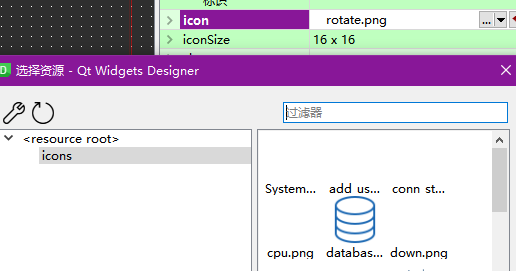
        Thanks! I add png files to the qrc and then I point the source path to the qlabel or qpushbutton.
        8e2afcaa-fa2c-43c1-a835-bb5e268adeea-image.png

        1 Reply Last reply
        0
        • SGaistS Offline
          SGaistS Offline
          SGaist
          Lifetime Qt Champion
          wrote last edited by
          #4

          Hi,

          Can you show the code you added that modifies your widget ?

          Interested in AI ? www.idiap.ch
          Please read the Qt Code of Conduct - https://forum.qt.io/topic/113070/qt-code-of-conduct

          H 1 Reply Last reply
          0
          • Christian EhrlicherC Offline
            Christian EhrlicherC Offline
            Christian Ehrlicher
            Lifetime Qt Champion
            wrote last edited by
            #5

            And does maybe your style/platform does not show icons by default? I think Mac has no icons

            Qt Online Installer direct download: https://download.qt.io/official_releases/online_installers/
            Visit the Qt Academy at https://academy.qt.io/catalog

            1 Reply Last reply
            0
            • SGaistS SGaist

              Hi,

              Can you show the code you added that modifies your widget ?

              H Offline
              H Offline
              Hedwig13
              wrote last edited by Hedwig13
              #6

              @SGaist
              Thanks! But I found that the problem might cause by Visual Studio's QT plugin. After I reboot the computer, some coding errors occured in my ui file and qrc file. After I re-opened these files with QT Creator and compile my application again in VS, this problem seems fixed.

              @Christian-Ehrlicher
              The platform is Win10, Qt5, VS2019.

              1 Reply Last reply
              2

              • Login

              • Login or register to search.
              • First post
                Last post
              0
              • Categories
              • Recent
              • Tags
              • Popular
              • Users
              • Groups
              • Search
              • Get Qt Extensions
              • Unsolved