
Issue with clipping of QLegend when writing QChartView to PDF
-
I am writing a ChartWidget (a QWidget which contains 1 or more QChartViews) to a PDF file. This is the code to render the ChartWidget to a PDF file:
       QPdfWriter writer( filePath );
        writer.setPageSize( toQPageSize( getPdfPageSize() ) );
        writer.setPageOrientation( getPdfOrientation()  );
        writer.setResolution( getPdfResolution() );

        // create a new ChartWidget, so don't have to re-parent or resize current one
        QRectF pageRect = writer.pageLayout().paintRectPixels( writer.resolution() );
        QSize sz( qCeil( pageRect.width() ), qCeil( pageRect.height() ) );
        ChartWidget* chartWidget = new ChartWidget( this );
        chartWidget->setAttribute( Qt::WA_DontShowOnScreen, true );
        chartWidget->resize( sz );
        chartWidget->populate(); // QCharts and QChartViews created

        // render the widget to PDF
        QPainter painter( &writer );
        chartWidget->render( &painter );

        // cleanup
        delete chartWidget;
Note that the ChartWidget is being created with the correct size for the PDF (not resized).
This works fine on Windows.
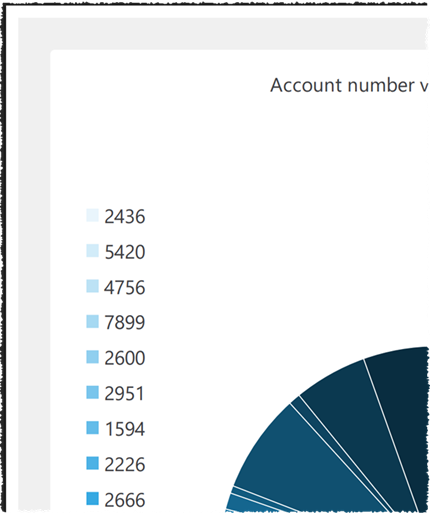
But on Mac the QLegend is always clipped.
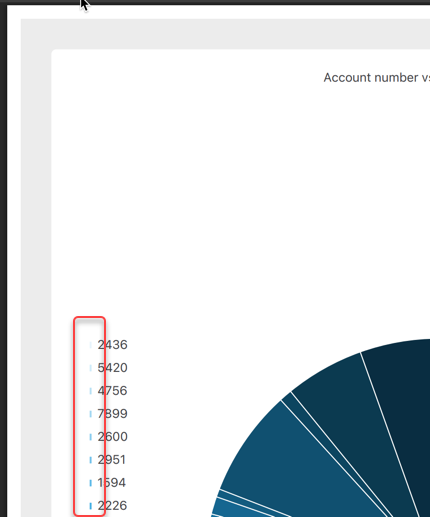
Any idea why? Is it something to do with the difference between logical and physical resolutions on Mac?
I asked Microsoft Copilot, but it gave me some (very confident) wrong answers.
I am on Qt 5.15.18.
