
How to support older Android Version with Qt 6.10!
-
Hi Guys,
i have installed latest Qt 6.10, on Windows 11, want to develop an Android app.
Everthings works (Voodoo!), I can run a Hello World App on an emulator, an mobile phone and tablet - mobile and tablet are running with Android 13.But how I can run the Android App under older mobiles, e.g. with Android 8?
Support for mobile platform https://doc.qt.io/qt-6/supported-platforms.html#mobile-platforms
says Android 9 - 16 is supported with Qt 6.10 release.Watching here https://doc.qt.io/qt-6.5/supported-platforms.html#mobile-platforms
says Android 8 - 15 is supported with Qt 6.5 LTS release.Sure I can install Qt 6.5 LTS, but support ends April 2026. No good idea to use 6.5 :-(
When I check Creator's "Settings / SDKs / Android / SDK Manager" i can add missing packages for Android 8 (done):
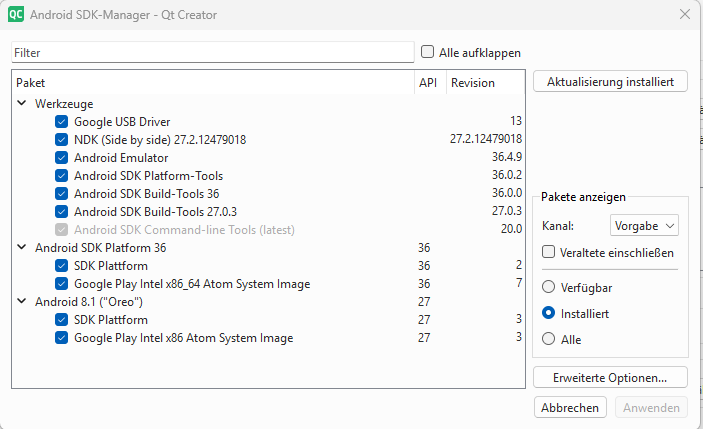
The top, "Android SDK Platform 36" was already installed and, I think, is used for my running HelloWorld App (Voodoo!).
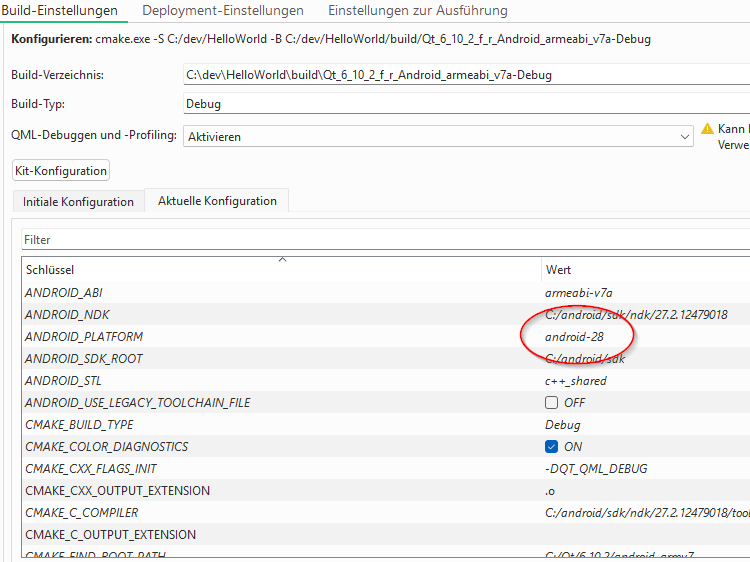
In the build settings I see following, API 28 means Android 9 (the minimum supported Android of Qt 6.10).
Later in the build setting I found:
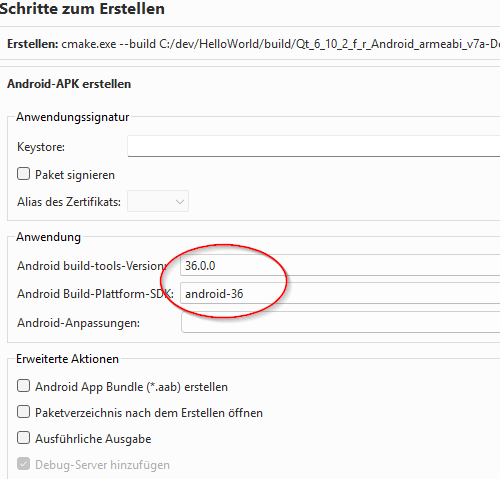
but cannot change (right place?) !
Is it even possible to create an app with Qt 6.10 for Android 8?
What steps I have to do?And I am also confused about the SDK versions, API and so on.
App is build with Android 16 (API 36) but runs on Android 13 (API 33) device. Maybe higher APIs include lower APIs.
But when using a function/interface whatever from API 36 and run it on lower API 33 device, what happens?
It's little confusing what Qt is doing there without any exactly documentation.I already gained experience with the first Qt to Android port years ago. But the description hasn't really improved.
Thx for any answer!
-
Hi Guys,
i have installed latest Qt 6.10, on Windows 11, want to develop an Android app.
Everthings works (Voodoo!), I can run a Hello World App on an emulator, an mobile phone and tablet - mobile and tablet are running with Android 13.But how I can run the Android App under older mobiles, e.g. with Android 8?
Support for mobile platform https://doc.qt.io/qt-6/supported-platforms.html#mobile-platforms
says Android 9 - 16 is supported with Qt 6.10 release.Watching here https://doc.qt.io/qt-6.5/supported-platforms.html#mobile-platforms
says Android 8 - 15 is supported with Qt 6.5 LTS release.Sure I can install Qt 6.5 LTS, but support ends April 2026. No good idea to use 6.5 :-(
When I check Creator's "Settings / SDKs / Android / SDK Manager" i can add missing packages for Android 8 (done):
The top, "Android SDK Platform 36" was already installed and, I think, is used for my running HelloWorld App (Voodoo!).
In the build settings I see following, API 28 means Android 9 (the minimum supported Android of Qt 6.10).
Later in the build setting I found:
but cannot change (right place?) !
Is it even possible to create an app with Qt 6.10 for Android 8?
What steps I have to do?And I am also confused about the SDK versions, API and so on.
App is build with Android 16 (API 36) but runs on Android 13 (API 33) device. Maybe higher APIs include lower APIs.
But when using a function/interface whatever from API 36 and run it on lower API 33 device, what happens?
It's little confusing what Qt is doing there without any exactly documentation.I already gained experience with the first Qt to Android port years ago. But the description hasn't really improved.
Thx for any answer!
@jackmack said in How to support older Android Version with Qt 6.10!:
But how I can run the Android App under older mobiles, e.g. with Android 8?
Provide a different APK file for older versions, which will be built using Qt 6.5. For all higher versions, use Qt 6.10.
But please think if you really need this - Android 8 only accounts for about 1,2 % of Android market at the moment. Perhaps trying to support it is not worth the hassle?
Is it even possible to create an app with Qt 6.10 for Android 8?
What steps I have to do?I don't think so, very likely not without some serious tweaking of Qt source code.
And I am also confused about the SDK versions, API and so on.
App is build with Android 16 (API 36) but runs on Android 13 (API 33) device. Maybe higher APIs include lower APIs.
But when using a function/interface whatever from API 36 and run it on lower API 33 device, what happens?
It's little confusing what Qt is doing there without any exactly documentation.This is not a Qt issue, this comes from Android itself and is well documented by Google, see for example: https://developer.android.com/studio/publish/versioning#minsdk and https://developer.android.com/guide/topics/manifest/uses-sdk-element
-
J jackmack has marked this topic as solved
