
VSCode: In a multi-root workspace, Qt Qml extension fails to resolve the "workspaceFolder" setting correctly
-
Hi all,
I have a VS Code multi-root workspace project located in https://github.com/anttikes/usb-fm-radio/. When I open the workspace file in the root, go to "GUI" and open "Main.qml" I get an error from the qmllint tool that the "GUI" module could not be found.
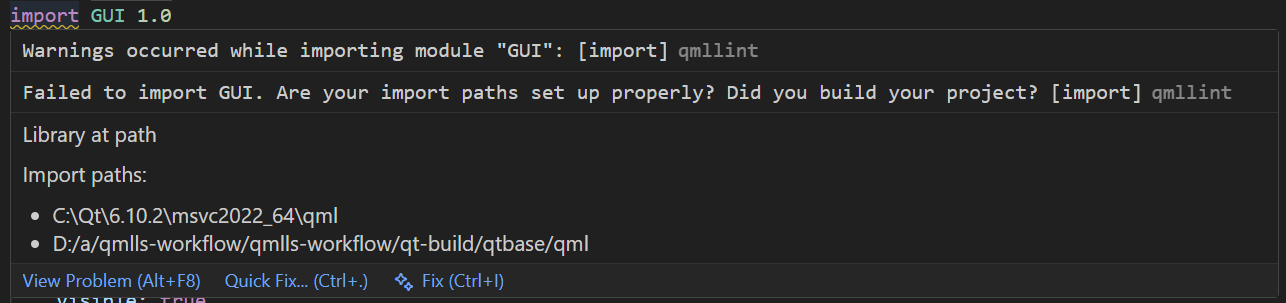
The reason seems clear: a missing import path. I then modify ".vscode/settings.json", and add the string array setting "qt-qml.qmlls.additionalImportPaths" to look like this:
"qt-qml.qmlls.additionalImportPaths": [
    "${workspaceFolder}/build/GUI/components"
]
This causes a rather perplexing behavior. In Main.qml the import path error stays and a new directory entry appears into the list, but the path looks wrong:
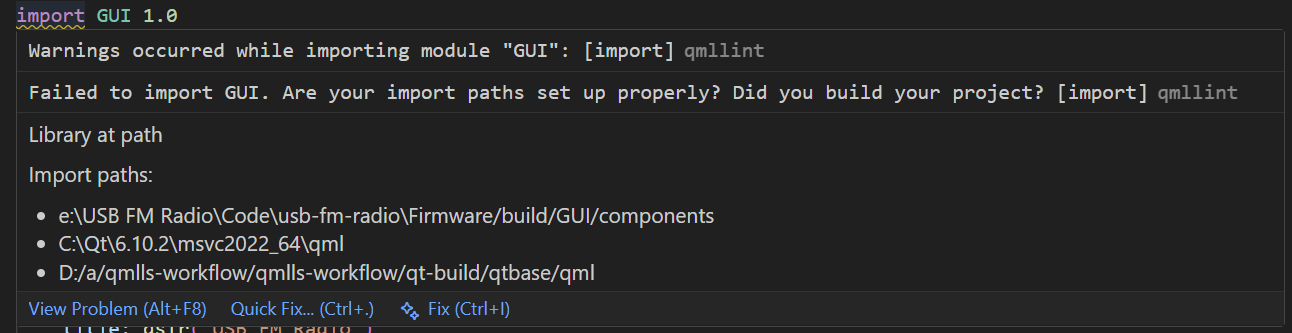
For some reason, the extension or the linter has reviewed the workspace file and taken the first entry in the "folders" sub-key. This behavior is obviously wrong because we are in the "GUI" portion of the multi-root workspace.
Here is an excerpt of the "qt-qml" output in VS Code, with my username redacted from the output:
2026-02-11 22:23:14.888 [info] [qmlls] Stopping QML Language Server: "Firmware" 2026-02-11 22:23:14.888 [info] [qmlls] Stopping QML Language Server: "GUI" 2026-02-11 22:23:14.889 [info] [qmlls] QML Language Server stopped: "GUI" 2026-02-11 22:23:14.890 [info] [qmlls] QML Language Server stopped: "Firmware" 2026-02-11 22:23:14.891 [info] [qmlls] Starting QML Language Server with:-be:/USB FM Radio/Code/usb-fm-radio/GUI/build;-dC:/Qt/Docs/Qt-6.10.2;-Ie:\USB FM Radio\Code\usb-fm-radio\Firmware/build/GUI/components;-IC:\Qt\6.10.2\msvc2022_64\qml 2026-02-11 22:23:14.892 [info] [qmlls] Starting QML Language Server with:-bE:/USB FM Radio/Code/usb-fm-radio/Firmware/build 2026-02-11 22:23:14.956 [info] [qmlls] QML Language Server started for Firmware C:\Users\-----\AppData\Local\qmlls\files\qmlls.exe 2026-02-11 22:23:14.958 [info] [qmlls] QML Language Server started for GUI C:\Users\-----\AppData\Local\qmlls\files\qmlls.exe 2026-02-11 22:41:51.537 [info] [qmlls] Stopping QML Language Server: "GUI" 2026-02-11 22:41:51.560 [info] [qmlls] QML Language Server stopped: "GUI" 2026-02-11 22:41:51.562 [info] [qmlls] Starting QML Language Server with:-be:/USB FM Radio/Code/usb-fm-radio/GUI/build;-dC:/Qt/Docs/Qt-6.10.2;-IC:\Qt\6.10.2\msvc2022_64\qml 2026-02-11 22:41:51.626 [info] [qmlls] QML Language Server started for GUI C:\Users\-----\AppData\Local\qmlls\files\qmlls.exe -
-
Hi,
See this post for information about the bug tracker.

