Memory usage issue with Qt Creator updated to version 18.0+
-
After I updated my Qt Creator to the latest version, when opening a project, the memory usage soared to 100% and occupied all the physical and virtual memory, eventually causing it to crash.During this period, Qt Creator occupied a total of over 80GB of various memory spaces (when I was making the statistics, I adopted the memory commit data from Windows Explorer, which seemed to include 31.3GB of physical memory and over 60GB of virtual memory).
This kind of situation has never occurred when I used Qt Creator before. Should I continue to use the new version or revert to the old one and wait? Has anyone encountered a similar problem? -
After I updated my Qt Creator to the latest version, when opening a project, the memory usage soared to 100% and occupied all the physical and virtual memory, eventually causing it to crash.During this period, Qt Creator occupied a total of over 80GB of various memory spaces (when I was making the statistics, I adopted the memory commit data from Windows Explorer, which seemed to include 31.3GB of physical memory and over 60GB of virtual memory).
This kind of situation has never occurred when I used Qt Creator before. Should I continue to use the new version or revert to the old one and wait? Has anyone encountered a similar problem?@XiaoMingTongxue Try running Qt Creator with
qtcreator -tcs(temporary clean settings).This way we can find out if there is something wrong with the settings, or with the project itself.
-
@XiaoMingTongxue Try running Qt Creator with
qtcreator -tcs(temporary clean settings).This way we can find out if there is something wrong with the settings, or with the project itself.
@cristian-adam
First of all, I would like to thank you for your help.After opening Qt Creator according to your method, the following happened to me:
- The personalized configuration of Qt Creator seemed to be cleared. I opened that project by following the steps of "Open Project -> Select the target qmake file".
- I reconfigured the project.
- When I tried to open the MainWindow.ui of the project, I encountered the same situation as before where the memory was occupied and Qt Creator was forced to close.
Over the past period, by constantly attempting to open the same project, I have discovered some patterns and made certain speculations: every time the memory exception occurs during the opening stage of the .ui file. If I do not attempt to open this file, then none of my operations will cause an exception.
I speculate that there might be two reasons for this phenomenon: the compatibility between the Qt version and the IDE version, and the use of Qss.
My IDE version has always been updated to the latest, but due to some reasons, I need to develop programs related to Qt5. Some information indicates that there are certain compatibility issues between the two.
Additionally, when the .ui file could be opened normally before, I had not yet edited the controls within it using Qss. During the process of writing Qss, Qt Creator did indeed experience some minor lag, although I did not pay much attention to it.
I wonder if these additional details can help you understand the situation I am encountering. Recently, I plan to roll back the IDE to Qt Creator 4 to try to solve the related problems. If there are any further developments, I may continue to bother you.
Finally, I would like to express my gratitude once again for your guidance in resolving the exception despite your busy schedule.
-
@XiaoMingTongxue Try running Qt Creator with
qtcreator -tcs(temporary clean settings).This way we can find out if there is something wrong with the settings, or with the project itself.
@cristian-adam
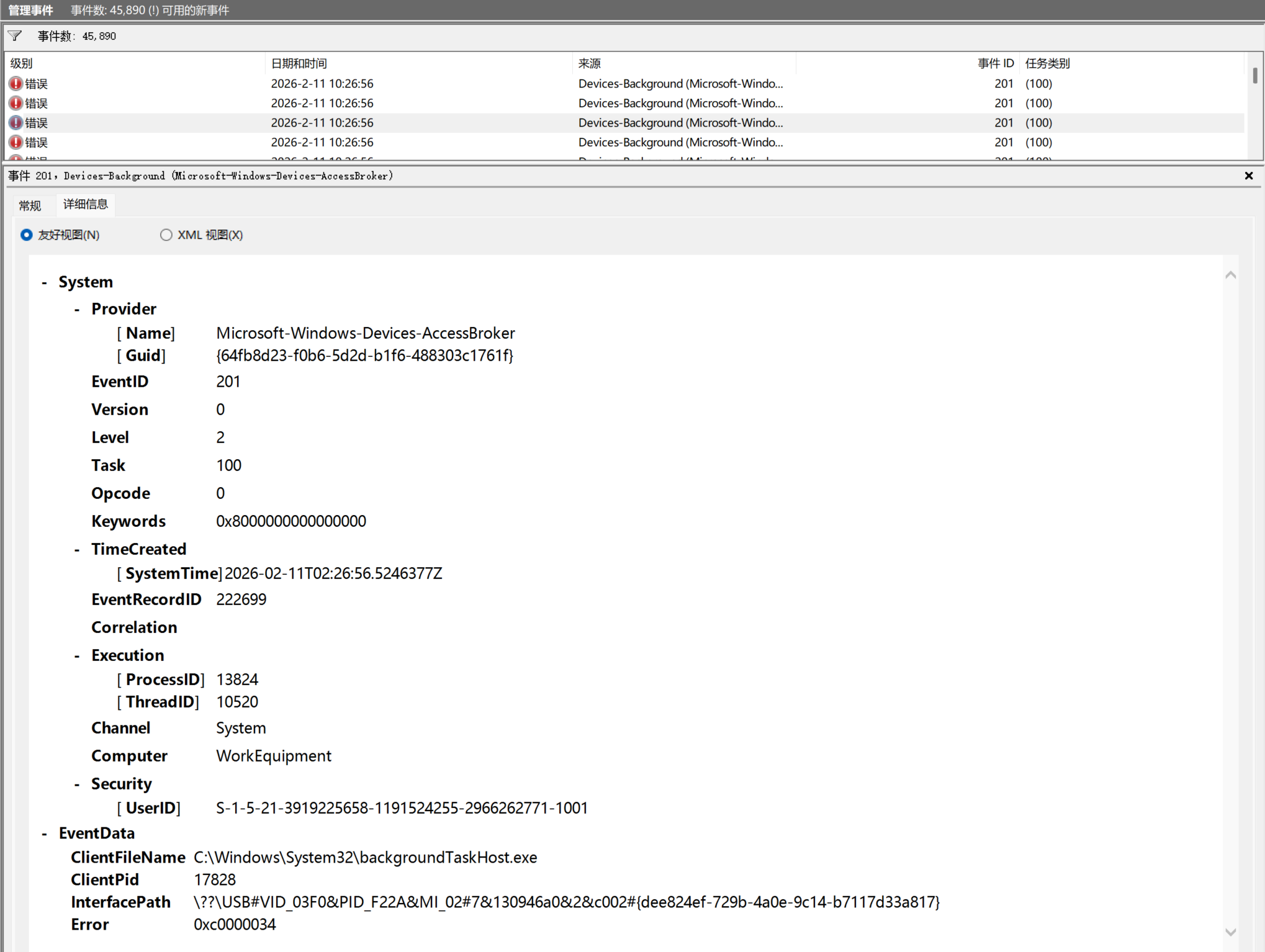
I've made a new breakthrough here: I suddenly recalled the experience of locating problems through Windows' system logs when I used to check project anomalies, so I tried to look for answers in my system logs.Surprisingly, at the same time as my Creator's anomaly, there were large-scale system errors. The error process came from the Windows background program backgroundTaskHost.exe, and the source of the error was an unconnected HP printer.
I consulted an AI, which told me that when Creator uses Designer to open a .ui file, it scans all connected devices on the computer in full. Coincidentally, the driver or cache of this device of mine might have had some abnormalities, causing a failure in the access of Devices-AccessBroker, and then repeatedly accessing this non-existent device, resulting in a large accumulation of memory usage.
Even after I tried to delete the device from the Device Manager, the anomaly was still triggered.
Now I'm trying two things: disabling Creator's full device scan function and completely removing this annoying virtual device from my computer. I will try every method I can find and also hope you can give me some more professional advice and help.
Thank you very much!