Skip to content
  • Categories
  • Recent
  • Tags
  • Popular
  • Users
  • Groups
  • Search
  • Get Qt Extensions
  • Unsolved
Collapse
Brand Logo
  1. Home
  2. Qt Development
  3. Qt Creator and other tools
  4. Qt Creator Git Log output format

Qt Creator Git Log output format

Scheduled Pinned Locked Moved Solved Qt Creator and other tools
14 Posts 3 Posters 863 Views 2 Watching
  • Oldest to Newest
  • Newest to Oldest
  • Most Votes
Reply
  • Reply as topic
Log in to reply
This topic has been deleted. Only users with topic management privileges can see it.
  • aha_1980A Offline
    aha_1980A Offline
    aha_1980
    Lifetime Qt Champion
    wrote last edited by
    #5

    @JonB You need to add a blank second line after the subject. That's also what Creators commit dialog suggests when you write the message.

    That's all I can tell you.

    Regards

    Qt has to stay free or it will die.

    1 Reply Last reply
    0
    • JonBJ JonB

      @J.Hilk Don't know whether what you wrote is "real" or not?

      @aha_1980 Here are screenshots:

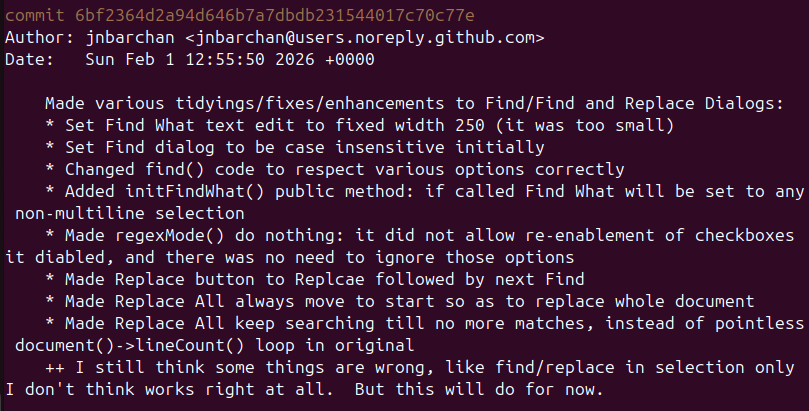
      1. git log in a terminal. Nice, readable output:

      Screenshot 2026-02-02 074601.png

      1. Same item from Creator > Git > Log. Joined into single line, ridiculously long, scrolls way off to right of window:

      Screenshot 2026-02-02 074401.png

      Note that the lines other than than the comment --- like Author or Date --- appear as own lines. But the comment seem to all be joined into a single line. Why? Which would you rather read?!

      J.HilkJ Offline
      J.HilkJ Offline
      J.Hilk
      Moderators
      wrote last edited by
      #6

      @JonB it is real, its guidelines from the linux kernel git, and became the defeacto standard. some git commands don't work properly , if you don't flow it, like:

      git log --oneline
      git shortlog
      git format-patch

      You're missing the blank line


      Be aware of the Qt Code of Conduct, when posting : https://forum.qt.io/topic/113070/qt-code-of-conduct


      Q: What's that?
      A: It's blue light.
      Q: What does it do?
      A: It turns blue.

      1 Reply Last reply
      1
      • J.HilkJ Offline
        J.HilkJ Offline
        J.Hilk
        Moderators
        wrote last edited by
        #7

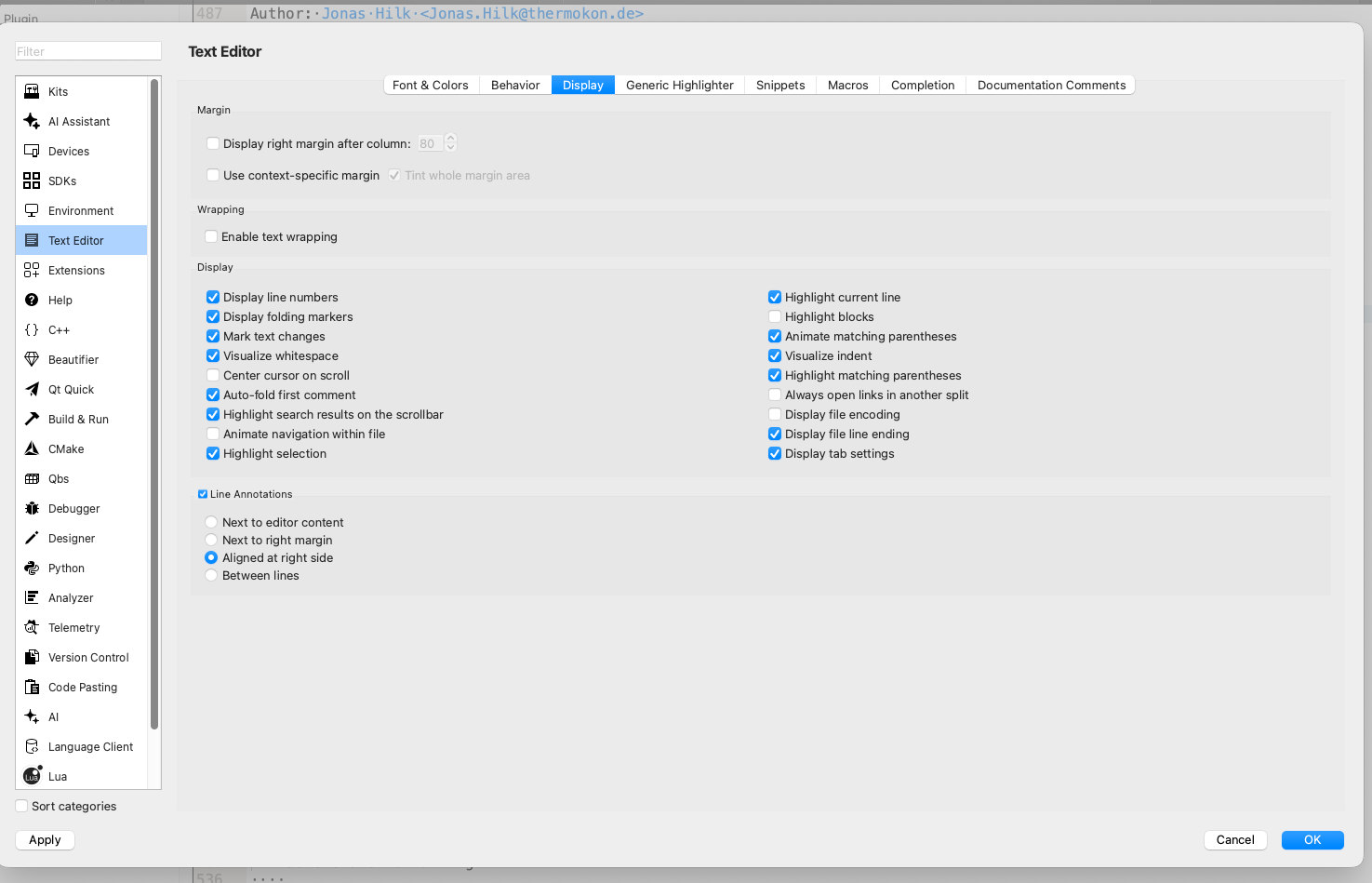
        try enabling text wrapping:

        image.png


        Be aware of the Qt Code of Conduct, when posting : https://forum.qt.io/topic/113070/qt-code-of-conduct


        Q: What's that?
        A: It's blue light.
        Q: What does it do?
        A: It turns blue.

        1 Reply Last reply
        0
        • JonBJ Offline
          JonBJ Offline
          JonB
          wrote last edited by JonB
          #8

          Thanks guys, let's go slowly:

          @J.Hilk said in Qt Creator Git Log output format:

          try enabling text wrapping:

          Umm. That indeed causes the "long line" to wrap over multilines instead of scrolling over to right. But it's still one long line, lost all the line breaks for layout. And that is at the expense of altering line wrap behaviour globally just to satisfy this Git Log output. Meaning that all my source code wraps, which I would not dream of doing (drowning kittens screeching?). And it says nothing about why Creator is choosing to join into one long line in the first place.

          So are you two saying that if I want to type in a multiline comment for git I should always put a blank line after the first line of multiline? I can start doing that. Will that cause Creator not to join into a single line? Fair enough, though I still don't see why my present log output being multiline and shown fine in terminal should be presented joined in Creator?

          1 Reply Last reply
          0
          • aha_1980A Offline
            aha_1980A Offline
            aha_1980
            Lifetime Qt Champion
            wrote last edited by
            #9

            @JonB As @J.Hilk already said, the problem is git log --oneline (That's a simplification, Creator uses a more complicated pattern, but in principle it requests the subject line from git). And git does not simply give the first line, but rather the whole message until the first empty line.

            So there's really not much we can do here without breaking the "conventions".

            Regards

            Qt has to stay free or it will die.

            JonBJ 1 Reply Last reply
            1
            • aha_1980A aha_1980

              @JonB As @J.Hilk already said, the problem is git log --oneline (That's a simplification, Creator uses a more complicated pattern, but in principle it requests the subject line from git). And git does not simply give the first line, but rather the whole message until the first empty line.

              So there's really not much we can do here without breaking the "conventions".

              Regards

              JonBJ Offline
              JonBJ Offline
              JonB
              wrote last edited by
              #10

              @aha_1980
              Ah now I see git log --oneline does this. So maybe Creator is not doing its own line-joining, it is coming from some git command. Fair enough. I will change my behaviour to put in a blank line after the first in future.

              Just before I go hunt to look it up: is there a (simple) way to edit my existing git log comment for this? It will need to throw me into an editor on the multiline comment so I can preserve it while inserting one blank line, so command-line only won't suit?

              1 Reply Last reply
              0
              • aha_1980A Offline
                aha_1980A Offline
                aha_1980
                Lifetime Qt Champion
                wrote last edited by
                #11

                @JonB If the commits are still local, you can run an Interactive rebase (either in the Shell or from within Creator) and select r (reword) for each commit. Git then presents you all commit messages one after another for editing.

                You could even create a script that does all this automatic :)

                But as rebase changes the commit hashes, that is nothing you can do on commits in a public branch.

                Qt has to stay free or it will die.

                JonBJ 1 Reply Last reply
                1
                • aha_1980A aha_1980

                  @JonB If the commits are still local, you can run an Interactive rebase (either in the Shell or from within Creator) and select r (reword) for each commit. Git then presents you all commit messages one after another for editing.

                  You could even create a script that does all this automatic :)

                  But as rebase changes the commit hashes, that is nothing you can do on commits in a public branch.

                  JonBJ Offline
                  JonBJ Offline
                  JonB
                  wrote last edited by
                  #12

                  @aha_1980
                  Thanks. I did Google and came up with about the same. And it doesn't help that it's a couple of commits ago. I will leave this existing one and try a blank line in next commit, thanks.

                  1 Reply Last reply
                  2
                  • aha_1980A Offline
                    aha_1980A Offline
                    aha_1980
                    Lifetime Qt Champion
                    wrote last edited by
                    #13

                    @JonB You're welcome.

                    Qt has to stay free or it will die.

                    1 Reply Last reply
                    1
                    • JonBJ Offline
                      JonBJ Offline
                      JonB
                      wrote last edited by
                      #14

                      Just did a new commit with multiline comment, but put blank line immediately after first line. Now shows up multiline in Creator's Git Log commands. Perfect, thanks :)

                      1 Reply Last reply
                      0
                      • JonBJ JonB has marked this topic as solved

                      • Login

                      • Login or register to search.
                      • First post
                        Last post
                      0
                      • Categories
                      • Recent
                      • Tags
                      • Popular
                      • Users
                      • Groups
                      • Search
                      • Get Qt Extensions
                      • Unsolved