
Missing KCoreAddons and KWidgetsAddons developing in Kubuntu 24.04 LTS
-
Good morning to all,
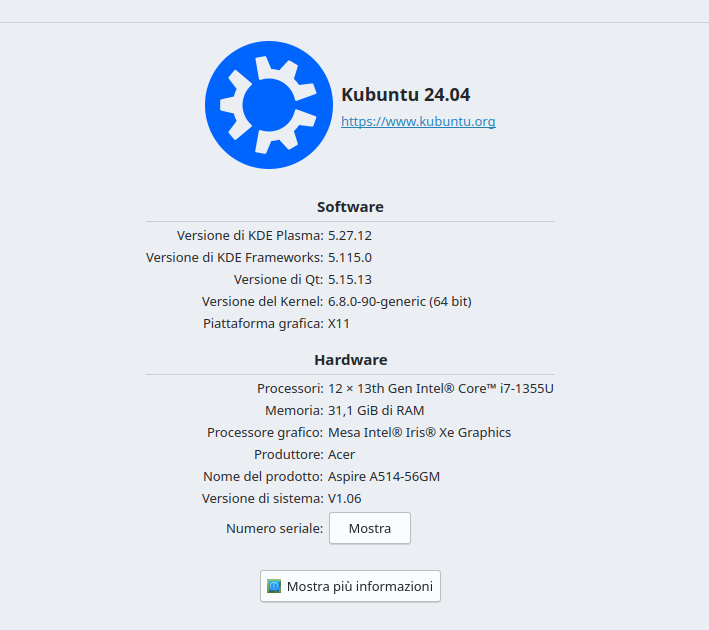
I develop under Kubuntu, as you can view in the attached image. I'm trying to compile an existing project, downloaded from GitHub. The .pro file contains that line:QT += xml svg network sql widgets printsupport concurrent KWidgetsAddons KCoreAddons
When I try to compile, I receive the following message:
09:29:33: Running steps for project qelectrotech...
09:29:33: Starting: "/home/glafauci61/Qt/5.15.1/gcc_64/bin/qmake" /media/LinuxDati/Programmi-QT/QElectroTech/qelectrotech-source-mirror-master/qelectrotech.pro -spec linux-g++ CONFIG+=debug CONFIG+=qml_debug
Project ERROR: Unknown module(s) in QT: KWidgetsAddons KCoreAddons
09:29:33: The command "/home/glafauci61/Qt/5.15.1/gcc_64/bin/qmake /media/LinuxDati/Programmi-QT/QElectroTech/qelectrotech-source-mirror-master/qelectrotech.pro -spec linux-g++ CONFIG+=debug CONFIG+=qml_debug" terminated with exit code 3.
09:29:33: Error while building/deploying project qelectrotech (kit: Desktop Qt 5.15.1 GCC 64bit)
09:29:33: When executing step "qmake"
09:29:33: Elapsed time: 00:00.I can't understand what's the problem: both KCoreAddons and KWidgetsAddons libraries are set in the system, under the directory /usr/lib/x86_64-linux-gnu.
Anyone can help me?
-
Good morning to all,
I develop under Kubuntu, as you can view in the attached image. I'm trying to compile an existing project, downloaded from GitHub. The .pro file contains that line:QT += xml svg network sql widgets printsupport concurrent KWidgetsAddons KCoreAddons
When I try to compile, I receive the following message:
09:29:33: Running steps for project qelectrotech...
09:29:33: Starting: "/home/glafauci61/Qt/5.15.1/gcc_64/bin/qmake" /media/LinuxDati/Programmi-QT/QElectroTech/qelectrotech-source-mirror-master/qelectrotech.pro -spec linux-g++ CONFIG+=debug CONFIG+=qml_debug
Project ERROR: Unknown module(s) in QT: KWidgetsAddons KCoreAddons
09:29:33: The command "/home/glafauci61/Qt/5.15.1/gcc_64/bin/qmake /media/LinuxDati/Programmi-QT/QElectroTech/qelectrotech-source-mirror-master/qelectrotech.pro -spec linux-g++ CONFIG+=debug CONFIG+=qml_debug" terminated with exit code 3.
09:29:33: Error while building/deploying project qelectrotech (kit: Desktop Qt 5.15.1 GCC 64bit)
09:29:33: When executing step "qmake"
09:29:33: Elapsed time: 00:00.I can't understand what's the problem: both KCoreAddons and KWidgetsAddons libraries are set in the system, under the directory /usr/lib/x86_64-linux-gnu.
Anyone can help me?
@gfa.lafauci said in Missing KCoreAddons and KWidgetsAddons developing in Kubuntu 24.04 LTS:
can't understand what's the problem
I guess the problem is that you're using Qt installed via Qt Online Installer. Try to use Qt provided by Kubuntu.
-
@gfa.lafauci Hi and welcome to devnet,
Did you also install the development packages for these two libraries ?
Interested in AI ? www.idiap.ch
Please read the Qt Code of Conduct - https://forum.qt.io/topic/113070/qt-code-of-conduct -
@gfa.lafauci Hi and welcome to devnet,
Did you also install the development packages for these two libraries ?
@SGaist, I try to install KCoreAddons-dev and KWidgetsAddons-dev via apt, but I receive the message "the package is not available" (or similar). I searched for them on my system and both are stored in '/usr/lib/x86_64-linux-gnu' directory. I inserted that path in the .pro file, but never change. I know that both two packages are essential for Kubuntu, and I don't understand why QT6 can't reach them.
-
@gfa.lafauci said in Missing KCoreAddons and KWidgetsAddons developing in Kubuntu 24.04 LTS:
can't understand what's the problem
I guess the problem is that you're using Qt installed via Qt Online Installer. Try to use Qt provided by Kubuntu.
-
@jsulm, how?
@gfa.lafauci By using qmake provided by Qt installed from Kubuntu packages.
-
G gfa.lafauci has marked this topic as solved
-
I resolved the problem modifying the following statement in .pro files:
QT += xml svg network sql widgets printsupport concurrent #KWidgetsAddons KCoreAddonsNext, I add one new section:
# using KCoreAddons and KWidgetsAddons
unix {
  INCLUDEPATH += /usr/include/KF5/KCoreAddons

  LIBS += /usr/lib/x86_64-linux-gnu/libKF5CoreAddons.so \
          /usr/lib/x86_64-linux-gnu/libKF5WidgetsAddons.so
}
With these modifications, the project compiles and links correctly.
-
I resolved the problem modifying the following statement in .pro files:
QT += xml svg network sql widgets printsupport concurrent #KWidgetsAddons KCoreAddonsNext, I add one new section:
# using KCoreAddons and KWidgetsAddons
unix {
  INCLUDEPATH += /usr/include/KF5/KCoreAddons

  LIBS += /usr/lib/x86_64-linux-gnu/libKF5CoreAddons.so \
          /usr/lib/x86_64-linux-gnu/libKF5WidgetsAddons.so
}
With these modifications, the project compiles and links correctly.
@gfa.lafauci a quick search on https://packages.debian.org returns:
- libkf5coreaddons-dev
- libkf5widgetsaddons-dev
Interested in AI ? www.idiap.ch
Please read the Qt Code of Conduct - https://forum.qt.io/topic/113070/qt-code-of-conduct -
@gfa.lafauci a quick search on https://packages.debian.org returns:
- libkf5coreaddons-dev
- libkf5widgetsaddons-dev
@SGaist, thank you. I saw these packages, and I downloaded them.
They were essentials to solve my problem.Pls, quote me, so I can post without limitations. Thank you.
Bye.

