
Using GStreamer Within Qt (QGroundControl-Like Architecture)
-
@SGaist All of the errors occur while building the Qt6 GStreamer plugin within my project. As for your second question, yes I am trying to compile the plugin by directly copying it into my own project.
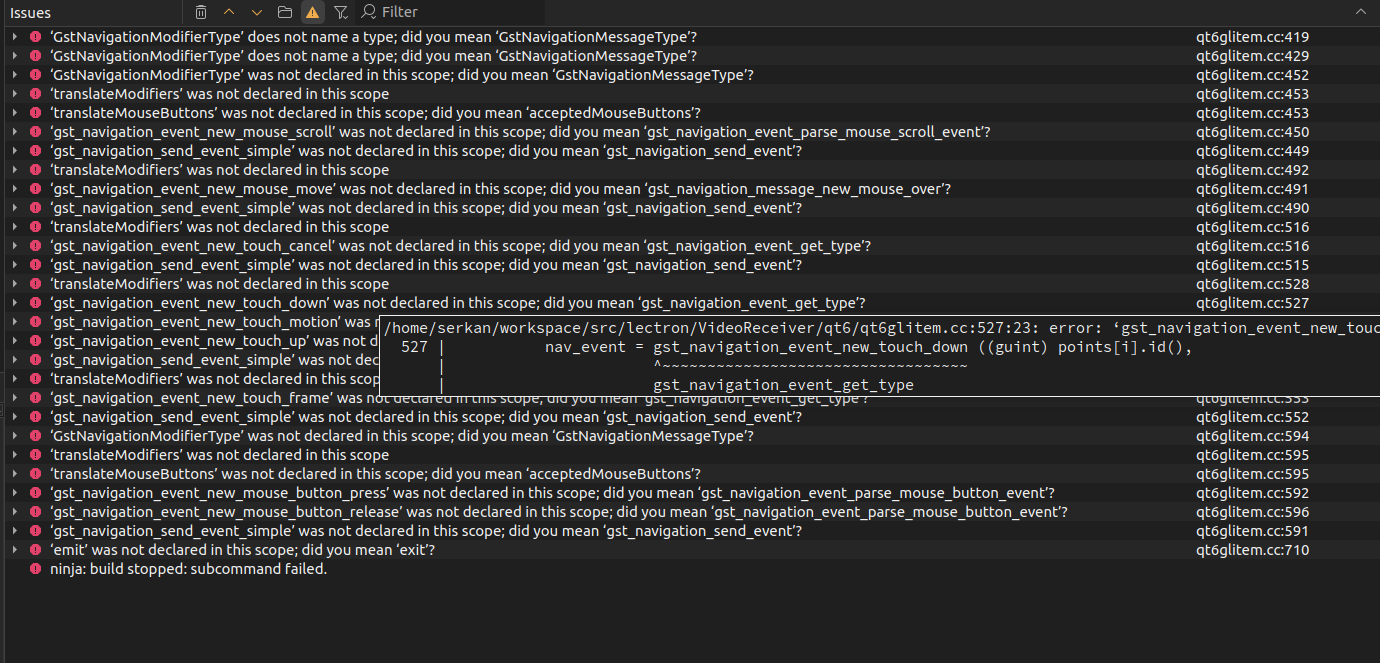
@serkan_tr It seems like this is an incompatibility issue between the gstream version and qgroundcontrol requirements. You should try reinstalling a newer version.
-
@hoandepchai To ensure version compatibility, I specifically built GStreamer 1.22 from source. In this process, I took the Qt6-related code from the example ext directory in the source tree and integrated it into my project. However, the Qt side keeps producing build errors. If there is a reference project or an example that demonstrates the correct setup, I could continue the project based on that. So far, though, I have not found any GStreamer examples other than QGroundControl.
-
Try downloading the latest version of gstream, version 1.26. I've used both 1.22 and 1.26 and they both process video, but for Windows.
-
@hoandepchai and @SGaist As a temporary solution, I am receiving the video using appsink, performing the required conversions to pass it to the QML side, and creating a QImage. I then send this QImage to the QML layer. The code currently works, and I can receive everything sent via GStreamer without issues. However, I am not sure how correct this approach is from an architectural and performance perspective.
void VideoReceiver::process(GstSample *sample)
{
    GstBuffer *buffer = gst_sample_get_buffer(sample);
    GstCaps *caps = gst_sample_get_caps(sample);

    GstMapInfo map;
    gst_buffer_map(buffer, &map, GST_MAP_READ);

    GstVideoInfo info;
    gst_video_info_from_caps(&info, caps);

    QImage img(
        map.data,
        info.width,
        info.height,
        QImage::Format_RGB888
    );

    m_lastFrameTime = std::chrono::steady_clock::now();
    m_frameCounter++;

    if(!hasVideo()) {
        m_hasVideo = true;
        hasVideoChanged();
    }

    m_frame = img.copy();
    provider->updateImage(m_frame);
    emit frameChanged();

    gst_buffer_unmap(buffer, &map);
}
Image { anchors.fill: parent fillMode: Image.PreserveAspectFit visible: videoReceiver && videoReceiver.hasVideo source: videoReceiver ? videoReceiver.frameUrl : "" cache: false } -
@hoandepchai and @SGaist As a temporary solution, I am receiving the video using appsink, performing the required conversions to pass it to the QML side, and creating a QImage. I then send this QImage to the QML layer. The code currently works, and I can receive everything sent via GStreamer without issues. However, I am not sure how correct this approach is from an architectural and performance perspective.
void VideoReceiver::process(GstSample *sample)
{
    GstBuffer *buffer = gst_sample_get_buffer(sample);
    GstCaps *caps = gst_sample_get_caps(sample);

    GstMapInfo map;
    gst_buffer_map(buffer, &map, GST_MAP_READ);

    GstVideoInfo info;
    gst_video_info_from_caps(&info, caps);

    QImage img(
        map.data,
        info.width,
        info.height,
        QImage::Format_RGB888
    );

    m_lastFrameTime = std::chrono::steady_clock::now();
    m_frameCounter++;

    if(!hasVideo()) {
        m_hasVideo = true;
        hasVideoChanged();
    }

    m_frame = img.copy();
    provider->updateImage(m_frame);
    emit frameChanged();

    gst_buffer_unmap(buffer, &map);
}
Image { anchors.fill: parent fillMode: Image.PreserveAspectFit visible: videoReceiver && videoReceiver.hasVideo source: videoReceiver ? videoReceiver.frameUrl : "" cache: false }@serkan_tr one thing I don't understand: you are building GStreamer yourself, so why don't you build the plugin librairies as well ? You would get the Qt 6 plugin that way.
Interested in AI ? www.idiap.ch
Please read the Qt Code of Conduct - https://forum.qt.io/topic/113070/qt-code-of-conduct -
@serkan_tr one thing I don't understand: you are building GStreamer yourself, so why don't you build the plugin librairies as well ? You would get the Qt 6 plugin that way.
@SGaist Actually, I do not want to develop my own GStreamer plugins. I was forced to take this approach because I cannot use the default Qt plugins. My main goal is to understand how those default plugins should be properly integrated into the system.
-
@serkan_tr one thing I don't understand: you are building GStreamer yourself, so why don't you build the plugin librairies as well ? You would get the Qt 6 plugin that way.
-
@SGaist Actually, I do not want to develop my own GStreamer plugins. I was forced to take this approach because I cannot use the default Qt plugins. My main goal is to understand how those default plugins should be properly integrated into the system.
@serkan_tr I guess the paths of your compiled gstreamer are not set properly. Can you show what you did in this regard?
-
@SGaist gstreamer Qt5/6 plugin is made in gstreamer, not in Qt5/6. If he builds gstreamer, Qt5/6 gstreamer plugin is built if Qt5/6 is installed.
@JoeCFD said in Using GStreamer Within Qt (QGroundControl-Like Architecture):
@SGaist gstreamer Qt5/6 plugin is made in gstreamer, not in Qt5/6. If he builds gstreamer, Qt5/6 gstreamer plugin is built if Qt5/6 is installed.
I am fully aware of that, hence my question to @serkan_tr to understand what he was trying to do with that code.
-
@Bonnie As far as I know, using QVideoWidget + QMediaPlayer to build a video player provides a solid and powerful interface. However, to my knowledge, it does not support receiving video data that is decoded from a UDP stream. Nevertheless, thank you I will review the documentation again, as I might be mistaken.
@serkan_tr Hey I just did some tests so I think I'd write it here.
I test with Qt6.4.2 (because my linux VM is an old debian bookworm and everything was installed by apt).
The udp stream is sent by running:gst-launch-1.0 videotestsrc ! openh264enc ! mpegtsmux ! udpsink host=127.0.0.1 port=5004
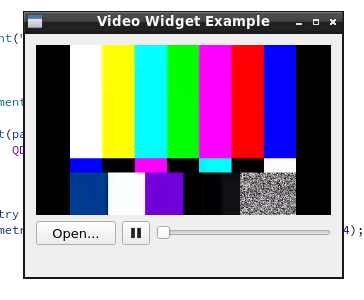
Then I tried the simple Video Widget Example and run with argument: udp://0.0.0.0:5004
After clicking the play button, video can be shown:
As I check the Qt6.4 documentation, ffmpeg backend was still a technology preview back then. So the default backend I tried first is gstreamer.
I also tried ffmpeg backend by setting QT_MEDIA_BACKEND=ffmpeg and it also worked.But I do think you trying to use qml may still be a better idea because I also read this from the updated documentation that
Qt Multimedia is not a general purpose streaming framework and not necessarily the architecturally best way to use GStreamer with Qt. Developers, who need a high degree of control over the GStreamer pipeline, but only want to show the video output Qt, may want to consider using GStreamer's qml6glsink.
-
 S serkan_tr has marked this topic as solved

