
Using GStreamer Within Qt (QGroundControl-Like Architecture)
-
Hello,
I have encountered an issue and, despite my research, I could not find sufficient or well-structured technical resources explaining this topic clearly. I would appreciate guidance from those who have experience in this area.First, I would like to clearly state my objective. I am receiving a video stream from an external device (such as a robot or UAV) via GStreamer using protocols like UDP or TCP. I want to display this incoming video stream inside a Qt-based GUI that I am developing. My main requirement is to render the video not in a separate window or fullscreen, but inside a specific UI component (for example, a dedicated Item or widget area within the interface).
During my research and after analyzing QGroundControl, I noticed that it uses a Qt + GStreamer integration for video rendering. Based on this, I attempted to build a similar structure by examining the relevant Qt6–GStreamer source files used in QGroundControl.
However, I ran into a version compatibility issue. On a default Ubuntu installation, GStreamer 1.20 is available, while Qt6 support starts from GStreamer 1.22. For this reason, I built GStreamer from source and attempted to compile the related Qt6 integration code. Unfortunately, I am encountering numerous build errors during this process.
At this point, I believe I am missing or misconfiguring something fundamental, but I have not been able to identify exactly what is wrong. As alternatives, I would like to ask:
-
Is there a simpler or more recommended way to embed a GStreamer video stream into a Qt UI component?
-
Instead of directly replicating the QGroundControl architecture, is there a more suitable approach for this use case?
-
Are there any up-to-date and detailed documents that explain this integration step by step?
My current project structure and related source files are as follows. I would appreciate it if you could review them and provide feedback on any incorrect or missing configurations
├── CMakeLists.txt
├── main.cpp
├── Main.qml
└── qt6
    ├── gstplugin.cc
    ├── gstqml6glsink.cc
    ├── gstqml6glsink.h
    ├── gstqsg6glnode.cc
    ├── gstqsg6glnode.h
    ├── gstqt6element.cc
    ├── gstqt6elements.h
    ├── gstqt6gl.h
    ├── gstqt6glutility.cc
    ├── gstqt6glutility.h
    ├── qt6glitem.cc
    └── qt6glitem.h
My development environment and system details are as follows:
- Operating Systems: Ubuntu 22.04 and Windows 10
- Qt Version: Qt 6.8
- Gstreamer Base code
Using GStreamer is not a strict requirement. My primary goal is to decode video streams transmitted over UDP, TCP, or similar protocols and display them within a Qt-based user interface. I am also open to alternative libraries or different approaches to achieve this.
Any guidance or references would be greatly appreciated. Thank you in advance.
-
-
@Bonnie As far as I know, using QVideoWidget + QMediaPlayer to build a video player provides a solid and powerful interface. However, to my knowledge, it does not support receiving video data that is decoded from a UDP stream. Nevertheless, thank you I will review the documentation again, as I might be mistaken.
@serkan_tr Hey I just did some tests so I think I'd write it here.
I test with Qt6.4.2 (because my linux VM is an old debian bookworm and everything was installed by apt).
The udp stream is sent by running:gst-launch-1.0 videotestsrc ! openh264enc ! mpegtsmux ! udpsink host=127.0.0.1 port=5004
Then I tried the simple Video Widget Example and run with argument: udp://0.0.0.0:5004
After clicking the play button, video can be shown:
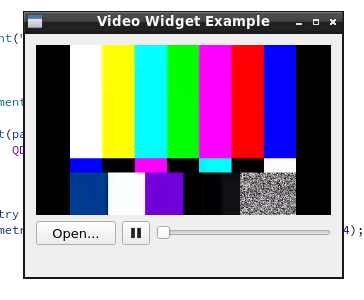
As I check the Qt6.4 documentation, ffmpeg backend was still a technology preview back then. So the default backend I tried first is gstreamer.
I also tried ffmpeg backend by setting QT_MEDIA_BACKEND=ffmpeg and it also worked.But I do think you trying to use qml may still be a better idea because I also read this from the updated documentation that
Qt Multimedia is not a general purpose streaming framework and not necessarily the architecturally best way to use GStreamer with Qt. Developers, who need a high degree of control over the GStreamer pipeline, but only want to show the video output Qt, may want to consider using GStreamer's qml6glsink.
-
Hi,
Which errors are you encountering ?
Are you copying the Qt6 GStreamer plugin within your own project ? -
Hello,
I have encountered an issue and, despite my research, I could not find sufficient or well-structured technical resources explaining this topic clearly. I would appreciate guidance from those who have experience in this area.First, I would like to clearly state my objective. I am receiving a video stream from an external device (such as a robot or UAV) via GStreamer using protocols like UDP or TCP. I want to display this incoming video stream inside a Qt-based GUI that I am developing. My main requirement is to render the video not in a separate window or fullscreen, but inside a specific UI component (for example, a dedicated Item or widget area within the interface).
During my research and after analyzing QGroundControl, I noticed that it uses a Qt + GStreamer integration for video rendering. Based on this, I attempted to build a similar structure by examining the relevant Qt6–GStreamer source files used in QGroundControl.
However, I ran into a version compatibility issue. On a default Ubuntu installation, GStreamer 1.20 is available, while Qt6 support starts from GStreamer 1.22. For this reason, I built GStreamer from source and attempted to compile the related Qt6 integration code. Unfortunately, I am encountering numerous build errors during this process.
At this point, I believe I am missing or misconfiguring something fundamental, but I have not been able to identify exactly what is wrong. As alternatives, I would like to ask:
-
Is there a simpler or more recommended way to embed a GStreamer video stream into a Qt UI component?
-
Instead of directly replicating the QGroundControl architecture, is there a more suitable approach for this use case?
-
Are there any up-to-date and detailed documents that explain this integration step by step?
My current project structure and related source files are as follows. I would appreciate it if you could review them and provide feedback on any incorrect or missing configurations
├── CMakeLists.txt
├── main.cpp
├── Main.qml
└── qt6
    ├── gstplugin.cc
    ├── gstqml6glsink.cc
    ├── gstqml6glsink.h
    ├── gstqsg6glnode.cc
    ├── gstqsg6glnode.h
    ├── gstqt6element.cc
    ├── gstqt6elements.h
    ├── gstqt6gl.h
    ├── gstqt6glutility.cc
    ├── gstqt6glutility.h
    ├── qt6glitem.cc
    └── qt6glitem.h
My development environment and system details are as follows:
- Operating Systems: Ubuntu 22.04 and Windows 10
- Qt Version: Qt 6.8
- Gstreamer Base code
Using GStreamer is not a strict requirement. My primary goal is to decode video streams transmitted over UDP, TCP, or similar protocols and display them within a Qt-based user interface. I am also open to alternative libraries or different approaches to achieve this.
Any guidance or references would be greatly appreciated. Thank you in advance.
@serkan_tr said in Using GStreamer Within Qt (QGroundControl-Like Architecture):
Is there a simpler or more recommended way to embed a GStreamer video stream into a Qt UI component?
Have you tried
QVideoWidget+QMediaPlayerjust like in the Qt Multimedia examples? -
-
@serkan_tr said in Using GStreamer Within Qt (QGroundControl-Like Architecture):
Is there a simpler or more recommended way to embed a GStreamer video stream into a Qt UI component?
Have you tried
QVideoWidget+QMediaPlayerjust like in the Qt Multimedia examples? -
Hi, I'm also working on a custom UAV project using Qgroundcontrol, but I'm running it on Windows. From what I know and have done, I only use gstream to handle video streams.
@hoandepchai Could you explain how this is done in practice? Have you implemented this approach in any of your own projects before? I previously worked on QGC, and since I want to develop my own screen, I would like to reuse this video receiving pattern within my own GUI. However, I am not fully clear on how this should be implemented.
-
@Bonnie I do not have much knowledge about this topic. Can I receive a video stream published via GStreamer such as a stream coming over UDP by using QVideoWidget + QMediaPlayer?
@serkan_tr I'm not sure actually so I was wondering have you tried.
QVideoWidget + QMediaPlayer is the most simple and recommended approach of video playing in Qt Multimedia module. But Qt Multimedia has changed quite a a lot from qt5 to qt6.
In qt5, I would say yes you can, since gstreamer was the default media backend of linux os.
But for qt6, according to the documentation, the default backend is FFmpeg and I'm not sure whether it supports the streaming protocols you want (as I remembered early versions of qt6 surely don't, but they may fix that in later versions). Also the gstreamer backend is still available on linux, you should be able to change it.
So I would recommend to read the above document, try the examples of video players, and play your streaming url to see if that works. -
@serkan_tr I'm not sure actually so I was wondering have you tried.
QVideoWidget + QMediaPlayer is the most simple and recommended approach of video playing in Qt Multimedia module. But Qt Multimedia has changed quite a a lot from qt5 to qt6.
In qt5, I would say yes you can, since gstreamer was the default media backend of linux os.
But for qt6, according to the documentation, the default backend is FFmpeg and I'm not sure whether it supports the streaming protocols you want (as I remembered early versions of qt6 surely don't, but they may fix that in later versions). Also the gstreamer backend is still available on linux, you should be able to change it.
So I would recommend to read the above document, try the examples of video players, and play your streaming url to see if that works.@Bonnie As far as I know, using QVideoWidget + QMediaPlayer to build a video player provides a solid and powerful interface. However, to my knowledge, it does not support receiving video data that is decoded from a UDP stream. Nevertheless, thank you I will review the documentation again, as I might be mistaken.
-
@SGaist All of the errors occur while building the Qt6 GStreamer plugin within my project. As for your second question, yes I am trying to compile the plugin by directly copying it into my own project.
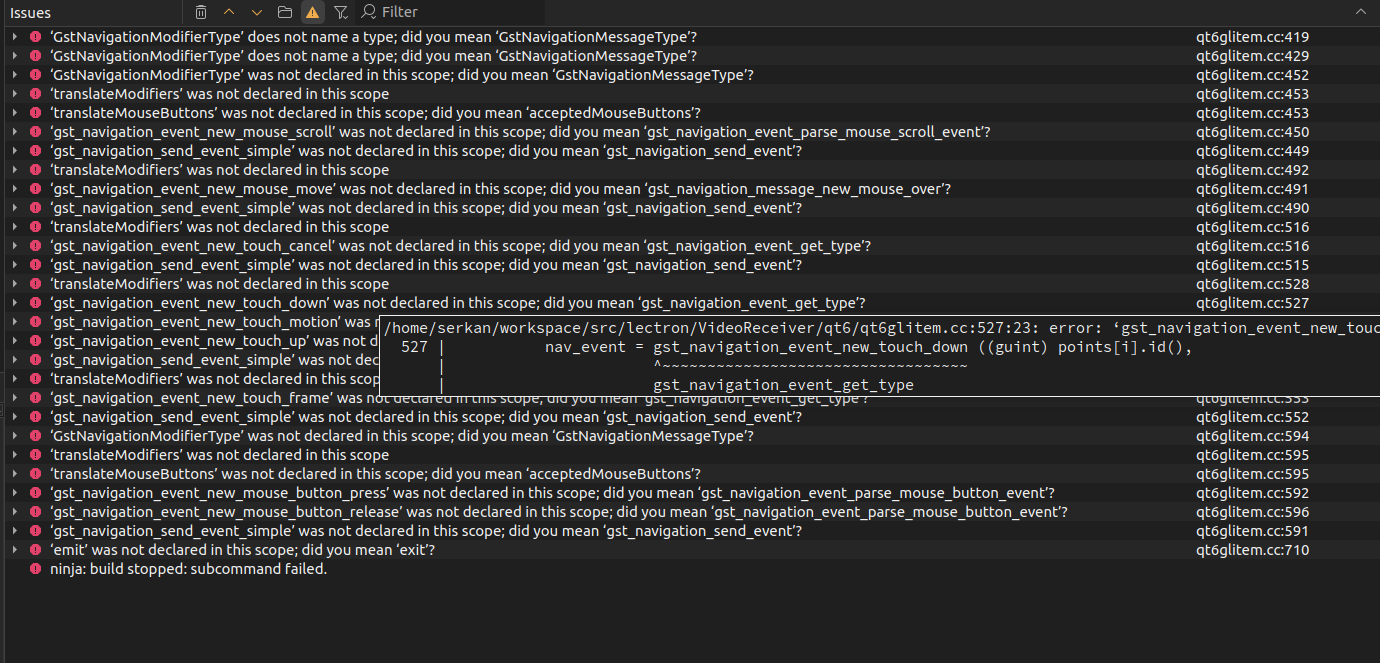
@serkan_tr It seems like this is an incompatibility issue between the gstream version and qgroundcontrol requirements. You should try reinstalling a newer version.
-
@hoandepchai To ensure version compatibility, I specifically built GStreamer 1.22 from source. In this process, I took the Qt6-related code from the example ext directory in the source tree and integrated it into my project. However, the Qt side keeps producing build errors. If there is a reference project or an example that demonstrates the correct setup, I could continue the project based on that. So far, though, I have not found any GStreamer examples other than QGroundControl.
-
Try downloading the latest version of gstream, version 1.26. I've used both 1.22 and 1.26 and they both process video, but for Windows.
-
@hoandepchai and @SGaist As a temporary solution, I am receiving the video using appsink, performing the required conversions to pass it to the QML side, and creating a QImage. I then send this QImage to the QML layer. The code currently works, and I can receive everything sent via GStreamer without issues. However, I am not sure how correct this approach is from an architectural and performance perspective.
void VideoReceiver::process(GstSample *sample)
{
    GstBuffer *buffer = gst_sample_get_buffer(sample);
    GstCaps *caps = gst_sample_get_caps(sample);

    GstMapInfo map;
    gst_buffer_map(buffer, &map, GST_MAP_READ);

    GstVideoInfo info;
    gst_video_info_from_caps(&info, caps);

    QImage img(
        map.data,
        info.width,
        info.height,
        QImage::Format_RGB888
    );

    m_lastFrameTime = std::chrono::steady_clock::now();
    m_frameCounter++;

    if(!hasVideo()) {
        m_hasVideo = true;
        hasVideoChanged();
    }

    m_frame = img.copy();
    provider->updateImage(m_frame);
    emit frameChanged();

    gst_buffer_unmap(buffer, &map);
}
Image { anchors.fill: parent fillMode: Image.PreserveAspectFit visible: videoReceiver && videoReceiver.hasVideo source: videoReceiver ? videoReceiver.frameUrl : "" cache: false } -
@hoandepchai and @SGaist As a temporary solution, I am receiving the video using appsink, performing the required conversions to pass it to the QML side, and creating a QImage. I then send this QImage to the QML layer. The code currently works, and I can receive everything sent via GStreamer without issues. However, I am not sure how correct this approach is from an architectural and performance perspective.
void VideoReceiver::process(GstSample *sample)
{
    GstBuffer *buffer = gst_sample_get_buffer(sample);
    GstCaps *caps = gst_sample_get_caps(sample);

    GstMapInfo map;
    gst_buffer_map(buffer, &map, GST_MAP_READ);

    GstVideoInfo info;
    gst_video_info_from_caps(&info, caps);

    QImage img(
        map.data,
        info.width,
        info.height,
        QImage::Format_RGB888
    );

    m_lastFrameTime = std::chrono::steady_clock::now();
    m_frameCounter++;

    if(!hasVideo()) {
        m_hasVideo = true;
        hasVideoChanged();
    }

    m_frame = img.copy();
    provider->updateImage(m_frame);
    emit frameChanged();

    gst_buffer_unmap(buffer, &map);
}
Image { anchors.fill: parent fillMode: Image.PreserveAspectFit visible: videoReceiver && videoReceiver.hasVideo source: videoReceiver ? videoReceiver.frameUrl : "" cache: false }@serkan_tr one thing I don't understand: you are building GStreamer yourself, so why don't you build the plugin librairies as well ? You would get the Qt 6 plugin that way.
Interested in AI ? www.idiap.ch
Please read the Qt Code of Conduct - https://forum.qt.io/topic/113070/qt-code-of-conduct -
@serkan_tr one thing I don't understand: you are building GStreamer yourself, so why don't you build the plugin librairies as well ? You would get the Qt 6 plugin that way.
@SGaist Actually, I do not want to develop my own GStreamer plugins. I was forced to take this approach because I cannot use the default Qt plugins. My main goal is to understand how those default plugins should be properly integrated into the system.
-
@serkan_tr one thing I don't understand: you are building GStreamer yourself, so why don't you build the plugin librairies as well ? You would get the Qt 6 plugin that way.
-
@SGaist Actually, I do not want to develop my own GStreamer plugins. I was forced to take this approach because I cannot use the default Qt plugins. My main goal is to understand how those default plugins should be properly integrated into the system.
@serkan_tr I guess the paths of your compiled gstreamer are not set properly. Can you show what you did in this regard?
-
@SGaist gstreamer Qt5/6 plugin is made in gstreamer, not in Qt5/6. If he builds gstreamer, Qt5/6 gstreamer plugin is built if Qt5/6 is installed.
@JoeCFD said in Using GStreamer Within Qt (QGroundControl-Like Architecture):
@SGaist gstreamer Qt5/6 plugin is made in gstreamer, not in Qt5/6. If he builds gstreamer, Qt5/6 gstreamer plugin is built if Qt5/6 is installed.
I am fully aware of that, hence my question to @serkan_tr to understand what he was trying to do with that code.
-
@Bonnie As far as I know, using QVideoWidget + QMediaPlayer to build a video player provides a solid and powerful interface. However, to my knowledge, it does not support receiving video data that is decoded from a UDP stream. Nevertheless, thank you I will review the documentation again, as I might be mistaken.
@serkan_tr Hey I just did some tests so I think I'd write it here.
I test with Qt6.4.2 (because my linux VM is an old debian bookworm and everything was installed by apt).
The udp stream is sent by running:gst-launch-1.0 videotestsrc ! openh264enc ! mpegtsmux ! udpsink host=127.0.0.1 port=5004
Then I tried the simple Video Widget Example and run with argument: udp://0.0.0.0:5004
After clicking the play button, video can be shown:
As I check the Qt6.4 documentation, ffmpeg backend was still a technology preview back then. So the default backend I tried first is gstreamer.
I also tried ffmpeg backend by setting QT_MEDIA_BACKEND=ffmpeg and it also worked.But I do think you trying to use qml may still be a better idea because I also read this from the updated documentation that
Qt Multimedia is not a general purpose streaming framework and not necessarily the architecturally best way to use GStreamer with Qt. Developers, who need a high degree of control over the GStreamer pipeline, but only want to show the video output Qt, may want to consider using GStreamer's qml6glsink.
-
 S serkan_tr has marked this topic as solved

